Running a medical practice means managing nonstop responsibilities – patient inquiries, appointments, checkups, follow-ups, documentation, referrals, test results, care coordination, billing, insurance, and communication.
When these tasks are scattered across phone calls, WhatsApp messages, spreadsheets, and different apps, your practice becomes stressful, slow, and disorganized.
GoHighLevel for Doctors changes that completely.
It brings all your patient communication, scheduling, workflows, reminders, forms, documentation, and billing into one organized system.
Whether you run a:
- family clinic
- dental practice
- specialist center
- telemedicine service
- pediatrics office
- mental health practice
- or multi-location medical facility
GoHighLevel helps you deliver better care with less administrative work.
This guide shows you how to use GoHighLevel to run your medical practice more efficiently, communicate clearly, reduce no-shows, and give patients a smoother experience from first contact to ongoing care.
TL;DR: How GoHighLevel Helps Doctors & Medical Practices
- GoHighLevel helps you manage appointments, patients, communication, medical forms, reminders, and follow-ups in one organized system.
- You can automate key medical workflows like appointment confirmations, test result notifications, prescription follow-ups, pre-visit forms, and post-care reminders.
- Medical funnels and landing pages help you attract new patients for consultations, screenings, checkups, and specialty services.
- This guide shows you step-by-step how to use GoHighLevel to simplify patient management, reduce administrative load, improve care delivery, and build a more efficient medical practice.
How to Set Up GoHighLevel for Doctors – (Step-by-Step Tutorial)
Let’s keep it simple – we’ll both set up your account first, then follow the step-by-step strategies to put everything in place.
Below is your full setup plan for a medical practice:
Step 1: Create HighLevel Account for 30 Days Free
Since you’re just starting with GoHighLevel, you would need to properly set up your account.
And you can do that for free through our exclusive 30-Day Free Trial link here.
In order to start, head over to gohighlevel.com/30-day-free-tial free trial and click on “30 DAY FREE TRIAL” as you can see below.

Upon clicking on “30 DAY FREE TRIAL“, a page will pop that looks exactly like the image below.
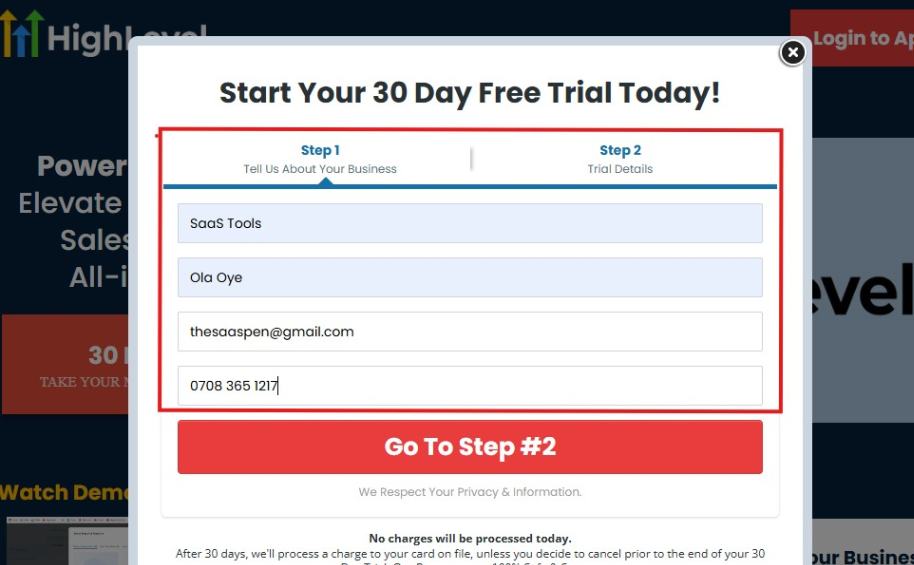
If you take a closer look at the image above, you will see that you need to supply your:
- Business name
- Company name
- Company email
- Phone number
Supply all the pieces of information and click on “Go To Step #2.”
On the next page, you will be required to select the plan you want to opt in for.
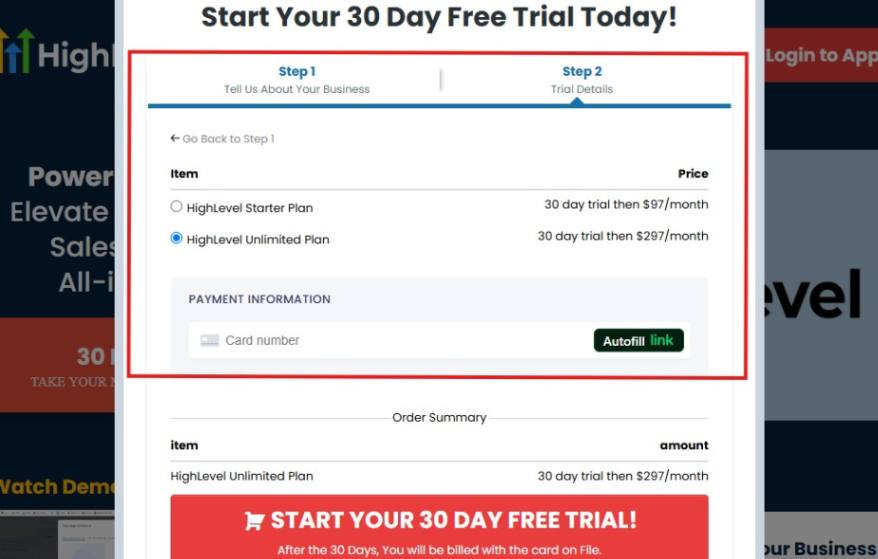
As you can see from the image above, you can either choose from:
- HighLevel Starter Plan
- HighLevel Unlimited Plan
Select the HighLevel Unlimited Plan and continue – you can always upgrade to the SaaS Mode later if you want that or downgrade.
The next thing you want to do is supply your credit card information.
Note: You will not be debited anything today until the end of your trail that is if you don’t cancel. Keep in mind that $1 will be debited and refunded back instantly into your account just to test your card is working.
After you have supplied the information accordingly, click on “START YOUR 30 DAY FREE TRIAL” and you will be asked to confirm you’re not a robot.
After that, the page below will pop up.
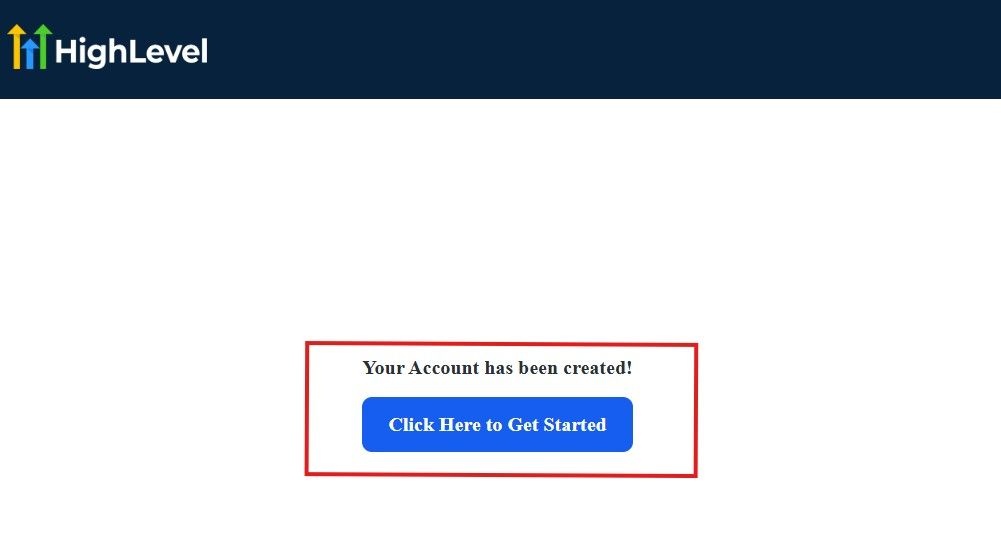
The image above says, “Your Account has been created!” Now, you need to click on the blue button that says “Click Here to Get Started.“
Click on the blue button to start your onboarding process.
Step 2: GoHighLevel Onboarding Process
The onboarding questions help GoHighLevel understand why you have signed up for the platform so that it can tailor your experience accordingly.
This is all you need to do:
After you click on the blue button above, the page below will pop up.
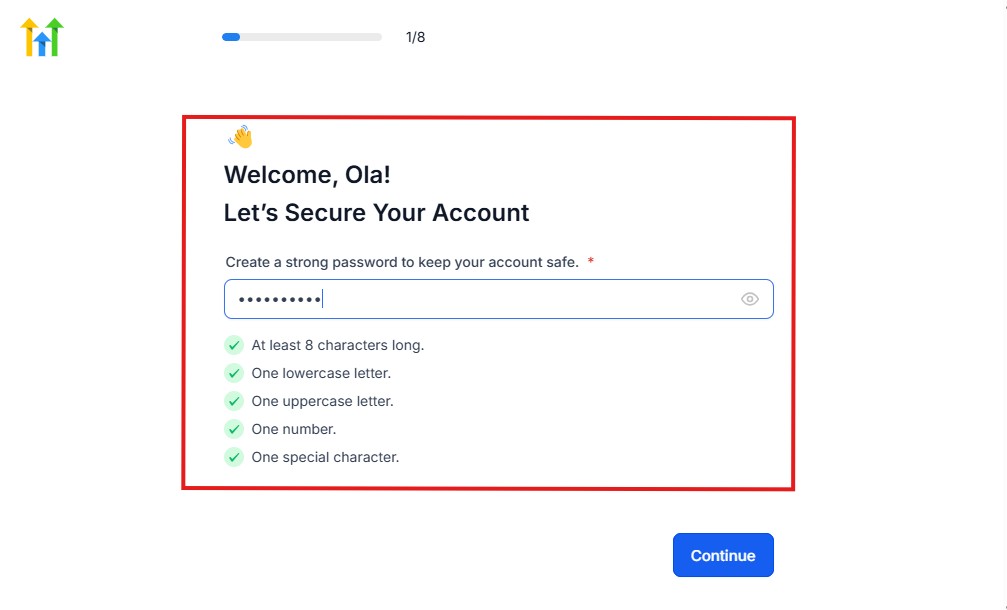
As you can see above, you need to set up your password, and the password has to be:
- At least 8 characters long
- One lowercase letter
- One uppercase letter
- One number
- One special character
If you have input the password and it matches all the description above, everything will be green just the way it’s in the image.
Click on “Continue” there after, and the image below will pop up.
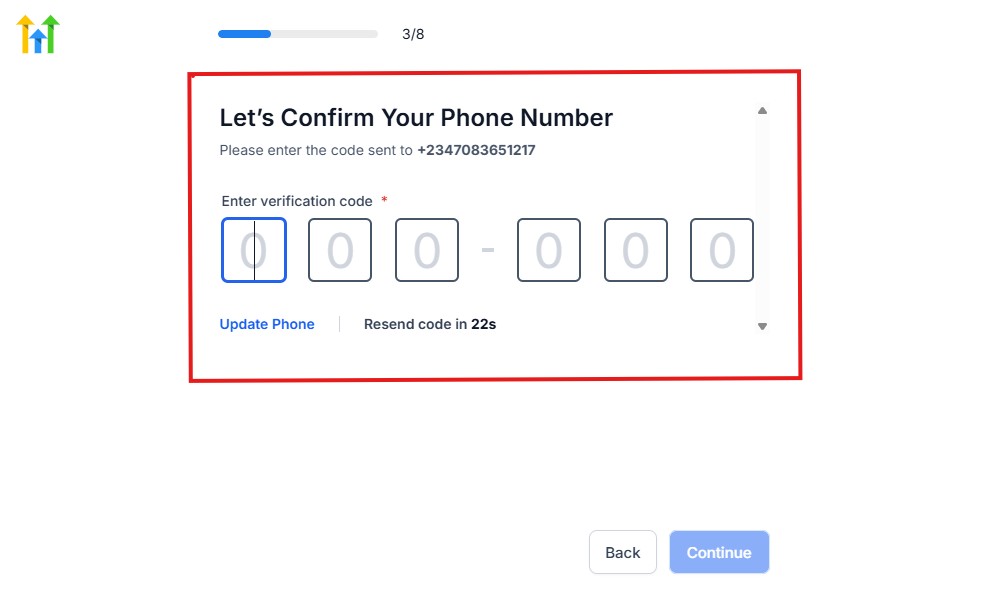
As you can see, a code will be sent to you to confirm your email address and phone number. The process is the same for the 2.
The next thing you need to do is to select how you plan to use GoHighLevel, as you can see below.
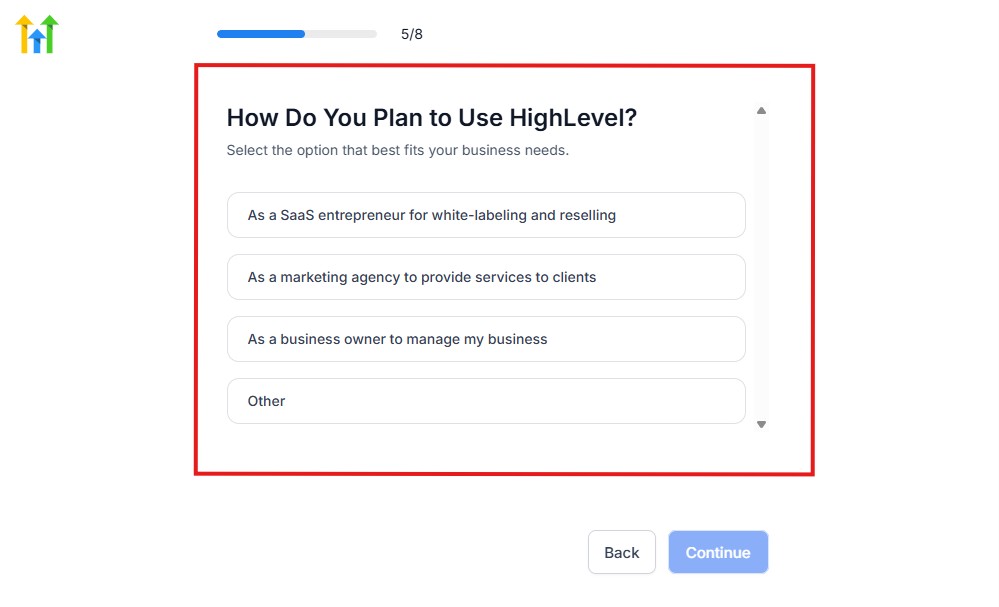
Select what best matches why you have signed up and click on Continue.
On the next page, you will be asked if you plan to resell GoHighLevel or not.
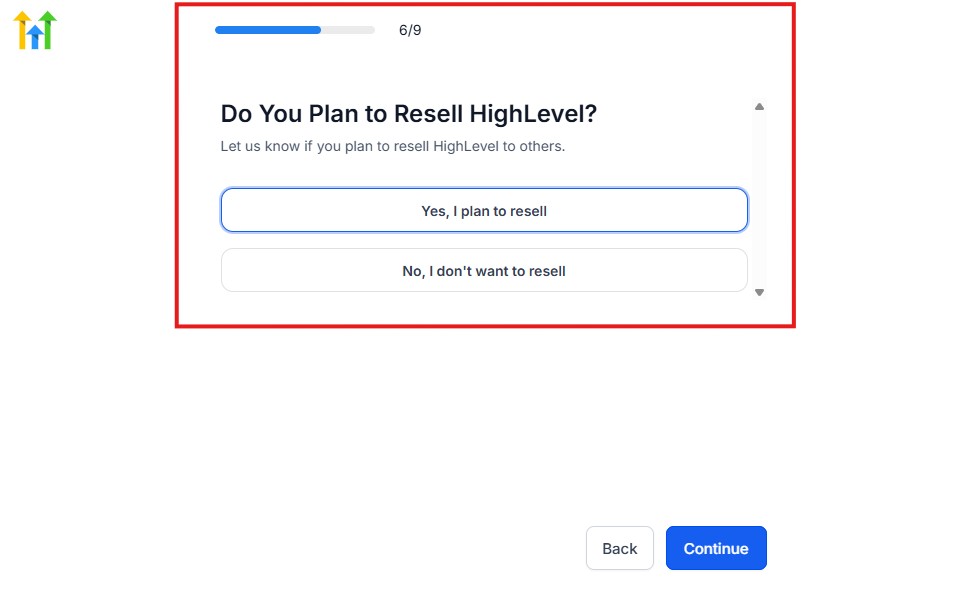
Select the answer based on the reason why you have signed up and click on “Continue”
Then, the page below will pop up.
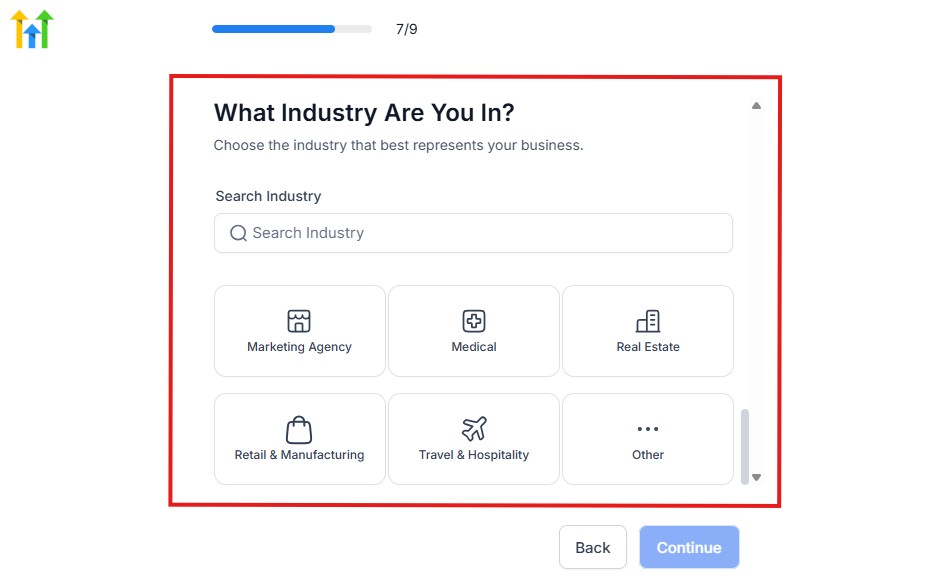
From the image above, you need to select the industry that you fall on. You can also make use of the search button if you can’t find it right away.
Then, click on continue after you select your industry.
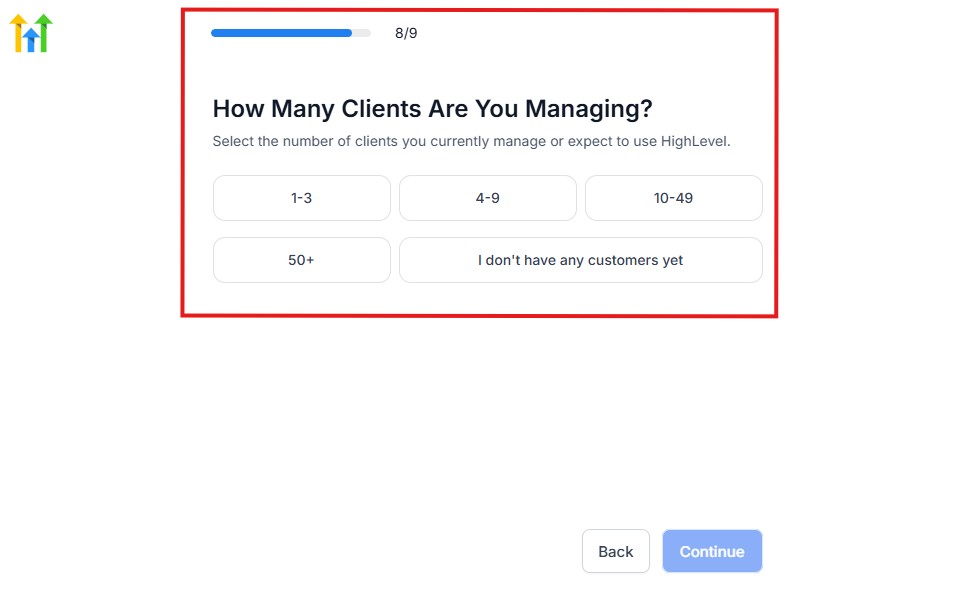
Then, the next thing you need to do is to select the number of clients that you currently have. Select “I don’t have any customers” yet if you currently don’t have one.
On the next page, you will be asked to select the platforms you currently use that you can integrate with GoHighLevel right away.
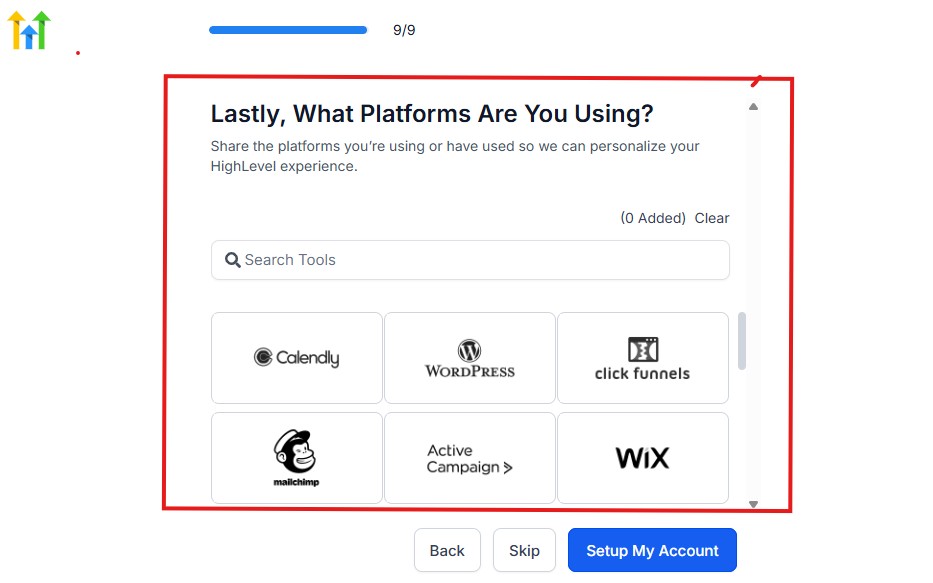
You can use the search button to search for any tools you want to add to your GoHighLevel account.
You can also skip this process and do it later if you want to.
After that, the page below will pop up.
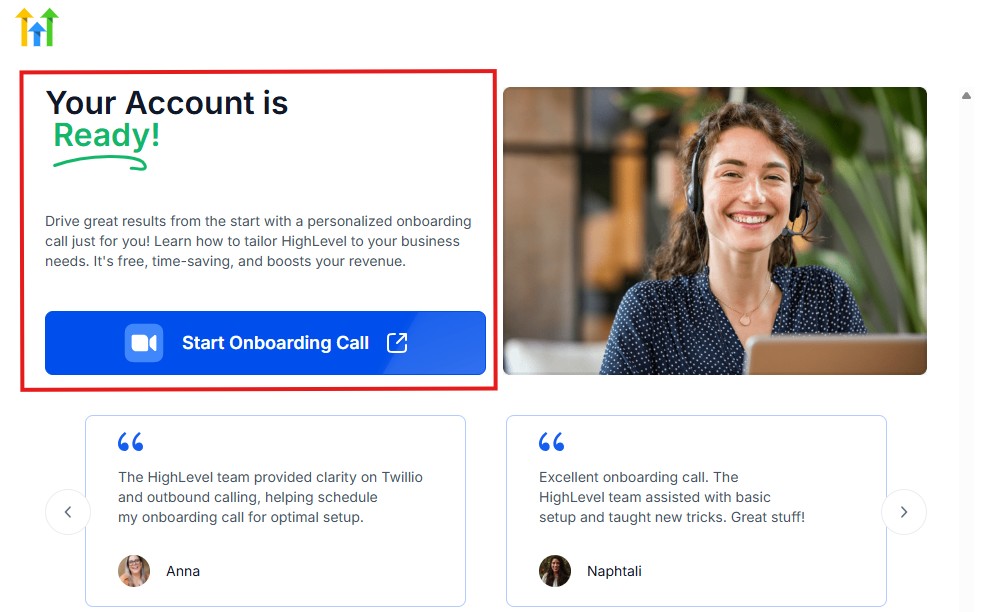
The page above says your account is ready and is asking you to “Start Onboarding Call.”
The “Onboarding Call” allows you to connect with the Go High Level team in order to discuss your account set-up process and everything regarding your plan in using HighLevel.
If you don’t want to start the “Onboarding Call” yet, just stroll down, and you will see the button in the image below.
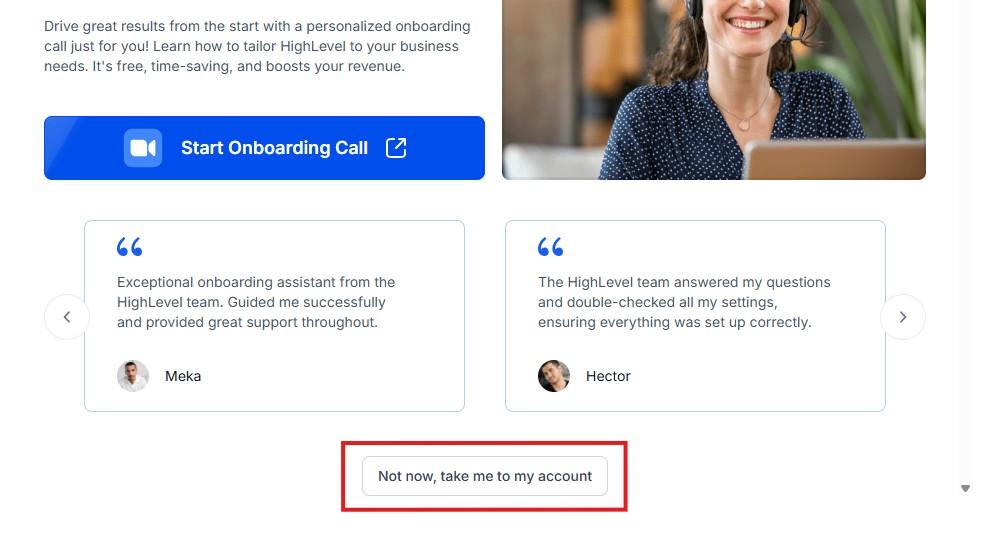
Simply click on “Not now, take me to my account“, and you will have access to your dashboard.
Note: If you have indicated that you want to resell HighLevel, you would have access to the agency dashboard by default, which looks like the image below.
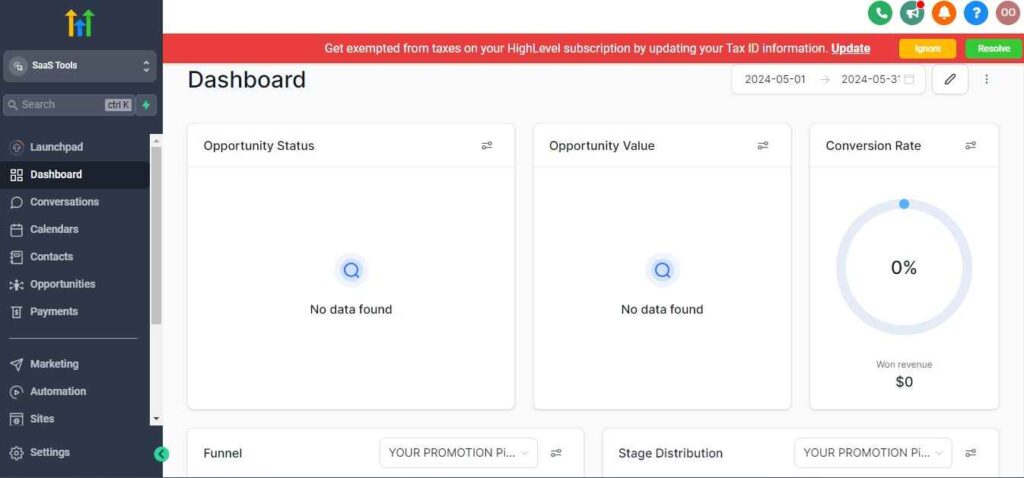
But if you didn’t indicate interest in reselling GHL, your dashboard will look like the image below.
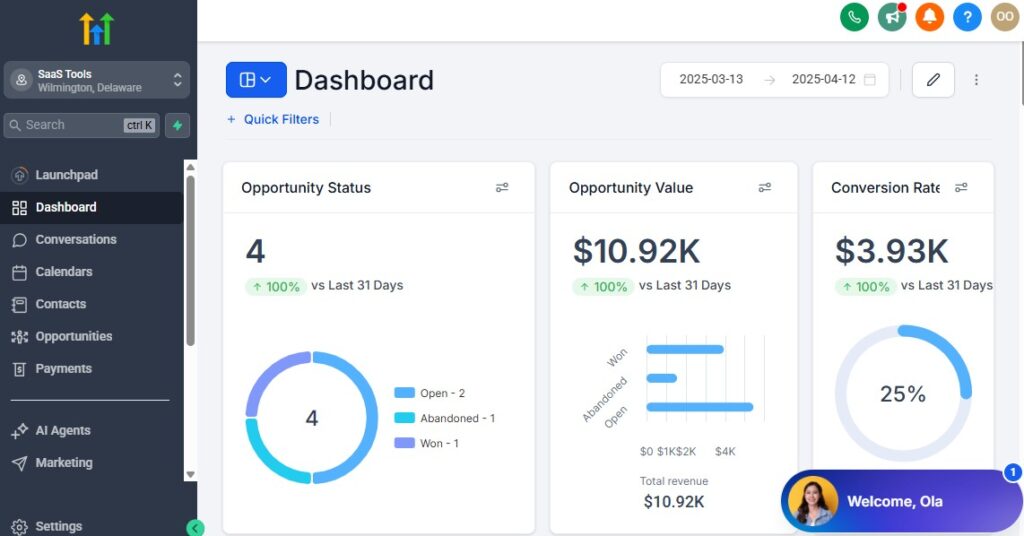
You can switch between these dashboards at any time.
The data you see on the dashboard above are not real data, they’re snapshots that you can use to kickstart your account setup process.
I want to say congratulations. You have successfully set up your Go High Level account.
Step 3: Create Your Medical Workspace
Start by creating a dedicated workspace tailored to your medical practice. This becomes your central hub for:
- Appointment scheduling
- New patient inquiries
- Follow-ups
- Medical forms
- Checkup reminders
- Billing and invoices
- Patient communication
- Documentation delivery
Everything lives in one organized system instead of scattered tools.
Step 4: Set Up Your Patient CRM
Your CRM becomes the engine of your practice, helping you track every patient from first inquiry to ongoing care.
Create a medical-focused pipeline such as:
- New Patient Inquiry
- Pre-Visit Forms Sent
- Appointment Booked
- Consultation Completed
- Diagnosis/Plan Provided
- Follow-Up Scheduled
- Ongoing Care
- Inactive Patient
This gives you clarity on every patient’s status.
Step 5: Import Existing Patient Records
Import your patient list and categorize them using:
- Tags (New Patient, Returning Patient, Chronic Care, Telemedicine, etc.)
- Visit type
- Specialty need
- Risk category
- Last visitation date
This helps you target patients with personalized reminders and care plans.
Step 6: Configure Your Business Phone Number & Communication Channels
Set up your communication system inside GoHighLevel:
- Dedicated practice phone number
- SMS messaging
- Missed-call text-back
- Shared inbox for all staff
- Optional WhatsApp integration
This ensures no patient inquiry or message gets lost.
Step 7: Create Appointment Calendars for Your Services
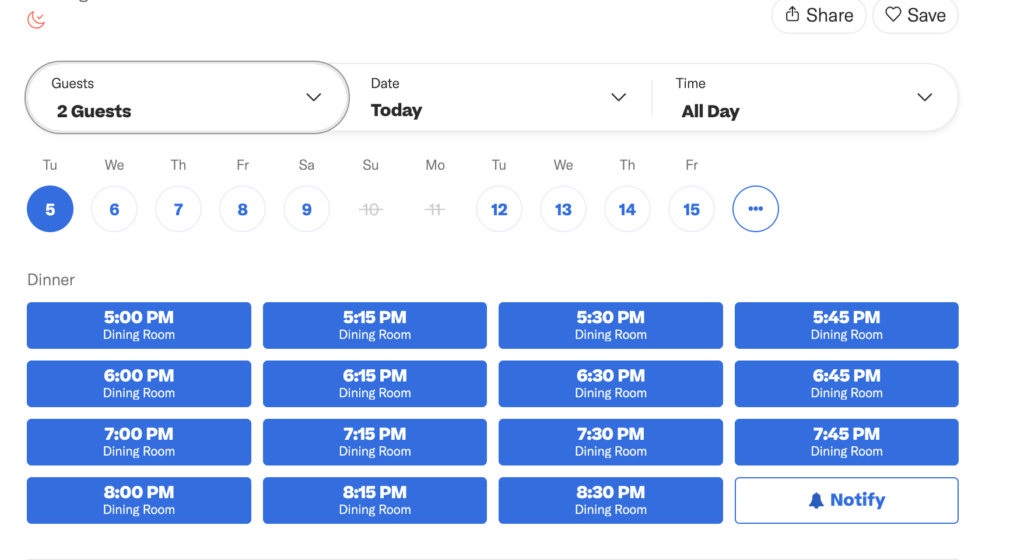
Doctors need multiple calendars for different visit types. Create calendars for:
- General consultations
- Telemedicine visits
- Follow-ups
- New patient assessments
- Diagnostic reviews
- Mental health sessions
- Lab result discussions
- Checkups (annual, pediatric, dental, etc.)
- Procedures
Each calendar can have its own availability, duration, and reminders.
Step 8: Set Up Pre-Visit Forms & Medical Intake Forms
Digital forms improve your workflow and save time at the office.
Create forms for:
- New patient intake
- Medical history
- Insurance details
- Consent forms
- Pre-procedure questionnaires
- Symptom checklists
- Telemedicine consent
- Pediatric forms
- Mental health intake forms
Patients complete these online before their appointment.
Step 9: Add Custom Fields for Medical Data Tracking
Medical practices need specific patient information. Useful custom fields include:
- Date of birth
- Insurance provider
- Primary physician
- Allergies
- Medical conditions
- Medications
- Preferred pharmacy
- Emergency contact
- Care plan stage
- Next appointment date
These fields help you personalize care and stay organized.
Step 10: Add Your Staff & Set Access Levels
You can add:
- Doctors
- Nurses
- Administrative staff
- Front desk
- Lab technicians
- Assistants
- Specialists
Assign roles and permissions based on responsibilities to keep everything secure.
Step 11: Set Up Automated Patient Workflows
Start with essential automations:
- New patient welcome sequence
- Appointment confirmation messages
- Pre-visit instructions
- Follow-up reminders
- Medication or prescription reminders
- Test result notifications
- Annual checkup reminders
- Post-procedure care instructions
Automation improves patient satisfaction and reduces manual work for staff.
Step 12: Enable Online Payments for Medical Services
Connect your payment gateway (Stripe, PayPal, or Square via Zapier) to collect:
- Consultation fees
- Follow-up payments
- Procedure deposits
- Telemedicine charges
- Lab fees
- Outstanding balances
You can also automate receipts and reminders for unpaid balances.
Step 13: Set Up Lead Capture Tools
Your medical practice can collect new patient inquiries through:
- Website forms
- Landing pages
- Google ads appointment forms
- Facebook lead forms
- Medical screening funnels
- QR codes for walk-ins
Every new patient immediately enters your CRM and triggers follow-up workflows.
Step 14: Integrate Your Calendar, Email & Other Tools
Sync your GoHighLevel workspace with:
- Google or Outlook Calendar
- Email provider
- File storage (Drive, Dropbox, OneDrive)
- Telemedicine tools (Zoom links, meeting modules)
- Billing systems (via Zapier/Make)
Integrations help your practice run as one unified system.
Managing Patients, Appointments & Medical Records With the CRM
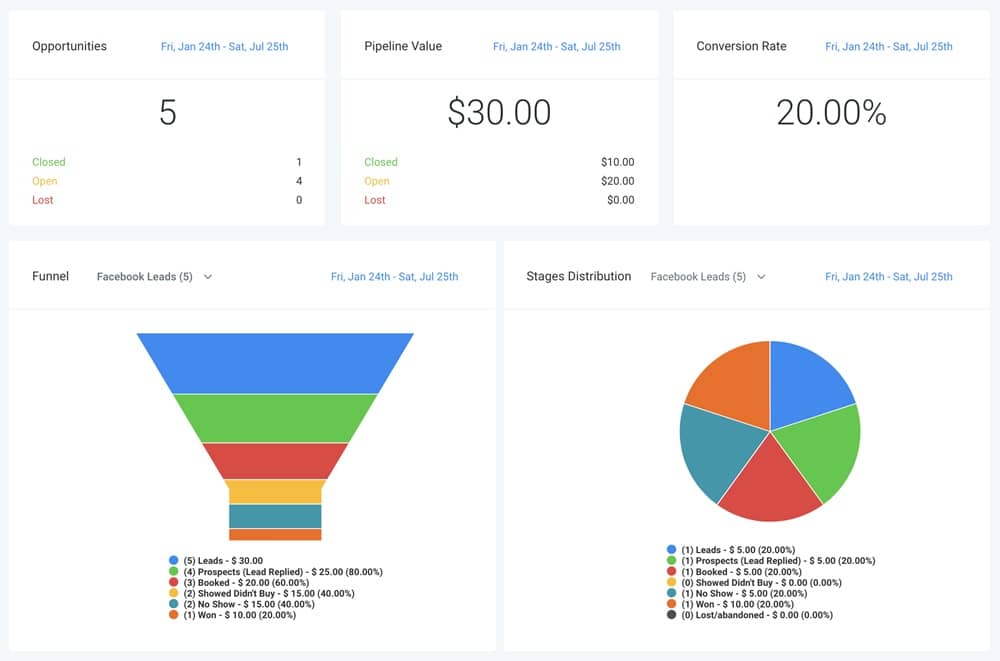
GoHighLevel’s CRM becomes the central system where you manage every patient, appointment, communication, and stage of care.
Instead of keeping information scattered across notebooks, files, WhatsApp messages, and spreadsheets, you organize everything in one structured place.
This improves patient care, reduces admin workload, and keeps your practice running smoothly.
Below is how to manage patients, appointments, and medical records inside GoHighLevel effectively.
Organize All Patient Inquiries in One Central Dashboard
Every patient inquiry flows straight into your CRM from:
- Website forms
- Landing pages
- WhatsApp or SMS
- Phone calls
- Google/Facebook lead forms
- Telemedicine requests
- Referral forms
You get a clean list of all new patients without missing anyone.
Use a Medical Pipeline to Track Patient Status Clearly
Build a pipeline that reflects your care process, such as:
- New Patient Inquiry
- Pre-Visit Forms Sent
- Appointment Scheduled
- Consultation Completed
- Diagnosis/Plan Provided
- Follow-Up Scheduled
- Ongoing Care
- Inactive Patient
You always know who needs attention and where each patient is in their care cycle.
Manage Patient Profiles & Store Medical Information
Each patient has a full profile where you can record and store:
- Medical history
- Symptoms
- Allergies
- Medications
- Risk factors
- Insurance details
- Preferred pharmacy
- Previous visits
- Next appointment
- Care plan details
This ensures you always have updated clinical information on hand.
Add Custom Medical Fields for More Accurate Tracking
GoHighLevel lets you create custom fields specific to your specialty.
Examples include:
- Chronic condition indicators
- Blood pressure or glucose history
- Surgical history
- Pregnancy status (OB/GYN)
- Mental health notes
- Dental chart data
- Test result summaries
- Referral notes
Custom fields help you personalize patient care.
Centralize All Patient Communication in One Unified Inbox
GoHighLevel combines all communication channels so you don’t miss messages:
- SMS
- Phone calls
- WhatsApp (via approved providers)
- Instagram DM
- Facebook Messenger
- Website chat
Patients get a fast response, and your team stays organized.
Track Appointments, Checkups & Follow-Up Visits Easily
Every appointment appears in the CRM with:
- Date
- Visit type
- Assigned doctor
- Status (scheduled, completed, rescheduled, no-show)
- Notes from the visit
You can also add internal reminders for future checkups.
Attach Medical Notes, Files & Documentation
Inside each patient record, you can attach:
- Lab results
- X-rays and imaging files
- Treatment plans
- Prescriptions
- Consent forms
- Referral documents
- Post-care instructions
This simplifies your documentation workflow.
Record Consultation Notes & Follow-Up Instructions
Doctors can store detailed notes such as:
- Diagnosis
- Findings
- Treatment recommendations
- Medication updates
- Next steps
- Care plan summary
Everything stays organized and accessible.
Track Missed Appointments & Automate Re-engagement
Patients who miss appointments can automatically be:
- Tagged as “no-show”
- Added to a follow-up list
- Sent rebooking reminders
- Moved to an at-risk pipeline stage
This prevents patients from falling through the cracks.
Segment Patients Based on Condition, Visit Type or Care Stage
Use smart lists to group patients by:
- Condition (e.g., hypertension, diabetes, asthma)
- Visit type (consultation, follow-up, procedure, checkup)
- Age group
- Risk category
- Specialty needs
- Insurance type
- Last visited date
This helps with targeted reminders and preventive care campaigns.
Store Telemedicine Consultations & Virtual Visit Notes
For telemedicine, you can store:
- Consultation notes
- Recorded calls (optional external storage)
- Shared documents
- Pre-visit forms
- Telemedicine consent files
- Follow-up instructions
All information stays in one patient record.
Automate Patient Record Updates After Each Visit
After completing an appointment, you can trigger automated actions such as:
- Adding visit notes
- Scheduling a follow-up
- Sending instructions or medication reminders
- Updating the patient pipeline stage
- Logging new symptoms or data
This keeps records updated without manual effort.
Automating Patient Intake, Follow-Ups & Care Coordination
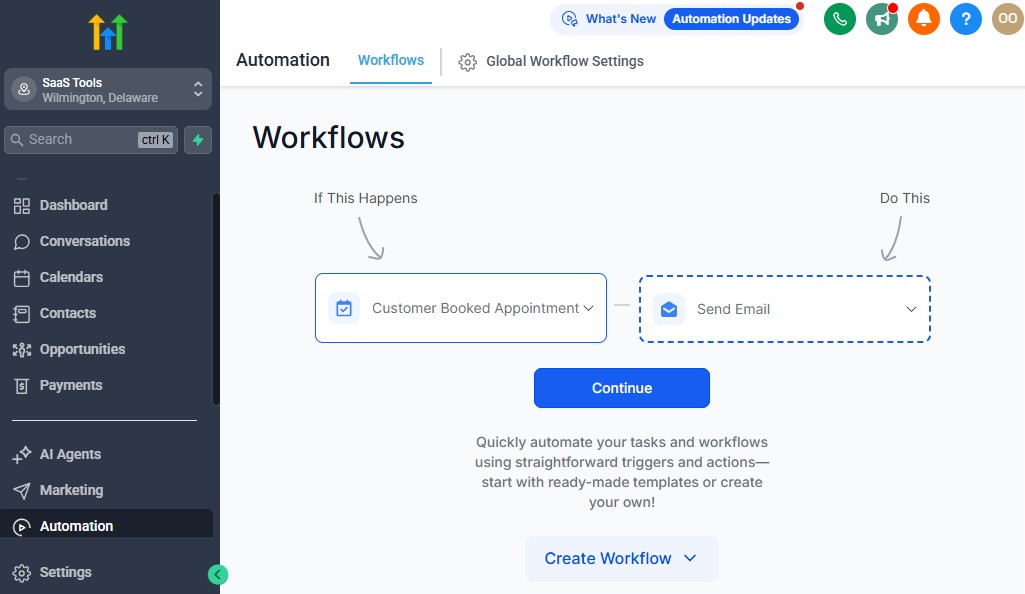
Automation is one of the most powerful ways doctors and medical practices can reduce administrative overhead, improve patient satisfaction, and keep care consistent.
Instead of relying on your staff to manually call patients, send reminders, follow up on lab results, or handle intake forms, GoHighLevel automates these tasks for you – allowing your team to focus on delivering better care.
Below are the key medical automations you should use in your practice.
Automate New Patient Intake & Pre-Visit Preparation
When a new patient contacts your practice, GoHighLevel can instantly send:
- A welcome message
- Pre-visit instructions
- Intake forms
- Medical history form
- Insurance details form
- Consent documents
- A link to book their appointment
This saves your staff time and ensures every patient is prepared before their visit.
Automate Appointment Confirmations & Reminders
GoHighLevel reduces no-shows by automatically sending:
- Immediate confirmation message
- 24-hour reminder
- 3-hour reminder
- “Reply 1 to confirm” instructions
- Practice location or telemedicine link
- Parking or preparation details
These reminders help patients show up on time and prepared.
Automate Telemedicine Scheduling & Instructions
For telehealth visits, automation can send:
- Video call link
- Device setup instructions
- Pre-visit symptom checklist
- Payment link (if applicable)
- Post-consultation notes
- Follow-up recommendations
This ensures smooth virtual consultations.
Automate Follow-Up Care After Appointments
After an appointment, GoHighLevel can automatically send:
- Thank-you message
- Summary of care or instructions
- Medication reminders
- Lifestyle recommendations
- Referral notes
- Follow-up appointment link
- “How are you feeling today?” check-in
Consistent follow-up improves treatment compliance and patient satisfaction.
Automate Test Result Notifications & Instructions
When lab results come in, trigger:
- “Your test results are ready” message
- A link to view or download results (uploaded manually)
- Next steps or follow-up instructions
- A request to schedule a review appointment
This keeps patients informed and reduces inbound calls.
Automate Chronic Care Reminders for Ongoing Patients
For chronic care patients, GoHighLevel can automate:
- Medication reminders
- Weekly symptom tracking
- Monthly check-in questionnaires
- Blood pressure or glucose reminders
- “Time for your follow-up visit” alerts
- Care plan updates
This helps you deliver more consistent long-term care.
Automate Post-Procedure Follow-Up & Recovery Instructions
After procedures, send:
- Recovery guidelines
- Pain management instructions
- Medication schedules
- When to call the clinic
- Wound care reminders
- Follow-up visit scheduling link
- Emergency contact details
This reduces complications and improves recovery results.
Automate Patient Satisfaction Surveys
Send automated feedback forms after:
- Consultations
- Checkups
- Procedures
- Telemedicine visits
Use responses to improve your care and identify issues early.
Automate No-Show Follow-Up & Rebooking
If a patient misses an appointment, GoHighLevel can send:
- A missed appointment notification
- A link to reschedule
- A follow-up message 24 hours later
- A “We still need to see you” reminder
- Optional call attempt automation for your staff
This prevents patient drop-off and keeps your schedule full.
Automate Yearly Checkup, Screening & Preventive Care Reminders
Set up automatic reminders for:
- Annual physicals
- Dental cleanings
- Pediatric checkups
- Mammograms
- Pap smears
- Vaccinations
- Eye exams
- Mental health check-ins
These reminders help patients stay consistent with preventive care.
Automate Internal Care Coordination for Staff
Automations can notify staff when:
- New patients complete forms
- Lab results are uploaded
- A referral is made
- A follow-up is needed
- A patient submits a symptom form
- A chronic condition requires attention
- A procedure is scheduled
This keeps your team coordinated and reduces manual communication.
Automate Insurance & Billing Follow-Ups
GoHighLevel can help with basic billing automations such as:
- Payment reminders
- Balance notifications
- Insurance verification reminders
- Outstanding bill follow-ups
- “Your statement is ready” messages
This improves your revenue flow and reduces admin mistakes.
Appointment Scheduling for Consultations, Checkups & Procedures
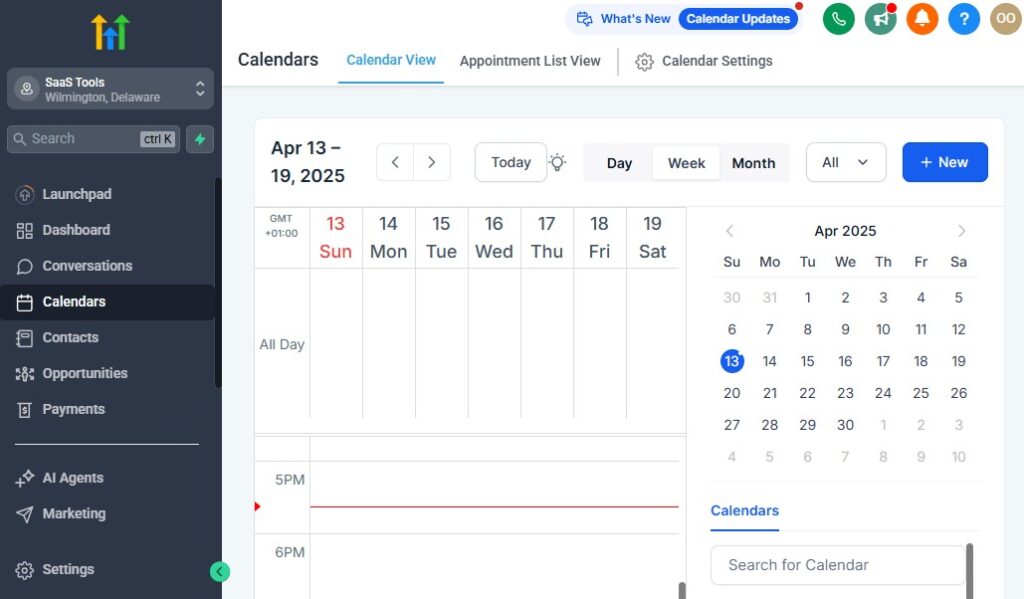
A medical practice lives and breathes through its scheduling system. Missed appointments, double bookings, unclear availability, or unprepared patients can slow your workflow and reduce the quality of care.
GoHighLevel helps you streamline your entire scheduling process – from booking to reminders to preparation – for all types of medical appointments.
Below is how to use GoHighLevel to run an efficient, organized, and patient-friendly scheduling system.
Create Dedicated Calendars for Each Medical Service
Set up separate calendars based on visit types, such as:
- General consultations
- Telemedicine visits
- Pediatric appointments
- Dental checkups
- Specialist consultations
- Follow-up appointments
- Lab result reviews
- Vaccinations
- Minor procedures
- Annual physical exams
Each calendar can have unique availability and instructions.
Allow Patients to Book Appointments Online
Instead of phone calls or walk-ins, patients can book directly from:
- Your website
- Landing pages
- Google ads
- Facebook or Instagram
- Automated SMS
- WhatsApp links
- QR codes in the clinic
This reduces front desk workload and improves patient convenience.
Set Availability Hours, Breaks & Provider Schedules
GoHighLevel helps you set:
- Working hours for each doctor
- Break times
- Surgery or procedure blocks
- Telemedicine-only hours
- Staff schedules
- Holidays and blackout dates
This ensures accurate appointment availability.
Add Custom Appointment Types With Clear Durations
Each visit type may require different time blocks:
- 15-minute follow-up
- 20-minute consultation
- 30-minute telemedicine call
- 45-minute pediatric appointment
- 60–90 minute procedures
GoHighLevel lets you define these durations so your schedule stays organized.
Send Automated Appointment Confirmations
Immediately after booking, patients receive:
- Confirmation SMS
- Confirmation email
- Calendar invite
- Address or telemedicine link
- Instructions on what to bring
This helps reduce confusion and improves attendance.
Reduce No-Shows With Automated Reminders
GoHighLevel sends reminders such as:
- 24-hour reminder
- 3-hour reminder
- 1-hour reminder
- Optional “Reply 1 to confirm” messages
Consistent reminders significantly reduce no-show rates.
Provide Pre-Visit Instructions Automatically
Different appointments require different preparation. Automate instructions like:
- “Fast for 8 hours before your appointment.”
- “Bring your insurance card and ID.”
- “Arrive 15 minutes early for paperwork.”
- “Bring previous test results.”
- “Stop eating after midnight (for procedures).”
This ensures patients come prepared.
Include Pre-Visit Forms in Scheduling Flows
Attach your forms directly to the booking process:
- Intake forms
- Medical history
- Consent documents
- Insurance forms
- Symptom checklists
- Pre-procedure questionnaires
This reduces waiting room time and speeds up the consultation.
Sync Calendars With Google, Outlook & Mobile Devices
GoHighLevel keeps your schedule aligned across all platforms by syncing with:
- Google Calendar
- Outlook Calendar
- Microsoft 365
- Apple Calendar
No risk of double booking – everything updates instantly.
Notify Staff When New Appointments Are Booked
Automation can alert your team whenever:
- A new appointment is added
- A visit is rescheduled
- A patient cancels
- A form is completed
- A procedure is booked
Everyone stays informed and prepared.
Track Completed, Missed & Rescheduled Visits
Inside your CRM, you can track:
- Completed consultations
- No-shows
- Last-minute cancellations
- Rescheduled appointments
- Visit history for each patient
This helps with follow-ups and future care planning.
Offer Both In-Person & Telemedicine Scheduling
Whether you’re running a physical clinic or virtual practice, GoHighLevel supports:
- Video consultations
- Remote checkups
- Hybrid visits
- Post-op recovery calls
- Mental health teletherapy sessions
Everything can be managed from one system.
Automate Post-Visit Follow-Ups
Once an appointment is completed, GoHighLevel can send:
- Thank-you message
- Summary or care plan
- Medication reminders
- Next visit scheduling link
- Satisfaction survey
This builds patient trust and accelerates recovery.
Building High-Converting Medical Landing Pages & Patient Funnels
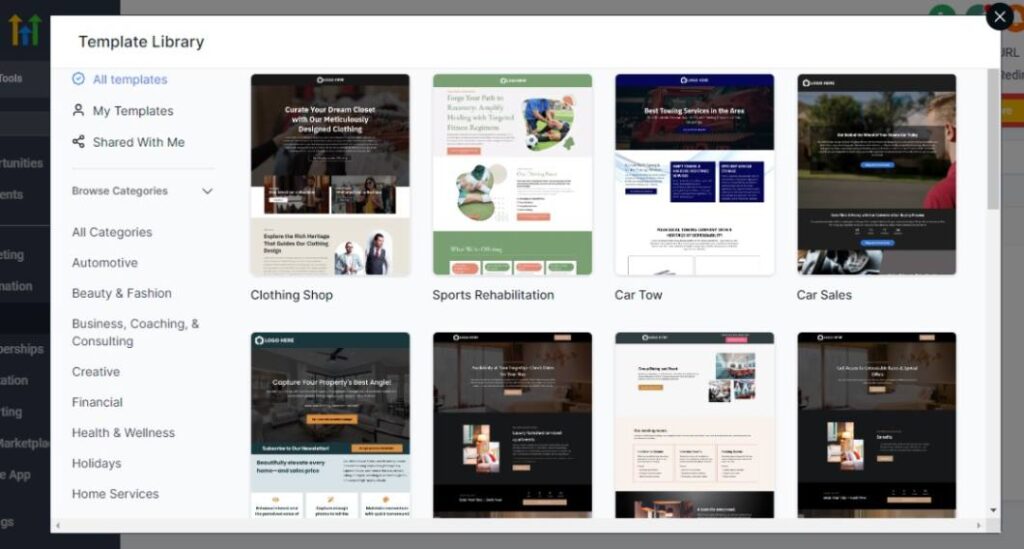
Your landing pages and patient funnels act as the digital front door to your medical practice.
Whether you offer consultations, checkups, screenings, specialized treatments, telemedicine services, or health programs, GoHighLevel helps you create professional, patient-friendly pages that convert visitors into booked appointments.
Here’s how to build high-converting funnels and landing pages tailored for medical practices.
Create Service-Specific Landing Pages for Your Medical Practice
Instead of one generic page, build separate landing pages for each medical service, such as:
- General consultations
- Telemedicine visits
- Pediatric appointments
- Dental checkups
- Women’s health services
- Chronic care programs
- Mental health therapy
- Screening programs (BP, diabetes, cholesterol, etc.)
- Vaccination clinics
- Emergency or urgent care visits
Dedicated pages help patients understand exactly what they are booking.
Use Clear, Reassuring Headlines That Reduce Patient Anxiety
Medical pages must feel trustworthy and calming.
Examples:
- “Book Your Consultation With a Licensed Medical Professional”
- “Get Quality Care Fast – Schedule Your Appointment Today”
- “Your Health Matters. Start With a Trusted Medical Provider”
- “Convenient Telemedicine Visits – Talk to a Doctor Online”
Your headline should make patients feel safe and supported.
Highlight Patient Benefits, Not Just Medical Services
Patients care about outcomes, not technical details.
Include benefits such as:
- Short wait times
- Same-day appointments
- Licensed, experienced providers
- Clean facility
- Friendly staff
- Private and secure consultations
- Fast test result turnaround
- Comprehensive care plans
This builds trust and encourages booking.
Showcase Patient Testimonials & Reviews
Social proof is essential in healthcare.
Include:
- Patient satisfaction reviews
- Testimonials about your bedside manner
- Google rating badges
- Success stories (HIPAA-safe)
- “What patients say” sections
This reassures new patients that your practice is reputable.
Add Simple, Patient-Friendly Booking Forms
Ask only for essential information:
- Name
- Phone
- Appointment type
- Preferred date
- Symptoms (optional)
Short forms convert better because they feel easier and less intimidating.
Use Strong Call-to-Action Buttons
Examples:
- “Book Your Appointment”
- “Schedule Your Consultation”
- “Start Your Telemedicine Visit”
- “Request an Appointment”
- “Talk to a Doctor Today”
CTAs should be clear, action-focused, and visible on the page.
Add Explanation Sections to Educate Patients
Medical funnels benefit from clarity. You can add sections like:
- “How your visit works”
- “What to bring”
- “How long the appointment takes”
- “What happens afterward”
- “Is this service right for you?”
Patients feel more confident when they know what to expect.
Include Trust Badges & Credentials
Add elements such as:
- Board-certified doctor badges
- Professional memberships
- Years of experience
- Hospital affiliations
- Clinic accreditation seals
- HIPAA compliance badges
These visual cues build credibility instantly.
Embed Maps, Locations & Contact Details
Patients need easy access to directions and communication channels.
Include:
- Clinic address
- Google Maps embed
- Parking instructions
- Public transport info
- Phone number
- WhatsApp or SMS link
Make it easy for patients to reach you.
Use Confirmation & Thank-You Pages to Guide Next Steps
After a patient fills the form, redirect them to a thank-you page that explains:
- When they’ll be contacted
- How to prepare
- How long the process takes
- Link to book instantly
- Link to complete forms
- Clinic hours and policies
This reduces uncertainty and increases follow-through.
Create Funnels for Specific Health Campaigns
Medical funnels work especially well for seasonal or targeted campaigns:
- Vaccination drives
- Health screening programs
- Diabetes/heart health awareness
- Mental wellness campaigns
- Dental cleaning promotions
- Women’s health month screenings
These funnels help you attract more patients consistently.
Connect Landing Pages to Automated Follow-Up Workflows
Once a patient submits a form, GoHighLevel can automatically:
- Send confirmation messages
- Assign them to a nurse or doctor
- Send pre-visit questions
- Invite them to book their appointment
- Add them to a nurture sequence
- Trigger patient intake forms
Every patient receives immediate attention.
Running Email & SMS Campaigns for Patient Engagement
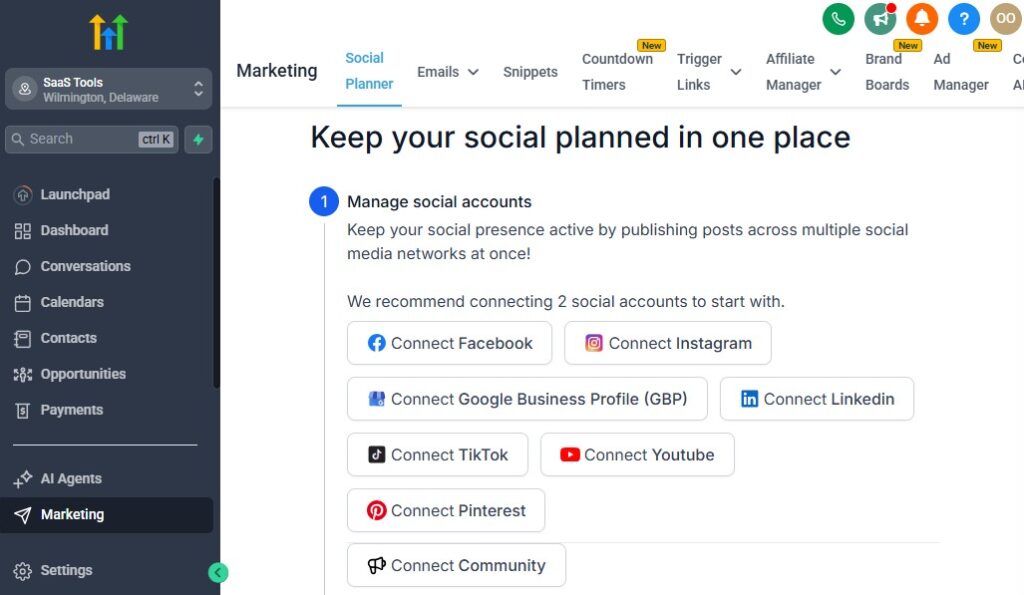
Clear, consistent communication is essential for every medical practice.
Whether you’re reminding patients about appointments, delivering follow-up instructions, announcing health programs, or sending preventive care reminders, GoHighLevel helps you automate and streamline all patient communication through SMS and email.
Here’s how to use GoHighLevel to keep your patients informed, engaged, and supported.
Nurture New Patients With Automated Welcome Sequences
Once someone becomes a new patient, you can automatically send:
- A welcome message
- Clinic information
- Provider introduction
- What to expect on their first visit
- Insurance and billing details
- Pre-visit forms
- Contact information
A warm welcome builds trust and prepares patients for their appointment.
Send Confirmation & Reminder Messages for Every Appointment
GoHighLevel can automatically deliver:
- Appointment confirmations
- 24-hour reminders
- 3-hour reminders
- “Reply to confirm” messages
- Directions or telemedicine links
These reminders dramatically reduce no-shows.
Send Follow-Up Instructions After Consultations
After a patient leaves the clinic, GoHighLevel can send:
- Summary of care
- Medication instructions
- Recovery tips
- Educational resources
- Referral notes
- Link to book the next appointment
This improves treatment compliance and patient care.
Deliver Test Result Updates & Review Reminders
When lab or diagnostic results are ready, you can automate:
- “Your test results are available” notification
- A secure link to view results (manual upload required)
- Reminder to schedule a review call
- Instructions on next steps
- Guidance based on result category
This keeps patients informed without requiring manual outreach.
Send Chronic Care & Medication Reminders
For long-term patients, GoHighLevel can automate:
- Daily or weekly medication reminders
- Blood pressure or glucose tracking forms
- Symptom check-in messages
- Monthly care review reminders
- Chronic condition education tips
These reminders help improve adherence and patient outcomes.
Promote Preventive Health Services With Targeted Campaigns
Use email and SMS campaigns to promote:
- Annual physicals
- Vaccination clinics
- Dental cleanings
- Eye exams
- Mental health check-ins
- Women’s health screenings
- Men’s health screenings
- Chronic disease prevention programs
Preventive care campaigns strengthen community health and increase clinic visits.
Send Seasonal Health Alerts & Educational Tips
Medical practices can send helpful, timely messages such as:
- Flu season alerts
- Allergy season advice
- Heatwave tips
- Travel medicine reminders
- Cold/flu prevention
- Heart health awareness
- Diabetes management tips
Patients appreciate proactive health communication.
Re-Engage Inactive or Overdue Patients Automatically
GoHighLevel can help you bring back patients who haven’t visited recently by sending:
- “We haven’t seen you in a while” reminders
- Annual checkup reminders
- Dental cleaning reminders
- Follow-up overdue notifications
- “It’s time for your next appointment” messages
This improves retention and encourages ongoing care.
Promote Special Programs, Screenings & Health Events
Use campaigns to announce:
- Surgical consultations
- Wellness programs
- Telemedicine days
- Screening campaigns
- Open clinic days
- Weight-loss or lifestyle programs
- Mental health workshops
These messages generate consistent patient activity.
Send Satisfaction Surveys & Collect Valuable Feedback
You can automatically send surveys after:
- Consultations
- Checkups
- Procedures
- Telemedicine visits
- Diagnostic reviews
Use feedback for quality improvement and staff training.
Educate Patients With Drip Campaigns & Health Series
Build automated series to educate patients on topics like:
- Managing chronic conditions
- Post-procedure recovery
- Healthy eating
- Stress management
- Exercise routines
- Managing medications
- Preventive care
These campaigns position your practice as a trusted health partner.
Personalize Messages Based on Patient Type or Condition
Segment patients by:
- Condition
- Age
- Visit history
- Risk level
- Specialist they need
- Insurance status
- Appointment type
Then send tailored email/SMS content that fits their needs.
Managing Payments, Invoices & Insurance Follow-Up
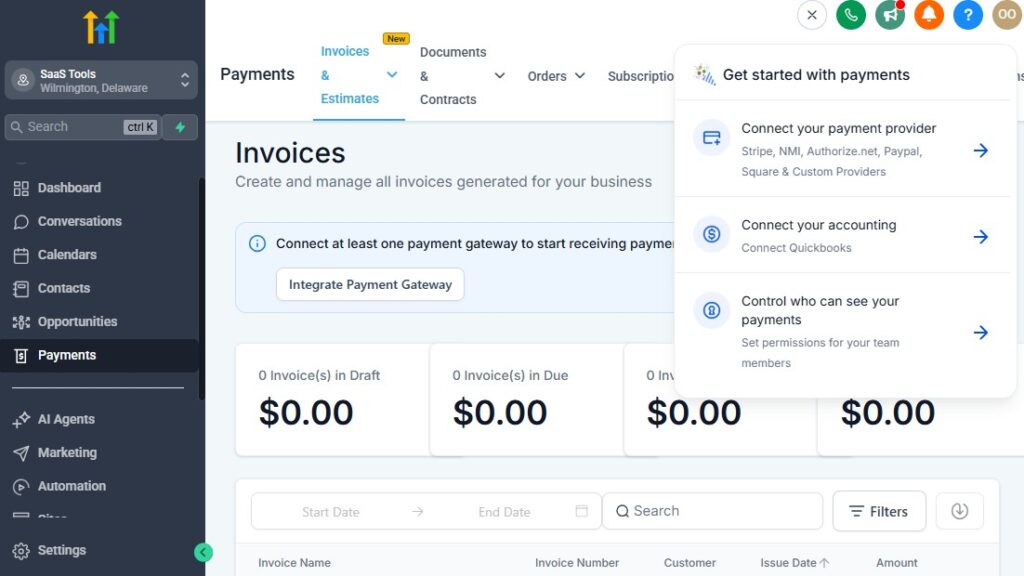
Managing payments in a medical practice can be one of the most time-consuming tasks – especially when you’re balancing consultation fees, follow-up visits, procedures, telemedicine charges, deposits, and outstanding balances.
GoHighLevel helps you streamline this process by handling payments, invoices, and reminders in a simple, organized, and automated system.
Here’s how to use GoHighLevel to manage your medical billing workflow more efficiently.
Accept Payments for All Types of Medical Services
GoHighLevel lets you collect payments for:
- Consultations (in-person & telemedicine)
- Follow-up visits
- Procedures
- Diagnostic reviews
- Lab or imaging fees (if applicable)
- Vaccinations
- Wellness programs
- Chronic care plans
Patients can pay online before or after their visit.
Offer Pre-Payment or Deposits for Procedures
If your practice requires deposits, GoHighLevel lets you:
- Charge procedure deposits
- Require pre-payment before booking
- Automatically send payment links
- Track cleared and pending deposits
This reduces cancellations and last-minute no-shows.
Send Clean, Professional Medical Invoices
Create invoices instantly for:
- Consultations
- Procedures
- Telemedicine visits
- Lab reviews
- Follow-up appointments
- Health programs
Each invoice can include:
- Itemized services
- Payment link
- Due date
- Billing contact
- Automated receipt after payment
You can also attach supporting documents when needed.
Automate Payment Reminders for Outstanding Balances
GoHighLevel can automatically send:
- 3-day outstanding balance reminders
- 7-day overdue notices
- “Your payment is due today” messages
- Friendly follow-up reminders
- Payment receipt confirmations
This reduces the need for staff to chase unpaid bills manually.
Support Recurring Payments for Care Plans
If you offer ongoing care or subscription-based services, GoHighLevel supports recurring billing for:
- Monthly chronic care management
- Subscription telemedicine
- Monthly wellness programs
- Mental health sessions
- Preventive care memberships
These payments renew automatically.
Add Payment Links to SMS, Email & Patient Portals
You can embed payment links wherever needed, including:
- Appointment confirmations
- Telemedicine instructions
- Invoice emails
- SMS reminders
- Patient portals
- Follow-up messages
This makes it easy for patients to pay without calling the office.
Track All Payments Inside the CRM
GoHighLevel stores every payment in one place, so you can track:
- Paid invoices
- Outstanding balances
- Patient payment history
- Refunds (if applicable)
- Pre-paid services
- Recurring billing status
- Revenue by service type
You get full visibility of your financial flow.
Attach Billing Notes to Patient Records
Inside each patient file, you can store:
- Insurance type
- Payment method
- Copay details
- Deductible notes
- Pending charges
- Past invoices
- Payment plans
This helps your team understand each patient’s billing status instantly.
Send Automated Payment Receipts & Documentation
After payment, GoHighLevel can send:
- A digital receipt
- Summary of services
- Optional post-care instructions
- A link to book the next visit
Patients get immediate confirmation.
Trigger Follow-Up Messages After Insurance Claims (Manual Entry)
Although GoHighLevel doesn’t process insurance directly, you can still automate:
- Claim submission reminders
- “Your insurance claim was processed” messages
- Instructions for copay settlement
- Balance notifications
- Follow-up scheduling
This keeps insurance-related communication organized.
Use Automated Billing Workflows for Better Revenue Tracking
You can build workflows that:
- Move patients to a “Billing Pending” stage
- Trigger reminders if payment isn’t made
- Notify staff for manual follow-up
- Mark invoices as complete
- Send next appointment messages once payment clears
This keeps your financial workflow clean and consistent.
Integrate with Stripe, PayPal & Square for Smooth Payments
GoHighLevel works with:
- Stripe (best for medical practices)
- PayPal (optional)
- Square (via Zapier/Make)
This ensures secure and fast payments for all services.
Delivering Test Results, Health Forms & Patient Documentation
Delivering medical documents quickly and securely is essential for every medical practice.
Patients expect fast access to their lab results, prescriptions, referral letters, medical forms, and post-care instructions.
GoHighLevel helps you deliver all of this in an organized, automated, and patient-friendly way.
Here’s how to manage and deliver medical documentation using GoHighLevel.
Upload and Send Test Results Securely
GoHighLevel lets you upload:
- Lab results
- Radiology reports
- Blood test summaries
- Diagnostic reports
- Specialist findings
- Scanned documents
You can send results to patients through:
- SMS link
- Patient portal
- Automated workflows
Patients receive results quickly and clearly.
Send a Notification When Test Results Are Ready
Once you upload a document, GoHighLevel can automatically send:
- “Your test results are ready” message
- A secure link to access results
- Optional next steps (book a review call, schedule follow-up, etc.)
Fast communication improves patient satisfaction.
Deliver Health Forms Before or After Appointments
You can create and send any medical form, including:
- New patient forms
- Medical history forms
- Symptom checklists
- Pre-procedure instructions
- Insurance information forms
- Consent and authorization forms
- Follow-up questionnaires
- Mental health assessments
Patients can complete forms online – no paper needed.
Store All Documents in Patient Records
Each patient profile can hold:
- Uploaded results
- Medical imaging notes
- Referral letters
- Progress reports
- Treatment plans
- Prescription files
- Past visit summaries
- Insurance forms
Everything stays organized and accessible to your staff.
Deliver Digital Prescriptions & Treatment Instructions
GoHighLevel allows you to send digital:
- Prescriptions (manual upload)
- Dosage instructions
- Medication schedules
- Pharmacy notes
- Follow-up recommendations
- Treatment plans
This reduces paperwork and speeds up communication.
Send Referral Letters & Specialist Notes
Upload and deliver:
- Referral letters
- Specialist reports
- Co-treatment notes
- Consultation summaries
- Imaging referrals
These can be automated or sent manually depending on workflow.
Provide Post-Care and Recovery Instructions Automatically
After a procedure or treatment, GoHighLevel can send:
- Recovery steps
- Warning signs to watch for
- Medication schedule
- Follow-up appointment link
- Emergency contact information
- Care guidelines
Automating this ensures every patient receives proper instructions.
Deliver Pediatric or Family Care Documents
If your practice includes pediatrics, you can provide:
- Vaccination forms
- Growth charts
- Pediatric progress notes
- School health forms
- Nutrition guides
- Development milestone documents
Parents appreciate receiving digital, easy-to-access documents.
Send Dental or Specialist Care Documentation
For specialists (dentists, dermatologists, ENT, cardiologists, etc.), GoHighLevel can deliver:
- Treatment plans
- X-ray or imaging summaries
- Procedure notes
- Oral hygiene instructions
- Follow-up procedures
- Cosmetic care aftercare guides
This helps patients stay informed and compliant.
Provide Downloadable Health Resources & Education Materials
You can create a digital library of:
- Nutrition guides
- Chronic disease management tips
- Preventive care instructions
- Mental health resources
- Women’s health or men’s health guides
- Exercise recommendations
- Lifestyle improvement sheets
Patients feel supported even outside the clinic.
Use the Membership Area for Patient Portals
GoHighLevel’s membership feature can serve as a secure patient portal where patients can access:
- Health documents
- Care summaries
- Test results
- Educational materials
- Video instructions
- Recovery guides
This creates a more professional patient experience.
Automate Documentation Delivery Based on Triggers
GoHighLevel can automatically send documents when:
- A form is submitted
- A procedure is completed
- A follow-up is scheduled
- Test results are uploaded
- A care plan changes
- A patient reaches a treatment milestone
No more manual follow-ups – the system handles it.
Collecting Reviews, Testimonials & Building Patient Trust Online
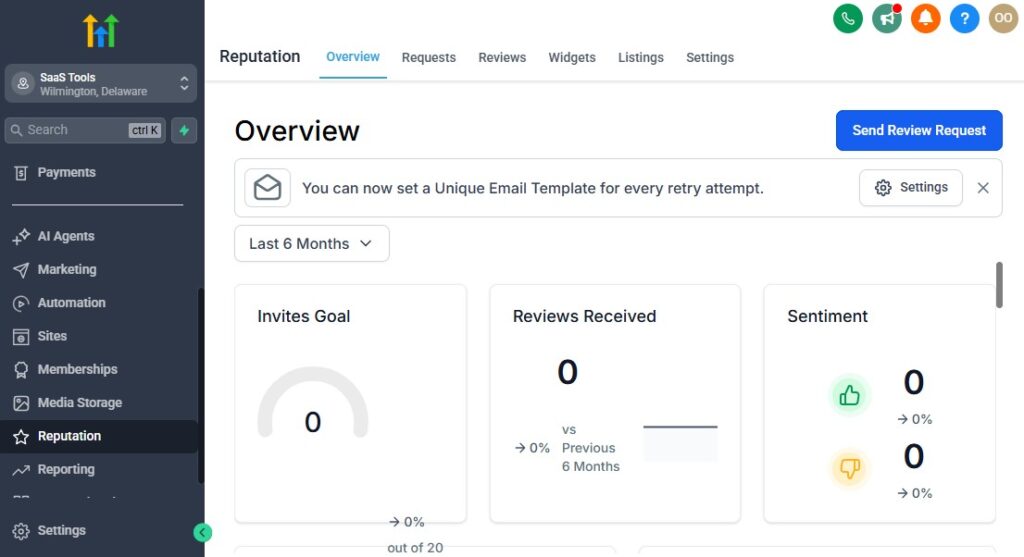
Trust is everything in healthcare. Before choosing a doctor or clinic, patients look for proof that your medical practice is professional, reliable, and delivers excellent patient care.
Reviews, testimonials, satisfaction surveys, and public feedback all play a major role in a patient’s decision.
GoHighLevel helps you collect, manage, and showcase patient trust signals automatically – without adding extra work for your staff.
Here’s how to build a strong, trustworthy online reputation using GoHighLevel.
Automate Review Requests After Appointments and Procedures
GoHighLevel can automatically trigger review requests after:
- Consultations
- Checkups
- Follow-up visits
- Telemedicine calls
- Procedures
- Screenings
- Diagnostic reviews
Patients receive a simple message asking them to leave feedback on your preferred platforms.
Send Follow-Up Reminders for Reviews
Most patients intend to leave a review but forget. You can automate:
- 24-hour reminder
- 3-day reminder
- Final reminder after 7 days
These gentle nudges dramatically increase review rates.
Guide Patients to the Best Review Platforms
Direct patients to platforms that matter most for medical practices:
- Google Business Profile
- Healthgrades
- WebMD
- Vitals
- Facebook reviews
- Clinic testimonial form
- Zocdoc (if applicable)
Patients can simply click and leave a rating.
Use a Review Filter to Manage Negative Feedback
To protect your clinic’s reputation, use a review funnel:
- Happy patients → directed to public review platforms
- Unhappy patients → directed to private feedback form
This helps you address concerns privately before they go online.
Collect Patient Testimonials for Your Website & Funnels
GoHighLevel makes it easy to request and collect testimonials including:
- Short written testimonials
- Rating-based feedback
- Video testimonials (if patient agrees)
- Surveys about satisfaction
- Comments about their experience
Always ensure shared testimonials are HIPAA-compliant (no sensitive health info without permission).
Showcase Patient Reviews on Your Landing Pages
Use the best testimonials to strengthen your funnels and landing pages:
- Consultation funnels
- Telemedicine pages
- Screening campaigns
- Specialist services
- Checkup and preventive care funnels
Patients trust real experiences shared by others.
Add Clinic Awards, Certifications & Professional Credentials
Increase trust by showcasing:
- Board certifications
- Years of experience
- Specializations
- Clinic accreditations
- Professional memberships
- Hospital affiliations
- Public health partnerships
Trust badges reassure patients instantly.
Share Success Stories (HIPAA-Safe)
If your practice treats chronic conditions or offers long-term care programs, you can highlight:
- Improvement progress
- General outcomes
- Patient experience summaries
- Program success rates
Always avoid sharing identifiable medical details unless you have explicit written consent.
Use Automated Patient Satisfaction Surveys
GoHighLevel allows you to send custom surveys to measure:
- Quality of care
- Staff friendliness
- Facility cleanliness
- Waiting time
- Ease of scheduling
- Understanding of treatment
- Overall experience
These surveys help you identify strengths and areas for improvement.
Build a Reputation Dashboard for Your Clinic
You can monitor:
- Total reviews
- Star ratings
- Patient comments
- Trends over time
- Negative feedback alerts
- Review platform performance
This gives you a real-time overview of your online reputation.
Use Patient Feedback to Improve Clinic Operations
Feedback helps you enhance:
- Appointment flow
- Communication quality
- Doctor-patient interaction
- Waiting time
- Treatment clarity
- Follow-up efficiency
Small improvements have a big impact on patient satisfaction.
Use Social Proof in Email & SMS Campaigns
Add reviews to:
- Appointment reminders
- Screening promotions
- Health program announcements
- Telemedicine promotions
- New patient nurture sequences
Social proof increases patient trust and boosts bookings.
Reporting & Analytics for Medical Practices
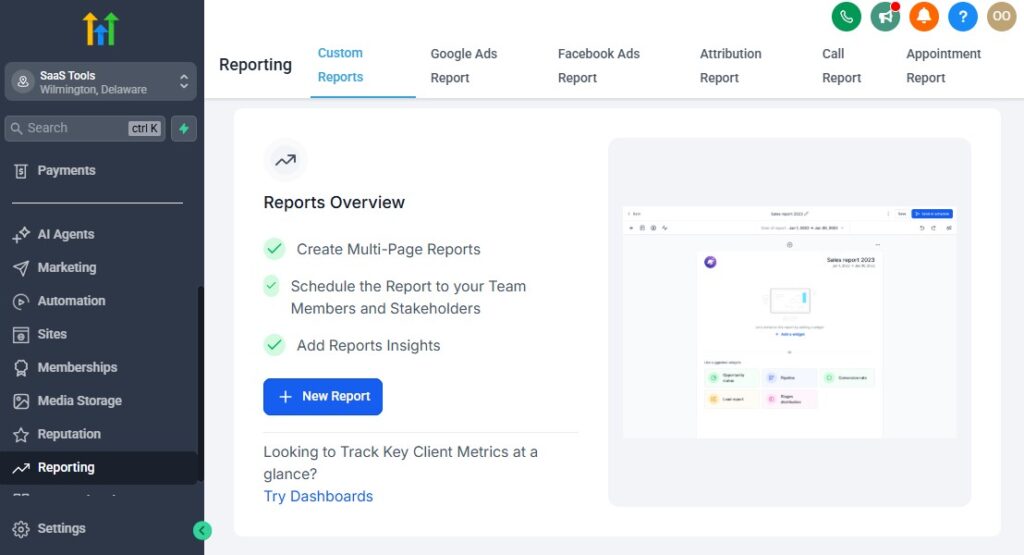
Every successful medical practice needs clear insights into patient activity, appointment flow, staff efficiency, revenue performance, and overall operational health.
GoHighLevel gives you powerful reporting tools that help you identify trends, reduce inefficiencies, improve patient care, and run your practice with confidence.
Here’s how to use GoHighLevel’s reporting and analytics to monitor and grow your medical practice.
Track All Patient Inquiries & Lead Sources
GoHighLevel shows exactly where new patients come from:
- Website forms
- Landing pages
- Google ads
- Facebook/Instagram ads
- WhatsApp or SMS inquiries
- Referral campaigns
- Screening funnels
- Telemedicine forms
- Walk-in QR codes
Understanding your top-performing channels helps you focus your marketing efforts.
Monitor Your Patient Pipeline to Identify Drop-Off Points
The CRM pipeline gives full visibility into patient stages:
- New inquiry
- Forms sent
- Appointment booked
- Consultation completed
- Diagnosis given
- Follow-up scheduled
- Ongoing care
- Inactive patient
Analytics help you see:
- Where patients stop responding
- How many inquiries convert into appointments
- How many first-time visits turn into long-term patients
- Which services attract the most new patients
This improves your patient journey and reduces lost opportunities.
Analyze Appointment Trends & Doctor Utilization
GoHighLevel helps you track:
- Total appointments booked
- Appointment type breakdown
- No-show rate
- Last-minute cancellations
- Peak booking hours
- Doctor-specific scheduling trends
- Telemedicine vs in-person ratios
This helps you optimize scheduling, staff allocation, and clinic hours.
Track No-Shows & Rebooking Performance
You can easily see:
- Daily/weekly/monthly no-show rates
- Which appointment types get the most cancellations
- High-risk patient segments
- How many missed appointments get rebooked
- Which automated reminders are working best
Reducing no-shows increases both revenue and patient care consistency.
Monitor Patient Follow-Up Compliance
Care doesn’t end at the first visit. GoHighLevel tracks:
- How many patients book follow-ups
- Which patients skip follow-up care
- Progress of chronic care patients
- Post-procedure recovery compliance
- Medication or reminder engagement
These insights help you improve long-term patient outcomes.
Track Revenue Across All Medical Services
GoHighLevel gives you a clear view of your financial performance:
- Total revenue
- Daily/weekly/monthly trends
- Payments collected
- Outstanding balances
- Telemedicine revenue
- Procedure-based revenue
- Program or screening campaign revenue
- Deposits vs completed payments
You always know where your income is coming from and what needs attention.
Monitor Billing, Invoices & Unpaid Balances
You can track:
- Paid invoices
- Pending invoices
- Overdue balances
- Recurring payments
- Failed payments
- Insurance-related notes (manual tracking)
Automated reminders help reduce billing delays.
Evaluate Email & SMS Engagement Performance
You can monitor:
- Open rates
- Click-through rates
- Delivery success
- Appointment booking conversions
- Patient responses
- Engagement over time
This helps refine your communication strategy for better patient engagement.
Assess Staff & Provider Performance
If your practice has multiple doctors or support staff, GoHighLevel helps you track:
- Appointment volume
- Consultation-to-follow-up rate
- Patient satisfaction survey results
- Response times
- Documentation completion rate
- Revenue per provider
- Patient retention per provider
These insights improve both clinical and administrative performance.
Identify At-Risk & Inactive Patients
GoHighLevel helps you identify patients who may need attention:
- Patients overdue for checkups
- Patients who missed appointments
- Long-term patients with no follow-up
- Chronic care patients not responding
- Patients who haven’t visited in 6–12 months
Automated re-engagement sequences can bring many back.
Measure Funnel & Landing Page Conversions
Your medical landing pages show:
- Visitor counts
- Conversion percentages
- Booking rate
- Form abandonment
- Lead source breakdown
- Cost per patient (if running ads)
This helps optimize patient acquisition campaigns.
Compare Monthly or Quarterly Clinic Performance
Track trends across:
- Patient volume
- Appointment types
- Consultation vs follow-up ratios
- Revenue growth
- Marketing performance
- Telemedicine usage
- Seasonal health patterns
This helps with planning, staffing, and budgeting.
Create Custom Dashboards for Full Operational Visibility
You can build dashboards to monitor:
- Daily patient flow
- Patient satisfaction scores
- Communication engagement
- Appointment forecasts
- Revenue targets
- Billing performance
- Lead conversion rates
- Preventive care compliance
Everything your practice needs is visible in real time.
Integrating GoHighLevel With Medical Tools & Healthcare Platforms
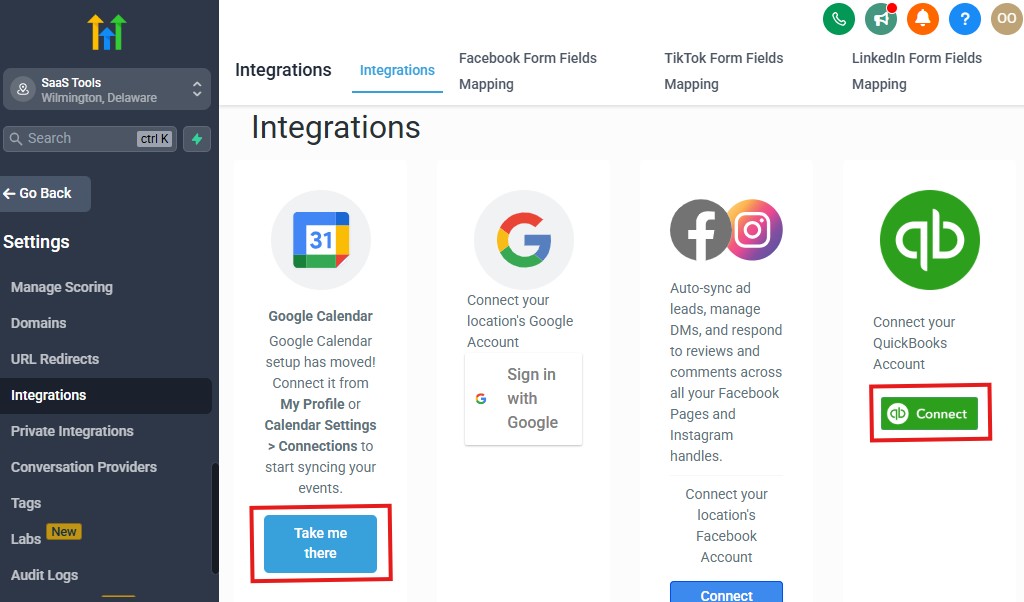
Most medical practices rely on several tools to manage patient care, communication, billing, electronic documents, and telemedicine.
While GoHighLevel is not a full EMR/EHR system, it integrates smoothly with many platforms your practice already uses – helping you streamline front-office operations and improve patient experience.
Here’s how to connect GoHighLevel with essential medical tools and platforms.
Integrate Calendar Tools for Smooth Scheduling
Sync your GoHighLevel appointment calendars with:
- Google Calendar
- Outlook Calendar
- Microsoft 365 Calendar
- Apple Calendar
This ensures your entire staff sees accurate availability and avoids double bookings.
Connect Payment Processors for Medical Billing
GoHighLevel works seamlessly with:
- Stripe (recommended)
- PayPal
- Square (via Zapier or Make)
This allows you to collect:
- Consultation fees
- Follow-up payments
- Procedure deposits
- Telemedicine fees
- Screening program payments
All payments sync back into your CRM.
Use File Storage Platforms for Medical Documents
Connect GoHighLevel with cloud storage platforms like:
- Google Drive
- Dropbox
- OneDrive
- SharePoint
You can upload and deliver:
- Lab results
- Diagnostic reports
- Referral letters
- Consent forms
- Test summaries
- Treatment plans
- Imaging files (PDF or JPEG formats)
These integrations help keep documentation secure and organized.
Integrate Telemedicine Tools
For video consultations, connect third-party telehealth solutions such as:
- Zoom
- Doxy.me
- Google Meet
- Microsoft Teams
You can automate:
- Telemedicine links
- Pre-visit instructions
- Reminders
- Post-consultation follow-ups
This creates a smooth virtual care experience.
Sync With Email Providers for Secure Communication
GoHighLevel integrates with:
- Outlook
- Gmail
- Custom domain email (SMTP/IMAP)
This allows you to:
- Send appointment confirmations
- Deliver patient documents
- Send follow-up emails
- Automate patient journeys
All communication stays in one unified inbox.
Connect Insurance & Billing Tools (Indirect via Zapier/Make)
While GoHighLevel doesn’t handle insurance claims directly, you can integrate tools like:
- Kareo
- Athenahealth
- DrChrono
- JaneApp
- SimplePractice
- TheraNest
Using Zapier or Make, you can automate:
- Claim status notifications
- Patient billing updates
- Appointment syncing
- Reminder triggers
This reduces manual data entry for your billing team.
Integrate Specialized Medical Software (Indirect)
Depending on your specialty, you can sync GoHighLevel with tools like:
- Dentrix (dentistry)
- ChiroTouch (chiropractic)
- Mindbody (wellness/therapy)
- PT-specific tools (physiotherapy)
- E-prescription systems (region dependent)
These connections typically use third-party automation tools or manual uploads.
Connect Wearables & Health Apps (via APIs/Automations)
For advanced practices, you can integrate:
- Fitbit
- Apple Health
- Oura Ring
- Garmin
- Strava
While not native integrations, automation tools help:
- Track patient metrics
- Trigger follow-ups
- Monitor chronic care habits
This is especially useful for lifestyle medicine, cardiology, and chronic disease management programs.
Integrate Social Media & Communication Channels
GoHighLevel unifies all communication by connecting:
- Facebook Messenger
- Instagram DM
- WhatsApp (via approved providers)
- Google Business Chat
- Website live chat widgets
All messages flow into one inbox for efficient patient support.
Connect Marketing & Advertising Platforms
You can integrate all major ad platforms, including:
- Meta Ads (Facebook/Instagram)
- Google Ads
- YouTube Ads
- TikTok Ads
This allows you to track:
- Which campaigns drive patient inquiries
- Conversion rates
- Cost per appointment
- Source-specific patient behavior
Your marketing becomes more efficient and data-driven.
Use Webhooks, APIs & Automation Tools for Custom Integrations
If your practice requires custom workflows, GoHighLevel supports:
- Webhooks
- API connections
- Zapier
- Make (Integromat)
- Pabbly
This opens the door for deeper integrations with:
- EHR systems
- Lab software
- Internal clinic tools
- Appointment boards
- Custom portals
- Inventory systems
You can build a fully connected medical workflow.
Advanced Automation for Medical Practices
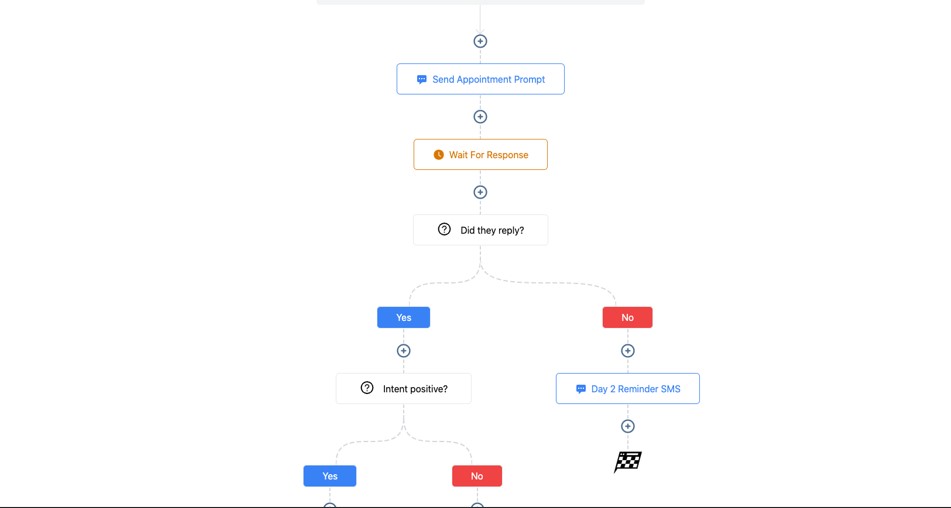
Advanced automation helps your medical practice reduce administrative workload, improve patient care, shorten response times, and create a seamless experience across consultations, checkups, procedures, and follow-ups.
With GoHighLevel, you can build powerful workflows that run your front-office operations almost hands-free while keeping patient care consistent and efficient.
Here are the most effective advanced automations for doctors and medical practices.
Automated Multi-Step Patient Intake Workflow
This workflow ensures every new patient enters your practice smoothly:
- Trigger when a new inquiry arrives
- Send welcome message
- Deliver digital intake forms
- Request insurance information
- Send medical history form
- Auto-notify staff when forms are completed
- Invite the patient to book a visit
- Move patient to “Ready for Appointment” stage
Your staff no longer manually prepares new patients – the system handles it.
Smart Routing & Assignment Based on Visit Type
Automatically assign patients to the right provider based on:
- Specialty (cardiology, pediatrics, dermatology, etc.)
- Visit type (consultation, telemedicine, follow-up)
- Availability
- Urgency
- Language preference
This ensures patients see the right doctor without manual scheduling conflicts.
Symptom-Based Triage Automation (Form Triggered)
You can use custom forms to trigger automated triage steps:
- “Urgent symptoms” → notify staff immediately
- “Mild symptoms” → send self-care instructions
- “Specialty needed” → direct to appropriate department
- “Lab required” → send lab request instructions
- “Telemedicine appropriate” → send virtual booking link
This improves patient flow and reduces delays.
Automated Pre-Procedure Preparation
For procedures, automate steps such as:
- Fasting instructions
- Medication restrictions
- Arrival time reminders
- Consent form requests
- Lab test reminders
- Pre-procedure checklist
- Transportation instructions
This eliminates repeated phone calls and ensures patients show up prepared.
Automated Post-Procedure Care & Recovery Support
Send automated care instructions after procedures:
- Pain management guidelines
- Medication schedules
- Wound care steps
- Warning signs
- Emergency instructions
- Follow-up appointment links
- Recovery tips
- Check-in form (“How are you feeling today?”)
This increases patient safety and improves outcomes.
Chronic Care Management Automations
For chronic conditions such as diabetes, hypertension, asthma, or heart disease, create recurring workflows:
- Weekly symptom check-in
- Monthly progress form
- Medication adherence reminders
- Diet or exercise recommendations
- Lab test reminders
- Chronic care education messages
- Regular provider consultation reminders
This ensures consistent monitoring and proactive intervention.
Telemedicine Automation for Virtual Care
Enhance virtual care with automated steps:
- Send telemedicine link
- Pre-visit tech prep instructions
- Symptom checklist
- Payment link (if needed)
- Automated follow-up care plan
- “Book your next telemedicine visit” reminder
Telemedicine becomes fast, professional, and reliable.
Missed Appointment Recovery Workflow
GoHighLevel can automatically detect missed appointments and send:
- “We noticed you missed your appointment” message
- Link to reschedule
- Reminder after 24 hours
- Final reminder after 3 days
- Optional staff call prompt
This reduces patient drop-off and protects your appointment flow.
Annual Checkup & Preventive Care Reminders
Set long-term reminders for:
- Annual physical exams
- Dental cleanings
- Eye exams
- Vaccinations
- Women’s and men’s health screenings
- Pediatric developmental checkups
The system brings patients back without your team lifting a finger.
Test Result Follow-Up & Next-Step Automation
After uploading results:
- Send “Results ready” notification
- Trigger instructions based on results category
- For abnormal results → request immediate review visit
- For normal results → educational tips
- Auto-send follow-up appointment links
- Notify staff if patient hasn’t booked within 48 hours
This ensures no patient is left without proper follow-up.
Patient Satisfaction & Quality Control Automation
You can automate quality feedback processes:
- Post-visit satisfaction survey
- Provider-specific ratings
- Wait time feedback
- Facility cleanliness feedback
- “How was your visit?” SMS
- Auto-tag patients based on feedback score
This helps your clinic improve care and operational quality.
Medication & Treatment Adherence Automation
For ongoing treatment plans:
- Daily medication reminders
- Weekly symptom trackers
- Refill reminders
- Dosage instructions
- “Have you taken your medication today?” prompts
- Missed medication alert workflow
Automation improves adherence and health outcomes.
Internal Staff Coordination Automations
GoHighLevel can automate internal workflows such as:
- Notify staff when forms are submitted
- Assign tasks when new results are uploaded
- Alert the doctor for abnormal test entries
- Notify billing for unpaid balances
- Assign follow-up calls to front desk
- Move tasks through status stages
This improves team coordination across departments.
HIPAA-Friendly Task Automation (Manual Document Storage)
While GoHighLevel isn’t a HIPAA-certified EMR, you can still create workflows that:
- Trigger tasks for HIPAA-compliant tools
- Remind staff to upload documents to secure EMR
- Move patient stages when EMR updates occur
- Send only non-sensitive messages through automation
This keeps both systems aligned.
Learn More:
- What is GoHighLevel? (Features, Use Cases, Pricing & More)
- GoHighLevel Review: (My Experience After 5 Years)
- GoHighLevel Pricing: (+ Discount Codes)
- GoHighLevel Features: (Full List of Tools)
- GoHighLevel Onboarding Checklist: (Complete Tutorial)
- GoHighLevel for Property Management: (Detailed Tutorial)
- GoHighLevel for Small Businesses: (2026 Helpful Tutorial)
- GoHighLevel for Service Businesses: (2026 Helpful Tutorial)
- GoHighLevel for Local Businesses: (2026 Helpful Tutorial)
- GoHighLevel for Healthcare Professionals: (2026 Helpful Tutorial)
Frequently Asked Questions
FAQs about GoHighLevel for Doctors
Can GoHighLevel replace my EMR/EHR system?
No. GoHighLevel cannot replace your EMR/EHR. It isn’t built for storing PHI or managing clinical records. You should use GoHighLevel for communication, scheduling, automations, reminders, forms, and patient engagement – while your EMR/EHR handles all medical data.
Is GoHighLevel HIPAA compliant?
GoHighLevel is not HIPAA compliant. You should avoid storing sensitive medical records inside it. Instead, use it for non-PHI communication and workflow automation, and continue securing all clinical information inside your EMR/EHR.
Can GoHighLevel reduce no-shows in my clinic?
Yes. Automated reminders significantly reduce no-shows. You can send SMS and email reminders at multiple intervals – 24 hours before, morning of, and even one hour before the appointment – which keeps patients informed and more likely to show up.
Can I automate pre-visit and post-visit instructions?
Absolutely. You can automate pre-visit instructions (fasting, medication rules, what to bring) and post-visit care instructions (recovery tips, follow-up guidance, reminders) based on appointment type. This improves patient readiness and care quality.
Can GoHighLevel help me collect online reviews?
Yes. GoHighLevel automates review requests right after appointments, sends personalized links, and filters low ratings into private feedback while directing positive reviews to public platforms like Google or Facebook. This boosts your clinic’s reputation effortlessly.
Final Thoughts
GoHighLevel gives your medical practice a smarter, more organized, and more modern way to manage patient communication, scheduling, follow-ups, and daily operations.
When you combine automation with clear workflows, your clinic becomes more efficient, your staff feels less overwhelmed, and your patients enjoy a smoother, more supportive experience.
By using GoHighLevel the right way, you’re able to:
- Reduce no-shows with automated reminders
- Deliver a better patient experience at every stage
- Stay consistent with follow-up care
- Keep your schedule fully booked
- Simplify payments and reduce administrative stress
- Build a strong online reputation
- Save hours each week through automation
Most importantly, you’re creating a patient-centered practice where people feel informed, valued, and cared for – even before and after their appointments.