Selling cars today isn’t just about having great vehicles on your lot. You need a system that helps you capture leads fast, follow up consistently, schedule test drives, manage negotiations, send quotes, collect documents, and close deals smoothly – all while giving buyers a professional, modern experience.
The problem is that most dealerships still rely on scattered tools, manual follow-ups, and outdated processes. This leads to missed leads, slow responses, lost deals, and frustrated buyers.
GoHighLevel for Car Dealerships changes everything.
It gives you an all-in-one platform to manage your:
- leads
- automate follow-ups
- schedule test drives
- deliver vehicle details
- send quotes
- collect deposits
- upload financing documents
- and even gather reviews
…all from one dashboard.
Whether you sell:
- new cars
- used cars
- EVs
- luxury vehicles
- or run a multi-location dealership
GoHighLevel helps you stay organized, convert more buyers, and deliver a premium buying experience.
This guide shows you exactly how to use GoHighLevel to streamline your entire dealership workflow from lead generation to final delivery.
TL;DR: How GoHighLevel Transforms Your Car Dealership
- GoHighLevel helps you manage leads, buyers, test drives, negotiations, documentation, and communication in one place.
- You can automate your entire sales process: lead follow-ups, appointment scheduling, negotiation reminders, paperwork requests, and review collection.
- Dealership funnels and landing pages help you attract more buyers, promote new arrivals, capture leads, and book more test drives.
- This guide walks you through how to use GoHighLevel to organize your sales team, speed up your process, increase conversions, and create a smoother buying experience.
Setting Up GoHighLevel for Your Car Dealership – (Step-by-Step Tutorial)
Let’s keep it simple – we’ll both set up your account first, then follow the step-by-step strategies to put everything in place.
Here’s exactly how to do it:
Step 1: Create HighLevel Account for 30 Days Free
Since you’re just starting with GoHighLevel, you would need to properly set up your account.
And you can do that for free through our exclusive 30-Day Free Trial link here.
In order to start, head over to gohighlevel.com/30-day-free-tial free trial and click on “30 DAY FREE TRIAL” as you can see below.
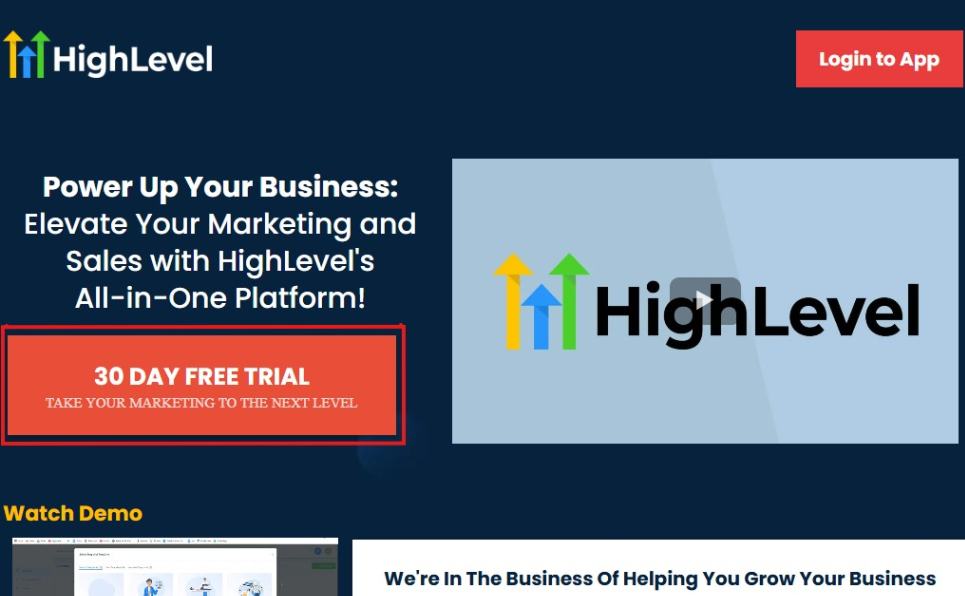
Upon clicking on “30 DAY FREE TRIAL“, a page will pop that looks exactly like the image below.
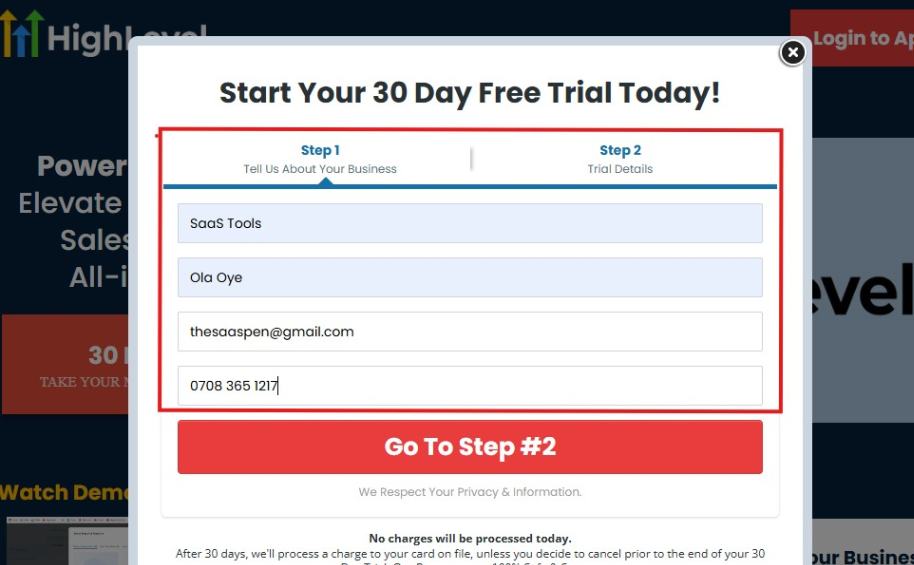
If you take a closer look at the image above, you will see that you need to supply your:
- Business name
- Company name
- Company email
- Phone number
Supply all the pieces of information and click on “Go To Step #2.”
On the next page, you will be required to select the plan you want to opt in for.
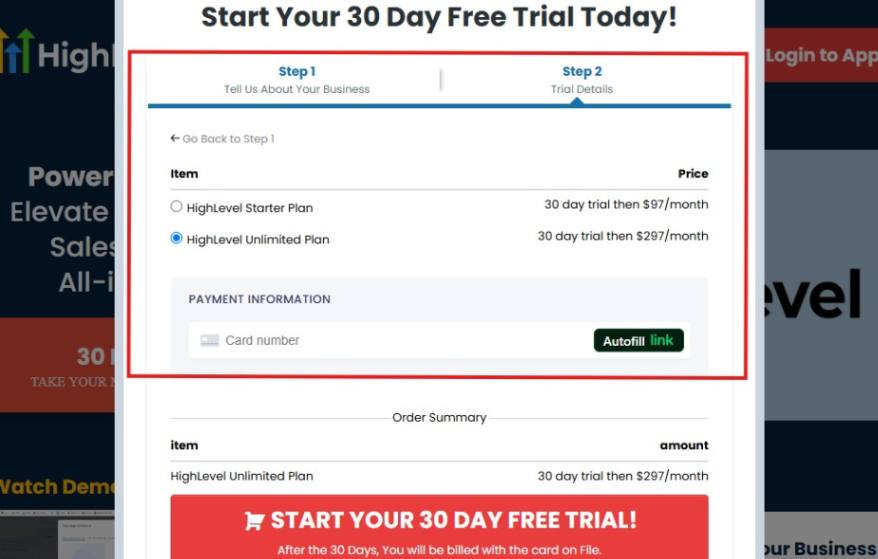
As you can see from the image above, you can either choose from:
- HighLevel Starter Plan
- HighLevel Unlimited Plan
Select the HighLevel Unlimited Plan and continue – you can always upgrade to the SaaS Mode later if you want that or downgrade.
The next thing you want to do is supply your credit card information.
Note: You will not be debited anything today until the end of your trail that is if you don’t cancel. Keep in mind that $1 will be debited and refunded back instantly into your account just to test your card is working.
After you have supplied the information accordingly, click on “START YOUR 30 DAY FREE TRIAL” and you will be asked to confirm you’re not a robot.
After that, the page below will pop up.
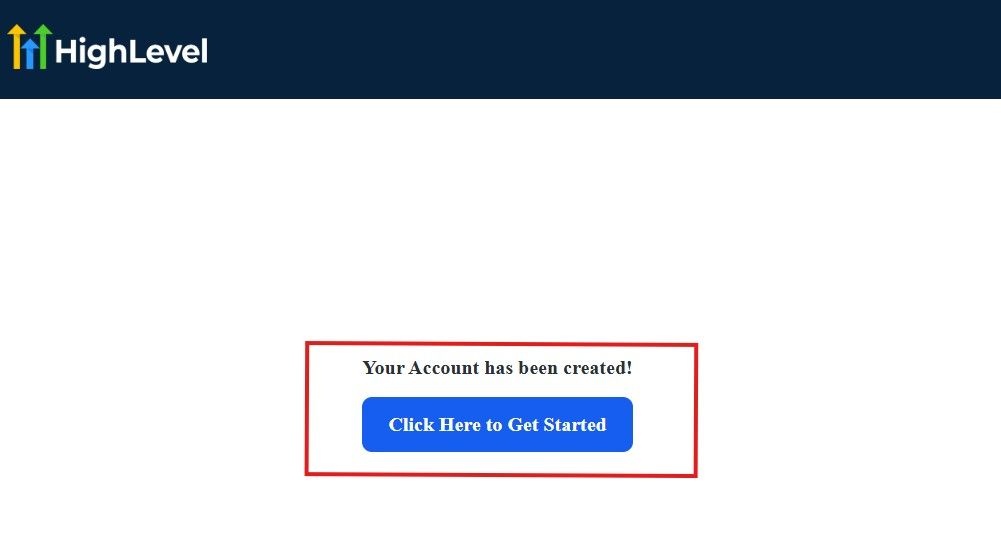
The image above says, “Your Account has been created!” Now, you need to click on the blue button that says “Click Here to Get Started.“
Click on the blue button to start your onboarding process.
Step 2: GoHighLevel Onboarding Process
The onboarding questions help GoHighLevel understand why you have signed up for the platform so that it can tailor your experience accordingly.
This is all you need to do:
After you click on the blue button above, the page below will pop up.
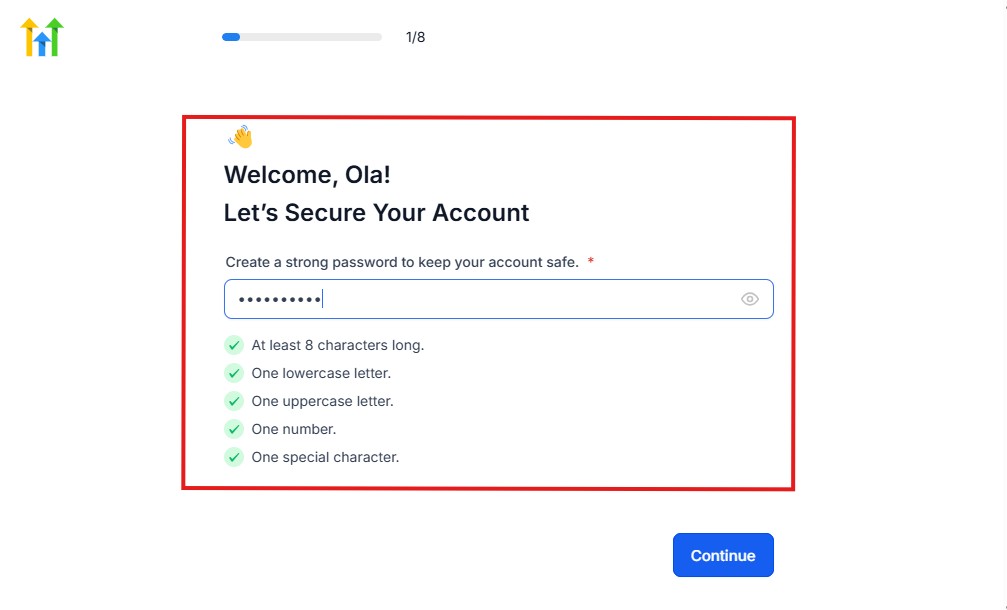
As you can see above, you need to set up your password, and the password has to be:
- At least 8 characters long
- One lowercase letter
- One uppercase letter
- One number
- One special character
If you have input the password and it matches all the description above, everything will be green just the way it’s in the image.
Click on “Continue” there after, and the image below will pop up.
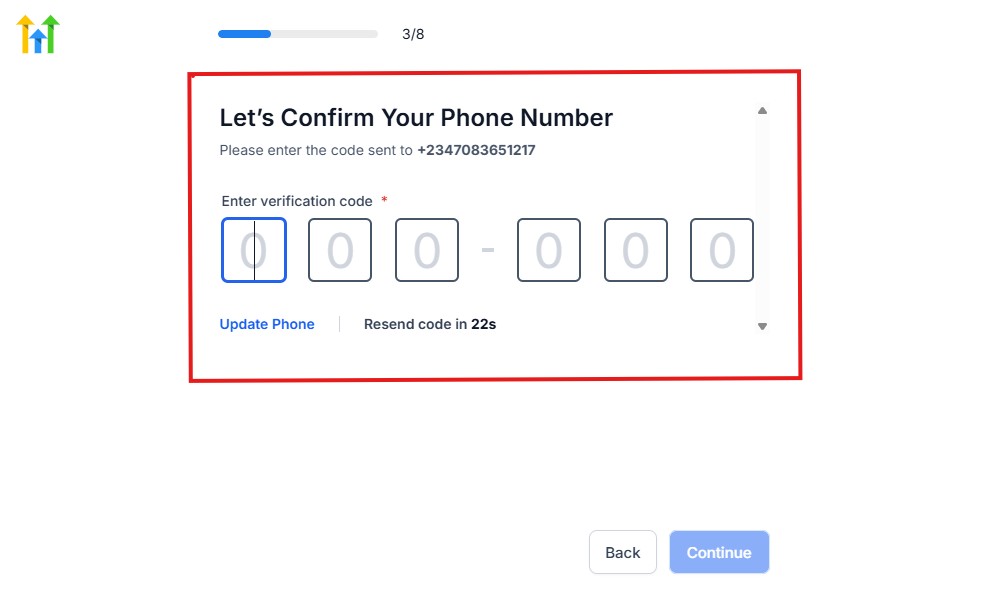
As you can see, a code will be sent to you to confirm your email address and phone number. The process is the same for the 2.
The next thing you need to do is to select how you plan to use GoHighLevel, as you can see below.
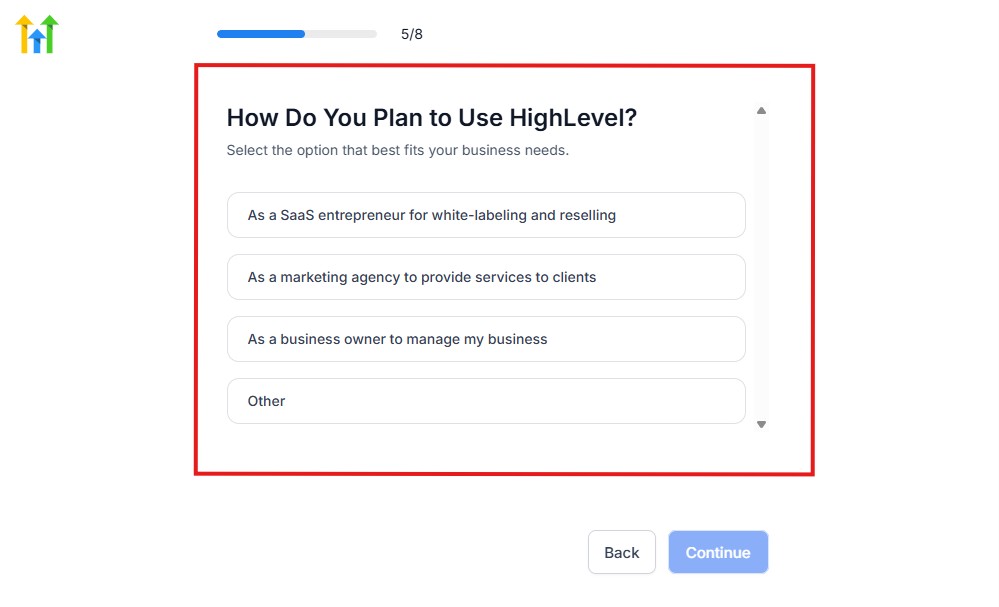
Select what best matches why you have signed up and click on Continue.
On the next page, you will be asked if you plan to resell GoHighLevel or not.
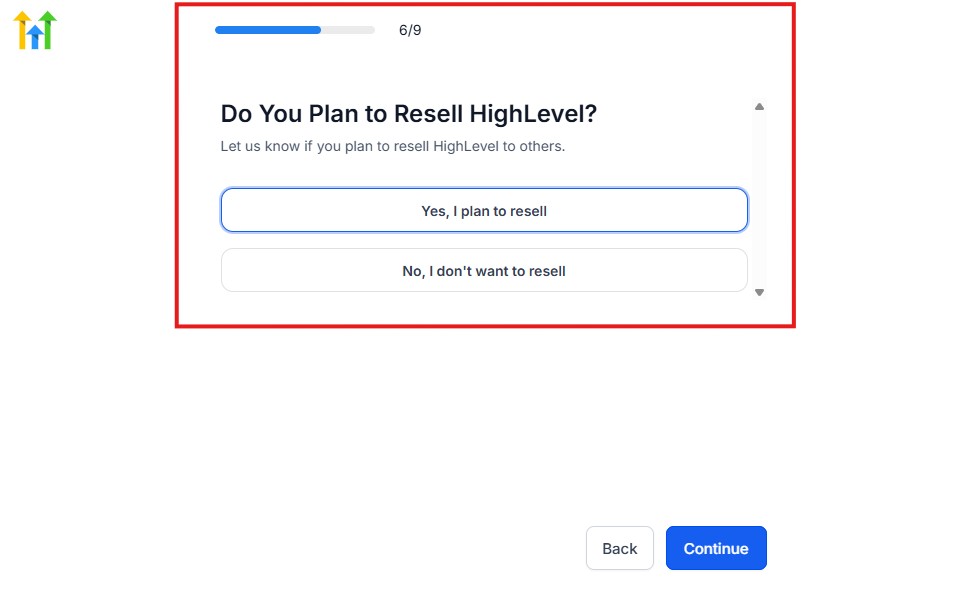
Select the answer based on the reason why you have signed up and click on “Continue”
Then, the page below will pop up.
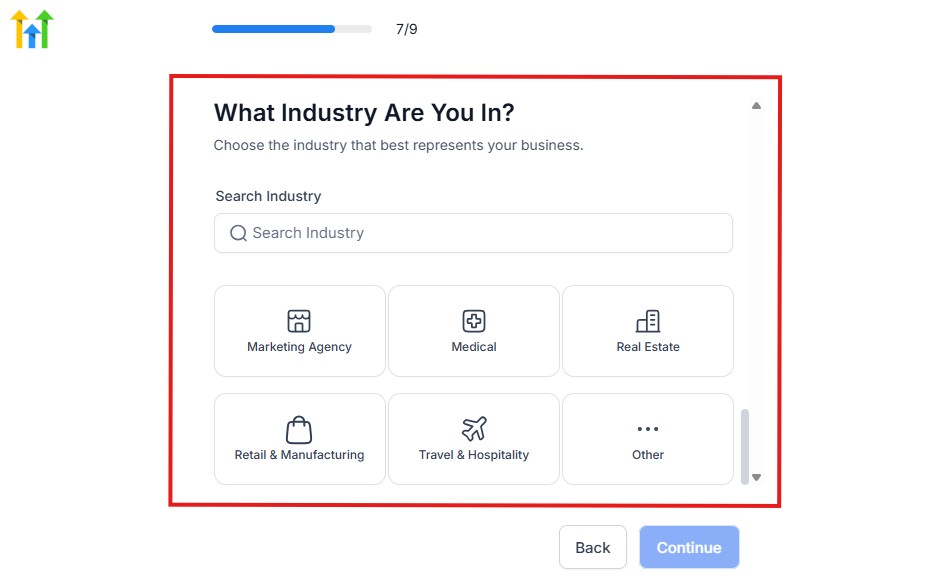
From the image above, you need to select the industry that you fall on. You can also make use of the search button if you can’t find it right away.
Then, click on continue after you select your industry.
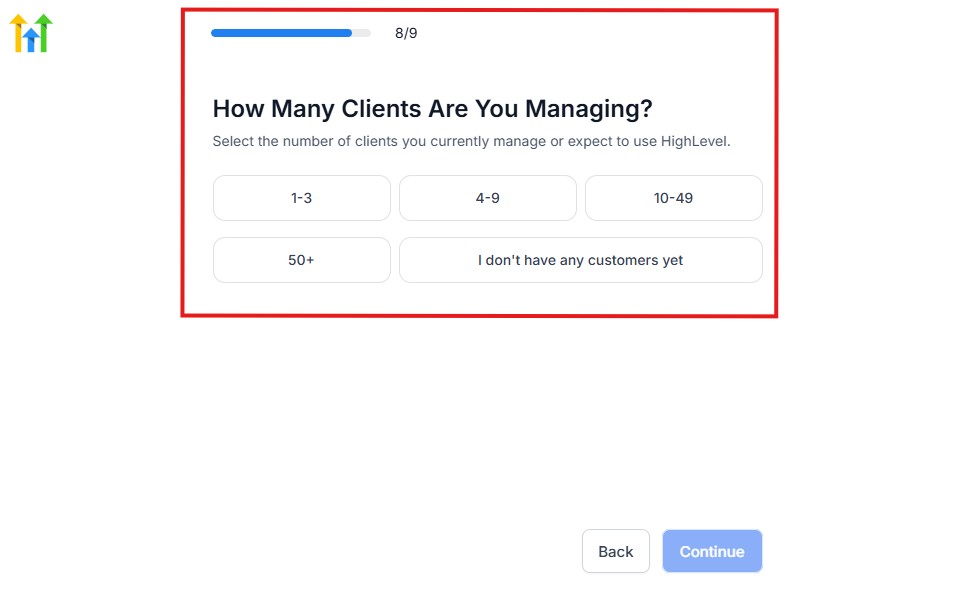
Then, the next thing you need to do is to select the number of clients that you currently have. Select “I don’t have any customers” yet if you currently don’t have one.
On the next page, you will be asked to select the platforms you currently use that you can integrate with GoHighLevel right away.
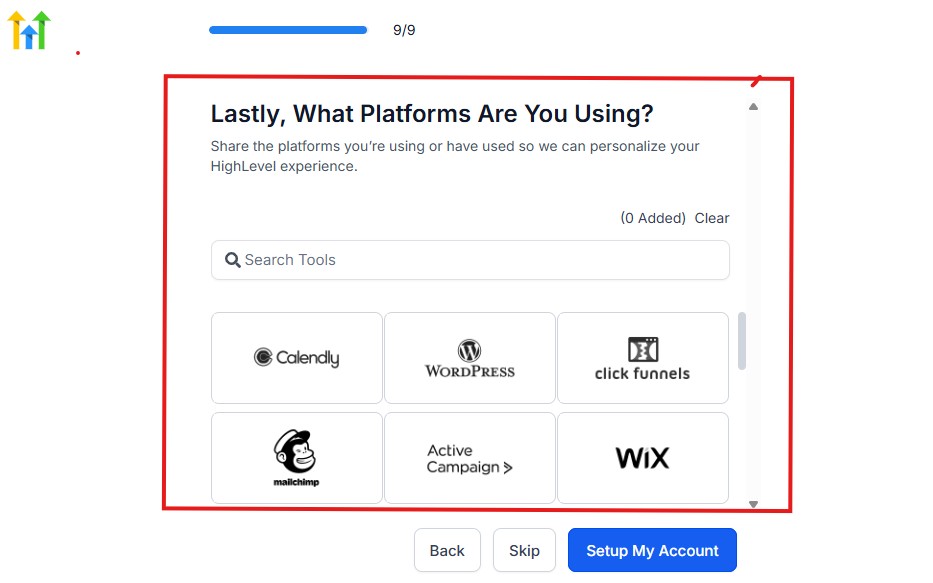
You can use the search button to search for any tools you want to add to your GoHighLevel account.
You can also skip this process and do it later if you want to.
After that, the page below will pop up.
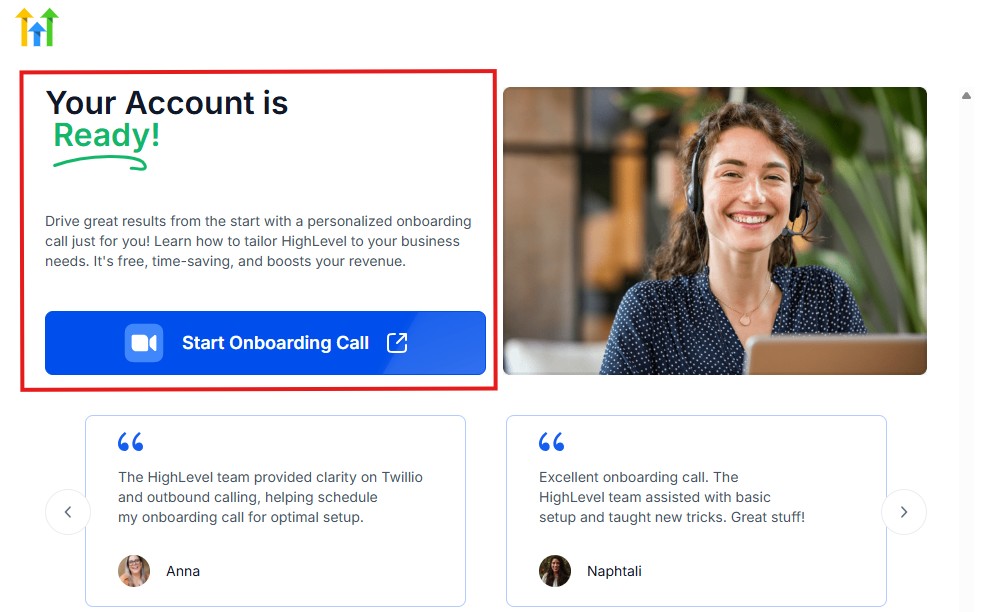
The page above says your account is ready and is asking you to “Start Onboarding Call.”
The “Onboarding Call” allows you to connect with the Go High Level team in order to discuss your account set-up process and everything regarding your plan in using HighLevel.
If you don’t want to start the “Onboarding Call” yet, just stroll down, and you will see the button in the image below.
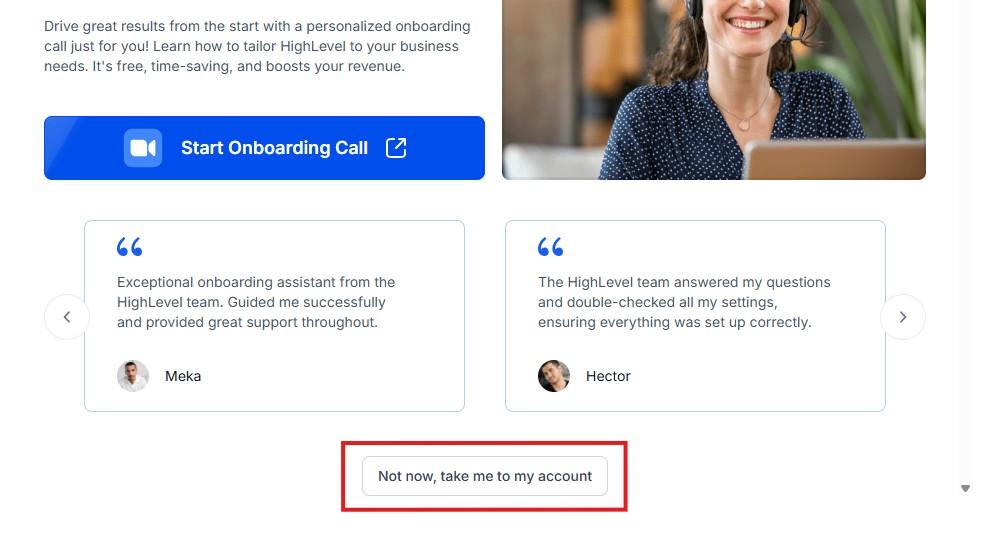
Simply click on “Not now, take me to my account“, and you will have access to your dashboard.
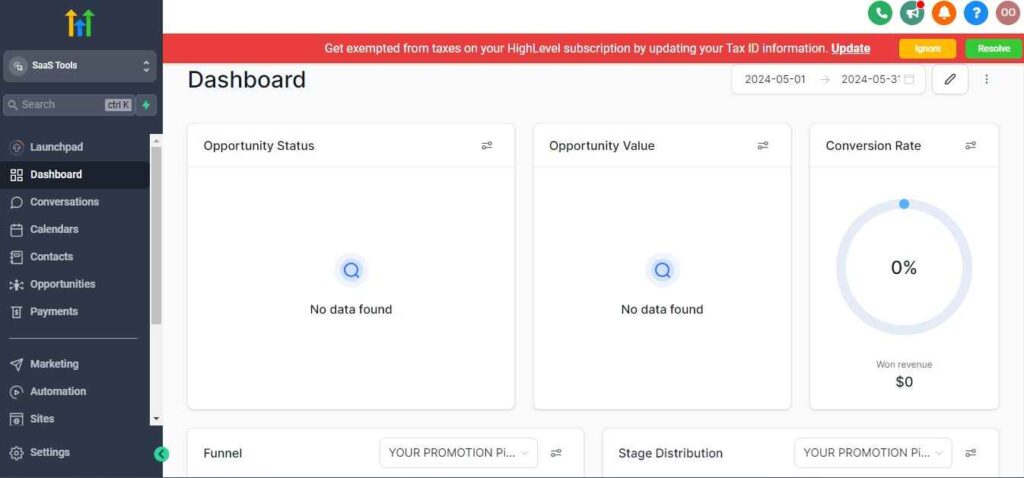
Note: If you have indicated that you want to resell HighLevel, you would have access to the agency dashboard by default, which looks like the image below.
But if you didn’t indicate interest in reselling GHL, your dashboard will look like the image below.
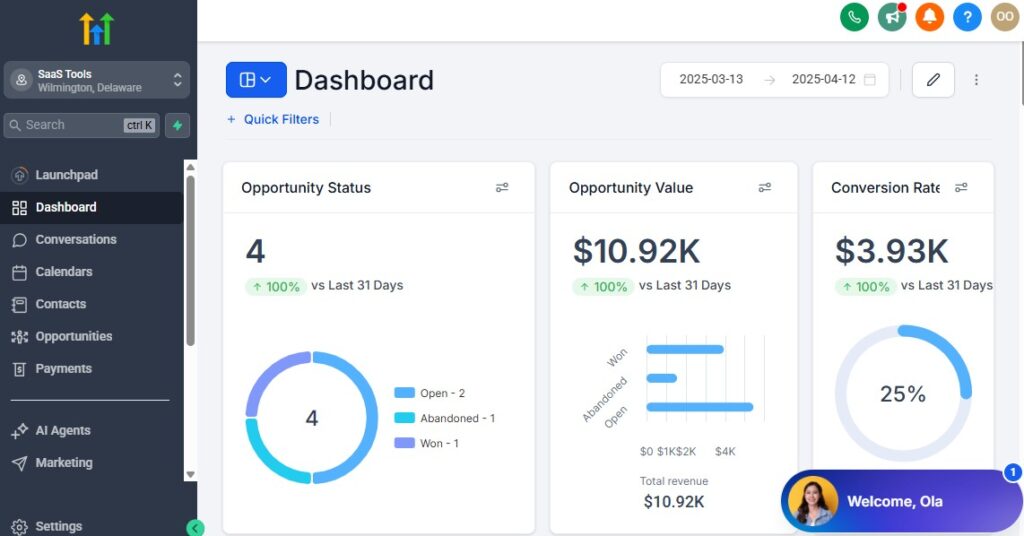
You can switch between these dashboards at any time.
The data you see on the dashboard above are not real data, they’re snapshots that you can use to kickstart your account setup process.
I want to say congratulations. You have successfully set up your Go High Level account.
Step 3: Create Your Dealership Workspace
Start by setting up your GoHighLevel account and creating a dedicated workspace for your dealership.
Inside this workspace, you’ll manage:
- Leads and inquiries
- Buyer communication
- Test drive bookings
- Negotiations
- Sales pipelines
- Finance and paperwork
- Team activity
- Automations
- Landing pages
- Inventory-related funnels
This becomes the central hub for your dealership operations.
Step 4: Set Up Your CRM for Leads, Buyers & Vehicle Sales
The CRM is where every lead and buyer’s journey will be tracked.
You want your pipeline to match the exact steps of your dealership workflow.
A typical car dealership pipeline includes:
- New Lead
- Contacted
- Appointment Scheduled
- Test Drive Booked
- Test Drive Completed
- Negotiation / Offer Sent
- Approved / Financing Ready
- Sold
- Delivered
- Review Requested
This gives your team a clear path to follow and prevents leads from slipping through the cracks.
Step 5: Import Past Leads & Customer Lists
If you have past leads or customers from spreadsheets, AutoTrader, Cars.com, Facebook Marketplace, or your website forms, import them into GoHighLevel.
You can tag them by:
- Vehicle interest
- Budget range
- Lead source
- Past purchase date
- Trade-in history
- Financing status
This allows you to market to your list more effectively and reactivate old leads.
Step 6: Add Your Sales Team & Set Permissions
Your sales team members will work inside the CRM, so set up user accounts for:
- Sales reps
- Finance managers
- Customer service reps
- Delivery coordinators
- Managers or team leads
GoHighLevel lets you assign permissions so each person only sees what they need.
Examples:
- Sales reps → Only their own leads
- Finance team → Only approved deals and documents
- Manager → Full visibility
This keeps everything organized and secure.
Step 7: Set Up Dealership Phone Numbers & Messaging
For smooth buyer communication, set up:
- A business phone number for your dealership
- SMS messaging for test-drive reminders
- Missed-call text-back
- Automated responses for new inquiries
- Shared inbox for your sales team
This ensures fast replies – which is critical in the car industry where buyers often compare multiple dealers.
Step 8: Build Your Dealer-Specific Calendars
Create calendars for:
- Test drives
- Showroom appointments
- Finance consultations
- Trade-in evaluation appointments
- Virtual vehicle walkthroughs
- Department calendars (Sales, Finance, Delivery)
- Staff-specific calendars
Each calendar sends automatic confirmations and reminders to reduce no-shows.
Step 9: Set Up Custom Fields for Buyer Details
Dealerships often need more information than just contact details.
Add custom fields such as:
- Vehicle interest (make/model/year)
- Budget range
- Financing needed?
- Trade-in details
- Preferred contact method
- Down payment amount
- Credit readiness
- Lead source
- Purchase timeline
These fields help your team understand each buyer quickly and personalize follow-ups.
Step 10: Enable Pipelines & Automations From Day One
Once the basics are set up, enable foundational automations like:
- New lead welcome sequence
- Missed-call text-back
- Test drive reminders
- Quote follow-ups
- Finance paperwork reminders
- Post-sale thank-you sequence
These workflows keep your dealership running smoothly with minimal manual effort.
Managing Leads, Buyers & Sales With the CRM
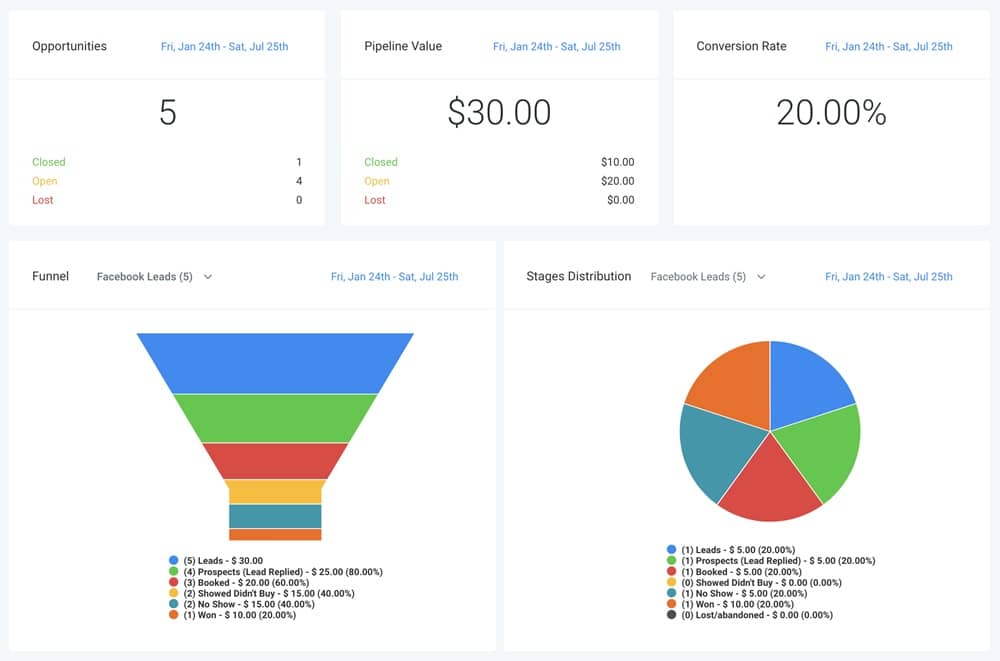
Your CRM is the backbone of your entire dealership. It’s where every lead enters, every buyer conversation happens, and every sale is tracked from first inquiry to final delivery.
When set up and used properly, it eliminates confusion, shortens response times, improves follow-ups, and helps your sales team close more deals consistently.
Here’s how to use GoHighLevel’s CRM to manage your leads, buyers, and full sales process effectively.
Organize All Leads in One Place
Instead of chasing leads across AutoTrader, Cars.com, Facebook Marketplace, your website, WhatsApp, and phone calls, GoHighLevel pulls all inquiries into one central inbox.
You’ll capture leads automatically from:
- AutoTrader
- Cars.com
- Your dealership website
- Facebook ads
- Google ads
- TikTok ads
- Landing pages
- Trade-in forms
- Lead magnets
- Walk-ins (added manually)
- Missed-call text-back
- Live chat / website chat widget
Every lead enters your pipeline instantly so nothing gets lost.
Use a Dealership-Focused Sales Pipeline
A structured pipeline helps your team know exactly where every buyer stands.
A recommended pipeline for dealerships:
- New Lead
- Contacted
- Appointment Scheduled
- Test Drive Pending
- Test Drive Completed
- Offer Sent / Negotiation
- Finance Review
- Approved / Closing
- Sold
- Delivered
- Review Requested
This keeps your entire sales process visible at a glance.
Track Vehicle Interest & Buyer Preferences
Inside each contact profile, you can track:
- Desired make and model
- New vs used interest
- Price range
- Color preference
- Trade-in vehicle details
- Financing needs
- Purchase timeline
- Notes from conversations
This helps you personalize your follow-up and recommend the perfect vehicles.
Use Custom Fields to Capture Critical Buyer Information
Dealerships need details beyond basic name and phone number.
Create custom fields for:
- Credit readiness
- Pre-approval status
- Driver’s license upload
- Proof-of-income document status
- Down payment amount
- Preferred appointment time
- Urgency level
- Lead source (exact platform)
These fields make qualification easy and improve your team’s response strategy.
Assign Leads to Sales Reps Automatically
GoHighLevel allows smart lead assignment based on:
- Appointment time
- Vehicle interest
- Lead source
- Sales rep availability
- Round-robin distribution
- Department rules (New cars, Used cars, EVs, Luxury)
This ensures fast response times and fair workload distribution.
Manage Conversations Inside One Unified Inbox
All communication with your buyers stays inside the CRM:
- SMS
- Phone calls
- Facebook Messenger
- Instagram DMs
- Google Business Messages
- WhatsApp (via integration)
You can reply from a single dashboard – making your dealership look fast, professional, and organized.
Track Test Drive Activity Easily
Each test drive gets logged inside the CRM with:
- Date & time
- Vehicle to be test-driven
- Assigned sales rep
- Buyer details
- Notes from the test drive
- Result (interested / not interested / needs follow-up)
This allows your team to follow up quickly, while the buyer’s interest is at its highest.
Monitor Negotiations & Offers
During the negotiation stage, you can document:
- Offers sent
- Counter-offers
- Financing options shared
- Buyer questions
- Estimated monthly payments
- Deal status
This keeps the full negotiation history in one place.
Track Sales Progress From Lead to Delivery
Inside each contact record, you can update:
- Test drive completed
- Offer accepted
- Trade-in inspected
- Financing approved
- Paperwork sent
- Deposit paid
- Vehicle prepped
- Delivery scheduled
- Delivery completed
Everything is visible and updated in real time.
Use Smart Lists to Prioritize Hot Buyers
GoHighLevel lets you create smart lists such as:
- Leads who opened your emails
- Leads who clicked vehicle photos
- Leads who asked about financing
- Leads who missed their appointment
- Leads who viewed your offer but didn’t reply
These lists help your team focus on buyers most likely to purchase.
Automating Workflows for Car Dealerships
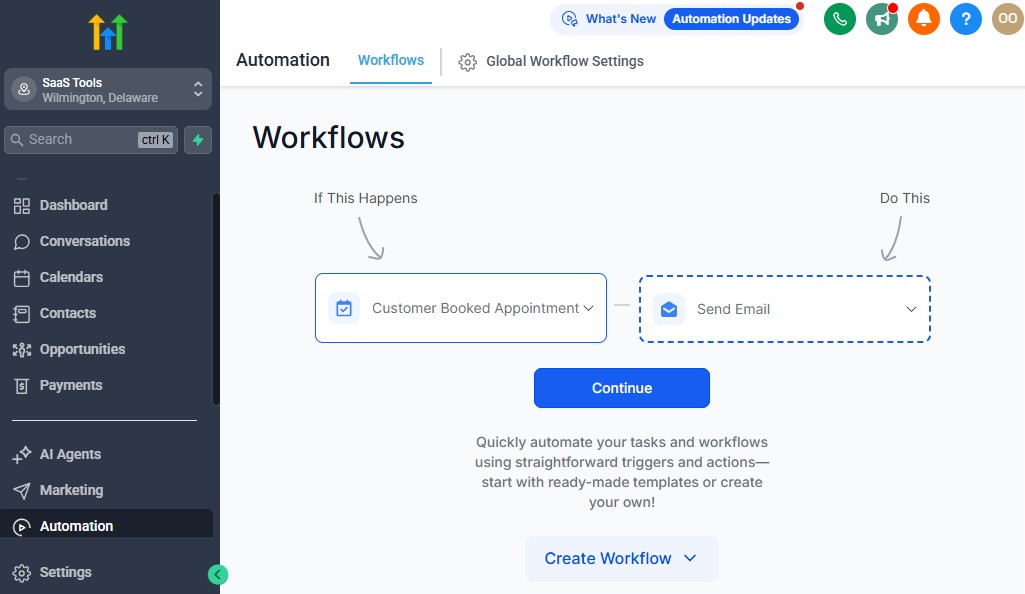
Automation is one of the biggest advantages GoHighLevel brings to your dealership.
Instead of manually chasing leads, reminding buyers about appointments, or following up after test drives, GoHighLevel handles everything automatically.
This keeps your sales team focused on selling while the system handles the repetitive work.
Here’s how to use automation to speed up your sales process, improve buyer experience, and close more deals.
Send Instant Responses to New Leads
When a lead inquires from AutoTrader, Cars.com, your website, Facebook Marketplace, or any platform, GoHighLevel can automatically send:
- A welcome SMS
- An email introducing your dealership
- A link to book a test drive
- Photos of the exact vehicle they asked about
- Contact details of the assigned rep
Fast responses increase your chances of closing – especially in a competitive market.
Automate Lead Assignment to Sales Reps
You can route leads automatically based on:
- Lead source
- Vehicle type
- Sales rep availability
- Round-robin distribution
- Department (Used, New, EV, Luxury)
This ensures the right rep gets the right lead without delays.
Book Test Drives Automatically
When a buyer shows interest, you can trigger a workflow that:
- Sends a booking link
- Suggests available time slots
- Assigns a rep
- Sends directions to the dealership
- Sends a confirmation message
No manual scheduling needed.
Send Appointment Confirmations & Reminders
Automated reminders reduce no-shows by more than 50%.
GoHighLevel can send:
- Confirmation SMS after booking
- Reminder 24 hours before
- Reminder 3 hours before
- Reminder 1 hour before
These reminders keep buyers committed and prepared.
Automate Post–Test Drive Follow-Up
After a test drive, you can automatically send:
- A thank-you message
- A link to pricing
- A details sheet of the car
- Financing options
- A “Ready to move forward?” message
- A follow-up call task assigned to the rep
This keeps the momentum going while the buyer is still interested.
Streamline Negotiation Follow-Up
Negotiations often drag on because buyers delay responses.
Automation can handle:
- Offer reminders
- “Any questions?” messages
- Financing reminders
- Deposit prompts
- Limited-time offer alerts
- Vehicle availability updates
This keeps your dealership top-of-mind and speeds up decision-making.
Automate Financing & Paperwork Reminders
Financing delays happen because buyers forget to send documents.
GoHighLevel can automate requests for:
- Driver’s license
- Income proof
- Employment verification
- Insurance details
- Trade-in documents
- Signatures on agreements
It can also send reminders until the buyer completes everything.
Automate Vehicle Delivery Processes
Once a buyer is ready for pickup or delivery, GoHighLevel can trigger:
- Delivery-day instructions
- What to bring (ID, insurance, etc.)
- Final payment reminders
- Dealership directions
- Assigned delivery coordinator contacts
This ensures a smooth, stress-free experience.
Trigger Post-Sale Follow-Up & Retention
After a sale, automation helps you maintain a long-term relationship.
Automatically send:
- A thank-you message
- Warranty documents
- Service reminders
- Review requests
- Trade-in alerts for upcoming opportunities
- Anniversary messages (1-year of ownership)
These workflows increase repeat purchases and referrals.
Run Automatic Re-Engagement Campaigns
If a lead goes cold, GoHighLevel can bring them back.
Set up workflows such as:
- New inventory alerts
- Special promotions
- “We found a car matching what you wanted”
- Financing update messages
- Trade-in value reminders
Cold leads often convert when reactivated with the right message.
Use Smart Logic to Personalize Automation
Advanced workflows let you create conditions like:
- If buyer opens an offer → send a follow-up
- If buyer doesn’t respond → send a reminder
- If financing approved → trigger delivery workflow
- If deposit paid → notify the sales rep
- If buyer ghosts → send a reactivation sequence
This creates a seamless, automated sales engine.
Appointment Scheduling for Showroom Visits & Test Drives
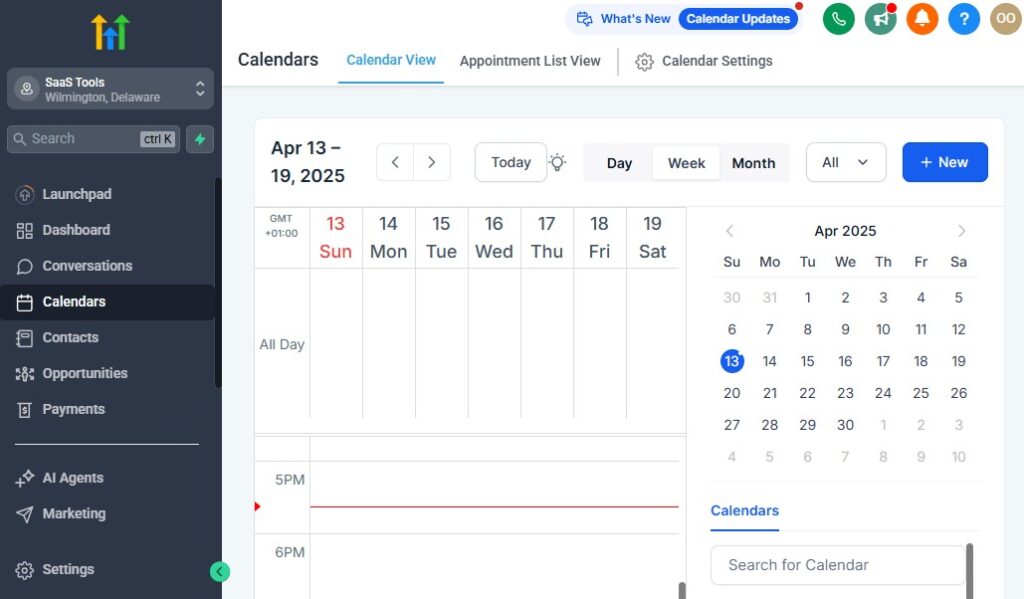
Appointment scheduling is one of the most critical parts of running a successful car dealership.
Buyers want fast, easy ways to book showroom visits, test drives, financing consultations, or trade-in evaluations – without waiting for a call back or dealing with unnecessary steps.
GoHighLevel gives you a clean, automated system that handles all bookings, reminders, confirmations, and rep assignments while keeping your team organized and your buyers informed.
Here’s how to use it to streamline your dealership’s scheduling process.
Create Dedicated Dealer Calendars
Start by setting up separate calendars for different activities inside your dealership:
- Test Drive Calendar
- Showroom Visit Calendar
- Sales Consultation Calendar
- Finance/Loan Consultation Calendar
- Trade-In Evaluation Calendar
- EV Demo Calendar (optional)
- Sales Rep–Specific Calendars
This ensures buyers always book the right type of appointment with the right department.
Let Buyers Book Appointments Online Instantly
Instead of manually scheduling everything, GoHighLevel allows buyers to book directly from:
- Your dealership website
- Vehicle landing pages
- Inventory funnels
- Facebook ads
- Google ads
- SMS campaigns
- Email links
- Social media posts
- QR codes in your showroom
This reduces friction and captures more test drives – the key step that leads to more closed deals.
Send Automatic Appointment Confirmations
Once a buyer books a test drive or showroom visit, GoHighLevel sends:
- SMS confirmation
- Email confirmation
- Calendar invite
- Directions to your dealership
- Assigned sales rep information
- What to bring (ID, proof of insurance, etc.)
This makes the experience feel professional and organized.
Reduce No-Shows With Automated Reminders
Buyers get busy and forget.
Automated reminders keep them committed.
GoHighLevel sends reminders:
- 24 hours before
- 3 hours before
- 1 hour before
These reminders also boost excitement and reduce last-minute cancellations.
Collect Important Buyer Details Before the Appointment
To prepare your team, you can add custom pre-booking questions:
- What vehicle are you interested in?
- Do you have a trade-in?
- Are you financing or paying cash?
- What’s your price range?
- Are you pre-approved?
- Preferred color or trim
- Upload driver’s license (optional)
This helps your team prepare the exact car and give a personalized experience.
Route Appointments to the Right Sales Rep Automatically
With smart routing, GoHighLevel assigns appointments based on:
- Rep availability
- Vehicle type (SUV, Truck, EV, Luxury)
- Location (multi-lot dealers)
- Round-robin distribution
This ensures a buyer never shows up unseen or unassigned.
Send Directions & Arrival Instructions
For buyers unfamiliar with your dealership, GoHighLevel can send:
- Google Map links
- Parking instructions
- Showroom entrance directions
- Contact details if they get lost
- Instructions for curbside test drives (optional)
This reduces confusion and improves the customer experience.
Use Rescheduling & Cancellation Automations
If a buyer cancels or reschedules:
- A new appointment is suggested automatically
- A follow-up message is triggered
- Your team is notified instantly
- Your rep can quickly re-engage the buyer
This keeps hot leads from going cold.
Keep Your Sales Team Organized With Calendar Sync
GoHighLevel syncs with:
- Google Calendar
- Outlook Calendar
- iCloud Calendar
This ensures your team knows exactly where they need to be – without double bookings or schedule conflicts.
Send Post-Appointment Follow-Up Automatically
After a test drive or visit, GoHighLevel can automatically send:
- Thank-you SMS
- Vehicle details & photos
- Financing options
- Limited-time offers
- “Ready to move forward?” prompts
This keeps the conversation alive and increases your closing rate.
Building High-Converting Car Sales Funnels & Landing Pages
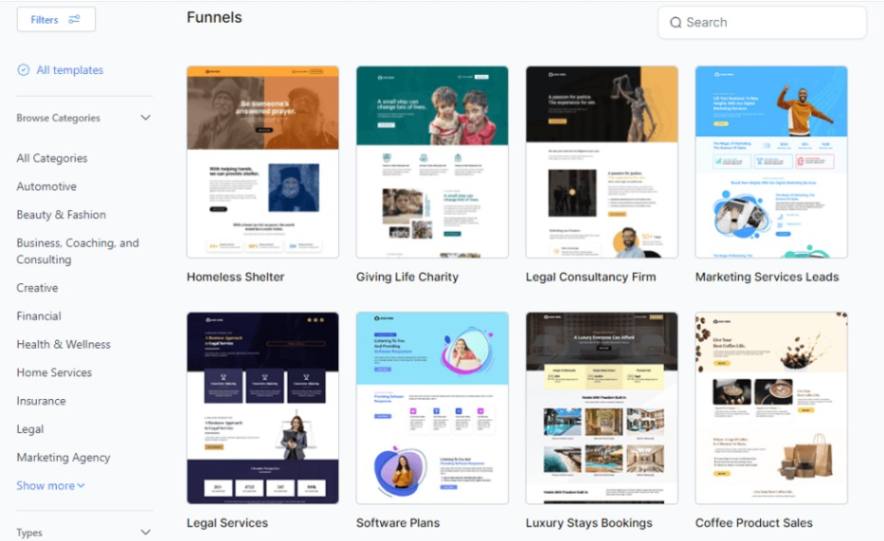
Your landing pages and funnels are where buyers make their first real decision about your dealership.
A strong page builds trust, presents the vehicle clearly, and moves the buyer toward booking a test drive or requesting more details.
GoHighLevel makes it easy to create professional, high-converting pages tailored to specific vehicles, promotions, or buyer types.
Here’s how to build funnels that turn website visitors into real leads and showroom appointments.
Create Vehicle-Specific Landing Pages
Buyers convert faster when they land on a page dedicated to a specific vehicle.
Examples include:
- “2023 Toyota Corolla – Special Offer”
- “Used Honda Accord – Certified Pre-Owned”
- “Electric Vehicles Demo Day – Book a Test Drive”
- “SUV Clearance Event – Limited Inventory”
Each page focuses on one vehicle or category, increasing conversions.
Showcase Vehicle Details Clearly
Your landing pages should feature:
- High-quality photos (interior, exterior, engine, dashboard)
- Model year, mileage, condition
- Trim level and packages
- Price or financing options
- Vehicle history overview
- Key features (safety, tech, comfort)
- Warranty information
- Certification badges (CPO, dealership guarantee)
This helps buyers feel confident before they contact you.
Use Strong Headlines That Hook Buyers
Your headline should instantly communicate the value.
Examples:
- “Book Your Test Drive for the 2023 Ford Explorer Today”
- “Affordable Used Cars With Low Mileage – Limited Stock”
- “Drive Home a Certified Pre-Owned Sedan With Zero Stress”
- “Looking for an SUV? See This Week’s Best Deals”
Clear, direct offers convert best.
Include a Simple Lead or Test Drive Form
Your forms should be short, clean, and easy to fill out.
Collect essentials like:
- Name
- Phone number
- Vehicle interest
- Appointment date (optional)
- Trade-in details
- Financing needs
Short forms generate more leads – longer forms qualify more. Choose your goal.
Add Trust Elements & Social Proof
Car buyers want to feel they’re dealing with a reputable dealership.
Add:
- Google reviews
- Facebook reviews
- Video testimonials
- “Trusted Dealer” badges
- Awards or certifications
- Warranty and return policies
- Before and after delivery photos
Social proof dramatically increases conversions.
Create Dealership Funnels for Promotions
GoHighLevel gives you templates for funnels that drive fast results, such as:
- Limited-time promotions
- Flash sales
- New model launches
- Inventory clearance
- Holiday deals
- “Trade in your car” funnels
- “Get pre-approved” funnels
Each funnel directs buyers to a single action, which boosts conversions.
Use Trade-In Valuation Funnels
Trade-in leads are some of the highest quality.
Your trade-in funnel should include:
- A simple vehicle form (make, model, year, mileage)
- Photo upload option
- Instant valuation steps
- Appointment booking option
This gives you warm, ready-to-buy leads.
Build Finance Pre-Approval Pages
Financing is a major decision point.
Your pre-approval funnel can collect:
- Income details
- Employment status
- Credit range
- Monthly budget
- Down payment amount
Pre-approved buyers convert at a much higher rate.
Use Thank-You Pages That Push Buyers to Take the Next Step
Once someone submits your form, use the thank-you page to guide them forward.
Include:
- “Book your test drive” CTA
- Vehicle recommendations
- Finance options
- Sales rep introduction video
- Live chat link
This keeps them engaged and moves them deeper into your pipeline.
Connect Your Funnels Directly to Automations
Every funnel action can trigger:
- Instant SMS replies
- Email confirmation
- Calendar booking link
- Tagging based on vehicle type
- Lead assignment
- Sales tasks
- Follow-up sequences
This gives you a complete, automated lead conversion engine.
Running Email & SMS Campaigns for Engagement & Repeat Buyers
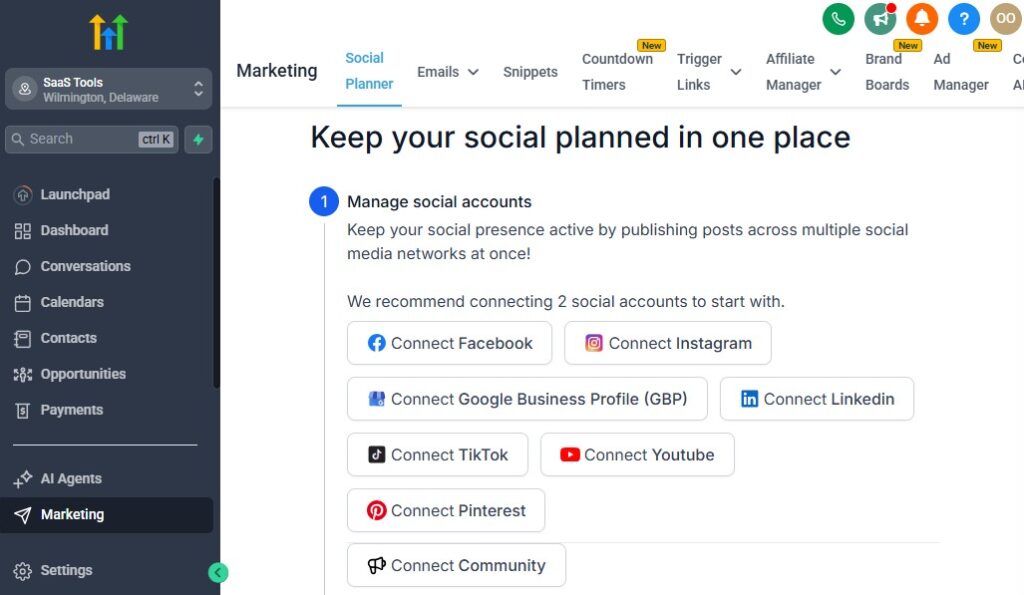
Consistent communication is one of the biggest advantages you can create as a car dealership. Most dealerships only contact buyers when they inquire – and that leaves a huge amount of money on the table.
With GoHighLevel, you can run automated email and SMS campaigns that nurture leads, bring back cold buyers, promote new inventory, and turn past customers into long-term repeat buyers.
Here’s how to use these campaigns to boost engagement and drive more sales.
Nurture New Leads With Automated Email & SMS Sequences
When a buyer shows interest – whether from AutoTrader, Facebook ads, your website, or a test drive form – GoHighLevel can automatically send a sequence that increases trust and moves them closer to booking.
Your nurture campaigns can include:
- Welcome message introducing your dealership
- Photos of the vehicle they asked about
- Pricing + financing information
- A link to book a test drive
- Sales rep contact details
- Testimonials and reviews
- Comparison guides for similar models
These messages build confidence and reduce buyer hesitation.
Send Follow-Ups After Showroom Visits & Test Drives
Once a buyer completes a test drive, GoHighLevel can trigger:
- Thank-you SMS
- Vehicle summary + photos
- Financing or lease options
- “Ready to move forward?” message
- Limited-time incentives
- A follow-up call task for the sales rep
These timely messages help close deals while interest is high.
Promote New Inventory to Interested Buyers
Whenever new vehicles arrive, you can instantly notify:
- Leads who asked for similar models
- Past customers looking for upgrades
- Buyers looking for specific body types (SUV, sedan, EV, truck)
- Anyone who signed up for inventory alerts
Your campaigns can include:
- New arrivals
- Price drops
- Featured vehicles of the week
- “Just listed” used cars
- Limited-stock alerts
These promotions keep your dealership top-of-mind.
Send Seasonal & Holiday Promotion Campaigns
Car sales spike during specific times – holidays, end-of-year sales, and seasonal promotions.
Your campaigns can promote:
- Holiday sales
- Clearance events
- End-of-month deals
- End-of-quarter incentives
- New-year model releases
- EV tax incentive reminders
- “Get ready for summer” SUV campaigns
These campaigns drive predictable boosts in showroom traffic.
Reactivation Campaigns for Cold Leads
Many buyers start the process, pause, and come back later. GoHighLevel helps you re-engage them automatically.
Examples of reactivation messages:
- “Still considering a new vehicle?”
- “We just got a model you may like.”
- “Your preferred car is now discounted.”
- “Trade-in value estimates have increased this month.”
- “Book a quick test drive to restart the process.”
Cold leads often convert when reminded at the right time.
Trade-In Reminder Campaigns
Trade-ins are powerful because they create both a seller and a buyer.
Automate campaigns like:
- “Your car may qualify for a higher trade-in value this quarter.”
- “We are actively buying used vehicles – get a free appraisal.”
- “Ready to upgrade your vehicle?”
These messages generate high-quality leads with strong buying intent.
Finance & Pre-Approval Campaigns
Financing plays a huge role in buyer decisions.
Send campaigns that help buyers move faster, such as:
- Pre-approval reminders
- Financing tips
- Credit score education
- Low-down-payment promotions
- Monthly payment breakdowns
- Interest rate updates
Buyers who feel informed convert more easily.
Service & Maintenance Reminder Campaigns
For dealerships with service departments, GoHighLevel helps you bring customers back through:
- Oil change reminders
- Tire rotation reminders
- Warranty service reminders
- Recall alerts
- End-of-lease reminders
- Annual inspection reminders
These campaigns increase repeat revenue and keep your dealership top-of-mind.
Referral Campaigns for Past Customers
Happy buyers can become your best lead source.
Automated referral messages can include:
- “Refer a friend and earn a gift card.”
- “Get $200 off your next service with a referral sale.”
- “Know someone looking for a car? Send them our way.”
Referrals convert at a much higher rate and cost nothing to generate.
Use SMS When You Want Faster, Higher Engagement
SMS messages have the highest open and engagement rates.
Perfect for:
- Appointment reminders
- Price drop alerts
- New arrival alerts
- Quick follow-ups
- Test drive confirmations
- Financing reminders
SMS gets attention instantly – which helps you close deals faster.
Managing Payments, Quotes, Invoices & Financing Documents
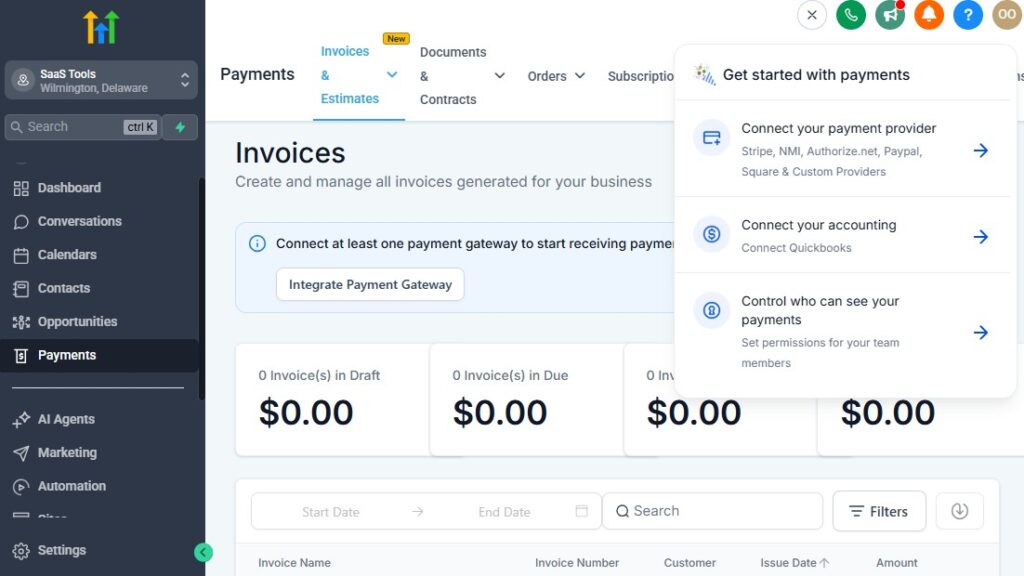
Managing pricing, negotiations, financing documents, and payments is one of the most sensitive parts of running a car dealership.
Buyers expect clarity, speed, and transparency – and your sales team needs a clean system to send quotes, track approvals, collect deposits, and manage all financial paperwork.
GoHighLevel helps you handle everything in one place with professional quotes, digital invoices, online payments, and automated reminders that keep deals moving without back-and-forth chaos.
Here’s how to streamline your finance and sales workflow.
Create Professional, Dealership-Branded Quotes
GoHighLevel allows you to send clean, professional quotes that buyers can view and approve online.
You can include:
- Full vehicle details
- Model, year, mileage
- Price breakdown
- Financing or lease options
- Trade-in deductions
- Taxes and dealer fees
- Warranty or service package pricing
- Vehicle photos
- Terms & conditions
Clear quotes build trust and reduce negotiation friction.
Send Quotes Instantly After a Test Drive or Inquiry
Instead of waiting hours or days, your sales reps can send quotes:
- Directly from the CRM
- From mobile devices
- Automatically via workflow
- With pre-set templates
Instant quotes increase the chance of closing the deal before buyers visit another dealership.
Track Quote Views & Approval Status
You can see:
- When a buyer opens your quote
- How many times they viewed it
- If they forwarded it
- Whether they approved or asked questions
- Their engagement with add-ons or warranty options
This insight helps your sales rep follow up at the perfect moment.
Automate Quote Follow-Up
If a buyer doesn’t respond to a quote, GoHighLevel can automatically send:
- A friendly reminder
- Updated availability (“Only 2 vehicles left”)
- Price drop alerts (optional)
- A “Ready to move forward?” message
- Financing options to reduce hesitation
Automated follow-ups close more deals and reduce manual chasing.
Collect Deposits & Payments Digitally
GoHighLevel integrates with payment gateways so buyers can:
- Pay deposits
- Make partial payments
- Pay balances
- Submit finance application fees
- Pay for add-ons or warranties
Buyers can use:
- Credit/debit cards
- Stripe
- PayPal
- Local gateways (via Zapier or webhooks)
This removes friction and speeds up the entire process.
Create & Send Clean Digital Invoices
Invoices can be generated automatically when:
- A quote is approved
- A deposit is paid
- A financing contract is signed
- A sale is finalized
Each invoice includes:
- Buyer details
- Vehicle information
- Price breakdown
- Payment link
- Due date
- Dealership branding
Digital invoices reduce errors and look professional.
Automate Invoice Reminders
Late payments slow down your workflow.
GoHighLevel can automatically send:
- “Your payment is due soon.”
- “Your invoice is now due.”
- “Here’s your payment link.”
- “Your invoice is overdue – please complete payment.”
These reminders help keep the deal on track without your team constantly checking in.
Manage Financing Documents in One Place
Car purchases often require a lot of documents.
GoHighLevel allows you to upload and track:
- Driver’s license
- Proof of income
- Insurance documentation
- Credit authorization forms
- Employment verification
- Trade-in paperwork
- Purchase agreements
- Warranty documents
Everything stays organized inside each buyer’s contact record.
Use Automated Document Request Workflows
If a buyer hasn’t submitted required documents, GoHighLevel can automatically request:
- Driver’s license photos
- Pay stubs
- Bank statements
- Insurance details
- Signed agreements
Buyers receive reminders until everything is completed.
Integrate E-Sign Tools for Faster Approvals
Connect tools like:
- DocuSign
- PandaDoc
- HelloSign
This allows buyers to sign:
- Purchase agreements
- Finance documents
- Warranty contracts
- Delivery forms
…all from their phone or computer.
Track Negotiation, Financing & Delivery Progress
Inside the CRM, you can track:
- Negotiation status
- Financing stage
- Approved credit terms
- Deposit received
- Vehicle prep status
- Delivery date scheduled
- Final payment completed
Everyone on your team stays aligned.
Send Receipts & Delivery-Day Instructions Automatically
After payment, GoHighLevel can send:
- Payment receipt
- Delivery instructions
- What to bring (ID, insurance card, etc.)
- Pickup time and location
- Rep contact information
- Warranty overview
This ensures buyers feel prepared and confident.
Delivering Vehicle Details, Photos & Sale Documents
Delivering vehicle information, sharing photos, and providing sale documents smoothly is a major part of creating a premium buying experience.
Buyers want clear details, easy access to paperwork, and quick communication – without digging through emails, waiting for attachments, or dealing with unorganized files.
GoHighLevel helps you centralize and deliver everything professionally, automatically, and in a way that builds trust and confidence throughout the buying process.
Here’s how to use it to streamline your document and information delivery.
Store All Vehicle & Buyer Files in One Organized Place
Each buyer’s profile in GoHighLevel becomes a complete file hub where you can upload:
- Vehicle photos
- Vehicle history reports (Carfax, autocheck, etc.)
- Inspection photos
- Walkaround videos
- Window stickers
- Warranty details
- Purchase agreements
- Financing documents
- Trade-in appraisal documents
- Delivery paperwork
Everything stays in one easily accessible location for both your team and your buyer.
Send Full Vehicle Details Instantly
When a buyer shows interest, you can instantly share:
- High-quality images
- Vehicle features and specs
- Mileage and history
- Pricing details
- Trim levels and packages
- Warranty or service contract options
- Comparison guides for similar vehicles
This fast delivery helps buyers make decisions quickly and builds trust in your dealership’s transparency.
Share Vehicle Walkaround Videos
Buyers often want a closer look before coming in.
You can send:
- Personalized walkaround videos
- Engine sound clips
- Test-drive footage
- Interior feature highlights
- 360-degree views
GoHighLevel allows you to send these via SMS or email directly from the CRM.
Use the Client Portal for Secure Document Access
GoHighLevel includes a professional client portal, where buyers can log in to access:
- Inspection reports
- Finance documents
- Price breakdowns
- Trade-in valuations
- Signed contracts
- Delivery instructions
- Vehicle photos
- Warranty guides
This is a major trust booster – most dealerships don’t offer anything this polished.
Deliver Purchase Agreements & Required Documents Digitally
Your buyers can receive:
- Offer sheets
- Purchase agreements
- Conditional sales contracts
- Warranty contracts
- Buyer’s guide disclosures
- Lending disclosures
- Odometer statements
- Delivery checklists
You can send them manually or automatically through workflows.
Use E-Sign Tools for Fast Signatures
Integrate tools like:
- DocuSign
- HelloSign
- PandaDoc
This allows buyers to sign:
- Purchase contracts
- Financing forms
- Warranty add-ons
- Delivery documents
…all from their phone or tablet.
Faster signatures = faster closings.
Send Delivery-Day Instructions Automatically
Once the deal is nearly complete, GoHighLevel can automatically send:
- Pickup time and location
- Required ID and documents
- Insurance details needed
- Trade-in items required (title, keys, plates)
- Parking details
- Contact info for the delivery rep
Buyers love clear communication – it reduces confusion and makes them feel cared for.
Deliver Warranty Information & Service Documents
To prevent confusion post-sale, you can share:
- Warranty start dates
- Duration and coverage details
- Service plan documents
- Maintenance schedules
- Roadside assistance information
This increases customer satisfaction and reduces after-sales complaints.
Automate Post-Delivery Documents & Messages
Once the vehicle is delivered, GoHighLevel can send:
- A thank-you message
- Final receipt
- Ownership documents
- Vehicle manuals (digital)
- Service reminders
- Review request funnel
- Referral incentives
This ensures your relationship doesn’t end at delivery.
Track All Sent Files & Documents
Inside each buyer profile, you can see:
- What files were sent
- When they were sent
- Whether they were opened
- Attachments viewed
- Pending document submissions
This helps your team know exactly what’s done and what’s still needed.
Collecting Reviews, Testimonials & Building Dealership Trust
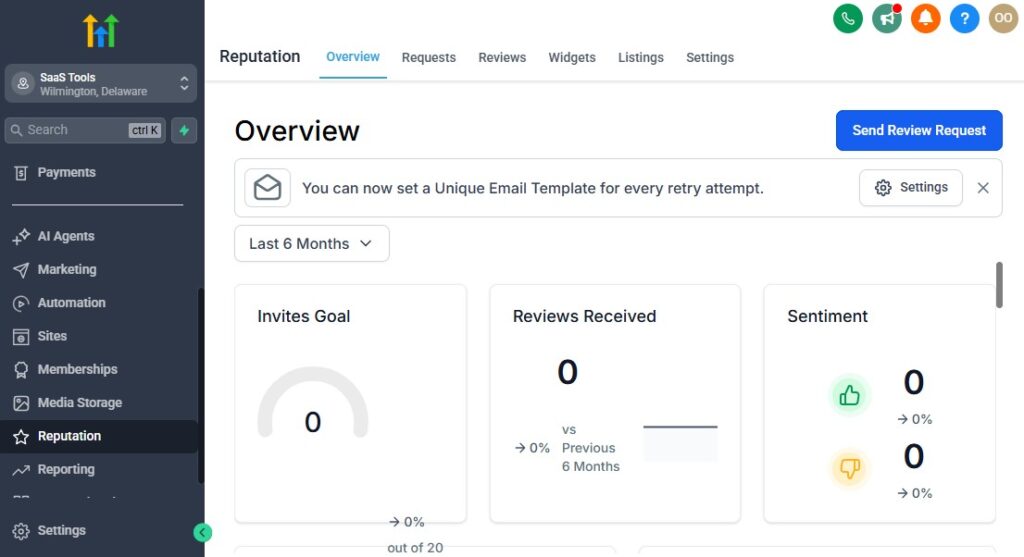
In the car dealership business, trust is everything. Buyers want proof that your dealership is reliable, transparent, and delivers a smooth buying experience.
Strong reviews and real customer testimonials help you stand out, close deals faster, and increase walk-ins and test-drive bookings – especially when buyers are comparing multiple dealerships.
GoHighLevel makes this process easy by automating review requests, showcasing testimonials, filtering negative feedback, and building a strong online reputation that works 24/7.
Here’s how to use it to build trust at scale.
Automate Review Requests After Every Sale
The moment a sale is completed, GoHighLevel can automatically send:
- A thank-you SMS
- A “How was your experience?” message
- Direct links to your review platforms
- A follow-up reminder if no review is submitted
This ensures your dealership consistently collects reviews without your team having to manually chase buyers.
Send Follow-Up Review Reminders Automatically
Most customers forget to leave a review unless you follow up.
GoHighLevel can send:
- A 24-hour reminder
- A 3-day reminder
- A final 7-day reminder
These gentle nudges triple the number of reviews you collect.
Direct Happy Customers to Public Review Platforms
You can send buyers directly to:
- Google Business Profile
- Facebook Reviews
- Yelp
- Cars.com
- DealerRater
- Trustpilot
Choose the platform where visibility matters most in your market. Google reviews are the most impactful for dealerships.
Use a Review Funnel to Filter Negative Feedback
A review funnel helps protect your reputation by collecting negative feedback privately while sending happy customers to public platforms.
Here’s how it works:
- Step 1: Buyer clicks your review link
- Step 2: They select “Great experience” or “Needs improvement”
- Step 3:
- “Great experience” → sent to Google Reviews
- “Needs improvement” → sent to a private feedback form
- Step 4: Your team is notified instantly about the issue
This keeps your online reputation positive and professional.
Showcase Reviews & Testimonials on Your Funnels and Website
Strong dealership proof converts buyers faster.
You can display:
- Real-time Google reviews
- Facebook testimonials
- Video testimonials from satisfied buyers
- Customer delivery photos
- “Happy customer” gallery
- 5-star rating badges
- Certification and trust logos
Add these to your:
- Landing pages
- Vehicle funnels
- Pre-approval pages
- Test drive funnels
- Website homepage
- Inventory pages
Trust elements dramatically increase conversion rates.
Add Customer Photos & Delivery Moments
Buyers love seeing other real customers.
You can showcase:
- Delivery day photos
- Keys-in-hand photos
- Family car purchase moments
- EV delivery moments
- Trade-in transformation photos
These images build emotional trust and improve buyer confidence.
Use Testimonials Inside Email & SMS Campaigns
Social proof works everywhere.
You can place testimonials inside:
- Follow-up emails
- Inventory alert campaigns
- Pre-qualification sequences
- Service reminders
- Re-engagement campaigns
- Trade-in offers
Seeing positive experiences from real buyers makes prospects feel more comfortable moving forward.
Monitor & Respond to Reviews From One Platform
GoHighLevel helps you see incoming reviews and respond quickly.
Best practices for dealerships:
- Thank happy buyers
- Respond politely to criticism
- Acknowledge concerns
- Offer to resolve issues
- Maintain a professional tone
This shows buyers you care about customer satisfaction.
Collect Testimonial Videos Easily
You can send a link that allows customers to record and upload:
- A selfie video testimonial
- A quick review of their experience
- A delivery reaction video
Video testimonials are powerful and perform well on landing pages, social media, and ads.
Build a Reputation Dashboard for Your Dealership
GoHighLevel gives you dashboards to track:
- Total reviews collected
- Star rating trends
- Review sources
- Sentiment patterns
- Conversion impact
- Locations with highest reputation scores
This helps you identify strengths and areas to improve.
Reporting & Analytics for Car Dealerships
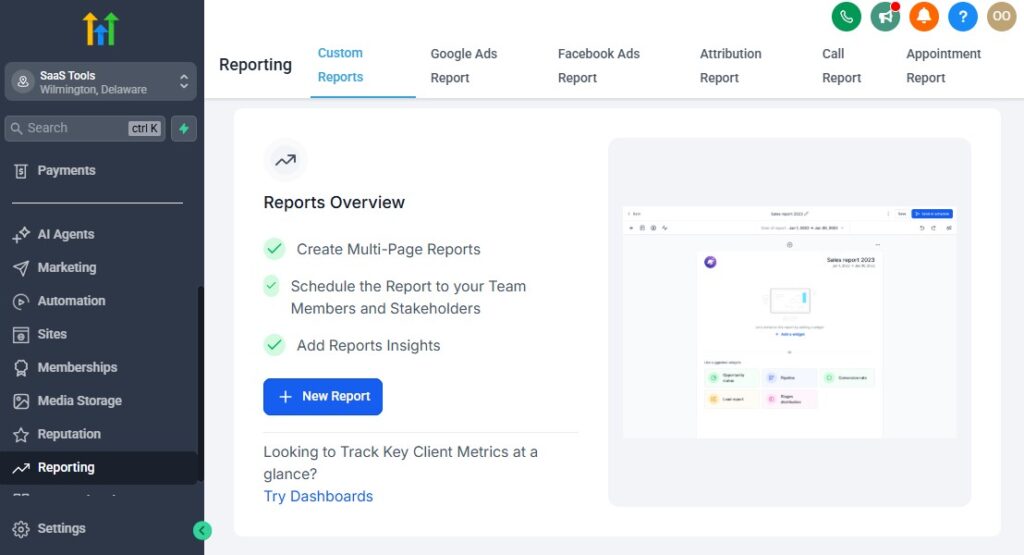
To run a profitable dealership, you need clear data on what’s working, what’s slowing down your sales process, and where buyers are dropping off.
GoHighLevel gives you powerful reporting tools that help you track leads, test drives, sales reps, revenue, inventory interest, and marketing performance – all in real time.
With the right analytics, you can make smarter decisions, improve your workflow, and grow your dealership with precision instead of guesswork.
Here’s how to use GoHighLevel’s reporting tools effectively.
Track Every Lead From Source to Sale
GoHighLevel helps you see exactly where your leads come from and how far they go in your pipeline.
Common lead sources include:
- AutoTrader
- Cars.com
- Facebook Marketplace
- Facebook/Instagram ads
- Google ads
- TikTok ads
- Website forms
- Test drive funnels
- Trade-in funnels
- Walk-ins
- SMS and missed-call text back
You can identify which source brings you the highest-quality buyers – not just leads.
Monitor Your Full Sales Pipeline Performance
Your pipeline shows how buyers move through each stage:
- New Lead
- Contacted
- Appointment Scheduled
- Test Drive Completed
- Negotiation
- Finance Review
- Approved
- Sold
- Delivered
You can also see:
- Bottlenecks – where leads get stuck
- Drop-off points – where buyers lose interest
- Stages that need faster follow-up
This helps your team improve speed and consistency.
Analyze Test Drive Performance
Test drives are the strongest indicator of purchase intent.
GoHighLevel lets you track:
- Number of test drives booked
- Number of test drives completed
- Show-up rate
- Test drive-to-sale conversion rate
- Rep performance during test drives
These insights show how well your dealership is converting serious buyers.
Track Sales Rep Performance
You can measure every sales rep’s effectiveness with metrics such as:
- Leads assigned
- Contact rate
- Appointment rate
- Test drive rate
- Sales closed
- Revenue generated
- Time to follow up
- Communication frequency
This helps you:
- Reward top performers
- Improve underperforming reps
- Balance lead distribution
- Increase overall sales team productivity
Monitor Dealership Revenue & Sales Metrics
GoHighLevel gives you a clean view of dealership revenue, including:
- Total revenue
- Monthly and quarterly sales
- Average revenue per vehicle
- Deposit amounts collected
- Pending payments
- Revenue by vehicle type (SUV, sedan, truck, EV, luxury)
- Revenue by lead source
- Revenue by sales rep
This creates a full financial picture of your dealership.
Analyze Inventory Interest & Buyer Behavior
You can track which vehicles generate the most attention:
- Vehicles with high page views
- Vehicles with high form submissions
- Models with high test drive requests
- Price ranges attracting the most buyers
- Vehicles with low engagement
- Fast-selling vs slow-moving inventory
These insights help you make better inventory decisions.
Measure Marketing Performance Across All Channels
You can see what campaigns produce real results using:
- Click-through rates
- Cost per lead
- Cost per test drive
- Cost per sale
- Lead quality score
- Ad-to-sale attribution
You know exactly which campaigns deserve more budget.
Track Email & SMS Engagement
GoHighLevel tracks engagement for all your communication campaigns:
- Open rates
- Click-through rates
- Reply rates
- Unsubscribes
- Message performance by segment
- Interest-based engagement patterns
This helps you improve your messages and timing.
Monitor Funnel & Landing Page Conversions
If you use landing pages for vehicle promotions, trade-ins, or test drives, GoHighLevel shows:
- Page views
- Form submissions
- Conversion percentages
- Bounce rates
- Funnel drop-off points
- Lead source effectiveness
You can easily optimize pages that aren’t performing well.
Compare Performance Month-by-Month
GoHighLevel lets you see dealership trends, including:
- Seasonal sales patterns
- Peak days or weeks
- Inventory interest changes
- Monthly staff productivity
- Conversion improvements
- Marketing ROI trends
This helps you plan staffing, promotions, and inventory strategy.
Build Custom Dashboards for Your Dealership
You can create dashboards for:
- Sales performance
- Finance department performance
- Test drive analytics
- Inventory interest
- Marketing ROI
- Customer satisfaction
- Lead source breakdown
Custom dashboards ensure your team sees the KPIs that matter most.
Integrating GoHighLevel With Car Dealership Tools
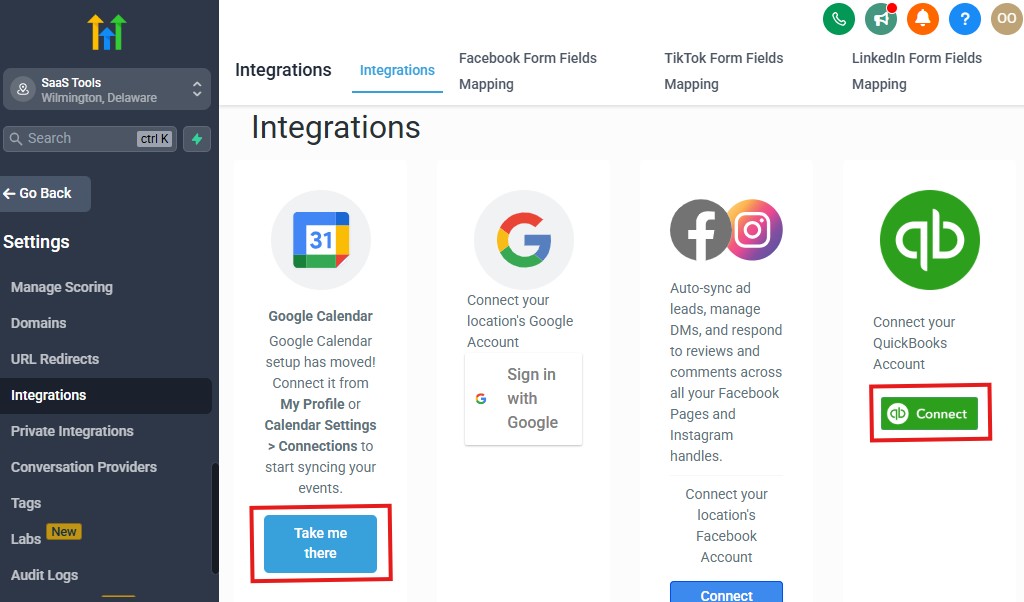
Your dealership likely uses multiple platforms – inventory listing tools, DMS systems, payment gateways, advertising platforms, e-sign tools, and communication channels.
Integrating these with GoHighLevel allows you to run your entire workflow smoothly from one central system.
Instead of jumping between different apps, GoHighLevel becomes your main hub, with everything syncing automatically.
Here’s how to connect the tools your dealership already uses.
Integrate Inventory & Listing Platforms
If you list vehicles on third-party platforms, you can integrate or automate data flow from:
- AutoTrader
- Cars.com
- Facebook Marketplace
- CarGurus
- Edmunds
- TrueCar
- Craigslist (via forms)
Through direct integrations, Zapier, or custom workflows, you can send leads from these platforms straight into your GoHighLevel CRM.
Every lead goes into:
- The correct pipeline
- The correct sales rep’s inbox
- Automated follow-up sequences
This eliminates manual entry and keeps speed high.
Connect Your Dealer Management System (DMS)
If you use a DMS, you can sync key information using Zapier, Make, or custom API connections.
Common systems include:
- DealerCenter
- VinSolutions
- Dealertrack
- Frazer
- Reynolds & Reynolds (API access needed)
- Tekion
Integrations can automate:
- Lead imports
- Deal status updates
- Inventory syncing
- Appointment creation
- Document tracking
This keeps your dealership’s backend and GoHighLevel aligned.
Integrate File Storage & Media Tools
Dealerships handle a lot of media – car photos, inspection reports, walkaround videos.
Connect:
- Google Drive
- Dropbox
- OneDrive
This helps you store and deliver:
- Vehicle folders
- Buyer documents
- Trade-in appraisal images
- Inspection videos
Everything stays organized and accessible from inside GoHighLevel.
Connect E-Signature Tools for Fast Approvals
Digital signing speeds up your deals.
Integrate tools like:
- DocuSign
- PandaDoc
- HelloSign
Use them for:
- Purchase agreements
- Finance documents
- Trade-in paperwork
- Delivery receipts
- Warranty contracts
Buyers can sign everything online, which shortens your sales cycle.
Integrate Finance & Payment Gateways
Connect payment platforms like:
- Stripe
- PayPal
- NMI
- Square (via Zapier)
- Local payment processors (via webhooks)
This allows you to collect:
- Deposits
- Down payments
- Full payments
- Application fees
- Add-on purchases
Payment confirmation is logged instantly in the CRM.
Connect Calendars for Smooth Appointment Syncing
Everyone in your sales team can sync their GoHighLevel calendars with:
- Google Calendar
- Outlook
- Microsoft 365
- iCloud
This eliminates double bookings and ensures schedules update in real time.
Integrate Communication Channels
Dealerships receive messages everywhere – GoHighLevel unifies them.
Connect:
- Facebook Messenger
- Instagram DMs
- WhatsApp (through approved providers)
- Google Business Messages
- Your website chat widget
Customers can contact you from any platform, and all messages appear in one unified inbox.
Sync Advertising Platforms for Better Tracking
For dealerships that run paid ads, integrate:
- Facebook Ads
- Instagram Ads
- TikTok Ads
- Google Ads
- YouTube Ads
This gives you accurate tracking for:
- Cost per lead
- Cost per test drive
- Cost per sale
- ROI per campaign
- Lead source performance
You’ll know exactly which ads produce real buyers.
Connect Zapier, Make, and Webhooks for Advanced Automations
For more complex workflows, you can use:
- Zapier
- Make (Integromat)
- Pabbly
- Webhooks
- Custom API calls
Use these tools to automate:
- Inventory updates
- Data syncing
- Multi-step workflows
- Deal status changes
- Notifications to your team
- CRM-to-DMS data mapping
This gives you full automation flexibility.
Integrate CRM Data With Sales, Service & Marketing Tools
If you use external systems for:
- Email marketing
- Service scheduling
- Customer loyalty
- Inventory alerts
- Performance analytics
You can sync all of them with GoHighLevel to maintain a centralized database.
Advanced Automation for Car Dealerships
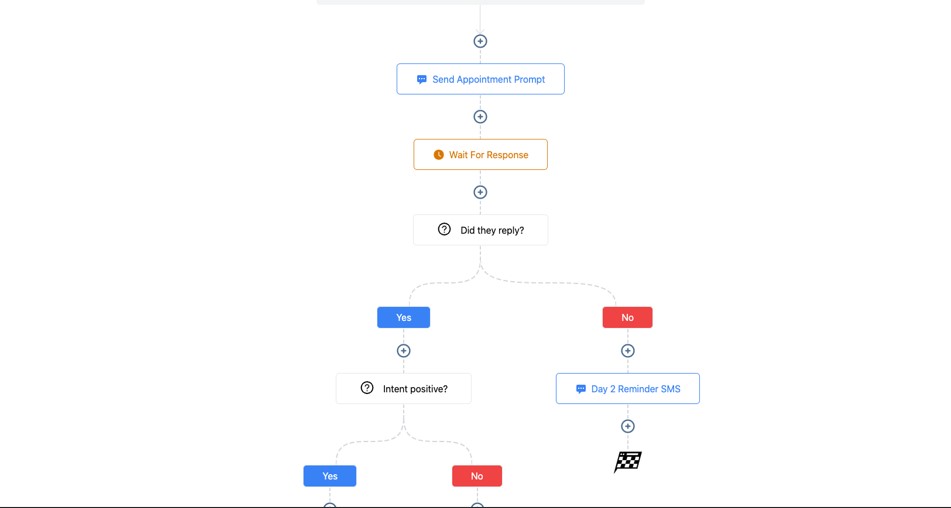
Once you’ve set up your basic workflows, you can unlock the full power of GoHighLevel using advanced automations.
These automations help you move faster, reduce manual tasks, improve buyer experience, and create a dealership that runs with precision – even during high-volume sales seasons.
Here’s how to take your dealership automation to the next level.
Smart Lead Routing Based on Buyer Behavior & Vehicle Interest
Instead of assigning leads manually, GoHighLevel can instantly route leads based on:
- Vehicle make/model they viewed
- New vs. used interest
- Price range
- Credit readiness
- Lead source (AutoTrader, Facebook Marketplace, Google Ads)
- Urgency level
- Trade-in status
- Sales rep specialty
This ensures every buyer lands in the right hands immediately – increasing conversion rates.
24/7 AI Chatbot for Instant Lead Capture
You can set up a chatbot that:
- Answers basic questions
- Sends vehicle details
- Books test drives
- Collects buyer information
- Suggests similar vehicles
- Transfers hot leads to reps
- Qualifies buyers based on pre-set criteria
This keeps your dealership responsive even when your team is offline.
Automated Buyer Qualification Workflows
Certain buyers need different follow-ups.
You can automate segmentation based on:
- Budget
- Approval status
- Trade-in availability
- Timeline to purchase
- Vehicle type preference
- Financing needs
Each segment receives personalized messages that match their readiness to buy.
Instant Trade-In Valuation Automations
Trade-in workflows can:
- Ask for vehicle details
- Request photos of the trade-in
- Trigger appraisal tasks for your team
- Send estimated valuation ranges
- Push buyers to schedule an in-person trade-in check
This system helps you take control of high-intent leads.
Finance Pre-Approval Automations
Finance delays kill deals – automation helps you fix that.
You can automate requests for:
- ID upload
- Proof of income
- Bank statements
- Insurance information
- Employment verification
- Credit authorization forms
Workflows can continue until all documents are uploaded.
Automated Negotiation Sequences
During negotiation, GoHighLevel can trigger:
- Follow-up messages
- Price drop alerts
- Dealer incentives
- Payment calculator links
- Monthly payment breakdowns
- “Let’s finalize your deal” reminders
These nudges help buyers move toward closing.
Delivery-Day Countdown Automations
Once the sale is complete, GoHighLevel can automatically:
- Send delivery confirmation
- Share pickup instructions
- Send a “3 days to delivery” reminder
- Send a “Tomorrow is delivery day” SMS
- Assign tasks to the delivery team
- Send a celebratory message post-pickup
This creates a premium, well-organized experience for buyers.
Automated Task Assignment for Your Team
Tasks can be created automatically when:
- A test drive is booked
- A trade-in form is submitted
- A negotiation reaches a stage
- Financing is approved
- Deposit is received
- A delivery date is set
Your team always knows exactly what to do.
Upsell & Cross-Sell Automations
After the sale, you can automate offers for:
- Extended warranties
- Service packages
- Oil change plans
- GPS trackers
- Ceramic coating
- Tire packages
- Accessories and upgrades
Upsells boost revenue without increasing marketing costs.
Customer Retention & Maintenance Automations
GoHighLevel can manage long-term customer relationships by automating:
- Oil change reminders
- Scheduled maintenance
- Tire rotation reminders
- Warranty expiration alerts
- End-of-lease reminders
- “Time to upgrade your vehicle” campaigns
These automations bring customers back long after the first sale.
Review Collection & Reputation Management Automations
Once a delivery is complete, GoHighLevel can automatically:
- Request reviews
- Send follow-up reminders
- Direct happy buyers to Google
- Filter unhappy buyers to private feedback
- Ask for video testimonials
- Add positive reviews to your funnels
This strengthens your dealership’s reputation over time.
Cold Lead Reactivation Automations
Buyers often return after weeks or months.
You can automate:
- “New inventory alert” messages
- “We found a car that matches your interest”
- Seasonal promotions
- Price drops
- Trade-in reminders
- “Still in the market?” check-ins
Reactivating old leads is one of the easiest ways to generate quick sales.
Conditional Logic for Advanced Customization
Create smart workflows like:
- If buyer views a vehicle → Send details automatically
- If buyer doesn’t book a test drive → Send link after 24 hours
- If financing is approved → Trigger delivery workflow
- If deposit paid → Notify sales rep + send checklist
- If buyer ghosts → Activate re-engagement sequence
This gives you a fully automated, intelligent dealership system.
Learn More:
- What is GoHighLevel? (Features, Use Cases, Pricing & More)
- GoHighLevel Review: (My Experience After 5 Years)
- GoHighLevel Pricing: (+ Discount Codes)
- GoHighLevel Features: (Full List of Tools)
- GoHighLevel Onboarding Checklist: (Complete Tutorial)
- GoHighLevel for Property Management: (Detailed Tutorial)
- GoHighLevel for Small Businesses: (2026 Helpful Tutorial)
- GoHighLevel for Service Businesses: (2026 Helpful Tutorial)
- GoHighLevel for Local Businesses: (2026 Helpful Tutorial)
Frequently Asked Questions
FAQs about GoHighLevel for car dealerships using GoHighLevel.
Can GoHighLevel capture leads from AutoTrader, Cars.com, and Facebook Marketplace?
Yes. GoHighLevel can capture leads from AutoTrader, Cars.com, Facebook Marketplace, your website, and other platforms using direct forms, integrations, and Zapier/Make automations. Every lead flows into your CRM instantly with no manual entry.
Can buyers book test drives and showroom appointments inside GoHighLevel?
Absolutely. You can create dedicated calendars for test drives, showroom visits, financing consultations, and trade-in evaluations. Buyers can book online, and GoHighLevel sends automatic reminders to reduce no-shows.
Does GoHighLevel help my sales team follow up with leads automatically?
Yes. GoHighLevel can automate lead follow-ups, post-test-drive messages, negotiation reminders, financing requests, cold lead reactivation, and delivery-day updates – helping your team close more deals with less effort.
Can I send quotes, invoices, and financing documents through GoHighLevel?
Yes. You can send professional quotes, digital invoices, payment links, and finance documents directly from the system. It also supports uploads, e-signatures, and automated reminders for missing paperwork.
Is GoHighLevel suitable for both new and used car dealerships?
Yes. Whether you sell new cars, used cars, luxury vehicles, EVs, or operate a multi-location dealership, GoHighLevel can be customized to fit your workflows, pipelines, team structure, and customer journey.
Final Thoughts
GoHighLevel gives your dealership the advantage it needs in a highly competitive market.
Instead of juggling multiple tools, slow follow-ups, or scattered communication channels, you get one unified system that supports your entire sales process – from the very first lead to the final delivery and beyond.
With GoHighLevel, you can:
- Capture more leads from every platform
- Respond instantly with automation
- Book more test drives
- Keep buyers engaged through consistent communication
- Speed up financing and negotiation processes
- Deliver documents and vehicle details professionally
- Collect more reviews to build trust
- Track every metric that matters
- Keep your team organized and accountable
When everything runs through one streamlined platform, your dealership closes more deals, delivers a smoother buying experience, and builds stronger long-term relationships with customers.
Your business becomes faster, more efficient, and more profitable – without adding more tools or more complexity.