Selling insurance requires fast follow-ups, clear communication, and a smooth client experience – yet most insurance agents still juggle leads, quotes, renewals, and claims across multiple disconnected tools.
This slows you down, causes missed opportunities, and makes retention harder than it should be.
GoHighLevel for Insurance Agents helps you simplify everything.
You get one platform to:
- manage leads
- deliver quotes
- automate follow-ups
- book consultations
- send renewal reminders
- track policies
- and keep clients updated
……without switching between apps all day.
Whether you sell:
- life
- auto
- home
- health
- or commercial insurance
GoHighLevel gives you the systems you need to work faster, close more policies, and build stronger relationships with your clients.
This guide walks you step-by-step through how to use GoHighLevel as an insurance agent so you attract better leads, follow up consistently, and deliver a professional experience that earns trust.
TL;DR: How GoHighLevel Transforms Your Insurance Agent Business
- GoHighLevel helps you manage leads, quotes, policyholders, renewals, and claims in one organized CRM.
- You can automate follow-ups, appointment scheduling, and renewal reminders to boost conversions and retention.
- Funnels, email/SMS campaigns, and nurture sequences help you attract new clients and build trust quickly.
- This guide shows you exactly how to set up and use GoHighLevel to streamline your insurance workflow and improve client satisfaction.
How to Set Up GoHighLevel for Insurance Agents – (Step by Step Tutorial)
Let’s get straight to the point – first, we’ll set up your account, then I’ll walk you through all the strategies you can use.
This is how to set it up:
Step 1: Create HighLevel Account for 30 Days Free
Since you’re just starting with GoHighLevel, you would need to properly set up your account.
And you can do that for free through our exclusive 30-Day Free Trial link here.
In order to start, head over to gohighlevel.com/30-day-free-tial free trial and click on “30 DAY FREE TRIAL” as you can see below.

Upon clicking on “30 DAY FREE TRIAL“, a page will pop that looks exactly like the image below.
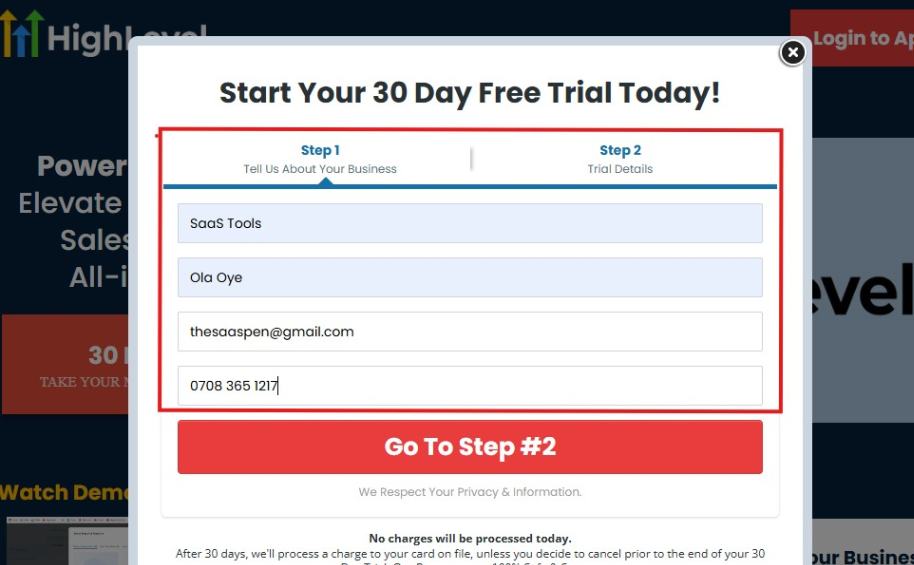
If you take a closer look at the image above, you will see that you need to supply your:
- Business name
- Company name
- Company email
- Phone number
Supply all the pieces of information and click on “Go To Step #2.”
On the next page, you will be required to select the plan you want to opt in for.
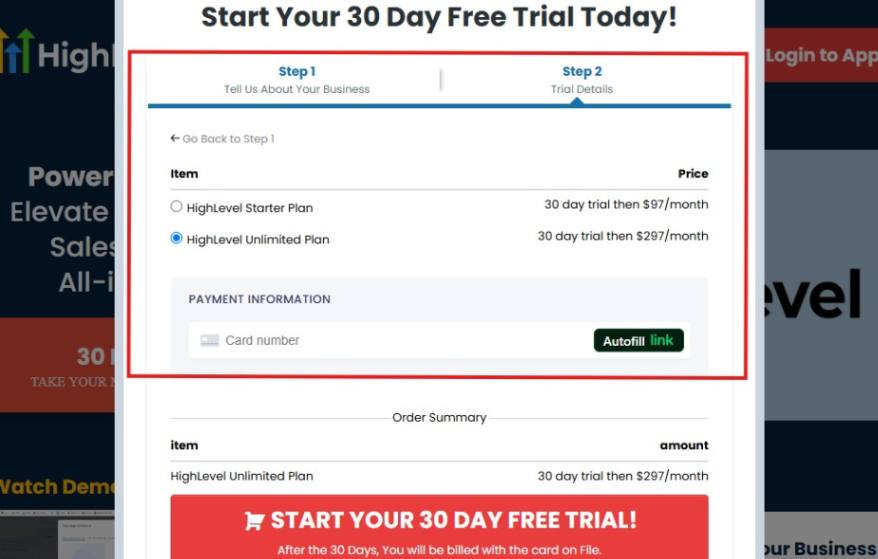
As you can see from the image above, you can either choose from:
- HighLevel Starter Plan
- HighLevel Unlimited Plan
Select the HighLevel Unlimited Plan and continue – you can always upgrade to the SaaS Mode later if you want that or downgrade.
The next thing you want to do is supply your credit card information.
Note: You will not be debited anything today until the end of your trail that is if you don’t cancel. Keep in mind that $1 will be debited and refunded back instantly into your account just to test your card is working.
After you have supplied the information accordingly, click on “START YOUR 30 DAY FREE TRIAL” and you will be asked to confirm you’re not a robot.
After that, the page below will pop up.
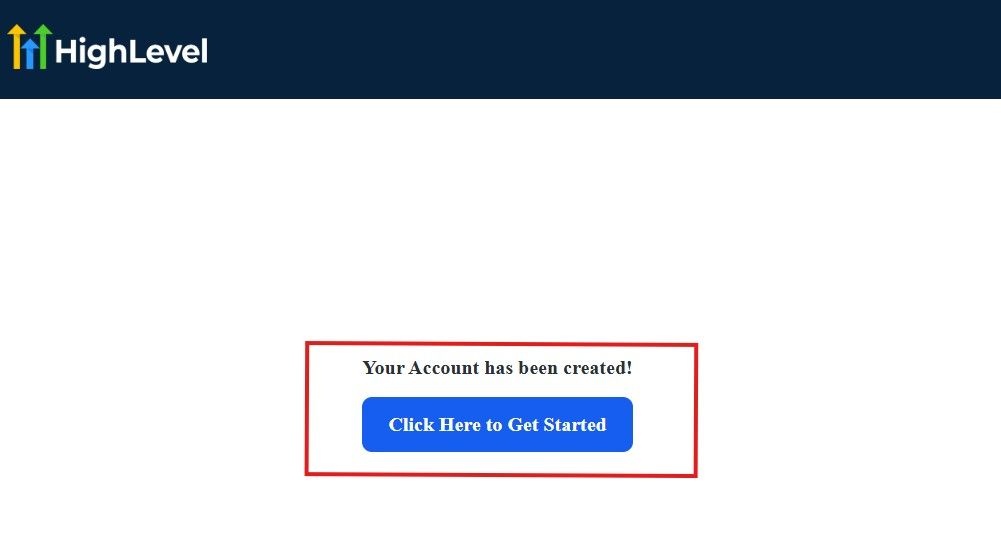
The image above says, “Your Account has been created!” Now, you need to click on the blue button that says “Click Here to Get Started.“
Click on the blue button to start your onboarding process.
Step 2: GoHighLevel Onboarding Process
The onboarding questions help GoHighLevel understand why you have signed up for the platform so that it can tailor your experience accordingly.
This is all you need to do:
After you click on the blue button above, the page below will pop up.
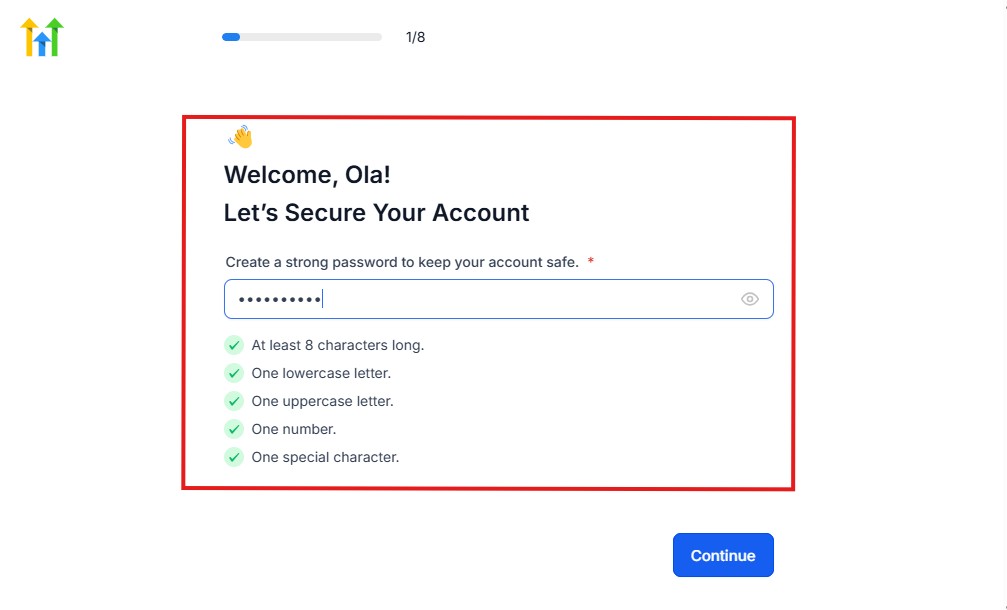
As you can see above, you need to set up your password, and the password has to be:
- At least 8 characters long
- One lowercase letter
- One uppercase letter
- One number
- One special character
If you have input the password and it matches all the description above, everything will be green just the way it’s in the image.
Click on “Continue” there after, and the image below will pop up.
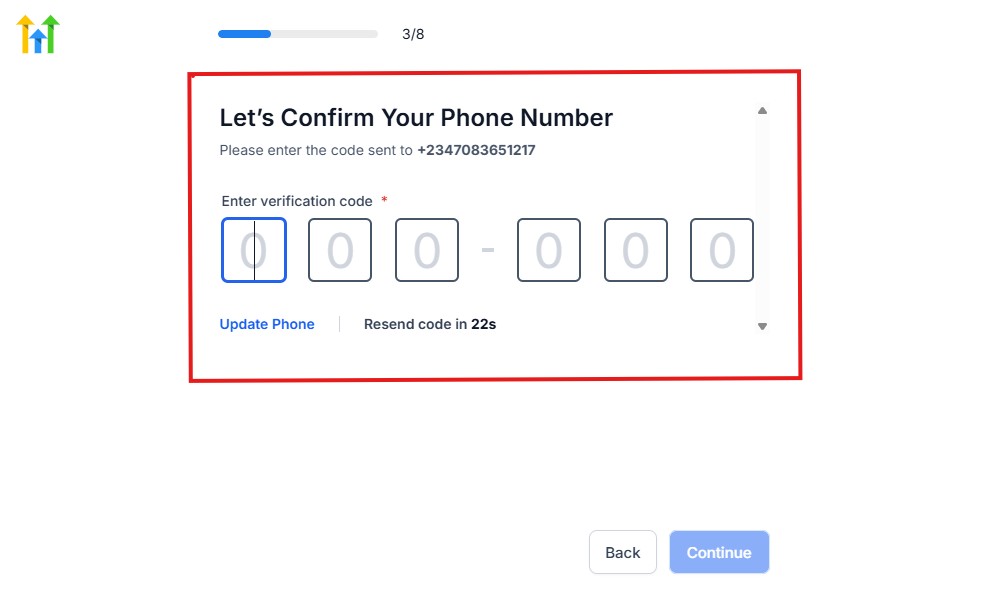
As you can see, a code will be sent to you to confirm your email address and phone number. The process is the same for the 2.
The next thing you need to do is to select how you plan to use GoHighLevel, as you can see below.
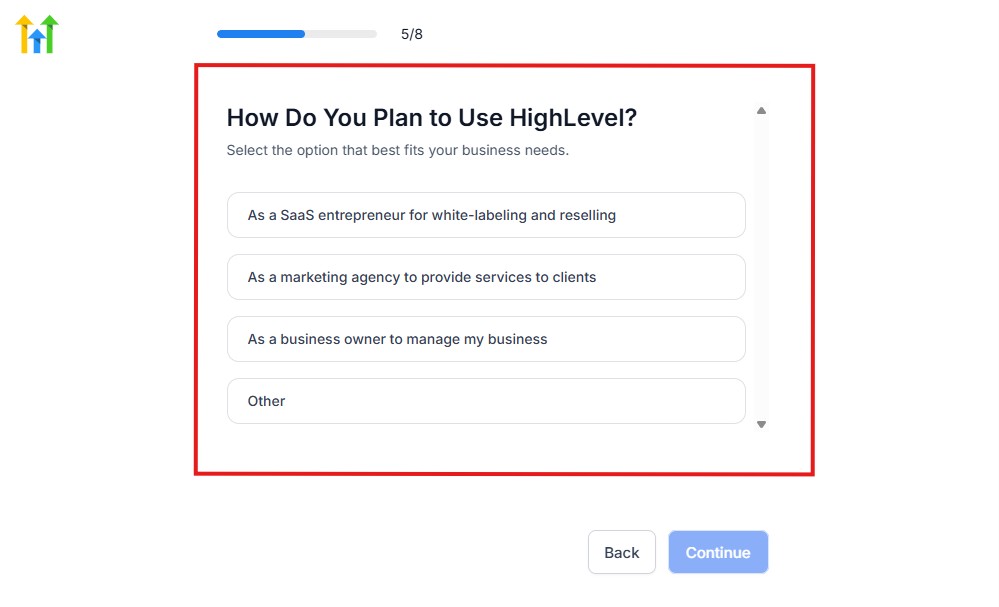
Select what best matches why you have signed up and click on Continue.
On the next page, you will be asked if you plan to resell GoHighLevel or not.
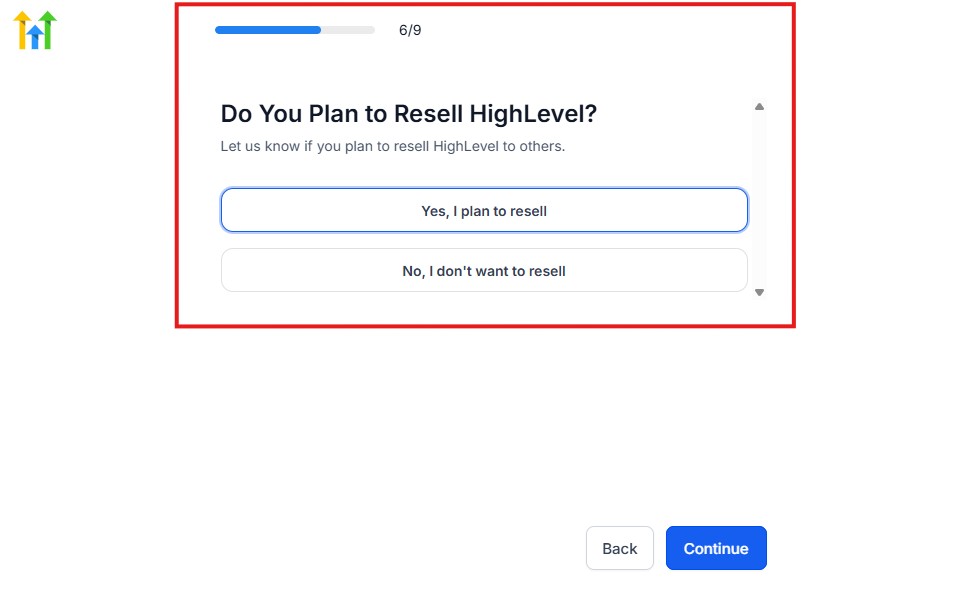
Select the answer based on the reason why you have signed up and click on “Continue”
Then, the page below will pop up.
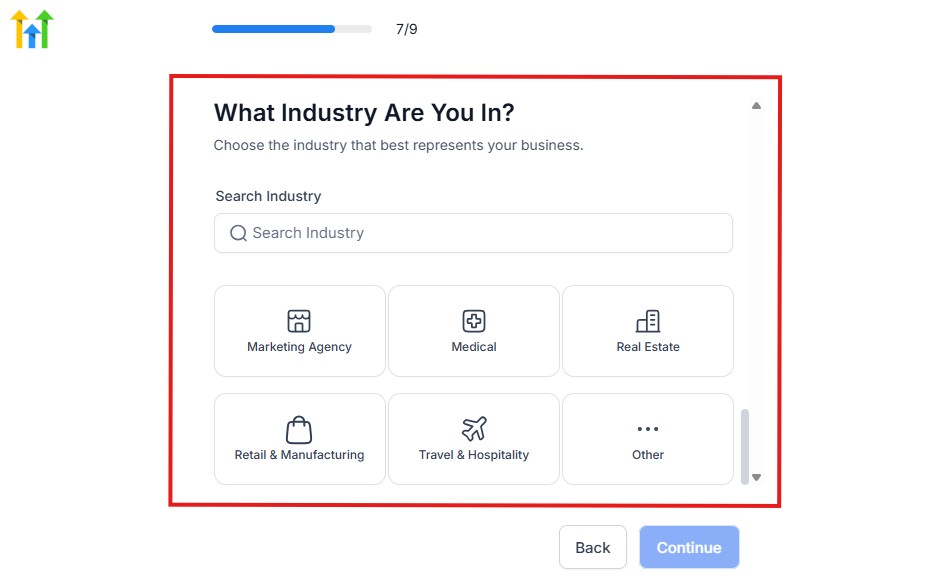
From the image above, you need to select the industry that you fall on. You can also make use of the search button if you can’t find it right away.
Then, click on continue after you select your industry.
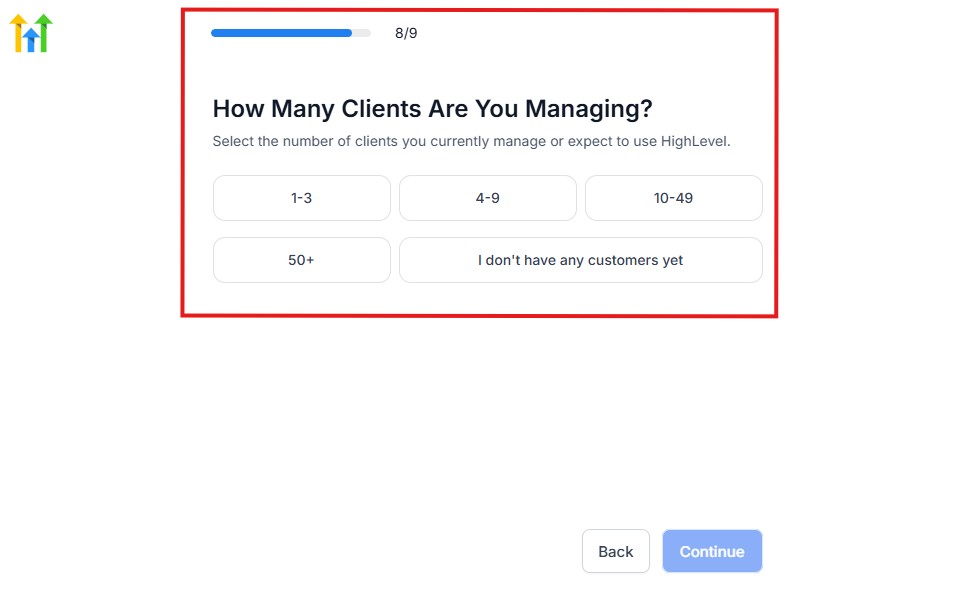
Then, the next thing you need to do is to select the number of clients that you currently have. Select “I don’t have any customers” yet if you currently don’t have one.
On the next page, you will be asked to select the platforms you currently use that you can integrate with GoHighLevel right away.
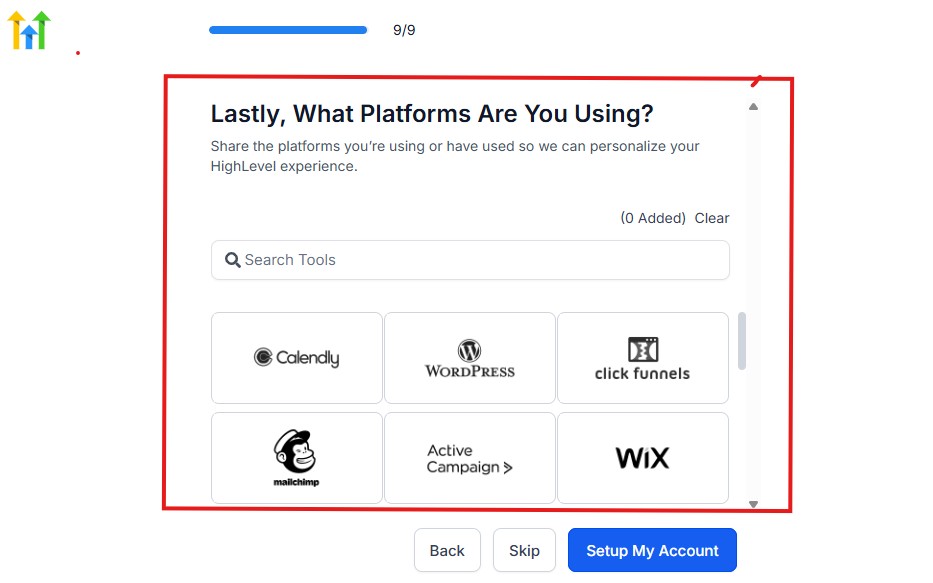
You can use the search button to search for any tools you want to add to your GoHighLevel account.
You can also skip this process and do it later if you want to.
After that, the page below will pop up.
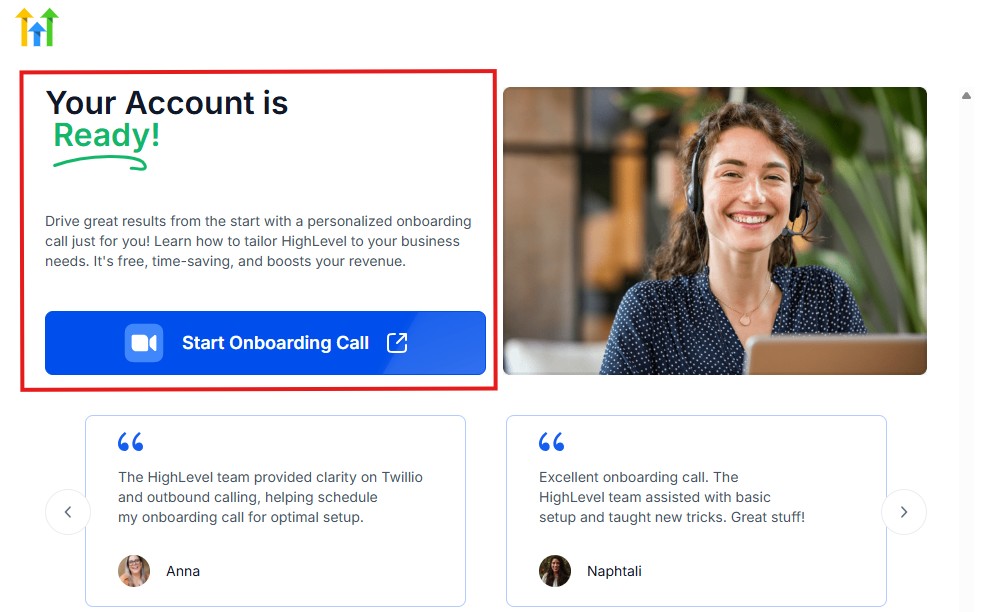
The page above says your account is ready and is asking you to “Start Onboarding Call.”
The “Onboarding Call” allows you to connect with the Go High Level team in order to discuss your account set-up process and everything regarding your plan in using HighLevel.
If you don’t want to start the “Onboarding Call” yet, just stroll down, and you will see the button in the image below.
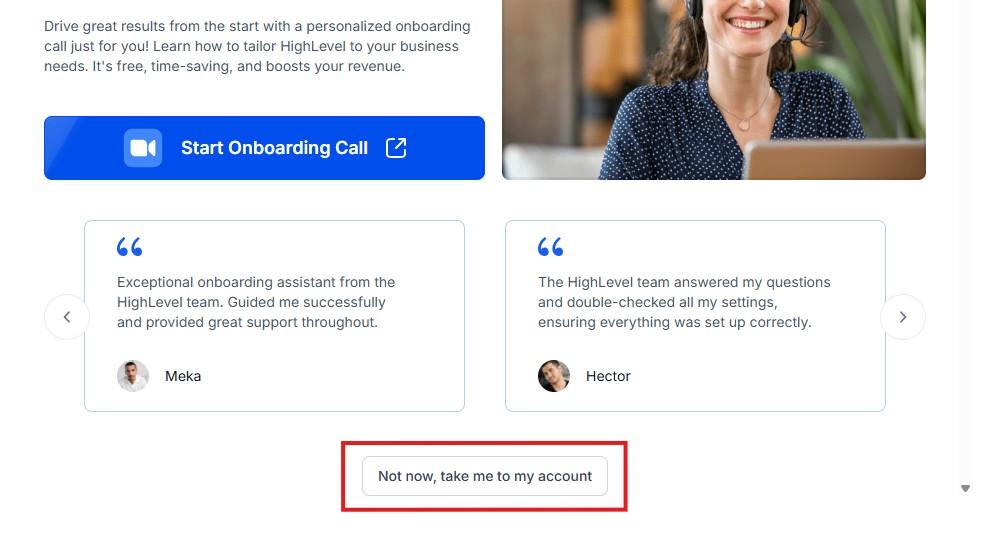
Simply click on “Not now, take me to my account“, and you will have access to your dashboard.
Note: If you have indicated that you want to resell HighLevel, you would have access to the agency dashboard by default, which looks like the image below.
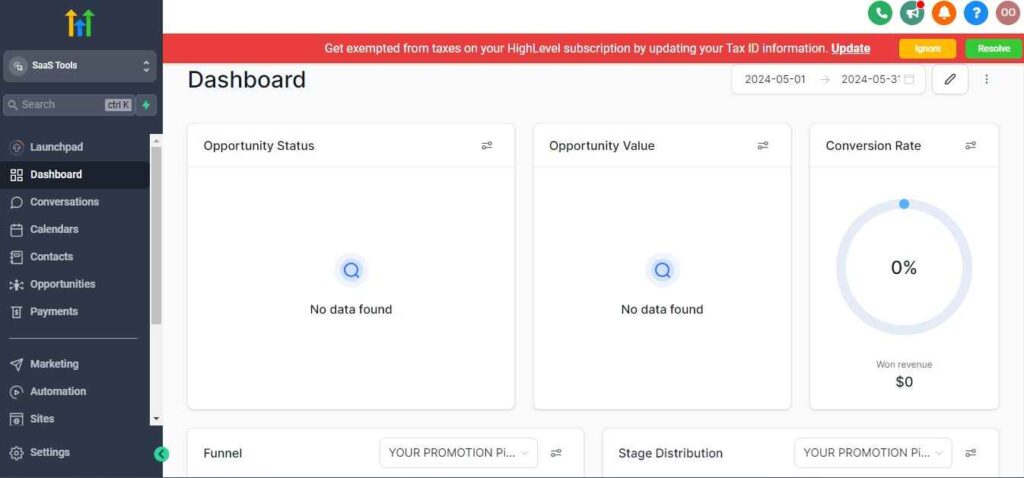
But if you didn’t indicate interest in reselling GHL, your dashboard will look like the image below.
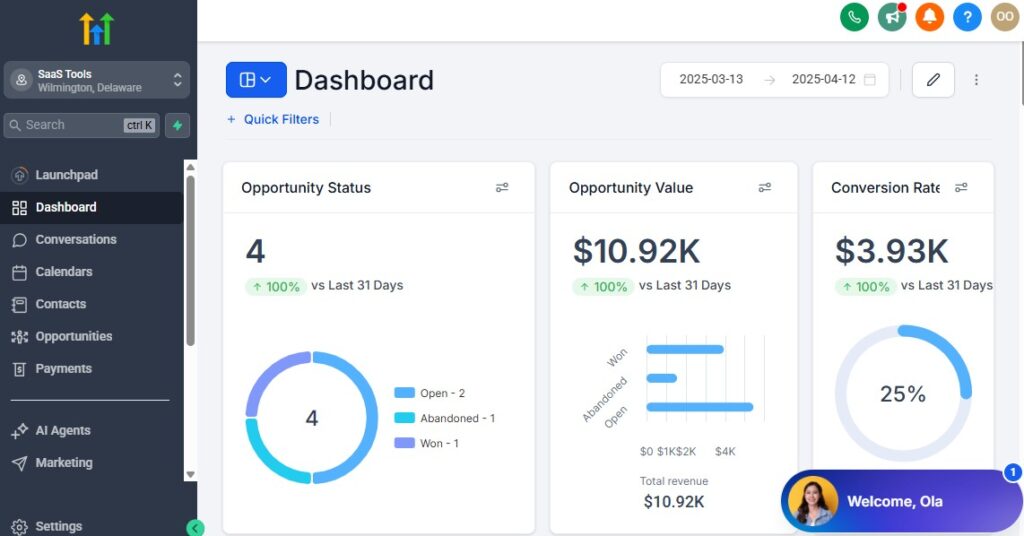
You can switch between these dashboards at any time.
The data you see on the dashboard above are not real data, they’re snapshots that you can use to kickstart your account setup process.
I want to say congratulations. You have successfully set up your Go High Level account.
Step 3: Create Pipelines for Each Insurance Product You Sell
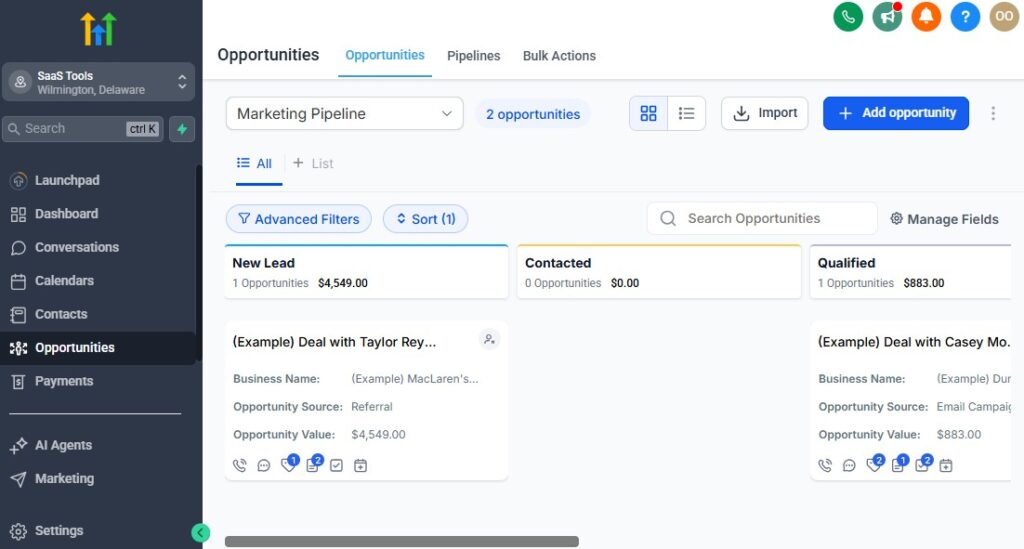
Different insurance lines have different sales cycles. Creating separate pipelines helps you stay organized, track quote statuses, and follow up consistently.
Recommended pipelines
- Auto Insurance Pipeline
- Home Insurance Pipeline
- Life Insurance Pipeline
- Health Insurance Pipeline
- Commercial/Business Insurance Pipeline
- Renewals & Retention Pipeline
How to set them up
Go to Opportunities → Pipelines → Create Pipeline
Add stages such as:
- New Lead
- Quote Requested
- Quote Sent
- Follow-Up Needed
- Pending Approval
- Policy Active
Save and assign each pipeline to the correct automation workflow
This keeps every lead and policy progress easy to track.
Step 4: Add Custom Fields for Insurance-Specific Data
Insurance requires detailed client information.
Use custom fields to keep everything organized and easily accessible.
Useful custom fields
- Policy Type (Auto, Life, Home, etc.)
- Coverage Amount
- Premium Amount
- Effective Date
- Renewal Date
- Carrier Name
- Claim Status
- Lead Source
How to create these
- Go to Settings → Custom Fields
- Choose field type (text, date, dropdown, etc.)
- Add fields like “Renewal Date” or “Policy Type”
- Assign them to forms, funnels, or workflows
These fields help you personalize communication and automate renewal reminders.
Step 5: Create Insurance-Specific Calendars
Insurance agents need different appointment types, so separate calendars help clients book exactly what they need.
Calendar examples
- Quote Consultation
- Policy Review Meeting
- Claims Support Call
- Renewal Consultation
- Multi-Policy Discount Consultation
How to set them up
- Go to Calendars → Create Calendar
- Choose Single User or Round Robin
- Set location (Zoom, office, phone call)
- Add availability and buffers
- Customize confirmation + reminder settings
This makes scheduling simple and ensures clients always know what to expect.
Step 6: Set Up User Roles & Team Permissions
If you have a team – agents, customer service reps, or admin staff – setting roles keeps everything secure and organized.
Best practice roles
- Admin: Full access
- Agent: Access to leads + pipelines
- CSR: Access to communication + renewals
- Sales Assistants: Access to tasks + follow-ups
How to configure
- Go to Settings → Team
- Add users
- Assign roles and permissions based on their responsibilities
This keeps client data secure while allowing your team to work efficiently.
Step 7: Build Your Lead Capture System
You need an automated way to capture leads from:
- Facebook Ads
- Google Ads
- Website forms
- Lead vendors
- Referral partners
- Landing pages
How to set it up
Connect forms to GoHighLevel funnels
Add automation triggers:
- “Form Submitted → Create Opportunity”
- Auto-tag based on insurance type
- Add to correct pipeline
Send instant SMS + email follow-ups
This ensures no lead slips through the cracks.
Step 8: Connect Communication Channels
All client communication should flow into GoHighLevel for tracking and compliance.
Channels to connect
- Email (Gmail/Outlook)
- Phone/SMS
- Facebook Messenger
- WhatsApp (optional, depending on your region)
How to do it
- Go to Conversations → Settings → Channels
- Connect each platform
- Test inbound/outbound messages
This gives you one centralized inbox where every conversation stays organized.
Step 9: Prepare Your Core Automations
Before selling or following up, set up key automations that keep your workflow running smoothly:
Must-have automations
- New lead welcome sequence
- Quote follow-up sequence
- Missed call text back
- Appointment reminders
- Renewal reminders
- Claims update notifications
How to set one up
Go to Workflows → Create Workflow
Add trigger (example: Form Submitted: Auto Insurance Lead)
Add steps:
- Send SMS
- Send Email
- Add to pipeline
- Assign task
- Wait → follow-up
- Update custom field
Publish
This builds the backbone of your automated insurance system.
Final Result: A Clean, Professional Insurance CRM Setup
Once your pipelines, calendars, custom fields, communication channels, and automations are ready, you’ll have a system that:
- Captures leads automatically
- Organizes every quote and policy
- Follows up consistently
- Handles renewals on autopilot
- Keeps clients informed at every step
- Supports compliance and documentation
- Saves you hours every week
You’re now ready to move into the next section.
Managing Leads, Quotes & Clients Using the CRM
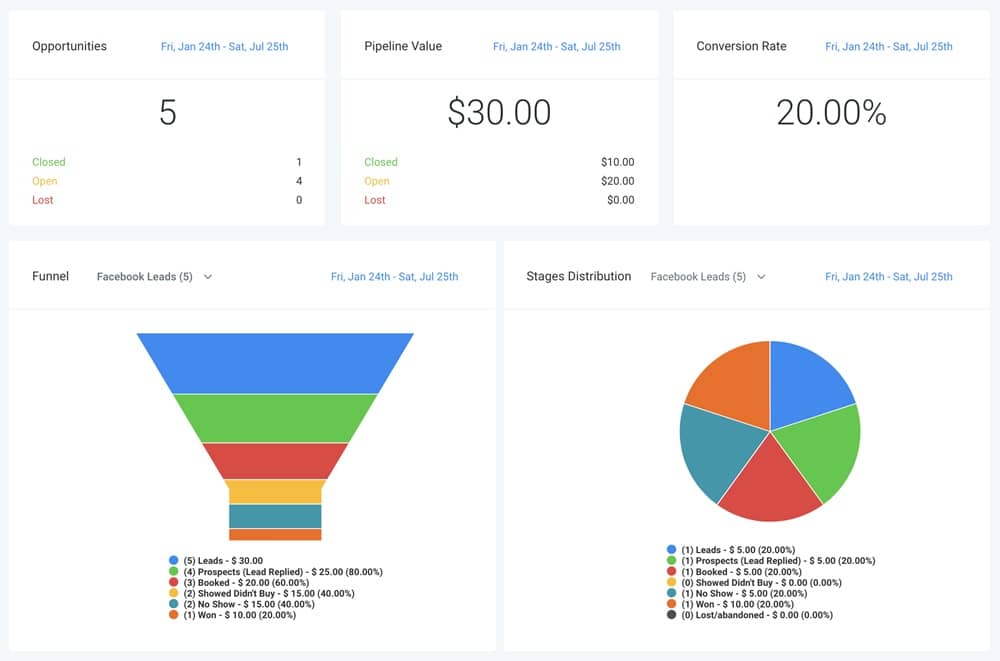
Managing insurance leads, quotes, and active policyholders becomes a lot easier when everything lives inside one CRM.
GoHighLevel gives you the structure to track conversations, follow-ups, quotes, renewals, claims, and policy status in a clean and organized workflow – without spreadsheets or scattered messaging apps.
This section walks you through how to manage every type of client relationship, plus how to set it up inside GoHighLevel so you stay on top of every opportunity.
Organize Leads by Insurance Type Using Tags & Pipelines
Insurance leads come in all shapes – auto, home, life, health, commercial.
Segmenting them correctly helps you follow up with precision.
Use tags to identify each lead
- Auto Lead
- Home Lead
- Life Lead
- Health Insurance Lead
- Commercial Lead
- Bundle Lead (Auto + Home, etc.)
How to automate tagging – GoHighLevel for Insurace Agents
- Go to Workflows → Create Workflow
- Trigger: Form Submitted or Funnel Step
- Add action: Add Tag: Auto Lead
- Assign them to the correct pipeline
This ensures every lead enters the right follow-up sequence instantly.
Use Pipelines to Track Lead Progress From Inquiry → Policy Active
Pipelines show you exactly where each lead is, what they need, and what action to take next.
Suggested stages
- New Lead
- Contacted
- Quote Requested
- Quote Sent
- Follow-Up Required
- Pending Approval
- Policy Active
How to manage opportunities
- Go to Opportunities → Pipeline
- Drag-and-drop leads based on progress
- Add notes, tasks, or reminders
- Trigger automations when leads move stages
This gives you a clear picture of your entire sales funnel.
Store Every Client Detail With Custom Fields – GoHighLevel for Insurace Agents
Insurance requires accurate client data. Custom fields keep everything organized and easy to reference.
Useful fields
- Policy Type
- Policy Number
- Carrier
- Premium Amount
- Effective Date
- Renewal Date
- Quote Amount
- Claim Status
How to add/update fields
- Open a client record → Custom Fields
- Fill out policy details
- Use workflows to auto-fill fields from forms
This helps you personalize communication and automate renewals.
Track Quotes Easily – From Requested to Sent to Closed
Quotes are the heart of your insurance workflow. GoHighLevel helps you track and follow them up without forgetting any lead.
How to track quotes
- Create a “Quote Sent” stage in your pipeline
- Add quote details inside custom fields
- Use tasks for follow-up reminders
- Add workflows to send automated quote follow-ups
Optional enhancement
Integrate quote tools through Zapier so quote creation updates the client record automatically.
This improves your conversion rate and keeps every lead moving.
Use the Unified Inbox to Manage All Communication
Your email, SMS, calls, WhatsApp, and social messages should all live in one place.
Why this helps
- No lost conversations
- Faster responses
- Complete communication history
- Better compliance documentation
How to use it
- Go to Conversations → All
- Filter by channel
- Reply directly inside the inbox
- Attach files, quotes, or policy docs
- Add internal notes for team members
This keeps your communication structured and easy to reference.
Assign Tasks to Stay Organized and Follow Up Consistently
Tasks help you stay on top of important actions like:
- Sending quotes
- Reviewing documents
- Following up on claims
- Reminding clients about forms
- Scheduling policy reviews
How to add a task
- Open the client record
- Click Tasks → Add Task
- Set due dates + assign to yourself or a team member
- Trigger tasks through workflows
This ensures nothing gets missed, especially during busy seasons.
Use Smart Lists to Separate Clients Based on Status
Smart Lists help you filter and target groups of clients instantly.
Useful Smart Lists
- Leads waiting for quotes
- Clients with upcoming renewal dates
- Claims in progress
- High-value policyholders
- Cold leads
- Unsold quotes
- Multi-policy prospects
How to create them
- Go to Contacts → Smart Lists
- Add filters (tags, fields, pipeline stages)
- Save the list for future use
This helps you stay proactive and strategic with follow-ups.
Keep Every Policyholder Organized in Client Records
For active clients, you can keep all policy details in one clean profile.
What to store
- Policy documents
- Renewal date
- Premium amount
- Claims history
- Carrier details
- Past conversations
- Notes + internal comments
- Attached files (ID, proof, forms, etc.)
How to maintain records
- Update custom fields after every change
- Upload new documents
- Add notes after calls
- Tag based on status (Active, Renewal Due, Lapsed)
This builds a complete client story – critical for retention.
Automate CRM Updates Based on Client Behavior
Save time by letting GoHighLevel update client records automatically.
Examples
- When a quote request form is submitted → add tag + move to pipeline
- When an appointment is booked → update the lead stage
- When the renewal date is close → add “Renewal Due” tag
- When a policy becomes active → move to “Policy Active” stage
- When SMS is replied → notify the agent
How to set it up
Go to Workflows
Choose trigger (form, tag, stage, date, etc.)
Add steps:
- Update field
- Add tag
- Move pipeline stage
- Send internal notification
This keeps your CRM updated without manual work.
The Result: A Clean, Organized CRM for Insurance Agents
With GoHighLevel running your CRM, you get:
- Clear visibility over every lead
- Faster follow-ups
- More accurate quotes
- Organized policyholder records
- Better client communication
- Higher conversion + retention
Everything stays in one place, nothing gets lost, and your workflow becomes more predictable.
Automating Lead Follow-Up, Quotes & Policy Nurturing
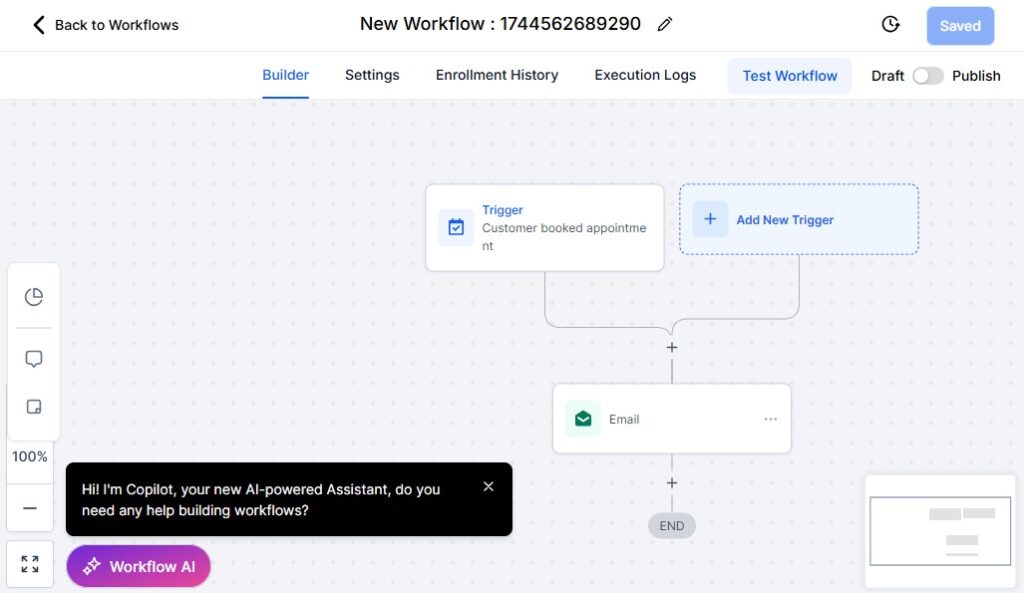
In insurance, speed + consistency determine how many quotes turn into policies. Most prospects don’t buy immediately – they compare rates, think about it, get busy, or simply forget to reply.
This is why automation matters. GoHighLevel helps you follow up instantly, nurture unresponsive leads, and keep every potential client moving toward a quote or policy decision.
This section shows you what to automate, why it works, and how to set it up inside GoHighLevel so your follow-up system runs 24/7 and converts more leads into real paying policyholders.
Automate Instant Follow-Up When a Lead Inquires
Speed is everything in insurance. If you contact a lead within 5 minutes, your chance of closing skyrockets.
What to automate immediately
- Welcome SMS
- Welcome email
- Notification to the agent
- Add to pipeline
- Assign lead source tag
- Book-a-call link
How to set it up
Go to Workflows → Create Workflow
Trigger: Form Submitted or Facebook Lead Form Submitted
Add actions:
- “Send SMS: Thanks for your inquiry…”
- “Send Email: Here’s what happens next…”
- “Create Opportunity in Auto/Home/Life Pipeline”
- “Add Tag: Auto Lead (or relevant)”
- “Notify User (Agent)”
This ensures every lead gets contacted instantly – even when you’re not online.
Create a 5–10 Step Follow-Up Sequence for Unresponsive Leads
Most insurance leads require multiple follow-ups before they respond or request a quote.
What to include in your follow-up sequence
- Quick introduction message
- Questions to understand their needs
- A link to book a consultation
- A summary of benefits/policy explanations
- Testimonials and success stories
- Soft deadlines or reminders
- A final “Still interested?” message
How to automate it
- Add Wait steps (1–3 days between messages)
- Add Email + SMS combos
- Use conditional logic:
- If they reply or book → stop workflow
- If they don’t respond:
- Add them to a nurture campaign
This keeps leads warm and engaged until they’re ready.
Automate Quote Delivery & Follow-Up
Once you send a quote, the real selling begins.
Most agents send a quote and wait – which leads to lost sales.
Automate the full quote process
- Tag added: “Quote Sent”
- Move lead to Quote Sent stage
- Send follow-up reminders
- Answer common objections
- Offer alternatives (bundles, lower deductibles, etc.)
- Send urgency messages before quote expiration
How to set it up
Add a tag Quote Sent to the client
Trigger: Tag Added – Quote Sent
Add steps:
- Email: “Here’s your quote…”
- Wait 24 hours → SMS: “Any questions about your quote?”
- Wait 48 hours → Email: benefits breakdown
- Wait 72 hours → Offer call link
This raises your quote-to-policy conversion rate dramatically.
Automate Policy Nurturing for Each Insurance Line
Different policies need different messaging.
GoHighLevel lets you build tailored nurture sequences.
Examples of insurance-specific nurturing
Auto Insurance:
- Reminders about discounts
- Importance of proper coverage
- Benefits of switching carriers
Home Insurance:
- Home protection tips
- Add-on coverage education
- Mortgage + insurance bundling opportunities
Life Insurance:
- Why coverage matters
- Term vs whole life explanations
- Stories that build urgency
Health Insurance:
- Enrollment deadlines
- Benefits explanation
- Prescription coverage info
How to automate it
Create a workflow for each insurance type
Trigger:
- Tag = “Auto Lead”
- Tag = “Home Lead”
- Tag = “Life Lead”
Add:
- Educational emails
- Call-to-action for quote requests
- SMS reminders
- Trust-building content
This allows your messaging to feel personalized and relevant.
Use Missed Call Text-Back to Boost Engagement
Insurance leads often call when you’re busy or with another client.
What happens automatically
- When you miss a call → send instant SMS
- “Sorry I missed you – how can I help?”
- Ask if they want a quote or call-back
How to enable it
- Go to Phone → Missed Call Text Back
- Turn it ON
- Customize your message
This alone can recover a large number of lost inquiries.
Use Behavioral Automation for Smart Follow-Up
Automation should adapt to how the client behaves.
Examples of smart triggers
- If they open your quote email → send reminder
- If they click the booking link → trigger a faster sequence
- If they don’t open → send an SMS instead
- If they reply → stop follow-up automatically
How to implement
Add If/Else branches in workflows
Choose triggers like:
- Email open
- Link click
- No reply after 2–3 messages
You get more conversions because the system responds intelligently.
Automate Policy Review Requests
Every insurance agent should schedule annual or semi-annual policy reviews.
What to automate
- Annual review email reminder
- Follow-up SMS
- Booking link with your calendar
- “Let’s update your coverage” sequence
How to implement
Create a custom field: Policy Renewal Date
Trigger: 30–60 days before renewal
Send:
- Review invitation email
- SMS reminder
- Follow-up offer
This increases renewals and cross-selling opportunities.
Automate Cross-Selling & Upselling Campaigns
Insurance cross-selling is extremely profitable – and easy to automate.
Cross-sell examples
- Auto → Home
- Home → Life
- Life → Health
- Business → Commercial Auto
- Anyone → Umbrella policy
How to automate
- Use segment tags (e.g., “Auto Only Client”)
- Trigger a workflow:
- “If client only has Auto → send Home Insurance offer”
- Add a call-to-action for a quote
- Follow-up if no response
This helps you grow your book of business with minimal effort.
Automate Lapsed Policy Follow-Up
Never lose a client just because they forgot to renew.
Automate reminders like
- “Your policy is past due…”
- “We can reinstate your coverage today”
- “Here’s what happens if your policy remains inactive”
How to implement
Create a tag: Lapsed
Trigger: Tag Added → Lapsed
Add:
- Email sequence
- SMS reminders
- Phone call tasks
This reactivates lost clients and protects your renewal rate.
The Result: A Follow-Up System That Works 24/7
When your follow-up and nurturing runs automatically, you get:
- Faster responses
- Higher quote request rates
- Better conversions
- More consistent follow-up
- Higher retention
- More cross-sells
- A cleaner, more reliable sales system
You focus on closing deals – while GoHighLevel handles the chasing, reminding, nurturing, and organizing.
Appointment Scheduling for Calls, Consultations & Policy Reviews
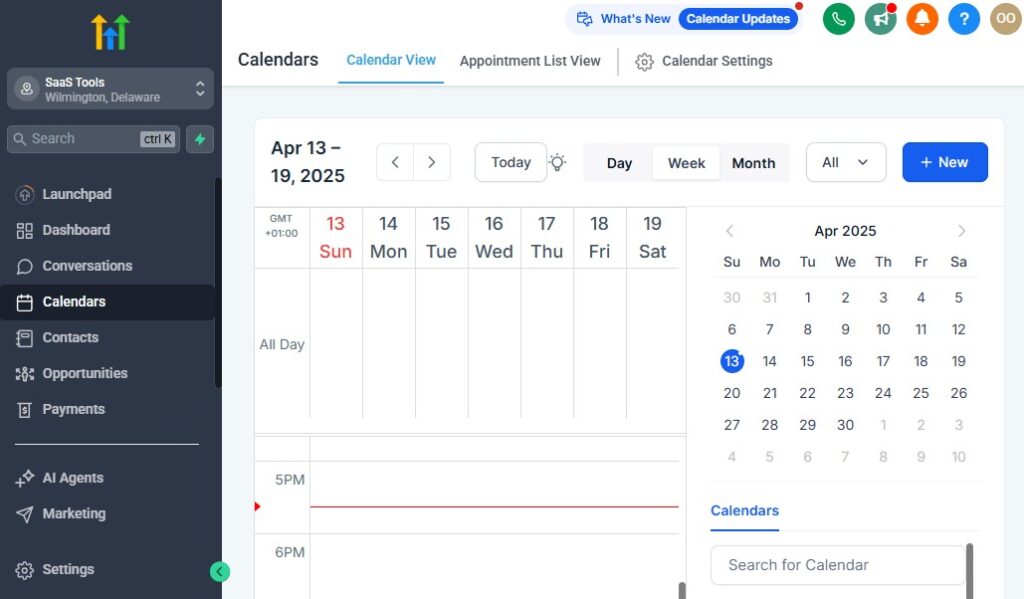
Scheduling is one of the most important parts of your insurance workflow. Prospects need consultations.
Clients need policy reviews. Some need help with claims. Others want to compare quotes or explore bundled policies.
If you try to handle scheduling manually, you’ll waste time going back and forth – and you’ll risk losing leads who prefer instant online booking.
GoHighLevel gives you a clean, automated scheduling system that keeps your calendar full and your clients informed at every step.
Below is what to set up, why it matters, and how to implement each part so your insurance agency stays organized and responsive.
Create Dedicated Calendars for Different Types of Insurance Appointments
Different appointment types require different prep.
Creating separate calendars makes your workflow cleaner and helps clients book the right call instantly.
Recommended calendars
- Quote Consultation Call
- Policy Review Meeting
- Claims Support Call
- Renewal Consultation
- New Client Strategy Call
- Multi-Policy Discount Consultation
How to set them up
- Go to Calendars → Create Calendar
- Choose Single User (or Round Robin if you have multiple agents)
- Set appointment duration
- Add location (Zoom, phone call, in-person)
- Add buffers (10–20 minutes)
- Customize the confirmation message
- Enable reminders (SMS + email)
This gives clients a simple, friction-free booking experience.
Use Smart Booking Links for Faster Conversions
You want prospects to book instantly the moment they show interest.
Where to use booking links
- Funnels
- Quote pages
- Email signatures
- SMS follow-ups
- Missed call text-back
- Facebook ads
- Website contact pages
How to add booking links
- Go to Calendars → Share Link
- Paste the link into emails, SMS, or funnel buttons
This removes the back-and-forth and speeds up your sales cycle.
Add Buffers to Keep Your Day Organized
Insurance calls often take longer than expected. Buffers give you breathing room.
Why buffers matter
- Prevent back-to-back stress
- Give you time to take notes
- Let you prepare documents
- Increase client satisfaction
How to set buffers
- In calendar settings, enable:
- Buffer Before (10–15 minutes)
- Buffer After (10–20 minutes)
This keeps your schedule smooth and predictable.
Automate Appointment Confirmations
Clients should receive all the call details instantly – without you manually messaging them.
What confirmations include
- Date & time
- Location or call link
- Required documents
- What to expect
- Rescheduling link
How to automate
- Open your calendar settings
- Toggle Send Confirmation Email/SMS
- Customize templates under Marketing → Templates
This reduces confusion and prepares clients before the call.
Automate Reminders to Reduce No-Shows
Insurance appointments are often forgotten – especially reviews and consultations. Reminders fix this.
Best reminder schedule
- 24 hours before
- 2 hours before
- 15 minutes before
How to implement
- Enable reminders inside the calendar
- Add SMS + email reminders
- Optional: Create workflow with custom reminders
Fewer no-shows = more policies sold.
Allow Rescheduling to Keep Clients in the Pipeline
Life happens. Giving clients an easy reschedule option keeps them engaged instead of losing the appointment completely.
How to enable
Inside calendar settings, toggle “Allow Rescheduling”
Set:
- Minimum notice (2–12 hours)
- Rules for last-minute changes
This creates flexibility without losing control of your schedule.
Use Intake Forms to Prepare for the Call
When clients provide information upfront, your calls become faster and more productive.
What to ask
- Policy type needed
- Coverage expectations
- Current carrier
- Renewal date
- Claims history
- Discounts they might qualify for
How to implement
- Create a form under Sites → Forms
- Attach it to your confirmation email
- Trigger form reminders inside a workflow
Better information = better quotes = better conversions.
Automate Post-Appointment Follow-Up
Every completed call should trigger a next step.
Follow-up automation examples
- Send quote
- Request documents
- Send pricing breakdown
- Offer bundled policy options
- Move client to the correct pipeline stage
- Assign a task for follow-up
- Add them to a nurture sequence
How to set it up
Go to Workflows → Create Workflow
Trigger: Appointment Status = Completed
Add:
- Email + SMS
- Task assignments
- Pipeline movement
This ensures no prospect falls through the cracks.
Use Round Robin Scheduling for Multi-Agent Teams
If several agents handle consultations, round robin scheduling distributes appointments evenly.
How to set it up
- Create a Round Robin Calendar
- Add team members
- Adjust weights (equal or priority-based)
- Each agent receives auto-notifications
Great for fast-growing agencies.
Keep All Appointments Synced Across Your Calendars
Connecting your external calendars helps prevent double booking.
How to integrate
- Go to Settings → Profile → Calendar Sync
- Connect Google or Outlook
- Enable two-way sync
Your GHL calendar updates automatically across all devices.
The Result: A Clean, Automated Scheduling System That Boosts Conversions
With GoHighLevel scheduling:
- Clients book without friction
- You reduce no-shows
- You stay more organized
- You close more policies
- You deliver a smooth, professional experience
- Your follow-up flows stay consistent
A strong scheduling system helps you convert more leads and keep clients engaged throughout their policy lifecycle.
Building High-Converting Funnels for Insurance Products
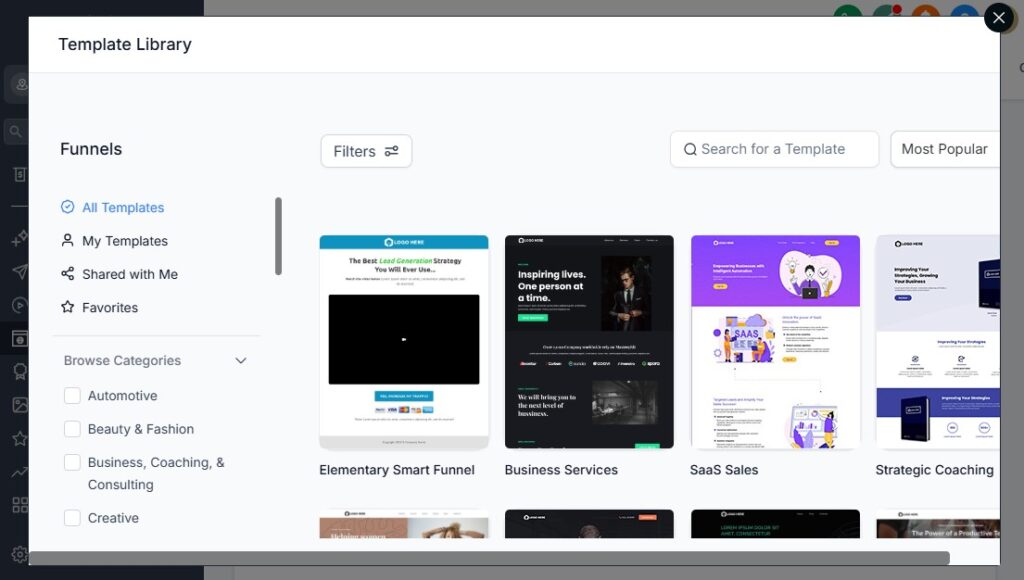
Your funnel is often the first real touchpoint between you and a potential client.
If it’s clean, clear, and compelling, prospects feel confident enough to request a quote, book a call, or submit their information.
If it’s confusing or cluttered, they leave immediately – and you lose the sale.
GoHighLevel makes it easy to build simple, high-converting funnels tailored to different insurance products.
This section shows you what funnels to create, what each page should include, and how to build them step-by-step so you turn more visitors into leads and more leads into policyholders.
Create Separate Funnels for Each Insurance Product
Different policy types attract different audiences.
Creating one funnel for all will weaken your message, reduce trust, and lower conversions.
Recommended funnels
- Auto Insurance Funnel
- Home Insurance Funnel
- Life Insurance Funnel
- Health Insurance Funnel
- Commercial Insurance Funnel
- Bundled Policy Funnel (Auto + Home, etc.)
Each funnel should have its own message, benefits, form, and call to action.
Build Simple, Focused Landing Pages That Speak to Pain Points
Insurance buyers are usually dealing with worry, confusion, or a specific need.
Your landing page should speak directly to that.
What every landing page should include
- A clear headline
- “Get Fast, Affordable Auto Insurance Quotes in Minutes”
- A short section explaining what you offer
- Benefits in quick bullet points
- Trust elements (reviews, badges, “licensed agent”)
- A strong call-to-action button
- A short form or direct calendar link
How to build this in GoHighLevel
- Go to Sites → Funnels → Create Funnel
- Add a landing page
- Use the drag-and-drop builder
- Add sections for:
- Headline
- Benefits
- Testimonials
- Form / Call booking
- Keep it simple and visually clean
A clean page converts better than a long, messy one.
Use Lead Magnets to Encourage More Quotes
Sometimes prospects aren’t ready to book or request a quote.
A lead magnet captures their info early and warms them up.
Lead magnet ideas for insurance
- “Top 10 Ways to Lower Your Auto Insurance Premium”
- “Homeowner Insurance Checklist”
- “Term vs Whole Life Explained Simply”
- “Small Business Insurance Essentials”
- “Health Insurance Enrollment Guide”
How to implement this
- Create the PDF and upload it to Sites → Media
- Build a two-step funnel:
- Step 1: Lead magnet opt-in
- Step 2: Thank-you + booking button
- Automate delivery using a workflow
This grows your pipeline even if leads aren’t ready to buy immediately.
Add High-Converting Forms to Capture Essential Info
Forms should collect just enough data to start the conversation without scaring prospects away.
Recommended fields
- Name
- Phone
- Policy type
- Zip code
- Current carrier (optional)
- Renewal date (optional)
How to build forms
- Go to Sites → Forms → Create Form
- Add essential fields
- Add hidden tags (Auto Lead, Home Lead, etc.)
- Embed the form on your landing page
Short forms = higher conversions.
Use Booking Funnels for Ready-to-Talk Prospects
Some visitors want to speak to you immediately.
A booking funnel gets them on your calendar fast.
Structure
- Page 1: Short description + calendar
- Page 2: Thank-you page
- Page 3: Optional prep form
How to set it up
- Add a Calendar Element inside your funnel
- Connect it to your Quote Consult calendar
- Add confirmation + reminder automations
This works especially well with warm leads from ads.
Use Trust Elements to Boost Conversion Rates
Insurance is trust-heavy.
Adding social proof makes prospects feel safe.
Trust elements to include
- Reviews
- Testimonials
- “Licensed Agent” badge
- Years of experience
- Carrier logos (only if permitted)
- Security and compliance badges
How to add them
- Use the funnel builder Testimonials element
- Upload screenshots of real reviews
- Add a “Why Choose Us?” section
Trust increases conversions instantly.
Create Thank-You Pages That Guide Next Steps
Most agents waste their thank-you page.
Instead, use it to push the lead further down the funnel.
What to include
- Confirmation message
- Clear instructions on what happens next
- A short video (“Here’s what to expect”)
- A button to book a meeting
- A link to upload documents (optional)
How to build it
- Create a new funnel step
- Add text, a button, or video
- Add next-step instructions
This keeps prospects engaged and reduces drop-offs.
Connect Every Funnel to an Automation Workflow
Your funnel collects leads – your workflow nurtures them.
What the workflow should handle
- Welcome message
- Tagging
- Pipeline movement
- Quote request instructions
- Appointment reminders
- Follow-up sequences
How to connect
- Open your funnel
- Click the form
- Select Add to Workflow
- Choose the correct workflow
This ensures no lead slips through the cracks.
Test Your Funnel Before Going Live
Testing prevents lost leads and broken journeys.
How to test
- Submit a test form
- Check CRM record
- Confirm emails/SMS arrive
- Verify pipeline updates
- Check confirmation page
- Test on mobile
Do this before running ads or sending traffic.
The Result: Funnels That Convert Insurance Leads at Scale
With the right funnels in place, you get:
- More qualified leads
- Higher quote requests
- More consultation bookings
- Accurate segmentation
- Faster follow-ups
- A predictable, automated lead-generation system
Your funnels become your 24/7 sales engine – warming leads, capturing info, and guiding prospects straight into your CRM.
Running Email & SMS Marketing Campaigns for Insurance Clients
Insurance is a relationship-driven industry. People don’t always buy immediately – they compare rates, ask questions, wait for renewal dates, or get distracted.
This is why consistent, automated communication matters. GoHighLevel helps you stay top-of-mind, answer questions quickly, educate prospects, and increase conversions without manual follow-ups.
This section shows you what campaigns to run, why they matter, and *how to build them step-by-step so your insurance agency stays visible, relevant, and trustworthy.
Use Email for Education & Value – Use SMS for Urgency
Email and SMS each play different roles in your marketing.
Email works best for:
- Policy education
- Coverage explanations
- Claims guidance
- Renewal preparation
- Cross-selling opportunities
- Newsletters
- Trust-building content
SMS works best for:
- Quick reminders
- Quote follow-ups
- Renewal alerts
- Appointment reminders
- Missing document requests
- Urgent updates
How to set both up
- Verify your email domain under Settings → Email Services
- Purchase a phone number under Settings → Phone Numbers
- Connect your email account (Gmail/Outlook)
- Use email + SMS together inside your workflows
This keeps your communication balanced and effective.
Create a Lead Nurture Sequence That Warms Prospects Automatically
Most leads don’t buy on the first message.
A nurturing sequence helps build trust and keep them engaged.
What to include in your nurture sequence
- Welcome message
- Introduction to your agency
- Benefits of working with a licensed agent
- Educational content (auto, home, life, health, or business insurance)
- Coverage explanations in simple language
- Testimonials or reviews
- Soft call-to-action for a quote or call
How to build it
Go to Workflows → Create Workflow
Trigger: Form Submitted, Tag Added, or Added to Funnel
Add steps:
- Day 0 → Welcome email
- Day 1 → SMS
- Day 3 → Educational email
- Day 5 → Story-based email
- Day 7 → Quote or booking CTA
- Day 10 → Final reminder
This sequence alone can boost conversions dramatically.
Run Quote Follow-Up Campaigns for Hot Leads
Once a lead receives a quote, they need guidance and reassurance – not silence.
Your quote follow-up should include
- A confirmation email with the quote
- A breakdown of what the quote includes
- Why the coverage level matters
- Payment or activation instructions
- A reminder after 24–48 hours
- A follow-up SMS
- A soft urgency message (if quote expires soon)
How to automate it
Trigger: Tag = Quote Sent
Add steps:
- Email: “Your quote is ready”
- Wait 1 day
- SMS reminder
- Wait 2 days
- Email with benefits explanation
- Wait 2 more days
- Final CTA
This creates a smooth experience that increases close rates.
Build Renewal Reminder Campaigns (Your Highest-Value Automation)
Renewals are the backbone of your insurance business.
Missing a renewal follow-up = losing long-term revenue.
What to automate
- 60-day renewal reminder
- 30-day renewal reminder
- 14-day countdown
- 3-day final notice
- “Your policy has renewed” confirmation
How to set it up
Create a custom field: Renewal Date
Use Date-Based Trigger → Before Renewal Date
Add:
- Email reminders
- SMS reminders
- A link to book a policy review
- Follow-up tasks for your team
This protects your retention rate and keeps clients insured.
Create Cross-Sell Campaigns to Increase Lifetime Value
Cross-selling is how insurance agents multiply their revenue.
Cross-sell opportunities
- Auto → Home
- Home → Auto
- Auto/Home → Life
- Life → Health
- Business owner → Commercial Auto
- Any policyholder → Umbrella insurance
How to automate
Create Smart Lists for single-policy clients
Trigger: Client has Auto but NOT Home
Send:
- Educational email
- Case study or testimonial
- Savings offer
- CTA to request a quote
Your book of business becomes more profitable with zero extra effort.
Build Claims Communication Campaigns
Clients want reassurance during a claim. Automated updates help keep them calm and informed.
What to automate
- Claim received
- Claim under review
- Documents missing
- Adjuster assigned
- Claim resolved
- Next steps
How to implement
- Add a custom field: Claim Status
- Create workflows triggered by status updates
- Send SMS + email to notify clients
This creates a premium customer experience.
Run Reactivation Campaigns for Old or Lost Leads
Old leads who never converted can still become clients later.
What to include
- “Are you still comparing insurance quotes?”
- “We can help you save on your renewal.”
- “Want updated rates? Markets have changed.”
- “Quick question – still looking for coverage?”
How to implement
- Create a Smart List: Inactive Leads
- Add a short 3–5 message workflow
- Include a strong call-to-action to re-engage them
This can instantly revive 5–20% of your old pipeline.
Use Seasonal or Event-Based Campaigns
Insurance demand spikes during certain situations.
Seasonal opportunities
- Moving season
- New-year coverage reviews
- Open enrollment (health)
- Hurricane or storm season (home insurance)
- Back-to-school (health/life)
How to set it up
- Use Date-Based Trigger
- Send 2–3 emails + SMS reminders
- Always include a booking link or quote CTA
This keeps your agency relevant throughout the year.
Enhance Campaigns With Personalization
Personalization = higher conversions.
What to personalize
- Name
- Policy type
- Renewal date
- Quote amount
- Coverage options
- Client-specific benefits
How to implement
Use dynamic variables like:
- {{contact.name}}
- {{custom_value.policy_type}}
- {{custom_value.renewal_date}}
Campaigns that feel personal perform significantly better.
Track Campaign Performance & Optimize Regularly
Monitoring results helps you improve over time.
Track metrics like
- Open rates
- Click-through rates
- Replies
- Booked appointments
- Policies sold
- Renewal conversions
How to monitor
- Go to Reports → Email Stats
- Use Funnels → Analytics
- Check Automation → Workflow Stats
This helps you refine your campaigns for maximum impact.
The Result: Marketing That Grows Your Insurance Business Predictably
When your marketing campaigns run smoothly, you’ll see:
- More booked calls
- Better quote conversion
- Higher renewal retention
- Stronger relationships
- More cross-sells
- A full pipeline – all year long
Your agency becomes a consistent, automated sales and retention machine – powered by simple, smart messaging.
Managing Quotes, Premium Payments & Renewal Reminders
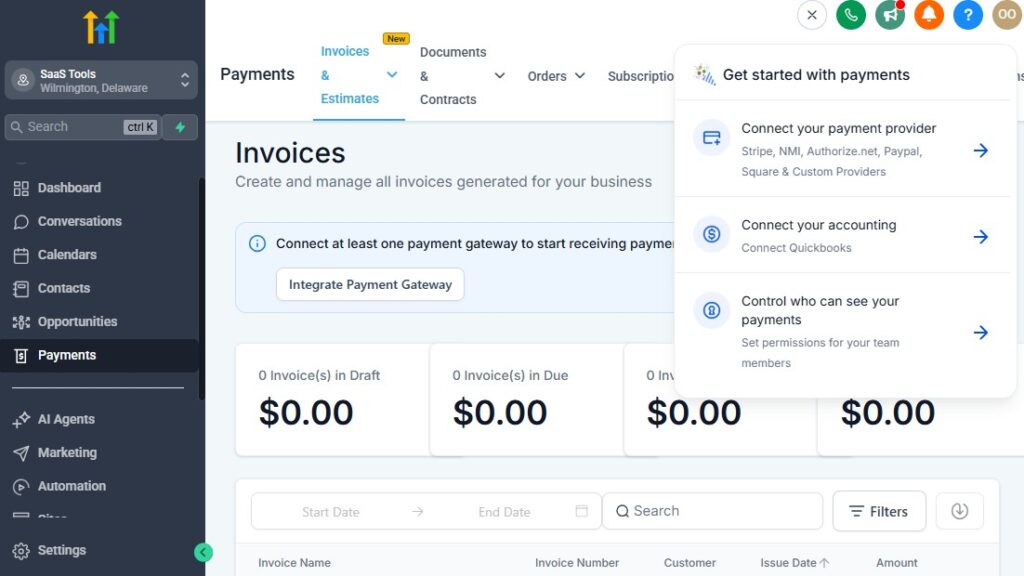
If you get quotes out fast, make it easy to pay, and never miss a renewal, your insurance book grows smoothly.
GoHighLevel helps you manage all three in one system so you’re not chasing people manually or relying on memory and spreadsheets.
Below, you’ll see what to set up and how to do it inside GoHighLevel so quotes, payments, and renewals run on autopilot as much as possible.
Organizing & Tracking Quotes in GoHighLevel
You don’t want quotes buried in email threads. Every quote should be tied to a contact and stage in your pipeline.
What you should track for each quote
- Policy type (auto, home, life, health, commercial)
- Carrier
- Quote amount
- Quote date
- Expiry date (if any)
- Status: Requested, Sent, Accepted, Declined
How to set this up
Create custom fields like:
- Quote Amount
- Quote Date
- Quote Expiry Date
- Quote Status
Add a “Quote Sent” stage in your pipeline.
When you send a quote (from your carrier or rating tool), update:
- The pipeline stage → Quote Sent
- The quote fields on the contact
This gives you a quick visual overview of where every quote stands.
Automating Quote Follow-Up
Most people won’t respond to a quote the first time. Your follow-up system should do the heavy lifting.
What your quote follow-up should do
- Confirm the quote was sent
- Explain what’s included in simple terms
- Handle common objections (price, coverage, carrier)
- Remind them before the quote expires
- Push them to a call/DM to finalize
How to automate it
Create a tag: Quote Sent.
In Workflows → Create Workflow:
- Trigger: Tag Added → Quote Sent.
Add steps like:
- Immediately:
- Email: “Here’s your quote and what it covers.”
- Optional SMS: “I’ve emailed your quote, check your inbox 😊.”
- After 1 day:
- SMS: “Any questions about your quote?”
- After 3 days:
- Email: “Quick breakdown of your coverage and options.”
- Before expiry (e.g. 7 days or 48 hours before):
- Email/SMS with mild urgency and a link to book a call.
Once this is in place, every quote gets proper follow-up without you chasing people manually.
Using GoHighLevel for Premium Payments (Links & Pages)
GoHighLevel won’t replace your carrier’s billing system, but it can still help you manage agency fees, consultation fees, or fixed service charges – and make it easier for clients to pay.
What you can collect through GoHighLevel
- Policy setup fees
- Broker/agency service fees
- Consultation fees
- Policy review fees
- Administrative charges
How to set up payments
- Go to Settings → Payments.
- Connect Stripe (or other supported processor).
- Create products (e.g. Policy Setup Fee, Consultation Fee).
- Create a payment link or checkout page in GoHighLevel.
- Add these links:
- In emails
- In SMS messages
- On your funnels (thank-you or booking pages).
Now, when you need a client to pay a fee, you just drop the link in your automation instead of typing out instructions every time.
Automating Payment Reminders (For Fees You Control)
If you’re collecting recurring fees or one-off charges through GoHighLevel, don’t chase people manually.
What to automate
- “Invoice created” → send payment link
- “Payment due today” reminders
- “Overdue” reminders
- Confirmation once paid
How to do it
Use a trigger like Tag Added: Payment Required or Form Submitted (fee agreement).
In your workflow:
- Step 1: Send email with payment link.
- Step 2: Wait 1–3 days.
- Step 3: If unpaid → send reminder email/SMS.
- Step 4: When payment is completed (using Stripe/Zapier, or manual tag):
- Add tag Payment Completed
- Send “Thank you, payment received” message.
This keeps your cashflow tidy and reduces awkward payment chasing.
Setting Up Renewal Fields to Power Automation
Renewals are where your real long-term money is. You must never rely on memory for dates.
Key fields you need
- Policy Effective Date
- Policy Renewal Date
- Policy Type
- Carrier
- Status (Active, Lapsed, Pending Renewal)
How to add them
- Go to Settings → Custom Fields and create date fields for:
- Effective Date
- Renewal Date
- Add them to your forms or fill them manually when a policy goes active.
These fields become the backbone of your renewal workflows.
Automating Renewal Reminder Campaigns
Your goal is simple: contact your client well before renewal, review their needs, and keep or upgrade the policy.
Suggested renewal reminder timeline
- 60 days before renewal – “Let’s review your policy.”
- 30 days before – “Time to renew / adjust your cover.”
- 14 days before – “We’re close to your renewal date.”
- 7 days before – Soft urgency.
- 1–3 days before – Final reminder.
- After renewal – Confirmation + thanks.
How to build this in GoHighLevel
Use a Date-Based Workflow.
Trigger: Based on Renewal Date field (e.g. 60 days before).
Add steps:
- Email: invite to a review or confirm details.
- SMS reminder: with a booking/link.
- Wait, then send the next reminder at 30/14/7 days.
After renewal:
- Tag: Renewed.
- Send a “Policy renewed” confirmation email/SMS.
- Optionally, add them to a cross-sell campaign (life, health, umbrella, etc.).
Now renewals happen proactively instead of reactively.
Handling Lapsed Policies With Automation
When a policy lapses, you shouldn’t just accept the loss. Automate a short win-back sequence.
What to do when a policy lapses
- Mark the policy as Lapsed (tag or custom field).
- Move the opportunity to a Lapsed / Inactive pipeline stage.
- Trigger a re-engagement workflow.
What the workflow should include
- Email: “Your policy appears to be inactive – here are your options.”
- SMS: quick check-in.
- Second email: explain risks of staying uninsured.
- Call-to-action: “Let’s talk about reinstating or updating your coverage.”
Even recovering a small percentage of these can significantly grow your book over time.
Linking Renewals & Quotes Together
A powerful move is to link renewal workflows to new quote flows.
Example
- 60 days before renewal → send review/quote offer.
- Client clicks link → goes to a “Renewal Review” funnel.
- They submit updated info → automatically:
- Updates fields in CRM.
- Adds tag Renewal Quote Requested.
- Triggers a quote follow-up workflow (like in Section 5).
You’re not just renewing blindly – you’re proactively remarketing and potentially improving coverage or pricing.
The Result: A System That Protects Revenue & Grows Your Book
When you manage quotes, premium-related payments, and renewals in GoHighLevel like this, you get:
- Faster quote responses
- Clean tracking of quote status
- Less manual payment chasing
- Far fewer missed renewals
- More policy retention
- More chances to cross-sell or upsell at renewal time
You’re no longer “hoping” people get back to you – your system makes sure they’re reminded, nudged, and guided at every key step.
Delivering Policies, Documents & Claims Communication
Once a client agrees to a policy, the next steps matter just as much as the sale. Clients expect smooth document delivery, clear instructions, fast claims communication, and reassurance at every stage. GoHighLevel helps you create a seamless post-sale experience that builds trust, reduces confusion, and boosts long-term retention.
This section breaks down how to deliver policies, how to organize client files, and how to automate claims communication so clients always feel supported and informed.
Deliver Policy Documents Quickly & Professionally
Insurance clients want their policy papers as soon as possible. GoHighLevel helps you organize and deliver everything in one place.
Documents you may deliver
- Policy declaration pages
- Coverage summary
- Digital ID cards
- Billing schedule
- Terms & conditions
- Claim instructions
- Carrier-specific documents
How to deliver documents
Upload files to Contacts → Files.
Send an email with:
- A secure download link
- A summary of the policy
- Important next steps
Add a confirmation SMS:
- “Your policy documents have been emailed 🎉 Let me know if you need help.”
This makes the delivery look polished and professional.
Organize Important Files Inside Each Client Profile
Your client’s entire policy history should live inside GoHighLevel.
What to store
- Quote files
- Signed applications
- ID cards
- Claim documents
- Renewal notices
- Policy changes
- Payment confirmations
How to set this up
Use the Files tab in the contact profile.
Create custom fields for:
- Policy Number
- Carrier
- Effective Date
- Renewal Date
Add tags for easy sorting (e.g., Auto Policy Active, Home Policy Active).
This keeps everything in one place for compliance and customer service.
Create a “New Policy Delivery” Automation
Every new policy should trigger a clean onboarding experience.
What your automation should include
- Welcome email + policy summary
- Attach/download policy documents
- ID card delivery (if auto insurance)
- Claims instructions
- Renewal date confirmation
- A link to schedule a “Policy Review Call”
- Tag the client as “Policy Active”
- Move them into the Active Clients pipeline
How to build it
Trigger: Tag Added → Policy Active OR Pipeline Stage: Policy Active.
Add:
- Email: “Welcome! Your policy is now active.”
- SMS: “Your policy documents have been sent to your email.”
- Task for your team: confirm everything is uploaded.
- Optional: add to a long-term nurture sequence.
This gives every client a polished onboarding journey.
Deliver Updates or Policy Changes Automatically
When clients request changes (address update, coverage changes, adding a driver), you should send them updated documents automatically.
How to handle policy updates
- Update custom fields
- Upload new documents
- Trigger a “Policy Updated” workflow
What the workflow should do
- Send policy update confirmation
- Attach updated documents
- Provide next steps
- Notify your team
Clients appreciate fast, clear updates.
Build a Claims Communication System Clients Can Rely On
Claims are emotional. Clients want reassurance and fast updates.
What to automate
- Claim received
- Claim assigned
- Documents required
- Under review
- Approved/Denied
- Payout details
- “What happens next” messages
How to implement
Create a custom field: Claim Status.
Each time status changes, update the field.
Trigger a workflow:
- If Claim Status = Received → send confirmation.
- If Claim Status = Missing Documents → send checklist + upload link.
- If Claim Status = Approved → send payout timeline.
This reduces calls, confusion, and stress on both sides.
Use SMS for High-Priority Claim Communication
SMS feels more personal and is read much faster.
What to send via SMS
- “We’ve received your claim.”
- “Your adjuster has been assigned.”
- “We need one more document.”
- “Your claim is under review.”
- “Your claim has been approved.”
How to activate
- Add “Send SMS” steps in your Claim workflows.
- Keep messages short and reassuring.
Clients stay informed without wondering “What’s happening with my claim?”
Create a Document Upload Funnel for Claims
Make it easy for clients to submit claim documents.
How to build it
Go to Sites → Funnels.
Create a simple page with:
- A brief instruction
- A file upload form
- A thank-you page
Connect the form to a workflow:
- Tag “Documents Submitted”
- Notify your team
- Move client to “Claim Under Review”
This keeps claims organized and reduces back-and-forth emails.
Automate Follow-Up for Missing Claim Documents
Clients often forget to send required documents.
Automation closes the loop for you.
How to do it
Trigger: Tag Added → Documents Required.
Add steps:
- Email: list missing documents
- SMS reminder
- Wait 2–3 days
- Follow-up message
If documents still missing:
- Notify your team
- Move client to “Waiting on Client”
This keeps claim timelines predictable.
Create a Centralized Claims Pipeline
Tracking claims in your head or on paper is risky.
Use a dedicated claims pipeline.
Suggested stages
- Claim Submitted
- Documents Needed
- Under Review
- Adjuster Assigned
- Decision Pending
- Approved
- Denied
- Closed
How to build it
- Go to Opportunities → Pipelines → Create Pipeline
- Add stages above
- Move clients automatically using workflows
This gives you a clear view of your claims workload.
The Result: Smooth, Professional Delivery & Claims Experience
When you deliver policies and manage claims through GoHighLevel:
- Clients feel supported
- Communication is consistent
- Documents stay organized
- Claims progress stays transparent
- You look more professional and reliable
- You save hours every week on follow-ups
A strong delivery + claims system sets your agency apart and increases retention naturally.
Collecting Reviews, Testimonials & Building Trust Online
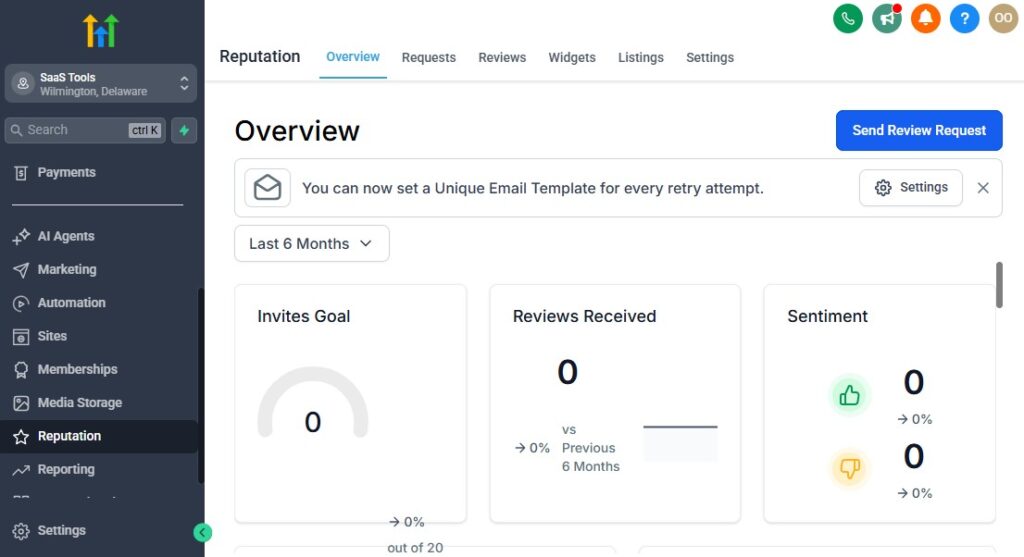
In the insurance industry, trust is everything. People want to know they’re working with someone dependable, responsive, and knowledgeable.
Reviews and testimonials play a huge role in proving credibility – especially when prospects are comparing agents or deciding whether to switch providers.
GoHighLevel helps you create a simple, automated system that collects real reviews, showcases them beautifully, and builds a strong online reputation that fuels more leads and conversions.
Let’s break down how to collect reviews, where to showcase them, and how to automate everything using GoHighLevel.
Use Automated Review Requests After Policy Activation
The best time to ask for a review is right after a positive moment, such as:
- When a policy becomes active
- When a claim is resolved
- After a consultation goes well
- After you help a client save money
- After a renewal is completed
How to automate the request
Trigger: Tag Added → Policy Active or Pipeline Stage = Completed.
Add steps:
- Email: “Thank you for choosing us – would you mind leaving a quick review?”
- SMS with review link
- A short follow-up reminder after 2–3 days
Where to send them
- Google Reviews (highest impact)
- Facebook Page
- Yelp
- Better Business Bureau (optional)
This builds social proof passively, every week.
Make It Easy With a Single Review Link
Clients won’t leave a review if the process feels complicated.
How to simplify
Use a single Google Review link
Add it to:
- SMS
- Thank-you pages
- Footer of funnels
Make it one click – no searching, no confusion
This boosts your review volume significantly.
Create a Testimonial Collection Funnel
Testimonials help with conversion on your landing pages and funnels.
How to build it
Go to Sites → Funnels → Create Funnel.
Add:
- A simple form asking:
- “What did you love about working with us?”
- “What problem did we help you solve?”
- Permission to showcase the testimonial
- Add a “Thank You” step.
- Tag the contact (e.g., Testimonial Submitted).
- Add them to a workflow that saves the testimonial to a custom field or notifies you.
Use this funnel link
- After renewals
- After positive feedback
- After policy savings
You’ll build a growing library of social proof on autopilot.
Display Testimonials on Your Funnels & Website
Your landing pages convert better when they show real client results.
What to showcase
- Star ratings ⭐⭐⭐⭐⭐
- Short testimonial quotes
- Client first name + city (keeps privacy)
- Screenshots of real Google reviews
- Before/after savings examples (if appropriate)
Where to place testimonials
- Above the call-to-action button
- Near pricing or coverage explanation
- On quote request pages
- On policy-specific funnels
These small placements dramatically improve trust and conversion.
Use Video Testimonials for Higher Impact
Video builds deeper trust and engagement.
You can collect video testimonials through GoHighLevel forms.
How to do it
- Create a form with a file upload field
- Ask clients to record a short video on their phone
- Add simple prompts:
- “How did we help you?”
- “What made you choose us?”
- “Would you recommend us?”
Video testimonials are powerful for ads, landing pages, and social media.
Build a “Proof & Reviews” Page on Your Agency Website
A dedicated review page helps prospects feel confident before requesting a quote.
What the page should include
- Google review widget
- Top testimonials
- Video testimonials
- Review submission link
- Trust badges (licensed agent, years of experience, carriers you work with, etc.)
How to build it
- Go to Sites → Websites → Create Page
- Add:
- Review block
- Star ratings
- “Why people trust us” section
- Call-to-action button
This page becomes an asset you can use in ads, follow-ups, and emails.
Automate Follow-Up for Review Requests
Most clients don’t leave a review on the first ask – but they will on the second or third.
How to automate a gentle reminder
- Wait 2–3 days from initial request.
- Send a short reminder email:
- “Just checking in – your review would mean a lot to us!”
- Add an SMS reminder as well
People appreciate being reminded politely.
Celebrate Clients for Leaving Reviews
A small thank-you goes a long way.
How to automate appreciation
- Send a “thank you” email
- Send a personalized SMS
- Add a tag: Brand Advocate
- Add them to a referral workflow (optional)
This builds loyalty and encourages word-of-mouth referrals.
Protect Your Reputation With Feedback Forms
Not every client is thrilled – that’s okay. What matters is catching negative feedback privately.
How to handle it
- Create a “Private Feedback Form”
- Ask:
- “What could we have done better?”
- “How can we improve your experience?”
- Route negative submissions to you or your team
- Avoid sending unhappy clients to Google Reviews
This helps you fix issues before they become public.
Use Social Proof in Your CRM Workflow
Whenever you nurture prospects or send quote follow-ups, drop in a little trust.
How to use social proof in automations
- Add review snippets to quote follow-up emails
- Include testimonial screenshots in booking reminders
- Use “Real story from a client like you…” in nurturing messages
- Add star ratings in SMS messages (simple but effective ⭐⭐⭐⭐⭐)
This improves conversions through psychological reassurance.
The Result: A Trust-Driven Insurance Brand That Converts More Leads
When you collect and showcase reviews consistently, you get:
- Stronger credibility
- Higher quote-to-policy conversion
- Increased trust from new leads
- More referrals
- Better retention
- A reputation that sells for you automatically
GoHighLevel helps you build a brand people feel safe with – one that stands out in a competitive insurance market.
Reporting & Analytics for Insurance Agencies
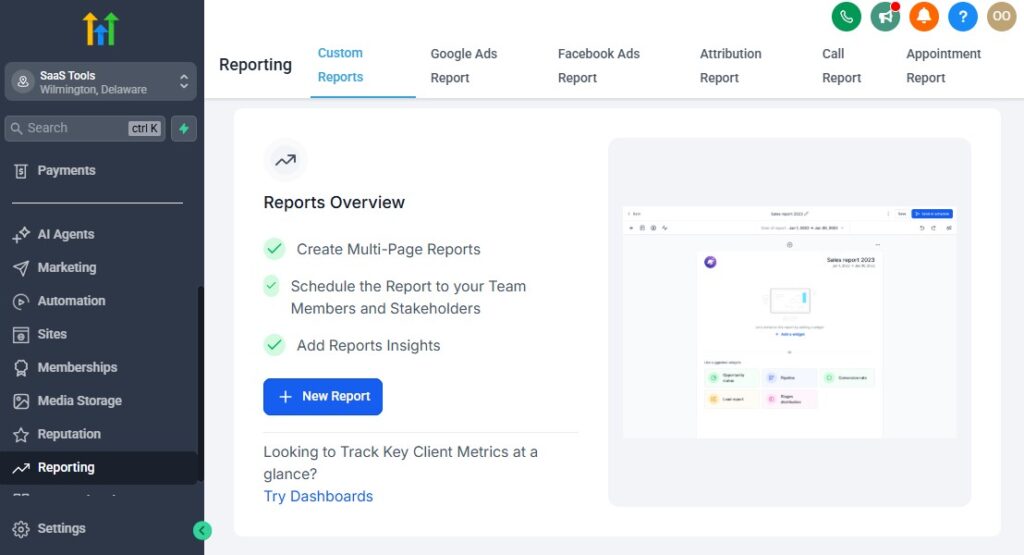
To grow your insurance agency predictably, you need clear visibility into your numbers – where leads come from, how they convert, how long quotes take to close, which policies generate the most revenue, and where your follow-up system is leaking.
GoHighLevel gives you the analytics you need to make smarter decisions, tighten your operations, and scale intentionally.
This section shows you what to track, why it matters, and how to set it up so you always know exactly what’s working and what needs improvement.
Track Lead Sources to See What Marketing Channels Work Best
You shouldn’t guess where your best leads come from.
Tracking sources shows you which campaigns bring high-quality prospects.
What to track
- Facebook/Instagram ads
- Google Search ads
- Website traffic
- Referral partners
- Organic content
- Lead magnet downloads
- Email campaigns
How to track it
- Create hidden fields in your forms:
- Source
- Campaign
- Add UTM parameters to ads.
- Use the Attribution Report under Analytics.
This helps you stop wasting money on channels that underperform.
Use Pipeline Reports to Monitor Sales Performance
Pipelines show you how leads move from inquiry → quote → policy.
Metrics to monitor
- Number of new leads
- Quote request rate
- Quote sent rate
- Quote follow-up rate
- Conversion rate
- Time spent in each stage
- Policies closed
How to view it
- Go to Opportunities → Pipeline View
- Use Pipeline Stats to compare performance
This helps you spot bottlenecks, such as:
- Leads not being contacted fast enough
- Quotes being sent late
- Poor follow-up on “Quote Sent” stage
Fix the bottleneck → increase sales instantly.
Track Appointment Metrics to Improve Booking Rates
Appointments drive sales in insurance.
You need to know how many are being booked, completed, or no-showed.
Track these metrics
- Booking rate
- Show-up rate
- Cancellations
- Completed consultations
- Average consultation-to-policy conversion
How to track it
- Go to Calendars → Appointments Report
- Check “Completed,” “Cancelled,” “No Show,” etc.
This helps you improve your reminder system and booking funnels.
Monitor Email & SMS Performance for Better Engagement
Your communication strategy determines how well leads warm up.
Track important email metrics
- Open rate
- Click rate
- Reply rate
- Unsubscribe rate
- Bounce rate
SMS metrics
- Delivery rate
- Reply rate
- Link click rate
How to view it
- Go to Marketing → Emails → Analytics
- And Marketing → SMS → Analytics
This shows you which messages resonate – and which need improvement.
Review Workflow Performance to Spot Automation Gaps
Your automations should run your agency 24/7.
If something breaks, you need to know.
What to analyze
- Workflow conversion rate
- Drop-off points
- Steps with low engagement
- Messages with low opens or replies
- Automation errors
How to check
- Go to Automation → Workflows → View Stats
This helps you refine sequences, adjust timing, and improve message quality.
Track Renewal Performance to Protect Your Retention Rate
Renewals are your most valuable metric – because they protect your long-term revenue.
Track
- Total renewals due
- Renewal response rate
- Renewals completed
- Lapsed policies
- Renewal recovery rate
- Time-to-renewal
How to set up tracking
Use custom fields for Renewal Date
Create Smart Lists:
- Renewals This Month
- Renewals Next Month
- Lapsed Clients
This ensures no renewal slips through the cracks.
Use Smart Lists to Segment Clients by Performance Indicators
Smart Lists give you actionable insights at a glance.
Useful Smart Lists
- High-value policyholders
- Low-engagement leads
- Hot leads (recent opens/clicks)
- Quote Sent but No Response
- New Leads This Week
- Clients with multiple policies
- At-risk clients (no engagement for 90 days)
How to build them
- Go to Contacts → Smart Lists
- Filter by tags, custom fields, or pipeline stages
Your data becomes more actionable instantly.
Monitor Claims Metrics (If You Manage Claims Internally)
Claims are highly sensitive – you need a clear status overview.
Track
- Total claims submitted
- Claims requiring documents
- Claims under review
- Claims approved
- Claims denied
- Average claim resolution time
How to track
- Build a Claims Pipeline
- Track each stage visually
- Use custom fields like Claim Status
This ensures clients receive updates quickly and consistently.
Review Revenue Metrics for Better Forecasting
Even though GoHighLevel doesn’t replace carrier billing, it can help you track revenue-related metrics you control.
Track
- Agency fees collected
- Consultation fees
- Recurring service fees
- Completed renewals
- New policies per month
- Policy types generating the most commissions
How to organize this
- Use Stripe inside GoHighLevel
- Create product categories (auto, home, life, etc.)
- Track revenue in Payments → Transactions
This helps you forecast and plan your marketing budget.
Monitor Team Performance if You Run a Multi-Agent Agency
If multiple agents work under you, performance tracking becomes essential.
Track
- Leads assigned per agent
- Quotes sent
- Follow-up consistency
- Policy sales
- Renewal completions
- Average response time
How to view it
- Use Conversations → Filter by User
- Use Opportunities → Filter by User
This helps you spot high performers and identify who needs support.
The Result: Clear Data → Smart Decisions → Bigger Results
When you track your numbers consistently, you get:
- A predictable pipeline
- Higher quote conversions
- Better follow-up performance
- More renewals
- Lower no-show rate
- Better team accountability
- Higher profitability
- More control over growth
Instead of guessing what’s working, you’ll know – and you’ll scale your insurance agency with confidence.
Integrating GoHighLevel With Insurance Tools & Carriers
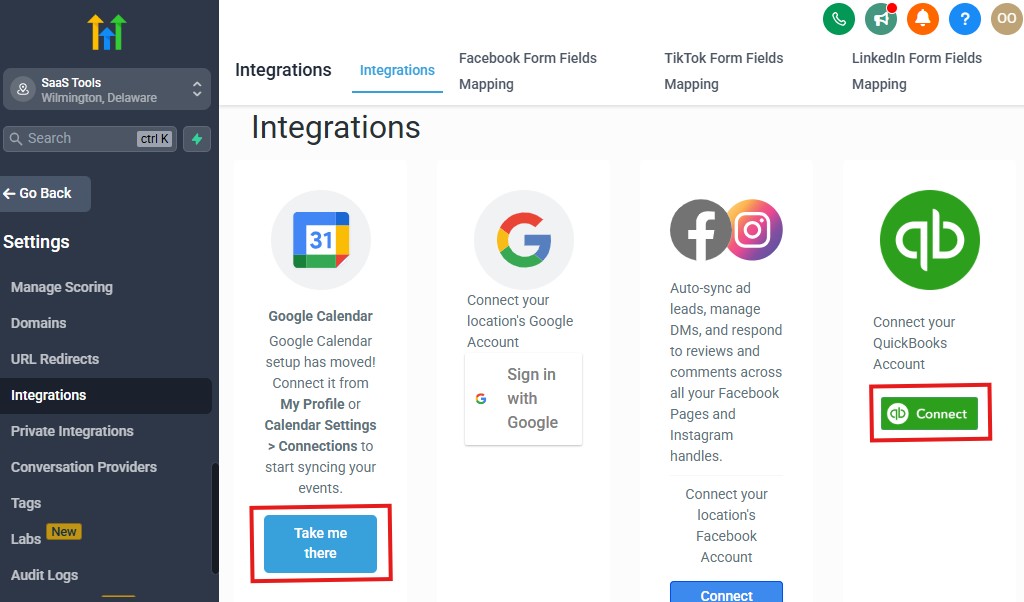
Your insurance business already relies on multiple tools – rating software, carrier portals, document systems, e-signing tools, payment processors, and communication platforms.
Instead of juggling everything manually, GoHighLevel lets you connect these tools together so your workflow becomes smoother, faster, and more accurate.
While GoHighLevel won’t replace your carrier systems, it will act as the central hub that connects everything and triggers the right actions automatically.
This section shows you what tools to integrate, why each matters, and how to set it up step-by-step so your agency runs like a well-organized machine.
Integrate Your Quote & Rating Tools (For Faster Quote Workflows)
Many insurance agents use rating tools to generate quotes quickly.
Popular rating tools you may be using
- EZLynx
- Applied Rater
- QQCatalyst
- PL Rating (Vertafore)
- Canopy Connect (document gathering + data extraction)
- Semsee (commercial quote platform)
How integration works
GoHighLevel doesn’t directly replace these systems, but you can integrate them using:
- Zapier
- Webhooks
- Email parsing
- Custom API connections (advanced users)
Ways to connect them
- When a lead submits a form → send data to your rating tool.
- When a quote is generated → send it back into GHL as a file or note.
- When a quote is ready → add tag Quote Sent to trigger workflows.
This pulls quote workflows into one place.
Connect E-Signature Tools for Applications & Forms
Insurance involves a lot of signatures – applications, disclosures, forms, and agreements.
Best e-sign tools to integrate
- DocuSign
- HelloSign
- PandaDoc
- Adobe Sign
How to integrate with GoHighLevel
- Create templates inside your e-sign tool.
- Use Zapier or Webhook triggers:
- “Document Sent” → update client record in GHL.
- “Document Completed” → add tag Policy Signed.
- Add signed documents to Contacts → Files automatically.
Use-case example
When a client signs a life insurance application →
GHL updates their stage to Pending Approval and sends a confirmation email.
This reduces manual admin work significantly.
Integrate Carrier Portals (Indirect but Powerful)
You can’t directly connect carriers like State Farm, Allstate, Travelers, or Progressive – but you can sync the data flow around them.
How agents usually integrate carriers indirectly
- Use Zapier or email parsing to detect carrier email updates
- Update the CRM when:
- A policy becomes active
- Renewal notices arrive
- Document packets are issued
- Claims notifications come in
How to automate this
Set up a dedicated email for carrier notifications.
Use “Email Parser by Zapier” to extract key info:
- Policy number
- Effective date
- Renewal date
- Policy status
Send the data into GoHighLevel → update custom fields.
This keeps your client records accurate without manual entry.
Integrate Your Phone, SMS & Calling Tools
Communication is the core of insurance.
GoHighLevel already includes calling & SMS, but you can extend it.
Tools to integrate
- Twilio (for more SMS/phone routes)
- JustCall
- Aircall
- RingCentral
How to integrate
- Go to Settings → Phone (for Twilio direct).
- For JustCall/Aircall → use Zapier triggers:
- New call → update GHL notes
- Missed call → start missed-call workflow
- SMS received → add to GHL conversation
This creates a unified communication record for compliance and history.
Integrate Email Platforms for Better Deliverability
If you already use external email platforms, you can sync them with GHL.
Supported providers
- Gmail
- Outlook
- Office 365
- Custom SMTP
How to set it up
- Go to Settings → Email Services.
- Connect your email provider.
- Verify domain for high deliverability.
This centralizes conversations and improves inbox visibility.
Connect Payment & Billing Systems (For Fees You Control)
Carriers handle premiums, but your agency may charge:
- Setup fees
- Broker fees
- Consultation fees
- Administrative fees
Payment processors you can integrate
- Stripe
- PayPal (through funnel embeds)
- NMI
- Authorize.net
How to integrate
Go to Settings → Payments.
Connect Stripe or NMI.
Create:
- Checkout pages
- Payment links
- Recurring subscriptions
Automation example
Payment completed →
Add tag “Fee Paid” →
Trigger onboarding workflow.
Integrate Document Management Platforms
If you store files elsewhere:
Platforms
- Google Drive
- Dropbox
- OneDrive
How to integrate
Use Zapier to:
- Upload new signed documents to Drive
- Create folders per client
- Sync uploaded funnel documents to your storage
Your documents stay organized while GoHighLevel holds the client-facing pieces.
Integrate Calendars for Smooth Scheduling
Every agent should sync at least one external calendar.
Supported calendars
- Google Calendar
- Outlook Calendar
How to connect
- Go to Settings → Profile → Calendar Sync.
- Enable two-way sync.
This prevents double-booking and ensures every appointment flows into your primary calendar.
Connect Webhooks & API for Advanced Automation
If you’re working with a developer or advanced tools:
You can automate
- Policy creation updates
- Claims updates
- Renewal status changes
- Document issuance
- Carrier data sync
How to set it up
Go to Workflows → Webhook Action.
Use:
- POST
- GET
- PUT
This sends or receives data with external systems automatically.
Integrate Lead Sources for Instant Lead Capture
Make sure every lead source flows into GoHighLevel automatically.
Lead sources you can integrate
- Facebook Lead Ads
- Google Ads
- TikTok Lead Forms
- Zillow
- HomeQuote.io
- Insurance lead vendors
- Website forms
- Lead magnet funnels
How to connect
- Facebook & TikTok: via Integrations
- Google Ads: via Google Business Integration
- Lead vendors: Zapier → Add Contact
- Website forms: embed GHL forms
Every lead enters your CRM instantly → triggers your follow-up automation → lands in a pipeline.
Integrating Everything Creates a Centralized Insurance Operations System
When your tools sync with GoHighLevel, you get:
- Faster quote handling
- Automated onboarding
- Centralized notes & documents
- Cleaner pipelines
- Better follow-up
- Accurate renewal reminders
- Single-source-of-truth client profiles
- Less admin work
- Better client experience
Your CRM becomes the command center for your entire insurance agency.
Advanced Automation for Insurance Agents
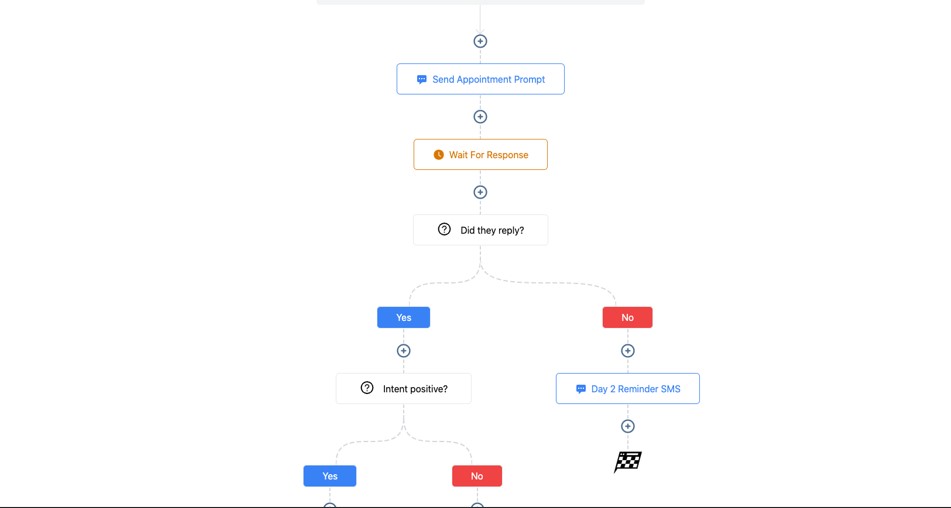
Once you’ve set up your basic pipelines, follow-ups, scheduling, and renewals, the next step is to build advanced automations that make your insurance agency run with almost zero manual effort.
These automations help you close more policies, reduce admin work, improve retention, and deliver a seamless experience from first inquiry to long-term client relationship.
This section breaks down high-level automations, why they matter, and how to implement each one step-by-step inside GoHighLevel.
Build Dynamic Lead Routing Based on Policy Type
Instead of manually assigning leads, let GoHighLevel decide who should handle each one.
How it works
- Auto leads → Auto specialist
- Home leads → Home/Property agent
- Life or health leads → Dedicated life/health team
- Commercial leads → Commercial specialist
How to automate it
- Trigger: Form Submitted
- Condition: If Policy Type = Auto
- Assign user = Auto Agent
- Add tag for tracking
- Notify the assigned agent
- Move to the correct pipeline
This reduces response time and increases conversions.
Create Multi-Step, Behavior-Based Follow-Up Sequences
Go beyond simple messages. Use actions clients take (or don’t take) to shape the journey.
Examples
- If they open an email → send a personalized follow-up
- If they click your booking link but don’t book → send an SMS reminder
- If they reply → instantly stop all automation
- If they don’t reply after 5 messages → move to long-term nurture
How to set it up
Use If/Else branches and Goal steps inside your workflows.
This makes your follow-up feel intelligent and human, not robotic.
Trigger Saved Quote Reminders Automatically
Sometimes clients get a quote but wait weeks before acting.
Automation idea
- Trigger: Quote Sent
- Wait 2 weeks
- Check if policy is active
- If NOT active:
- Send “Your rates may change soon” email
- Send SMS with booking link
- Move to “Inactive Quote” bucket if no response
This recovers quotes that are likely to be forgotten.
Create a Policy Upsell & Cross-Sell Engine
You shouldn’t manually remember who’s eligible for a second or third policy.
Common cross-sell paths
- Auto → Home
- Home → Life
- Auto/Home → Umbrella
- Business → Commercial Auto
- Any policyholder → Life
How to automate
Smart List: Clients with Auto but NOT Home
Workflow:
- Send special multi-policy discount offer
- Follow-up SMS
- Move them to Cross-Sell Pipeline
This increases customer lifetime value automatically.
Automate the Entire Renewal Cycle End-to-End
Renewals are your lifeline. Advanced automations ensure you NEVER miss them.
Advanced renewal workflow
- 90 days before: send review invitation
- 60 days: ask for updated information
- 30 days: reminder
- 7 days: soft urgency
- 1 day: final reminder
- If renewed → send onboarding email + add tag
- If not → trigger downgrade sequence
How to automate
Use Date-Based triggers linked to your “Renewal Date” custom field.
This protects your retention and stabilizes your revenue.
Automate Claim Progress Updates with Status Changes
Claims can be stressful – but automated updates keep clients reassured.
How to do it
Create a custom field: Claim Status
Trigger: When Claim Status changes
Send:
- Email + SMS with updated status
- Document request reminders
- “Next Steps” instructions
This saves you hours of back-and-forth messages.
Create an AI-Powered Lead Qualification Workflow
Let GoHighLevel automatically ask qualifying questions when leads submit a form.
Example
- “What type of insurance are you looking for?”
- “Do you currently have coverage?”
- “When does your current policy renew?”
How to automate
- Trigger: New Lead
- Use SMS to ask questions
- Add conditions to sort leads based on replies
- Route them to the right pipeline or agent
- Assign priority tags (Hot Lead, Warm, Cold)
You close more deals because qualified leads get attention first.
Automate Document Collection for Faster Applications
Most applications stall because clients delay sending documents.
Automation idea
- Trigger: Tag Added → Documents Needed
- Send file upload form
- Wait 48 hours
- If no upload → SMS reminder
- If still missing → notify agent
This accelerates application completion.
Use Round Robin Distribution With Load Balancing
For multi-agent agencies, distribute leads evenly or based on agent capacity.
How to set it up
Create a Round Robin workflow using “Assign User”
Add Conditions:
- If agent has more than X open opportunities → skip
- If agent unavailable → skip
This ensures fair distribution without overwhelming your team.
Create VIP Client Automations for High-Value Policies
High-value clients expect personalized service.
Automate VIP treatment
- Immediate introduction email
- Priority booking calendar
- Dedicated claims support message
- Quarterly review reminders
- Personalized birthday messages
- Annual appreciation message
How to automate
Tag: VIP Client → triggers a separate, upgraded automation path.
This builds loyalty & makes premium clients feel valued.
Build an Abandoned Quote Funnel With Smart Follow-Up
Sometimes clients start a quote form but don’t finish.
Automation idea
Trigger: Partial Form Submission
Send:
- “Looks like you didn’t finish your request”
- Provide a simple link to continue
- Offer to complete the quote via phone
This recovers lost leads who almost converted.
Create Automated Referral Campaigns
Happy clients will refer others – if you ask.
What to automate
- Send referral request after renewal or claim success
- Provide referral link
- Track referrals through tags
- Send thank-you message when referral comes in
This grows your agency at no extra cost.
Use Long-Term Nurture Campaigns for Clients Who Aren’t Ready Yet
Some prospects need weeks or months before they decide.
What to include
- Educational emails
- Story-based messages
- Coverage tips
- Seasonal insurance advice
- Soft offers
How to automate
Add long-term prospects to a 90-day nurture campaign.
This keeps you top-of-mind until they’re ready to buy.
The Result: An Agency That Runs On Autopilot
With advanced automation in place, you get:
- Faster lead qualification
- Higher quote conversion
- Lower admin workload
- Fewer missed renewals
- A smoother claims process
- Better retention
- More cross-sells
- Higher profitability
- A predictable sales engine
Your agency becomes a self-running growth machine, letting you focus on closing deals and serving clients – not chasing paperwork or reminders.
Learn More:
- What is GoHighLevel? (Features, Use Cases, Pricing & More)
- GoHighLevel Review: (My Experience After 5 Years)
- GoHighLevel Pricing: (+ Discount Codes)
- GoHighLevel Features: (Full List of Tools)
- GoHighLevel Onboarding Checklist: (Complete Tutorial)
- GoHighLevel for Property Management: (Detailed Tutorial)
- GoHighLevel for Small Businesses: (2026 Helpful Tutorial)
- GoHighLevel for Service Businesses: (2026 Helpful Tutorial)
- GoHighLevel for Local Businesses: (2026 Helpful Tutorial)
Common Mistakes Insurance Agents Make in GoHighLevel
GoHighLevel is a powerhouse for insurance agents – but only when it’s set up correctly.
Many agents jump in, build a few automations, and then get stuck with a messy CRM, inconsistent follow-up, and funnels that don’t convert.
The mistakes below are surprisingly common, and avoiding them instantly puts you ahead of most agents using the platform.
Here are the biggest mistakes to avoid, plus how to fix each one so your agency runs smoother, faster, and more profitably.
Using One Generic Pipeline for All Insurance Products
Different insurance lines require different steps. Mixing everything into one pipeline creates chaos.
What goes wrong
- Auto leads get mixed with life leads
- Quote statuses get confusing
- Follow-up becomes inconsistent
- Team members work on the wrong leads
Fix it
Create separate pipelines for:
- Auto
- Home
- Life
- Health
- Commercial
- Renewals
- Claims
Clean pipelines = clear actions.
Not Tagging Leads Properly (Or at All)
Tags are the backbone of automation.
If you skip them, everything breaks.
What goes wrong
- Wrong workflows trigger
- Cross-sells don’t fire
- Segmentation becomes impossible
- Follow-up feels generic
Fix it
Use tags like:
- Auto Lead
- Home Lead
- Quote Sent
- Policy Active
- Documents Required
- Renewal Due
Automate tagging based on forms, funnels, or actions.
Sending Long, Complicated Forms That Scare Prospects Away
Insurance requires information – but not all at once.
What goes wrong
- Leads abandon forms
- Lower conversion rate
- Fewer quote requests
Fix it
Use short forms first:
- Name
- Phone
- Policy type
- Zip code
Then use follow-up forms after they engage.
Not Automating the First Follow-Up
Your first 5 minutes determine your close rate.
Manual follow-up = missed opportunities.
Fix it
Trigger instant:
- SMS
- Pipeline update
- Internal notification
This boosts your chance of booking a consultation.
Not Using Appointment Calendars Properly
Going back and forth to schedule calls kills conversions.
What goes wrong
- Delayed replies
- Unnecessary confusion
- Lower booking rate
Fix it
Create dedicated calendars:
- Quote Consult
- Policy Review
- Claims Support
Embed your calendar everywhere.
Not Having a Dedicated Renewal Automation
Renewals are your most valuable revenue – yet many agents still rely on manual reminders.
What goes wrong
- Missed renewals
- Lost clients
- Declining retention
Fix it
Automate reminders:
- 60 days
- 30 days
- 14 days
- 7 days
- 3 days
Use custom fields for renewal dates.
Ignoring Cross-Sells & Upsells
Most agents only sell one policy per client when most clients need two or more.
Fix it
Use automation to promote:
- Auto + Home bundles
- Home → Life
- Auto/Home → Umbrella
- Business → Commercial Auto
Tag clients by status and automate follow-up offers.
Not Using Claims Communication Automations
Claims can overwhelm your inbox and take hours of manual messaging.
Fix it
Automate updates based on:
- Claim submitted
- Documents required
- Under review
- Adjuster assigned
- Approved
- Denied
Clients feel supported without constant manual texting.
Not Tracking Metrics & Pipeline Performance
If you don’t know your numbers, you can’t improve.
Fix it
Track:
- Lead source
- Quote conversion
- Renewal retention
- Appointment show rate
- Cross-sell rates
- Response times
Review your analytics weekly.
Overcomplicating Funnels
Insurance clients don’t want a long funnel – they want clarity and simplicity.
What goes wrong
- Too much text
- Unnecessary sections
- Confusing CTAs
Fix it
Use this simple structure:
- Clear headline
- Benefits
- Short form
- Trust elements
- CTA (book or request quote)
Minimal funnels convert best.
Not Keeping CRM Records Clean & Updated
If your CRM is messy, your agency becomes chaotic.
Fix it
Maintain:
- Custom fields
- Status updates
- Policy numbers
- Notes
- Tags
- Documents
Make it a daily habit or automate updates.
Not Testing Automations Before Going Live
A small mistake can break an entire workflow.
Fix it
Before launching:
- Submit test forms
- Check pipeline movement
- Verify SMS & emails
- Trigger all branches
- Check date-based workflows
Testing prevents embarrassing mistakes.
Not Personalizing Messages
Generic messages weaken trust – especially in insurance.
Fix it
Use variables:
- {{contact.name}}
- {{custom_value.policy_type}}
- {{custom_value.renewal_date}}
And add human-like tone. This increases response rates.
Relying Only on Email (Ignoring SMS)
SMS is critical in insurance due to urgency.
Fix it
Use SMS for:
- Appointment reminders
- Quote follow-ups
- Renewals
- Claims updates
Emails + SMS = better engagement.
Not Updating Workflows Based on Market or Carrier Changes
Coverage options, pricing, and carrier rules change regularly.
Fix it
Review workflows:
- Quarterly
- After major carrier changes
- During rate increases
- Before open enrollment seasons
This keeps your messaging relevant.
The Result: A Cleaner, Faster, More Efficient GoHighLevel Setup
When you avoid these mistakes, you get:
- Higher quote conversions
- Better client experience
- More renewals
- Stronger automation
- Faster response times
- Cleaner CRM
- More predictable growth
You’ll operate like a streamlined, modern insurance agency – not a chaotic one.
Tips to Maximize Efficiency & Client Satisfaction With GoHighLevel for Insurance Agents
GoHighLevel becomes incredibly powerful when you use it not just to automate tasks, but to elevate your client experience.
Insurance clients value clarity, speed, reassurance, and professionalism – and GoHighLevel helps you deliver all four consistently.
These tips help you streamline operations, increase retention, and make every client feel taken care of from the moment they inquire to long after their policy is active.
Keep Your Pipelines Clean & Updated Daily
Your pipeline is your control center.
A cluttered pipeline leads to missed follow-ups and lost revenue.
How to do it
- Move leads to the correct stage after every interaction.
- Add notes immediately after calls.
- Use tags to track key changes.
- Archive or close old opportunities.
Why it matters
A clean pipeline increases clarity, speed, and sales accuracy.
Use Short Forms First, Long Forms Later
Don’t overwhelm prospects upfront.
Short forms convert better, especially on mobile.
How to implement
- Use a 3–5 field form for initial capture.
- Send a second “information update” form after engagement.
Result
Higher quote request completion = more opportunities to close.
Automate Instant Follow-Up – Every Time
Clients love responsiveness.
A fast reply builds trust instantly.
What to automate
- Welcome SMS
- Welcome email
- Tagging
- Pipeline movement
- Agent notification
How it improves satisfaction
Clients feel taken care of from the first minute.
Add Personal Touches to Your Automation
People don’t want to feel like they’re talking to a robot – especially with insurance.
How to personalize
- Use {{contact.name}} everywhere
- Mention their policy type
- Reference renewal dates
- Respond to actions (opens, clicks, replies)
Why it works
Personalized messages lead to higher response and conversion rates.
Provide Clear, Simple Instructions in Every Message
Insurance is complicated. Your job is to make it feel simple.
How to implement
- Add “Here’s what happens next…”
- Add steps (1-2-3 format)
- Use links for document uploads
- Use buttons for scheduling
Result
Clients understand the journey and feel confident.
Use Automated Document Upload Pages
Document requests often slow everything down.
How to fix it
- Create a file upload funnel
- Add it to your document request workflow
- Send automatic reminders
- Notify your team when files arrive
Benefit
Faster applications and less back-and-forth.
Set Up Strong Appointment Reminders
Reminder systems reduce no-shows dramatically.
Best schedule
- 24 hours before
- 2 hours before
- 15 minutes before
Result
More completed consultations = more policies sold.
Build a Frictionless Quote Delivery System
Make it simple for clients to access and understand their quote.
How to improve
- Use a clean, personalized email
- Attach documents or include a summary
- Add a CTA to book a call
- Send SMS that says “Your quote is in your inbox!”
Benefit
Clients respond faster and ask fewer questions.
Use Review Automations to Build Trust Consistently
Your reputation sells for you.
How to automate
- Trigger review request after policy activation
- Include Google Review link
- Send a reminder after 2–3 days
Why it matters
More reviews = more trust = more clients.
Organize Client Data With Custom Fields
Having all policy information in one place saves time and prevents mistakes.
What to store
- Policy number
- Carrier
- Premium
- Renewal date
- Effective date
- Quote amount
- Claim status
Why it matters
Clear data = faster service + more professional communication.
Use Smart Lists to Stay Ahead of Tasks
Smart Lists help you act quickly based on client status.
Useful Smart Lists
- Renewals this month
- Quote Sent – No Response
- New leads this week
- Lapsed clients
- Multi-policy opportunities
Benefit
You can target the right people without searching manually.
Automate Renewal Journeys Early
Never wait until the last week to contact clients about renewals.
How to improve
- Trigger renewal reminders 60–90 days early
- Send policy review links
- Encourage updating information
- Add booking links
Result
Higher retention and more cross-sells.
Use Multichannel Communication (Email + SMS + Calls)
Clients respond differently depending on urgency.
When to use each
- Email: education, documents, detailed info
- SMS: reminders, confirmations, quick nudges
- Calls: complex questions, upsells, finalizing policies
Why it matters
You reach clients in the way they prefer.
Automate Claims Communication for Reassurance
Claims can be stressful. Clear communication builds loyalty.
How to automate
- Send updates at every status change
- Provide instructions
- Use SMS for time-sensitive messages
Result
Clients feel supported through the entire process.
Regularly Audit Your Workflows & Emails
Insurance changes, carriers change, and clients’ expectations evolve.
Audit checklist
- Review copy for clarity
- Update renewal scripts
- Adjust cross-sell offers
- Improve timing in follow-ups
- Replace outdated links
Benefit
Your system stays relevant and effective year-round.
Use Internal Notifications for Team Efficiency
Never let tasks get missed.
How to use them
- Notify agents when new leads arrive
- Notify team when documents are uploaded
- Notify admin when claims need attention
Result
Smooth, coordinated operations.
Keep Your Funnels Simple, Clean & Mobile-Friendly
Most insurance clients view funnels on mobile.
How to optimize
- Use bold, simple headlines
- Short bullet points
- Minimal sections
- Strong CTA
- Trust elements (⭐ or ✔)
Result
Higher conversion rates from paid traffic and referrals.
The Result: A More Efficient Agency & Happier Clients
When you implement these tips, you create an insurance agency that:
- Responds fast
- Runs smoothly
- Feels organized
- Communicates clearly
- Builds trust automatically
- Retains more clients
- Converts more leads
You’ll spend less time managing tasks and more time closing policies, serving clients, and growing your book of business.
Frequently Asked Questions
FAQs about GoHighLevel for Insurance Agents
Can GoHighLevel replace my insurance carrier software?
No. GoHighLevel doesn’t replace carrier portals, rating software, or underwriting tools. Instead, it acts as your central CRM and automation system, helping you manage leads, quotes, claims communication, renewals, and client relationships in one place.
Is GoHighLevel good for selling auto, home, life, health, and commercial insurance?
Yes. GoHighLevel works for all insurance types, and you can create custom pipelines, tags, workflows, and funnels for each line you sell. It’s flexible enough to handle personal lines, commercial lines, and even niche specialty products.
Can I automate quote follow-up and renewal reminders?
Absolutely.
This is one of the biggest advantages of GoHighLevel. You can automate:
- Quote delivery
- Quote reminders
- Renewal reminders (30, 60, 90 days)
- Policy review invitations
- Cross-sell offers
These automations help you close more policies with less effort.
Can I collect policy documents or ID cards inside GoHighLevel?
Yes.
You can upload and store documents directly inside each client profile. You can also build:
- File upload forms
- Document request workflows
- Claims document pages
Everything stays organized and accessible.
Is GoHighLevel good for multi-agent or multi-producer insurance teams?
Yes.
You can:
- Assign leads automatically
- Use round robin distribution
- Track agent performance
- Limit permissions based on roles
- Keep conversations organized
It’s great for small and large agencies.
Does GoHighLevel integrate with rating tools like EZLynx or Vertafore?
Not directly – but you can connect them using:
- Zapier
- Webhooks
- Email parsing
- Custom API builds
Most agencies forward lead data to rating tools automatically, then push quote updates back into GoHighLevel.
Can I run paid ads and have leads flow directly into GoHighLevel?
Yes.
You can integrate:
- Facebook Lead Ads
- Google Ads
- TikTok Lead Forms
All leads flow straight into your CRM → instantly trigger your follow-up sequence.
Can I collect payments using GoHighLevel?
Yes – for fees you control (not carrier premiums).
You can collect:
- Broker fees
- Service fees
- Consultation fees
- Administrative charges
Stripe integrates seamlessly for smooth payments.
Is GoHighLevel difficult for insurance agents to learn?
Not if you follow a structured setup. Once your pipelines, custom fields, automations, and scheduling are set up, the system becomes easy. Most agents see a major reduction in manual tasks within the first week.
Is GoHighLevel worth it for insurance agencies?
Definitely.
If you want to:
- Automate follow-up
- Improve lead conversion
- Boost renewals
- Centralize communication
- Keep client records organized
- Build trust with reviews
- Increase cross-sells
- Reduce admin work
…then GoHighLevel delivers massive value.
Final Thoughts
GoHighLevel gives you a powerful advantage as an insurance agent – the ability to organize your entire workflow, automate repetitive tasks, communicate consistently, and deliver a high-level client experience without working longer hours.
Instead of juggling multiple tools or chasing every lead manually, you get a single system that keeps your pipeline full, your clients engaged, and your operations running smoothly.
When you combine clean pipelines, smart automation, simple funnels, consistent follow-up, and strong client communication, your agency becomes faster, more reliable, and more profitable.
You’ll close more policies, retain more clients, handle renewals with confidence, and deliver an experience that makes people trust and recommend you.
GoHighLevel doesn’t replace your carrier tools – it elevates the way you run your entire business.
And once you have everything set up properly, you’ll feel the difference every day: less stress, fewer missed opportunities, and a more predictable book of business.
Use this guide as your blueprint, build your system step by step, and watch your insurance agency become more automated, efficient, and client-focused than ever.