Running a restaurant today means:
- handling reservations
- walk-ins
- table management
- catering requests
- takeout orders
- customer communication
- promotions
- reviews
- loyalty programs
- and a constant flow of daily operations.
When all these tasks sit across multiple apps, calendars, and staff members, things get messy fast.
GoHighLevel for Restaurants brings everything into one organized system.
Whether you run a:
- fine-dining restaurant
- café
- food truck
- bakery
- lounge
- bar
- catering business
- private chef service
- or multi-location chain
GoHighLevel helps you streamline bookings, automate communication, manage customer profiles, promote your restaurant, and drive more repeat customers.
This guide shows you how to use GoHighLevel to run your restaurant more efficiently, keep guests happy, boost loyalty, and increase revenue.
TL;DR: How GoHighLevel Helps Restaurants Grow
- GoHighLevel helps you manage reservations, walk-ins, catering requests, customer communication, and order inquiries in one place.
- You can automate restaurant workflows like booking confirmations, waitlist updates, catering follow-ups, reminders, and review requests.
- Restaurant landing pages, digital menus, and ordering funnels help you attract more guests and convert them faster.
- This guide shows you exactly how to use GoHighLevel to streamline operations, increase reservations, boost loyalty, and grow your restaurant efficiently.
How to Set Up GoHighLevel for Restaurants – (Step-by-Step Tutorial)
Let’s keep it simple – we’ll both set up your account first, then follow the step-by-step strategies to put everything in place.
Here’s exactly how to do it:
Step 1: Create HighLevel Account for 30 Days Free
Since you’re just starting with GoHighLevel, you would need to properly set up your account.
And you can do that for free through our exclusive 30-Day Free Trial link here.
In order to start, head over to gohighlevel.com/30-day-free-tial free trial and click on “30 DAY FREE TRIAL” as you can see below.

Upon clicking on “30 DAY FREE TRIAL“, a page will pop that looks exactly like the image below.
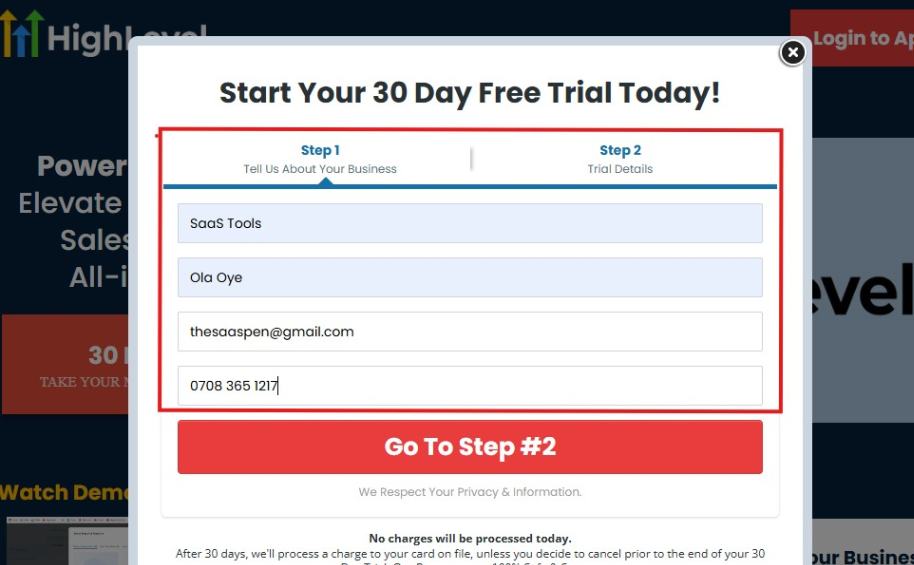
If you take a closer look at the image above, you will see that you need to supply your:
- Business name
- Company name
- Company email
- Phone number
Supply all the pieces of information and click on “Go To Step #2.”
On the next page, you will be required to select the plan you want to opt in for.
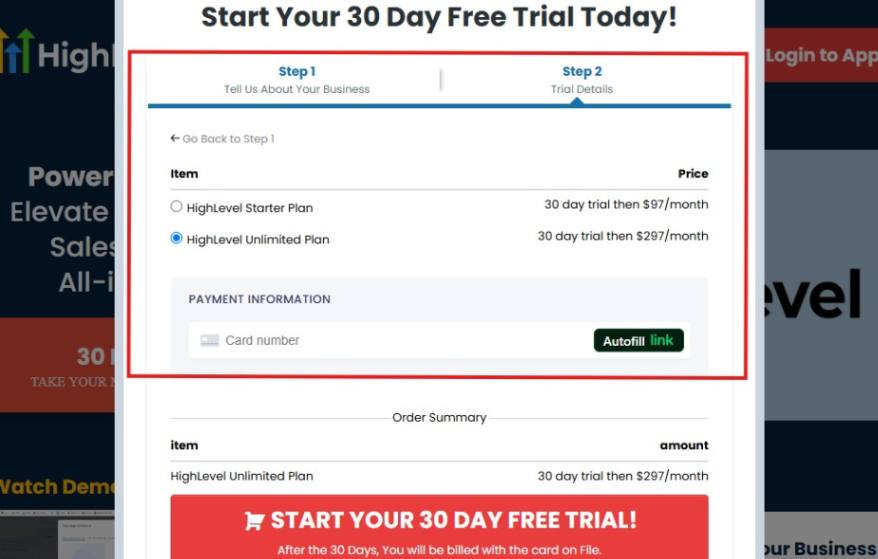
As you can see from the image above, you can either choose from:
- HighLevel Starter Plan
- HighLevel Unlimited Plan
Select the HighLevel Unlimited Plan and continue – you can always upgrade to the SaaS Mode later if you want that or downgrade.
The next thing you want to do is supply your credit card information.
Note: You will not be debited anything today until the end of your trail that is if you don’t cancel. Keep in mind that $1 will be debited and refunded back instantly into your account just to test your card is working.
After you have supplied the information accordingly, click on “START YOUR 30 DAY FREE TRIAL” and you will be asked to confirm you’re not a robot.
After that, the page below will pop up.
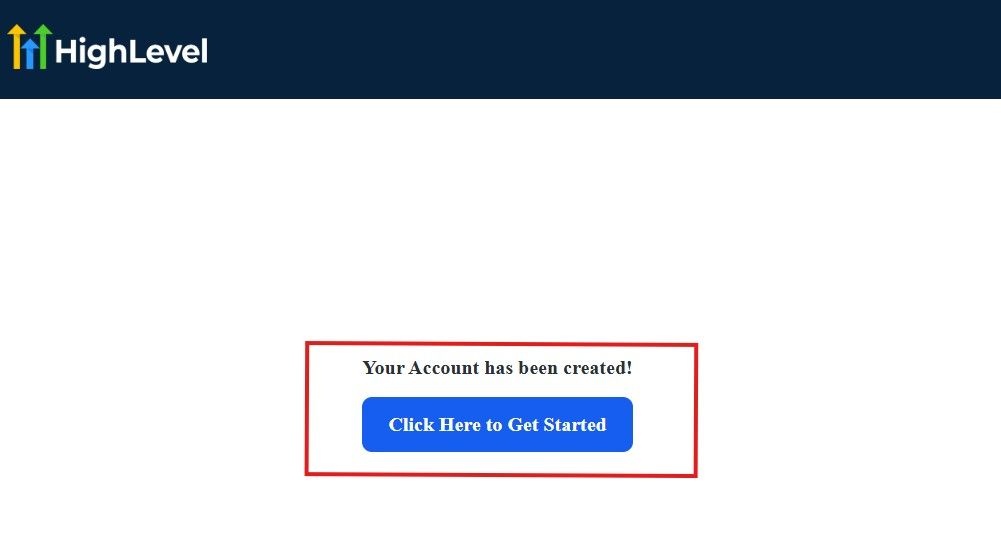
The image above says, “Your Account has been created!” Now, you need to click on the blue button that says “Click Here to Get Started.“
Click on the blue button to start your onboarding process.
Step 2: GoHighLevel Onboarding Process
The onboarding questions help GoHighLevel understand why you have signed up for the platform so that it can tailor your experience accordingly.
This is all you need to do:
After you click on the blue button above, the page below will pop up.
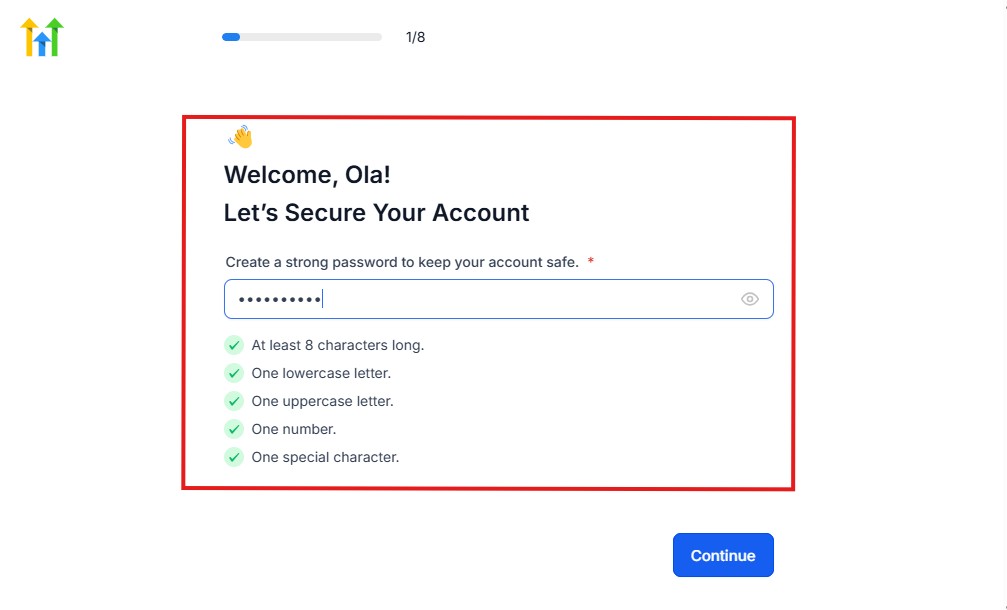
As you can see above, you need to set up your password, and the password has to be:
- At least 8 characters long
- One lowercase letter
- One uppercase letter
- One number
- One special character
If you have input the password and it matches all the description above, everything will be green just the way it’s in the image.
Click on “Continue” there after, and the image below will pop up.
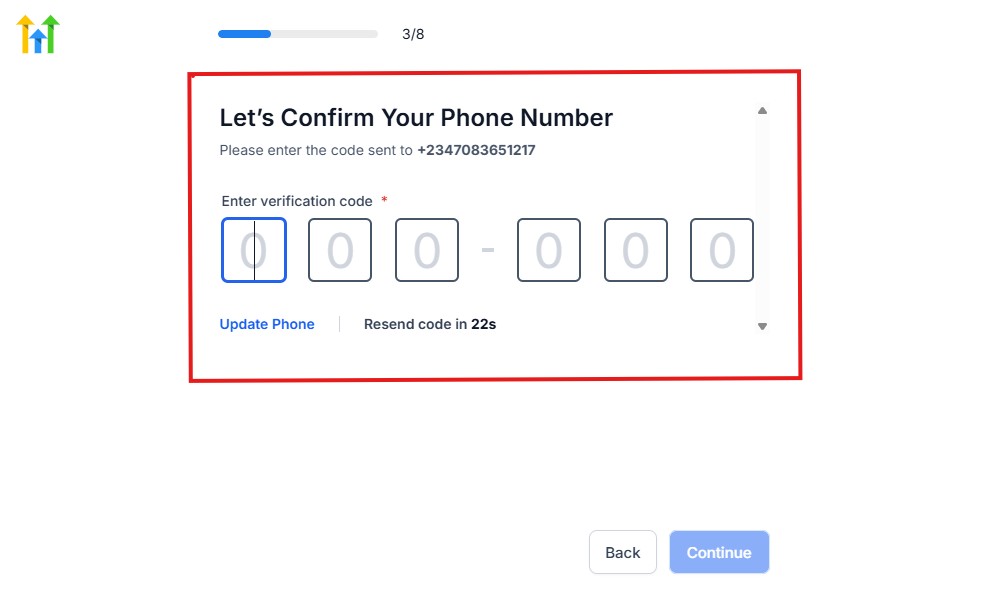
As you can see, a code will be sent to you to confirm your email address and phone number. The process is the same for the 2.
The next thing you need to do is to select how you plan to use GoHighLevel, as you can see below.
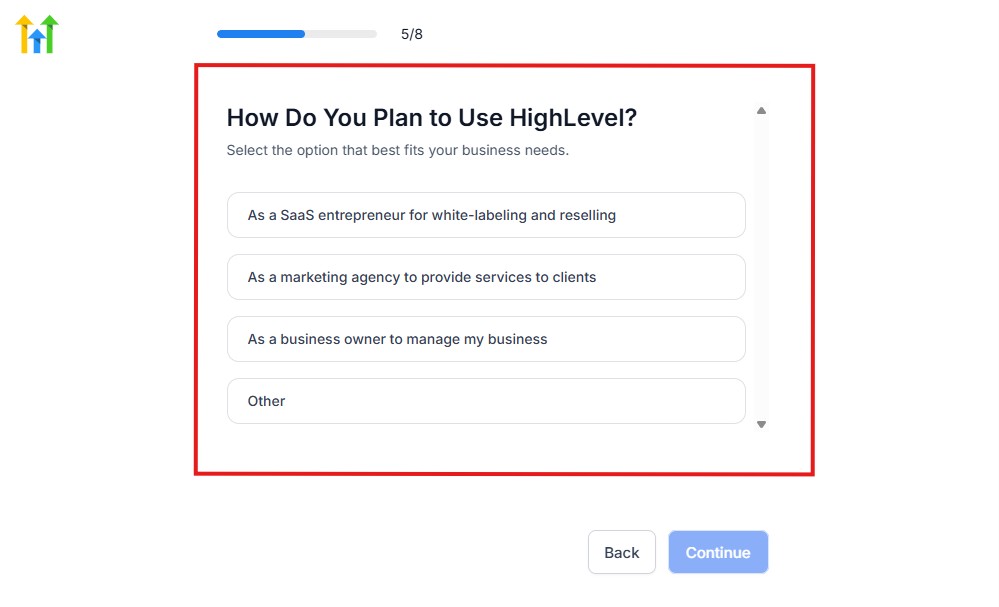
Select what best matches why you have signed up and click on Continue.
On the next page, you will be asked if you plan to resell GoHighLevel or not.
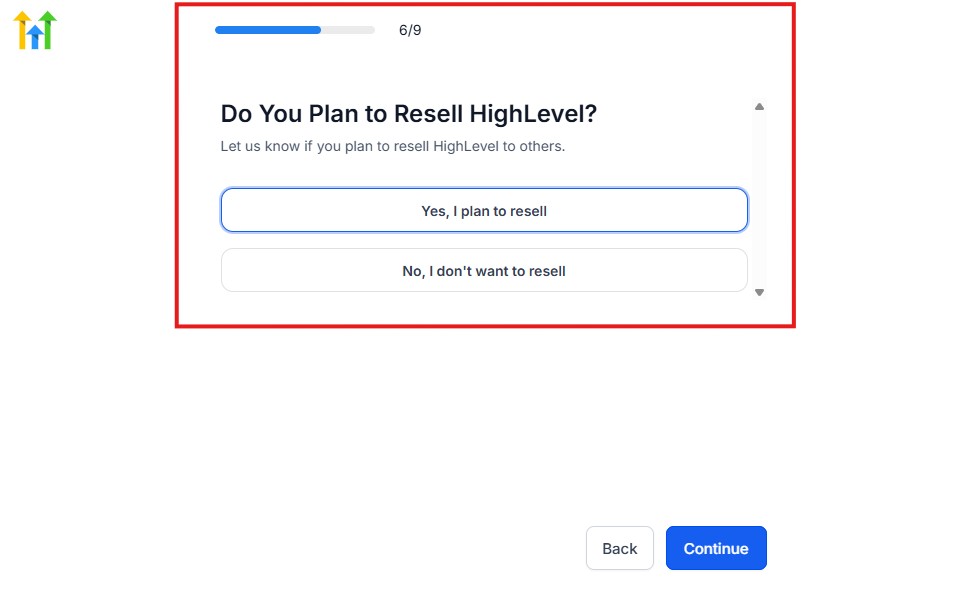
Select the answer based on the reason why you have signed up and click on “Continue”
Then, the page below will pop up.
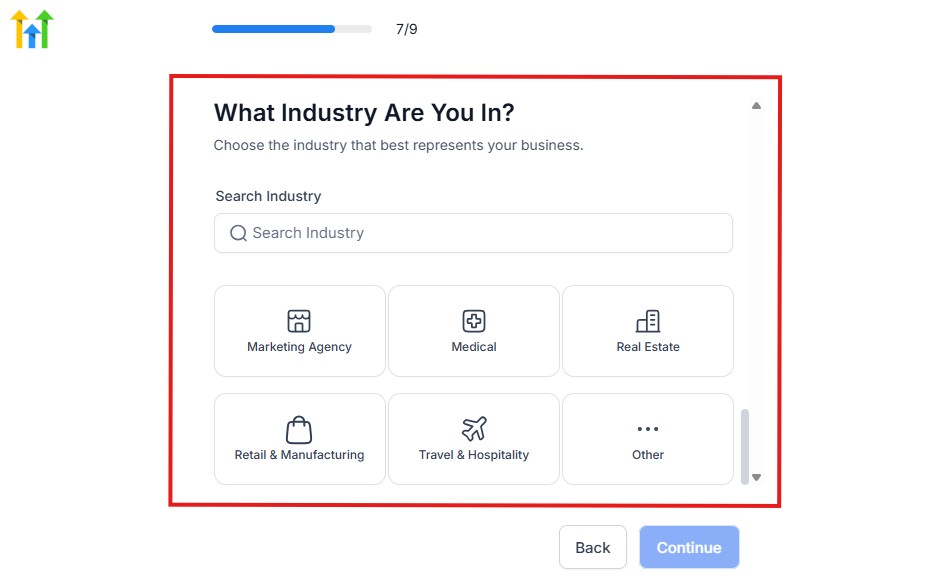
From the image above, you need to select the industry that you fall on. You can also make use of the search button if you can’t find it right away.
Then, click on continue after you select your industry.
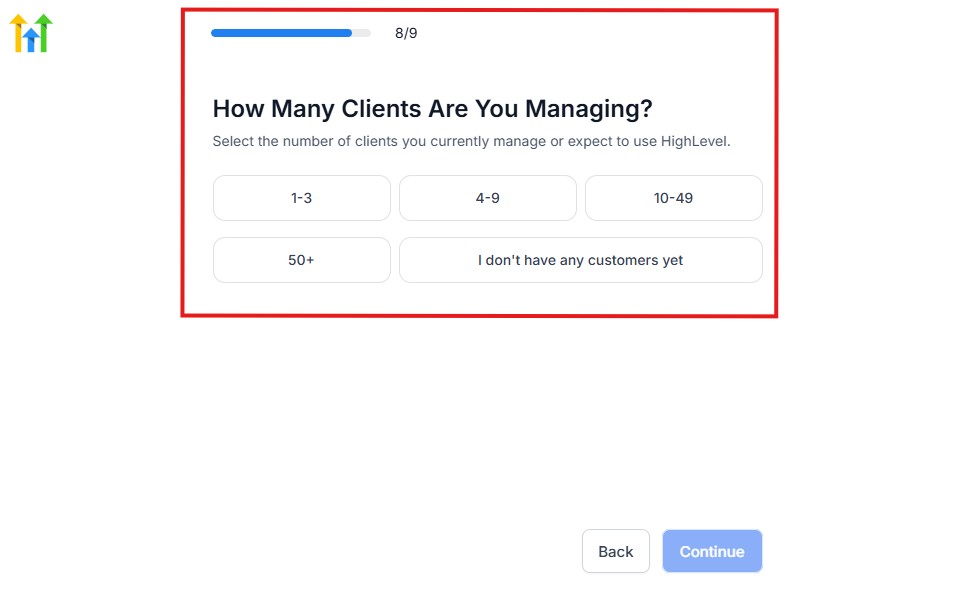
Then, the next thing you need to do is to select the number of clients that you currently have. Select “I don’t have any customers” yet if you currently don’t have one.
On the next page, you will be asked to select the platforms you currently use that you can integrate with GoHighLevel right away.
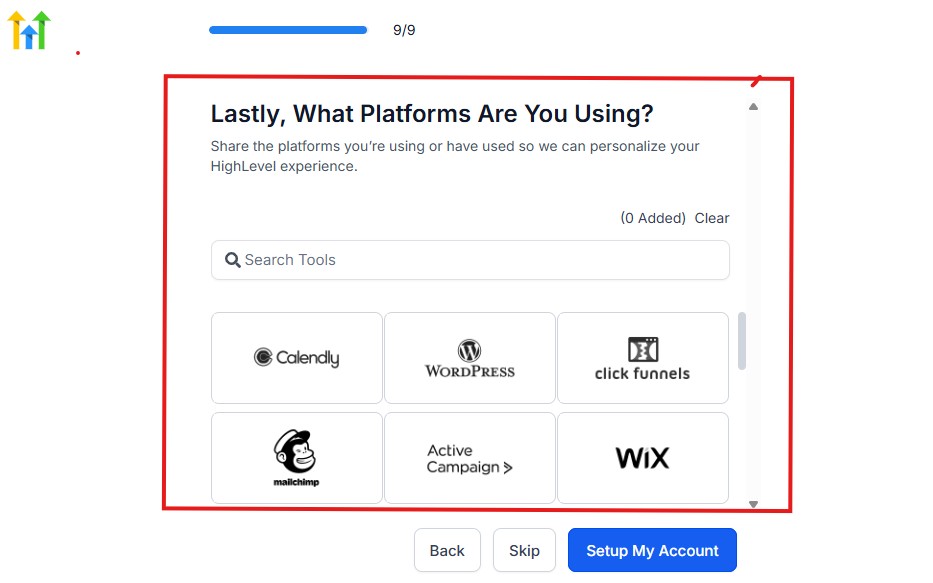
You can use the search button to search for any tools you want to add to your GoHighLevel account.
You can also skip this process and do it later if you want to.
After that, the page below will pop up.
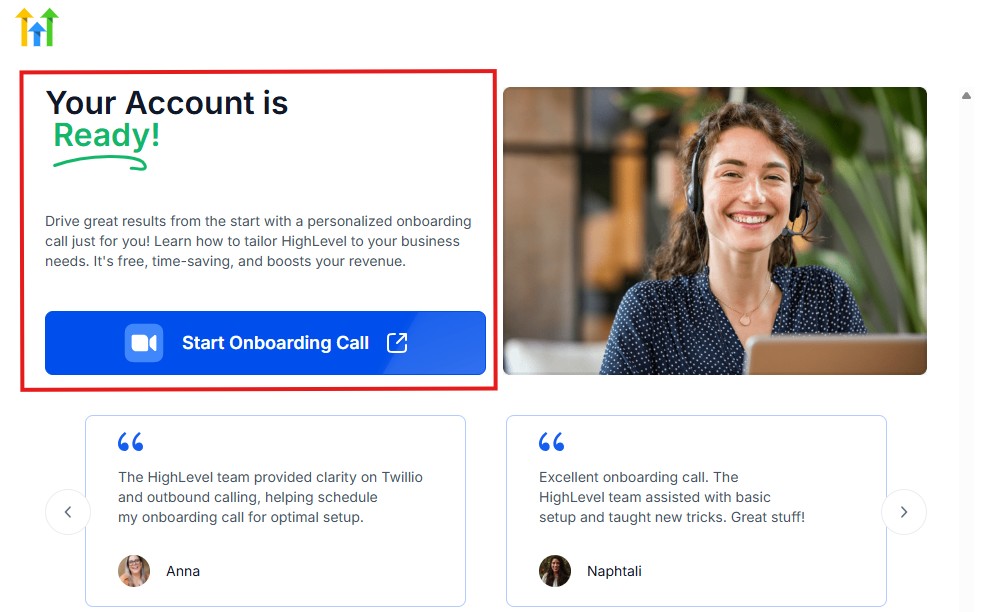
The page above says your account is ready and is asking you to “Start Onboarding Call.”
The “Onboarding Call” allows you to connect with the Go High Level team in order to discuss your account set-up process and everything regarding your plan in using HighLevel.
If you don’t want to start the “Onboarding Call” yet, just stroll down, and you will see the button in the image below.
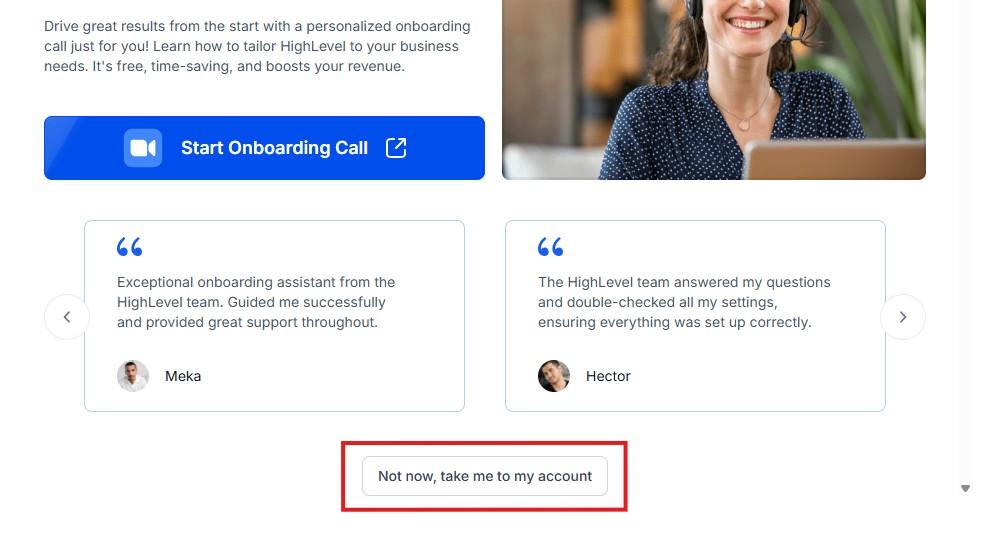
Simply click on “Not now, take me to my account“, and you will have access to your dashboard.
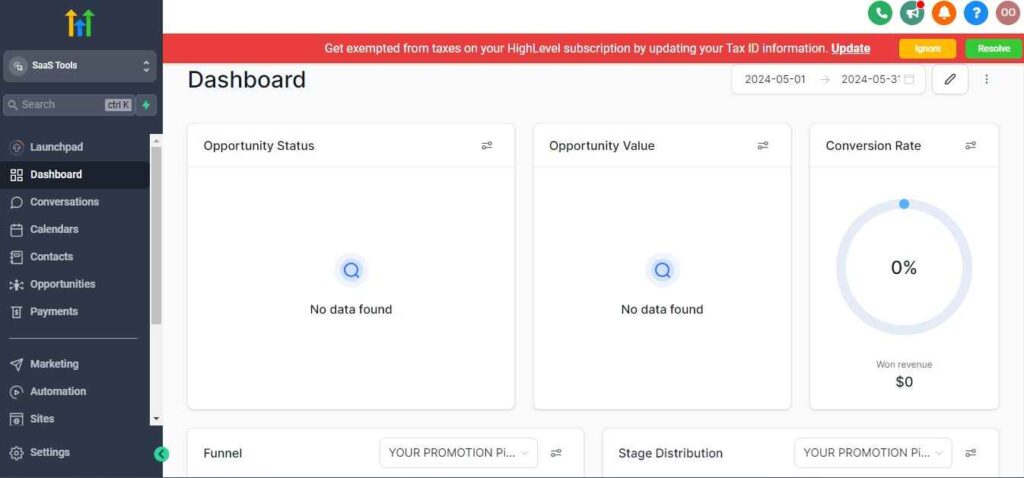
Note: If you have indicated that you want to resell HighLevel, you would have access to the agency dashboard by default, which looks like the image below.
But if you didn’t indicate interest in reselling GHL, your dashboard will look like the image below.
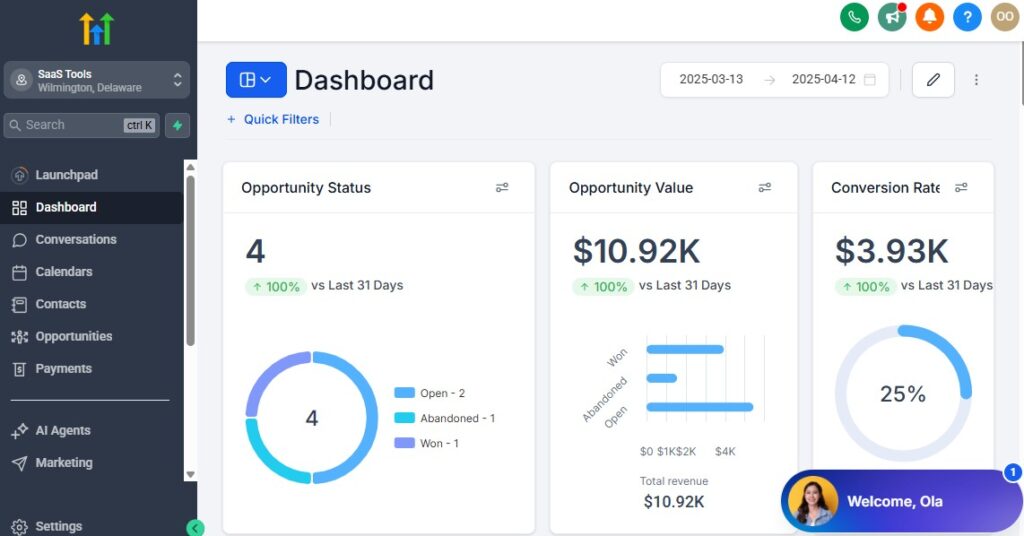
You can switch between these dashboards at any time.
The data you see on the dashboard above are not real data, they’re snapshots that you can use to kickstart your account setup process.
I want to say congratulations. You have successfully set up your Go High Level account.
Step 3: Choose Your Account Setup & Connect Your Essentials
Start by connecting the core tools your restaurant uses every day:
- Your domain (for landing pages, menus, and reservation pages)
- Google or Outlook calendar (to sync reservations)
- Email provider (Gmail, Outlook, or custom domain email)
- Phone number (for SMS confirmations & updates)
- Payment processor (Stripe recommended for deposits & catering fees)
This creates the foundation for your entire system.
Step 4: Create Custom Pipelines for Reservation & Customer Flow
Set up pipelines to manage every type of customer interaction:
- New Reservation Inquiry
- Reservation Confirmed
- Reservation Completed
- Catering Inquiry
- Catering Proposal Sent
- Catering Confirmed
- Takeout/Delivery Order Inquiry
- Event Booking Inquiry
- VIP or Loyalty Customer
This gives you full visibility into guest flow and business activity.
Step 5: Set Up Your Restaurant Calendars
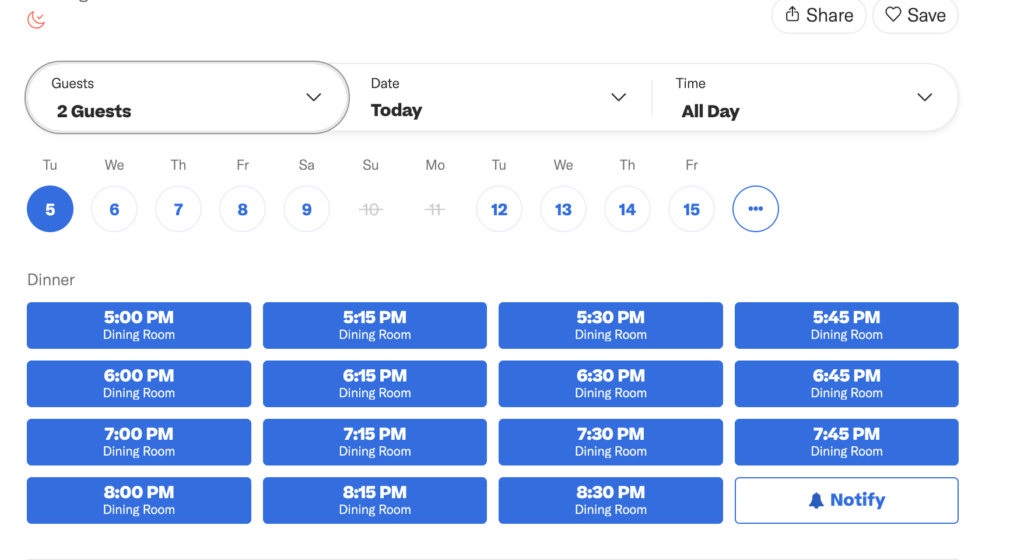
Create separate calendars if needed:
- Dine-in reservations
- Large parties
- Catering consultations
- Private events
- Chef’s table or tasting menus
- Takeout order pickups (optional)
Each calendar can have unique availability, time blocks, and buffer times.
Step 6: Connect Your Phone System for SMS Updates
Set up your restaurant’s SMS number to:
- Confirm reservations
- Send waitlist updates
- Notify guests when their table is ready
- Share order status
- Deliver catering confirmations
- Send promotional offers
Guests respond faster to texts than calls.
Step 7: Build Your Restaurant Forms
Create forms for:
- Reservations
- Catering requests
- Private event inquiries
- Takeout or pre-order forms
- Customer feedback
- Loyalty program signup
- VIP or special-event registration
These forms feed directly into your CRM for easy follow-up.
Step 8: Upload Your Digital Menus & Restaurant Assets
Add key files your customers may need:
- Food menu
- Drinks menu
- Catering menu
- Holiday specials
- Event pricing
- Seasonal promotions
- Buffet or brunch menus
These can be sent automatically after inquiries.
Step 9: Set Up Your Email & SMS Templates
Create reusable templates for:
- Reservation confirmations
- Catering proposals
- Order ready notifications
- Thank-you messages
- Review requests
- Loyalty program invites
- Birthday or anniversary offers
Templates save you and your staff hours of work every week.
Step 10: Organize Your Staff Access & Roles
Assign roles for:
- Reservation manager
- Host/hostess
- Catering & events manager
- Marketing team
- Restaurant owner or admin
Everyone gets the right access without seeing everything.
Step 11: Turn On Notifications for Important Actions
Activate instant alerts for:
- New reservations
- Catering inquiries
- Event requests
- VIP customer bookings
- Large-party confirmations
- Menu downloads
- Google review submissions
Your team never misses an important update.
Step 12: Set Up Your Restaurant Dashboard
Customize your dashboard to show:
- Daily reservation count
- Upcoming catering events
- New customer inquiries
- Table flow status
- Marketing performance
- Review ratings
- Loyalty program sign-ups
You get a complete snapshot of your restaurant’s daily operations.
Managing Guests, Reservations & Customer Profiles With the CRM
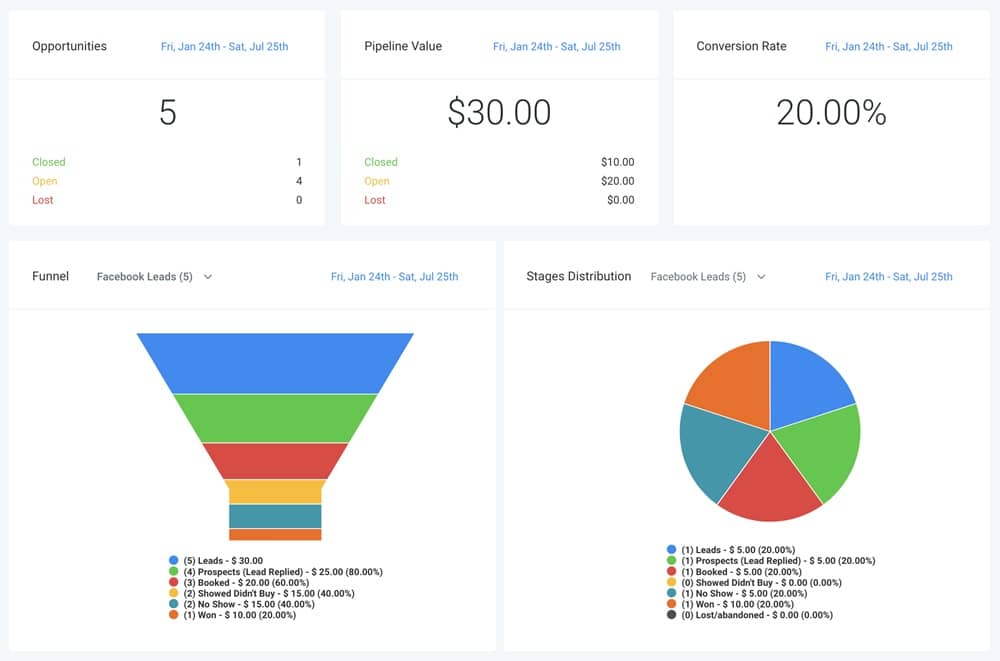
GoHighLevel’s CRM gives you a complete view of your guests, reservations, catering clients, event inquiries, and loyal customers – all in one place.
Instead of juggling notebooks, reservation books, WhatsApp messages, and scattered spreadsheets, you can manage your entire guest flow with a clean, organized system.
Here’s how to use the CRM to streamline your restaurant’s front-office and guest experience.
Organize Every Guest Into Clear CRM Pipelines
Create pipelines for each part of your restaurant operations:
Dine-In Reservation Pipeline
- New inquiry
- Confirmed
- Seated
- Completed
- Missed
Catering Pipeline
- New request
- Proposal sent
- Negotiation
- Confirmed
- Event completed
Private Event Pipeline
- Inquiry received
- Menu selection
- Deposit collected
- Event confirmed
- Event completed
Loyalty/VIP Guest Pipeline
- Signed up
- Active
- Inactive
- Reward pending
You always know where each guest stands and what needs attention.
Track Detailed Guest Profiles for Better Service
Every guest gets a complete profile inside the CRM, including:
- Name and contact details
- Reservation history
- Table preferences
- Favorite meals or drinks
- Allergy information
- Birthday or anniversary dates
- VIP or loyalty status
- Catering/event history
- Notes from staff
This helps your restaurant deliver personalized, memorable service.
Manage Reservations From a Central Dashboard
Your team can view and manage all reservations in one spot:
- Daily reservation list
- Time slots
- Table allocations
- Special requests
- Guest notes
- Walk-in additions
- Status updates (confirmed, seated, completed)
This eliminates confusion at the front desk or host stand.
Add Guests to Segments Based on Behavior
Segment your guests to understand and market to them better:
- Weekly regulars
- Special occasion customers
- Takeout-only guests
- Large-party bookers
- Catering clients
- High spenders
- Inactive guests
- First-time visitors
This helps you tailor messages and promotions that fit each group.
Centralize Walk-Ins & Last-Minute Reservations
Your team can log:
- Walk-in guests
- Estimated wait times
- Table assignments
- “Table ready” notifications
- Last-minute adds or changes
Everything stays tracked and updated inside your CRM.
Use Tags to Classify Guests Quickly
Assign tags such as:
- “VIP”
- “Allergies”
- “Birthday guest”
- “Catering lead”
- “Wine lover”
- “Brunch regular”
- “Corporate client”
- “High spender”
Tags help you personalize service and promotions instantly.
Store Catering & Event Details in the CRM
For catering clients, attach:
- Menu selections
- Guest count
- Event date and time
- Location
- Pricing & deposits
- Notes from calls
- Contract documents
- Staffing needs
Everything stays organized for smooth event execution.
Track Guest Communication in One Place
Every message appears inside GoHighLevel:
- SMS conversations
- Email replies
- WhatsApp (if integrated)
- Web chat inquiries
- Social media messages
Your staff can respond from one inbox instead of switching apps.
Use Automated Status Changes for Efficiency
Automatically move guests through the pipeline when actions occur:
- Reservation confirmed
- Deposit collected
- Catering proposal sent
- Menu downloaded
- Guest seated
- Event completed
This reduces manual updates and keeps your CRM accurate.
Keep a Record of Inactive or At-Risk Guests
GoHighLevel shows you when guests:
- Haven’t visited in months
- Open but don’t reply to messages
- Cancel repeatedly
- Drop off after initial visits
You can target them with specific re-engagement campaigns later.
Track Customer Lifetime Value (CLV)
See how much each guest has spent across:
- Dine-in visits
- Takeout orders
- Catering bookings
- Private events
- Seasonal promotions
This helps you identify VIP customers and reward loyalty.
Automating Workflows for Restaurants (Bookings, Waitlists, Follow-Ups)
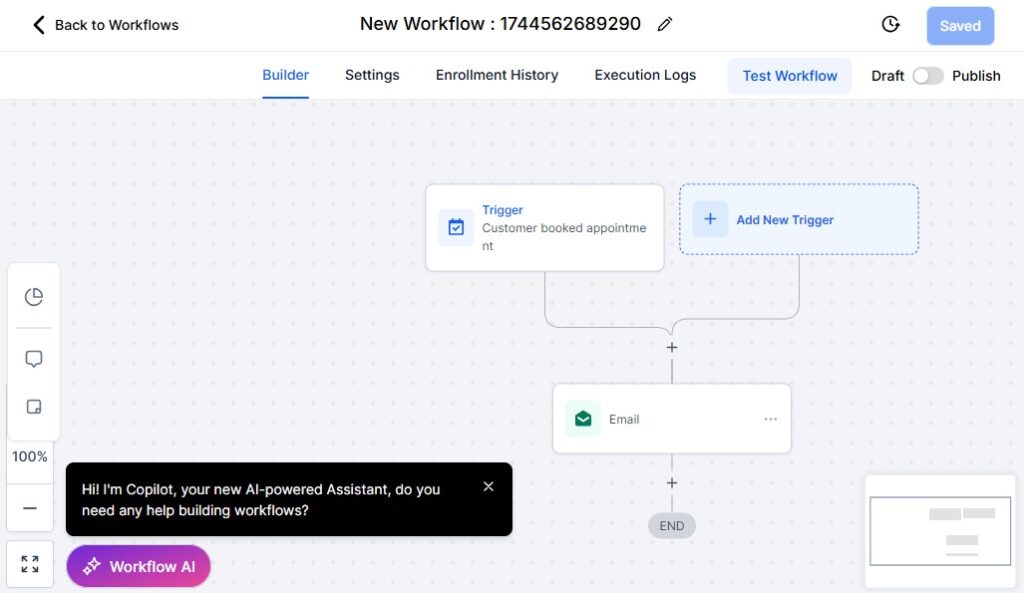
Restaurants run smoother when repetitive tasks are handled automatically.
Instead of your staff chasing reservations, managing waitlists, sending confirmations, or following up on catering requests, GoHighLevel can automate all of these processes – giving your team more time to focus on great service.
Here’s how to build powerful restaurant workflows that save time and improve your guest experience.
Automate Reservation Confirmations
When a guest books through your website, landing page, or a form, automate:
- Instant SMS confirmation
- Email confirmation
- Calendar invite
- Table or section assignment
- Staff notification
Guests receive clear details without anyone making a manual call.
Automate Reminder Messages Before Reservation Time
Reduce no-shows with automated reminders:
- 24-hour reminder SMS
- 3-hour reminder SMS
- “Reply 1 to confirm” message
- Parking or arrival instructions
- Menu link for review
- Special event reminders (live band, themed nights, etc.)
This keeps guests informed and committed.
Automate Waitlist Updates – GoHighLevel for Restaurants
When the restaurant is full, GoHighLevel can automate:
- “You’ve been added to the waitlist” message
- Estimated wait time
- “Your table is ready” notification
- Expired waitlist alerts
- Auto-remove if guest doesn’t respond
No more shouting names across the restaurant.
Automate Takeout & Delivery Status Updates
For restaurants offering takeout or delivery, automate:
- Order received confirmation
- Order in progress
- Order ready for pickup
- Delivery on the way (manual entry required)
- Thank-you message with a review link
This gives customers a smooth ordering experience.
Automate Catering Inquiry Workflows
For catering or large-party bookings, automate:
- Instant reply to inquiries
- Catering menu delivery
- Survey to collect event details
- Proposal or quote request form
- Staff task assignment
- Follow-up reminders
- Deposit payment link
This creates a professional, fast experience for high-value clients.
Automate Private Event Booking Processes
Automate steps such as:
- Venue availability confirmation
- Event detail questionnaire
- Menu selection form
- Deposit request
- Staff notifications
- Event reminders
- Post-event thank-you message
This keeps your events organized and consistent.
Automate Follow-Up Message After Visits
After dine-in, takeout, or delivery, automate:
- “Thank you for dining with us”
- “We’d love your feedback”
- Review link (Google, Facebook, Yelp)
- Invitation to join the loyalty program
- Offer for next visit (optional)
Follow-ups build repeat customers.
Automate Abandoned Reservation Recovery
If someone starts the reservation process but doesn’t finish:
- Send a reminder to complete booking
- Offer alternative time slots
- Provide phone number for quick booking
This recovers lost reservations effortlessly.
Automate Loyalty & VIP Program Enrollment
Automatically enroll guests in loyalty programs after:
- 2nd visit
- First online order
- Large-party booking
- High spending threshold
Send welcome messages and reward updates automatically.
Automate Birthday & Anniversary Offers
GoHighLevel can send:
- Birthday discounts
- Anniversary dinner invitations
- Celebration packages
- Personalized messages
Guests love restaurants that remember important dates.
Automate Menu Delivery & Upsell Messaging
After inquiries, automatically send:
- Food menu
- Drink menu
- Seasonal specials
- Chef’s recommendations
- Add-ons or promotions
This encourages higher spending and improved guest decisions.
Automate Staff Tasks & Internal Workflows
Trigger internal tasks such as:
- Prep table for large party
- Assign server or bartender
- Notify kitchen of special requests
- Alert staff of allergies
- Start order prep for takeout
- Notify manager of VIP arrival
This keeps operations smooth and coordinated.
Automate Guest Inactivity Re-Engagement
For guests who haven’t visited in a while:
- Send “We miss you” messages
- Offer limited-time deals
- Invite to events or theme nights
- Promote new menu items
- Suggest weekend reservations
This brings customers back consistently.
Reservation Scheduling for Dine-In, Takeout, Deliveries & Special Events
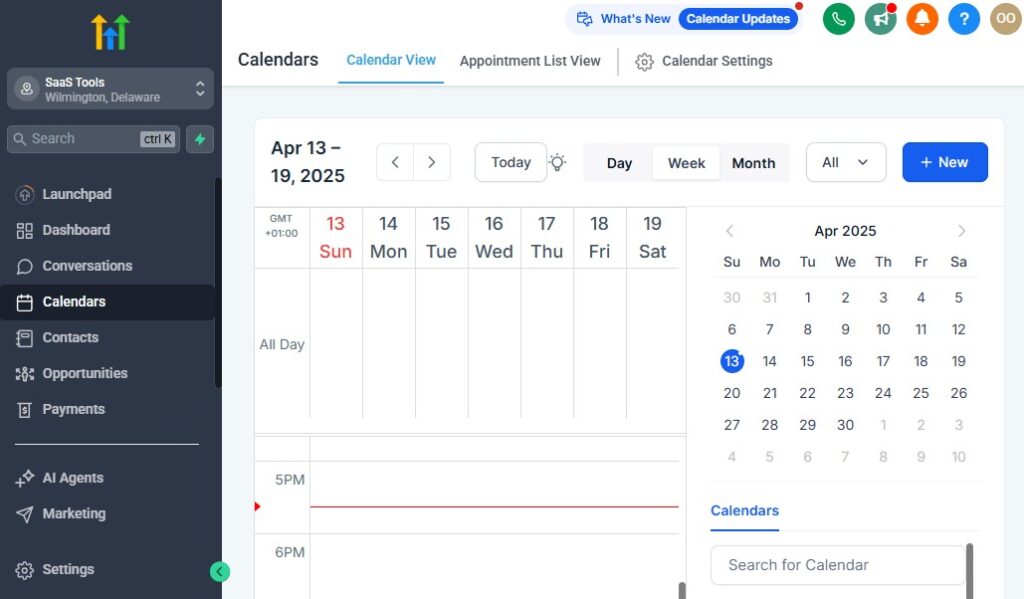
Your reservation system is the heartbeat of your restaurant.
Whether you’re managing dine-in bookings, takeout pickups, delivery windows, catering consultations, or private event scheduling, GoHighLevel gives you a clean, automated, and flexible scheduling system that keeps everything running smoothly – without overwhelming your staff.
Here’s how to set up and manage all your restaurant scheduling inside GoHighLevel.
Create Separate Calendars for Each Type of Booking
Different services require different time blocks and preparation. Set up dedicated calendars for:
- Dine-in reservations
- Takeout pickups
- Delivery scheduling
- Catering consultations
- Private events or large parties
- Brunch vs dinner service
- Chef’s table or tasting menus
Each calendar can have its own availability, buffers, instructions, and capacity limits.
Customize Availability Based on Your Restaurant Hours
Inside the calendar settings, set:
- Opening and closing hours
- Break times
- Last seating times
- Prep time before and after bookings
- Peak hours (to limit bookings)
- Staff availability if needed
This ensures guests only book times your kitchen and floor staff can handle.
Add Time Buffers to Maintain Smooth Service Flow
GoHighLevel lets you add:
- Table turnover buffers
- Prep time before large groups
- Additional time before catering calls
- Cleanup time after private events
This prevents scheduling conflicts and keeps service consistent.
Allow Guests to Book Online Through Your Website & Landing Pages
Guests can book from:
- Your website reservation page
- Facebook and Instagram links
- Google Business Profile
- SMS campaigns
- QR codes on menus
- Email promotions
Online reservations reduce front-desk pressure and increase accuracy.
Use Custom Reservation Forms to Capture Important Details
Add form fields such as:
- Number of guests
- Preferred seating area
- Special requests (birthday, anniversary, VIP needs)
- Allergies or dietary restrictions
- Occasion type (date night, business dinner, etc.)
- Contact details
- Notes for staff
This helps your team deliver a personalized dining experience.
Send Automated Reservation Confirmations
As soon as a guest books a spot, GoHighLevel can automatically send:
- SMS confirmation
- Email confirmation
- Calendar invite
- Table instructions
- Parking or arrival details
- Pre-order menu links (optional)
Guests feel informed instantly.
Reduce No-Shows With Automated Reminder Messages
Send reminders like:
- 24-hour reminder
- 3-hour reminder
- “Reply 1 to confirm your table”
- “Running late? Let us know.”
- Reminder about special events or live music
Consistent reminders improve show-up rates.
Use Smart Capacity Controls for Busy Hours
You can set:
- Maximum bookings per time slot
- Limited reservations during peak hours
- Blackout dates (holidays, private rentals)
- Special menu or event blocks (holiday brunch, wine night, etc.)
This helps you maintain kitchen efficiency and table availability.
Schedule & Manage Takeout Orders With Ease
For takeout pickups, GoHighLevel helps you:
- Create pickup time slots
- Limit the number of orders per slot
- Send automatic “Order ready” messages
- Trigger kitchen notifications
- Offer upsell recommendations (drinks, desserts, sides)
Everything stays organized and predictable.
Manage Delivery Windows for Better Efficiency
If you handle your own deliveries, GoHighLevel helps you:
- Set delivery time windows
- Limit orders by distance or volume
- Notify customers when the driver leaves (manual trigger)
- Send receipts and order summaries
- Automate follow-up feedback requests
This creates a smoother delivery experience.
Schedule Catering Consultations & Menu Planning Calls
For catering clients, your calendar can provide:
- Consultation slots
- Menu tasting appointments
- Event planning calls
- Deposit collection flows
- Follow-up reminders
This helps you close more catering deals professionally.
Manage Private Event & Large Party Bookings
GoHighLevel helps you handle:
- Booking requests
- Venue availability
- Menu reviews
- Deposit collection
- Final guest count reminders
- Event follow-up
You can automate most steps and track everything inside the CRM.
Notify Staff Automatically for Each New Booking
Set up instant notifications when:
- A reservation is made
- A catering call is booked
- A private event request comes in
- Table size exceeds certain limits
- Special dietary requests appear
This keeps your kitchen and floor team ready.
Use a Centralized Calendar to View All Restaurant Activity
Your staff can see:
- Reservations by time slot
- Catering schedule
- Private events
- Takeout pickup windows
- Delivery assignments
- VIP bookings
- Daily booking volume
Everyone stays aligned and organized.
Building High-Converting Restaurant Landing Pages & Menu Funnels
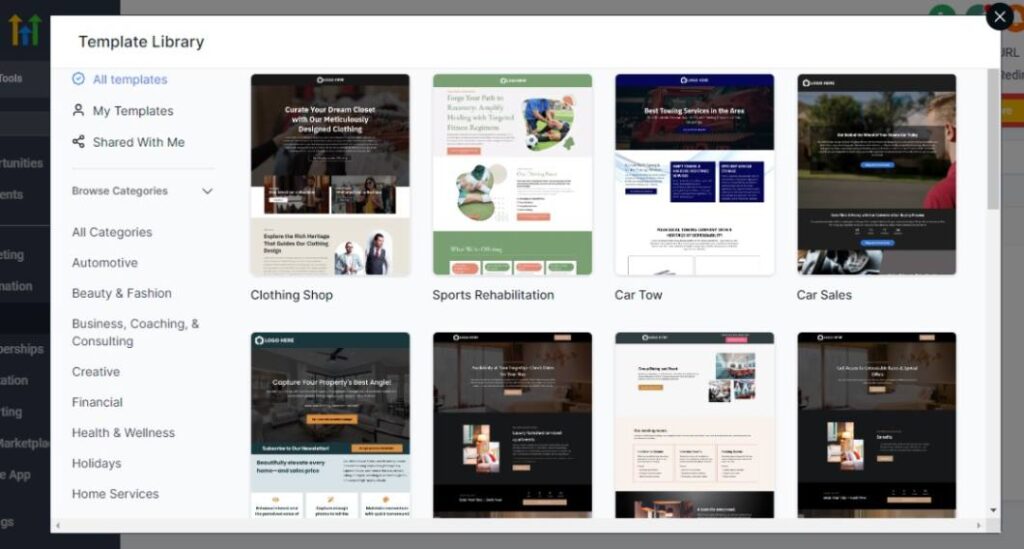
Your landing pages and menu funnels are often the first impression guests get of your restaurant.
Whether someone is checking your menu, booking a table, requesting catering, or signing up for a special event, GoHighLevel helps you build beautiful, high-converting pages that turn visitors into paying customers.
Here’s how to create powerful restaurant landing pages and funnels that boost reservations, orders, and guest engagement.
Create Service-Specific Landing Pages for Each Restaurant Offering
Instead of sending everyone to one generic homepage, build separate landing pages for:
- Dine-in reservations
- Takeout or delivery orders
- Catering services
- Private events or party bookings
- Holiday specials (Christmas, Valentine’s, Mother’s Day, etc.)
- Seasonal or limited-time menus
- Wine nights, tasting menus, or chef events
- Loyalty program sign-ups
Each page is tailored to the exact goal you want guests to take.
Use Clear, Mouth-Watering Headlines That Sell the Experience
Your headline should immediately communicate value and excite potential guests.
Examples:
- “Reserve Your Table – Fresh Meals, Amazing Atmosphere, Unforgettable Moments.”
- “Order From Your Favorite Restaurant – Fast Pickup, No Hassle.”
- “Book Catering for Your Event – Delicious Food, Stress-Free Planning.”
- “Join Our VIP List – Exclusive Deals and Priority Reservations.”
Strong headlines improve conversions instantly.
Add Professional Food Photos to Increase Appetite Appeal
High-quality images dramatically improve engagement. Include:
- Signature dishes
- Desserts
- Restaurant interior
- Bar or drink selection
- Catering setup examples
- Special event photos
Good visuals make your food irresistible.
Include Strong Call-to-Action Buttons
Make it easy for visitors to take the next step:
- “Book a Table”
- “Order Now”
- “Request Catering Quote”
- “Reserve Your Spot”
- “See Menu”
- “Join Our VIP List”
Clear, action-focused buttons convert visitors faster.
Feature Guest Reviews & Social Proof
Build trust by displaying:
- Google reviews
- Customer testimonials
- Social media shoutouts
- Food critic mentions
- Awards or certificates
- Restaurant ratings
Guests trust restaurants with strong social proof.
Showcase Your Menus With Easy-to-Browse Sections
Your landing pages should include:
- Food menu
- Drinks menu
- Catering menu
- Specials or promotions
- Pricing for events or packages
Add buttons like “Download Menu” or “View Full Menu.”
Use Simple Booking & Ordering Forms
Create forms with only the essential fields:
- Name
- Phone
- Number of guests
- Date & time
- Occasion type
- Special requests
Short forms convert better and reduce drop-offs.
Use Upsell & Add-On Sections to Increase Average Order Value
You can upsell:
- Drinks or cocktails
- Desserts
- Appetizers
- Special add-ons
- Catering packages
- Wine pairings
Upsells work extremely well in funnels.
Add “How It Works” Sections to Guide Guests
Explain your process clearly:
For dine-in reservations:
- Book a table
- Get confirmation
- Arrive & enjoy
For catering:
- Submit request
- Review proposal
- Confirm menu
- We handle the rest
Clarity increases trust and reduces hesitation.
Embed Maps, Hours & Contact Information
Make it easy for guests to visit or contact you:
- Google Map embed
- Hours of operation
- Pickup/delivery instructions
- Parking details
- Phone number
- WhatsApp or SMS link
Accessibility improves conversions.
Use Thank-You Pages to Move Guests Into the Next Step
After submitting a form, redirect guests to a thank-you page with:
- Confirmation message
- Reservation details
- Menu links
- Special offers
- VIP sign-up
- Review request
- Social media follow buttons
This keeps guests engaged on your platform.
Build Specialized Funnels for Promotions & Events
Funnels work extremely well for:
- Holiday dinners
- Live music nights
- Wine tasting events
- Chef specials
- Brunch weekends
- Seasonal menus
- Loyalty reward campaigns
Funnels convert better than regular web pages because they focus on one action.
Connect Landing Pages to Automated Follow-Up Workflows
After a guest fills a form, GoHighLevel can automatically:
- Send a confirmation message
- Deliver menus
- Request more details (for catering)
- Schedule reservation
- Assign staff tasks
- Add to a VIP or loyalty sequence
Automation completes the experience professionally.
Running Email & SMS Campaigns for Promotions, Engagement & Loyalty
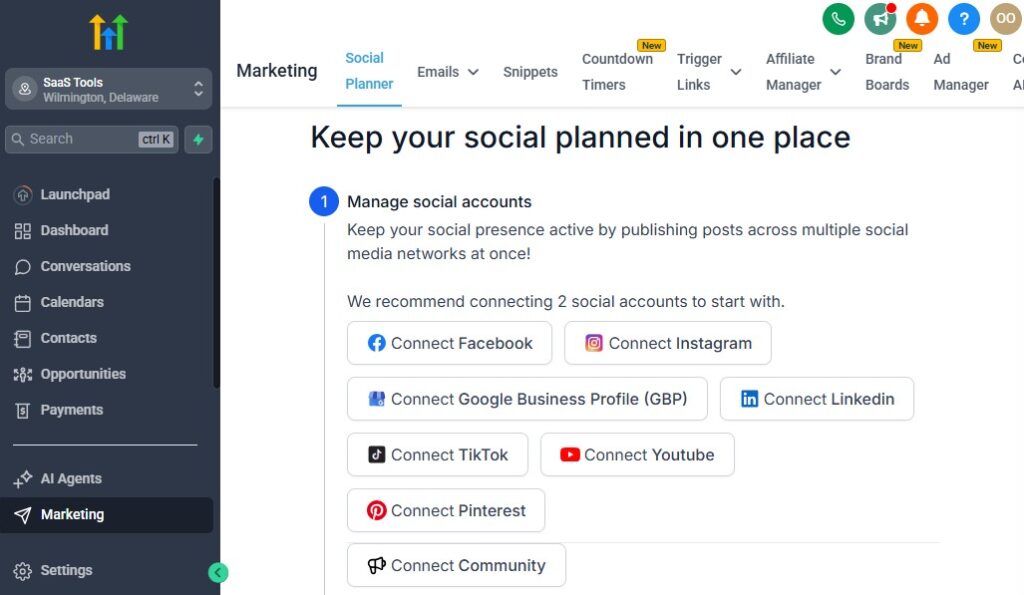
Email and SMS campaigns are powerful tools for restaurants.
They help you bring guests back, promote special events, fill slow days, launch new menus, drive takeout orders, and build long-term loyalty.
With GoHighLevel, you can automate these messages so your restaurant stays top-of-mind without constant manual effort.
Here’s how to use email and SMS to keep your guests engaged and your tables full.
Run Weekly or Monthly Promotion Campaigns
Use GoHighLevel to send out:
- New menu announcements
- Seasonal specials
- Happy hour promotions
- Weekend brunch reminders
- Limited-time discounts
- Holiday event invites
- Chef’s special dishes
Promotions give guests a reason to visit again sooner.
Send Automated Reservation Confirmation & Reminder Messages
For dine-in reservations or events, automatically send:
- Confirmation SMS or email
- 24-hour reminder
- 3-hour reminder
- Table instructions
- Parking or arrival details
- Menu preview
Guests appreciate clear communication.
Promote Takeout & Delivery Deals
Send campaigns that boost takeout, such as:
- “Order now and get 10% off pickup.”
- “Free dessert with any delivery order.”
- “Today’s special combo is now available.”
- “Your favorite dishes delivered to your door.”
SMS works especially well for last-minute cravings.
Create Loyalty & VIP Engagement Campaigns
Reward loyal guests by sending:
- Exclusive VIP offers
- Priority access to events
- Birthday or anniversary gifts
- Free appetizer or drink rewards
- Points updates (if you run a points system)
This keeps your best customers coming back often.
Run Holiday & Seasonal Event Campaigns
Restaurants thrive on seasonal excitement. Promote:
- Valentine’s Day dinner
- Christmas brunch
- Mother’s Day specials
- New Year’s Eve events
- Summer BBQ nights
- Wine tasting evenings
These campaigns generate high-value bookings.
Use Automated Birthday & Anniversary Messages
Automatically send special messages:
- Personalized birthday wishes
- Anniversary celebration invitation
- A complimentary dessert offer
- A discount voucher
Guests love receiving thoughtful, personalized touches.
Send Catering & Private Event Follow-Up Campaigns
For catering clients, send:
- Menu breakdowns
- Proposal reminders
- Upsell suggestions (desserts, bar services, extra staff)
- Venue options
- Event timeline updates
- Post-event thank-you emails
These campaigns help you win more large events.
Promote Online Menu Updates & New Dish Releases
Whenever you add or change items on your menu, send an update:
- “New dish alert!”
- “Try our new seasonal specials.”
- “Chef just added something amazing.”
These updates keep guests excited and curious.
Re-Engage Inactive Guests Automatically
If a guest hasn’t visited in 30, 60, or 90 days, send:
- “We miss you!” message
- Special comeback offer
- Invitation to upcoming events
- Menu or drink specials
Re-engagement drives repeat visits consistently.
Send Automated Review Requests to Build Your Reputation
After a visit or order, trigger:
- “How was your experience?”
- Review link for Google, Yelp, Facebook
- Short feedback survey
More reviews mean higher local ranking and more organic bookings.
Run SMS Flash Promotions for Instant Results
SMS has a 98% open rate. Use it when you want fast results:
- Slow night specials
- Happy hour updates
- Last-minute table availability
- Chef surprise specials
- Weekend rush promotions
Flash texts can fill a slow night in minutes.
Segment Your Guest List for Targeted Campaigns
Send tailored messages based on guest behavior:
- Frequent brunch customers
- High spenders
- Takeout-only guests
- Seafood lovers
- Wine event attendees
- First-time visitors
Personalized campaigns perform far better.
Automate Post-Visit Thank-You Messages
After dine-in, takeout, delivery, or events, send:
- Thank-you note
- Link to leave a review
- Invitation to join loyalty program
- Special offer for next visit
This builds strong relationships and repeat visits.
Managing Payments, Deposits, Invoices & Catering Orders
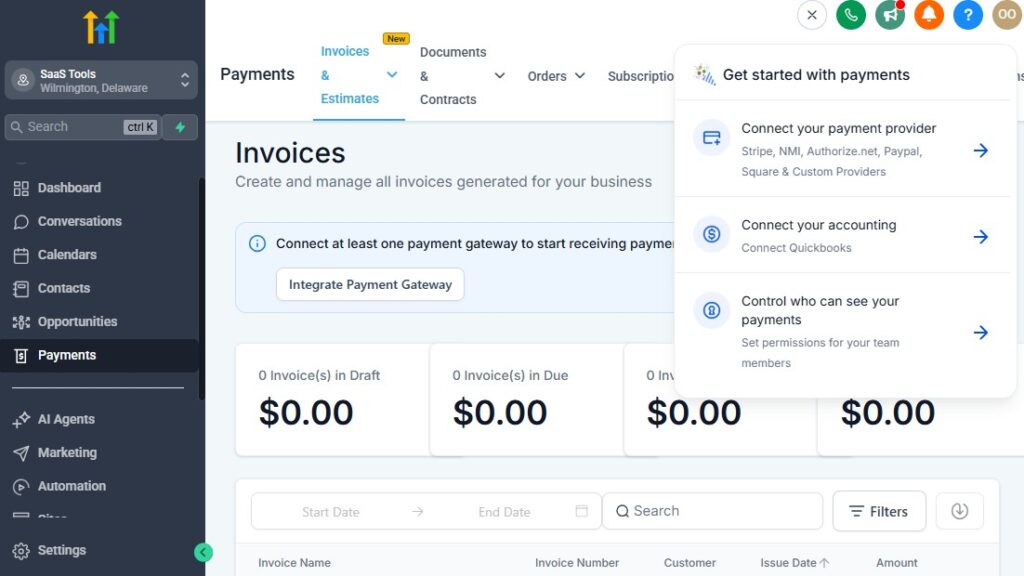
Restaurants have multiple revenue streams – dine-in, takeout, delivery, catering, private events, tasting menus, and holiday packages.
Managing payments and deposits across these areas can get messy. GoHighLevel helps you organize and automate the entire process so you stay in control of your finances without overwhelming your team.
Here’s how to use GoHighLevel to manage payments efficiently across all parts of your restaurant.
Accept Payments for All Restaurant Services
GoHighLevel lets you collect payments for:
- Dine-in deposits (for holidays or busy weekends)
- Table reservations with minimum spend
- Takeout and pre-orders
- Delivery orders
- Catering services
- Private events or venue rentals
- Tasting menus or special experiences
- Holiday packages (Christmas, Valentine’s, Easter, etc.)
Guests can pay online or through automated links.
Set Up Pre-Payment or Reservation Deposits
For high-demand days or events, you can require deposits:
- Holiday dinners
- Weekend prime-time bookings
- Large party reservations
- Chef’s tasting menu
- Wine or themed nights
- Private dining rooms
GoHighLevel automatically sends payment links and tracks deposit status.
Send Professional Invoices for Catering Clients
Catering often requires multiple steps and clear billing. GoHighLevel helps you create invoices for:
- Initial consultations
- Menu selection
- Staffing or equipment fees
- Delivery or setup costs
- Final event payment
- Add-ons and upgrades
Invoices include itemized details and a secure payment link.
Automate Payment Reminders For Outstanding Balances
Set automated reminders for unpaid or overdue invoices:
- Payment due in 3 days
- Payment due today
- “Your invoice is overdue”
- Final reminder with a support number
This prevents lost income and reduces manual follow-up.
Collect Deposits and Final Payments for Private Events
Private events often include multiple payments. You can automate:
- Deposit collection
- Balance due reminders
- Final payment
- Add-on services billing
Each step can trigger a status change in your event pipeline.
Manage Takeout & Delivery Payments Smoothly
GoHighLevel can help you:
- Send order confirmation with payment link
- Notify kitchen staff automatically
- Trigger “order ready for pickup” messages
- Confirm payment receipts
- Send digital receipts to guests
This creates a seamless takeout/delivery workflow.
Send Catering Proposals With Built-In Payment Links
When someone inquires about catering:
- Send a proposal with menu choices
- Include a deposit link
- Allow guests to confirm instantly
- Move the client to the “confirmed” stage once paid
This speeds up the decision-making process.
Track All Payments Inside the CRM
GoHighLevel organizes every financial detail:
- Paid invoices
- Outstanding balances
- Deposits collected
- Catering payments
- Takeout and delivery receipts
- Event payments
- Failed transactions
- Refunds (if applicable)
That gives you complete visibility into your revenue streams.
Store Payment History in Customer Profiles
Each guest profile includes:
- Total amount spent
- Number of visits
- Catering/event purchases
- VIP status
- Discounts or coupon usage
- Past orders
- Payment preferences
This helps you identify and reward high-value customers.
Add Payment Links to Email & SMS Campaigns
You can place links inside:
- Reservation confirmations
- Catering follow-ups
- Event reminders
- Order updates
- Promotion emails
- Loyalty offers
Guests pay easily with one click.
Automate Payment Receipts & Order Confirmations
After each payment, GoHighLevel automatically sends:
- A digital receipt
- Summary of the order or booking
- Menu or event details
- Pickup or arrival instructions
- Contact information for questions
This reduces confusion and enhances guest satisfaction.
Integrate Stripe, PayPal & Square for Flexible Payments
GoHighLevel supports:
- Stripe (recommended for reliability)
- PayPal
- Square via Zapier/Make
These keep payments secure and simple for your guests.
Monitor Revenue Trends From a Central Dashboard
Track revenue by category:
- Dine-in deposits
- Catering
- Private events
- Takeout and delivery
- Promotions
- Seasonal sales
- Repeat visit value
This helps you understand which services drive the most profit.
Delivering Menus, Order Confirmations, Catering Details & Customer Documents
Clear communication is one of the most important parts of running a restaurant.
Guests want quick access to menus, order details, catering information, event confirmations, and any documents they need.
GoHighLevel helps you deliver all of these automatically and professionally – without your staff constantly sending PDFs, answering calls, or replying to messages.
Here’s how to use GoHighLevel to deliver restaurant documents efficiently and improve guest satisfaction.
Deliver Digital Menus Automatically
Whenever someone visits your landing page or fills a form, GoHighLevel can automatically send:
- Food menu
- Drinks menu
- Catering menu
- Seasonal or holiday menus
- Buffet or brunch menus
- Wine or cocktail lists
You can send menus as:
- PDF download links
- Mobile-friendly pages
- Attachments inside emails
This helps guests review menu options instantly without waiting for a reply.
Send Order Confirmations for Takeout & Delivery
After someone places a takeout or delivery order, automate:
- Order received confirmation
- Order details summary
- Pickup instructions
- Estimated preparation time
- Delivery window (if applicable)
- Payment confirmation
This keeps guests informed and reduces order-related calls.
Provide Catering Details After Inquiry or Booking
Catering customers often need documents and clarification. GoHighLevel can send:
- Catering menu packages
- Pricing sheets
- Event planning forms
- Dietary options
- Staff requirements
- Delivery and setup details
- Contract or proposal files
- Deposit payment instructions
Everything arrives automatically, creating a professional booking experience.
Deliver Private Event Information & Agreements
For large parties, weddings, birthdays, or corporate bookings, deliver:
- Venue details
- Event menu options
- Minimum spend requirements
- Seating arrangement documents
- Decor and service guidelines
- Contract agreements
- Payment schedules
- Event checklist
This helps guests stay organized and confident in their planning.
Provide Reservation Details Automatically
After a guest books a table, GoHighLevel can send:
- Reservation confirmation
- Date and time
- Table or section info
- Special instructions
- Parking details
- Cancellation or modification link
- Menu or specials preview
This reduces confusion and no-shows.
Send Post-Order & Post-Visit Documents
After takeout, dine-in, or catering events, automate:
- Digital receipts
- Order summaries
- Thank-you notes
- Loyalty program invitations
- Feedback survey
- Review request
This improves your customer experience and reputation.
Attach Special Promotions & Offers
Whenever appropriate, include:
- Holiday promotions
- Weekend specials
- Limited-time discounts
- VIP-only offers
- Event invitations
This encourages repeat visits and reorders.
Deliver Allergy & Dietary Information on Request
If a guest selects dietary preferences in a form, GoHighLevel can send:
- Gluten-free options
- Vegan or vegetarian menus
- Nut allergy warnings
- Ingredient lists
- Special preparation notes
This shows care and professionalism.
Send Detailed Event Proposals & Quotes
For catering or private events, send structured proposals that include:
- Menu selections
- Headcount
- Pricing breakdown
- Add-ons
- Staff details
- Setup requirements
- Event timeline
- Payment link
Guests can review everything without needing a phone call.
Make All Documents Accessible Inside Customer Profiles
Every file sent to a guest is stored inside their CRM record:
- Past menus
- Order documents
- Proposals
- Receipts
- Special requests
- Event agreements
- Notes from staff
Your team always has the full history in one place.
Use the Membership Area as a Menu or Catering Portal
Restaurants can use GoHighLevel’s membership feature to create a digital portal for:
- Menus
- Event packages
- Catering forms
- Wine lists
- Seasonal offerings
- Exclusive VIP content
Guests can access menus anytime without contacting the restaurant.
Automate Document Delivery Based on Triggers
Automate file delivery when:
- A reservation is made
- A catering inquiry is submitted
- Payment is completed
- A special event is booked
- A guest joins the loyalty program
This keeps your communication professional and consistent.
Learn More:
- What is GoHighLevel? (Features, Use Cases, Pricing & More)
- GoHighLevel Review: (My Experience After 5 Years)
- GoHighLevel Pricing: (+ Discount Codes)
- GoHighLevel Features: (Full List of Tools)
- GoHighLevel Onboarding Checklist: (Complete Tutorial)
- GoHighLevel for Property Management: (Detailed Tutorial)
- GoHighLevel for Small Businesses: (2026 Helpful Tutorial)
- GoHighLevel for Service Businesses: (2026 Helpful Tutorial)
- GoHighLevel for Local Businesses: (2026 Helpful Tutorial)
- GoHighLevel for Hotels & Hospitality Management: (2026 Helpful Tutorial)
Collecting Reviews, Testimonials & Building Restaurant Reputation
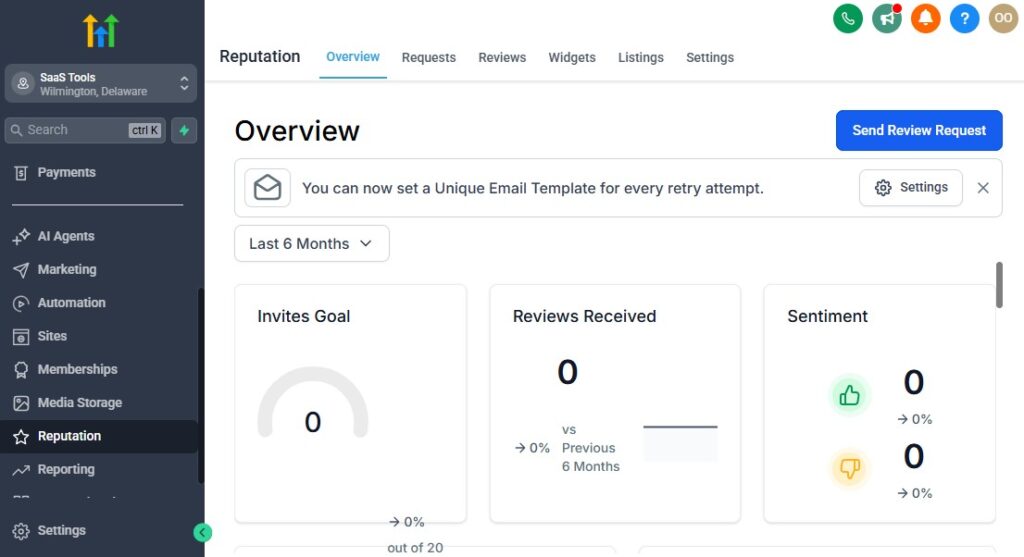
Your restaurant’s reputation is one of your most powerful marketing tools.
When guests look for a place to eat, they rely heavily on Google reviews, social media testimonials, ratings, and customer experiences.
GoHighLevel makes it easy to collect more positive reviews, handle feedback professionally, and build a strong online presence that attracts new guests consistently.
Here’s how to use GoHighLevel to build trust and improve your restaurant’s reputation.
Automate Review Requests After Dine-In, Takeout, or Delivery
As soon as a visit or order is completed, GoHighLevel can automatically send:
- A thank-you message
- Review request link
- Friendly follow-up reminder
Trigger these based on:
- Reservation completed
- Order delivered
- Catering event finalized
- Private event completed
More reviews mean higher ranking and more visibility.
Direct Happy Guests to Public Review Platforms
Send guests to the platforms that matter most:
- Google Business Profile (most important)
- Yelp
- Facebook reviews
- TripAdvisor
- OpenTable (if used)
This increases your public reputation and helps new guests choose your restaurant.
Use a Review Filter to Protect Your Rating
A smart method is:
- Satisfied guests → Google/Yelp
- Unsatisfied guests → private feedback form
This lets you address issues privately instead of them going public.
Collect Testimonials for Your Website and Funnels
Beyond short reviews, ask guests for:
- Written testimonials
- Star ratings
- Photo-based comments
- Short video testimonials (optional)
Use these on:
- Landing pages
- Menu funnels
- Catering funnels
- Private event pages
- Social media ads
Real customer experiences build instant trust.
Use Satisfaction Surveys to Improve Guest Experience
After a visit, send a short survey covering:
- Food quality
- Speed of service
- Friendliness of staff
- Cleanliness
- Table experience
- Delivery/takeout quality
- Price satisfaction
This helps you spot opportunities to improve operations.
Monitor Review Performance Inside Your Dashboard
Track:
- Number of reviews
- Average rating
- Review trends over time
- Sources generating the most reviews
- Negative feedback alerts
- Staff performance insights
You always know how your restaurant is performing publicly.
Feature Reviews on Your Website & Menus
Positive reviews can be integrated into:
- Home page
- Reservation page
- Catering page
- Menu sections
- Events page
- Email & SMS campaigns
- Printed menus (special highlights)
This boosts confidence and increases conversions.
Use Reviews to Improve Staff Training
Reviews often highlight:
- Exceptional service
- Slow service
- Mistakes in orders
- Atmosphere
- Cleanliness
- Hospitality levels
Use them to recognize great staff or improve team training.
Encourage Return Visits Using Follow-Up Messages
After a positive review, automate:
- “Thank you for your review!”
- Special reward (free dessert or drink)
- Exclusive event invite
- VIP loyalty program signup
This turns reviewers into repeat customers – your best long-term fans.
Share Testimonial Highlights on Social Media
Showcase:
- Screenshots of Google reviews
- Customer photos
- Short quotes
- Five-star highlights
- Guest stories
Social proof boosts engagement and creates buzz.
Build a Strong Reputation for Catering Services
Catering reviews are extremely powerful. Collect:
- Event photos
- Corporate testimonials
- Wedding or birthday reviews
- Party host feedback
- Client satisfaction scores
These help you close more high-ticket catering deals.
Use Negative Feedback for Improvement – and Save Customers
When someone leaves a negative comment privately:
- Respond quickly
- Apologize and offer a solution
- Invite them back
- Provide a compensation offer (optional but effective)
Recovering unhappy guests strengthens loyalty and prevents bad reviews from spreading.
Reporting & Analytics for Restaurants – GoHighLevel for Restaurants
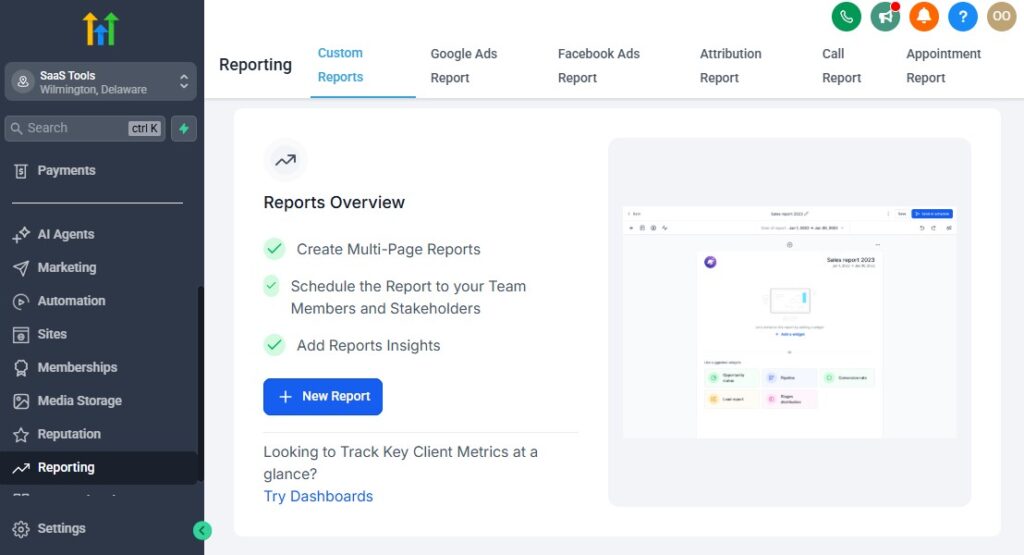
To grow your restaurant efficiently, you need clear visibility into what’s working and what isn’t.
GoHighLevel gives you powerful reporting tools that help you understand reservations, guest behavior, marketing performance, catering revenue, peak hours, and overall business trends.
When you track the right numbers, you make better decisions – and your restaurant becomes more profitable, predictable, and scalable.
Here’s how to use GoHighLevel reporting and analytics to run a data-driven restaurant.
Track All Guest Inquiries & Reservation Sources
GoHighLevel helps you see exactly where your guests come from:
- Website reservation form
- Google Business Profile
- Instagram or Facebook ads
- Organic search
- QR codes on menus or signage
- Email/SMS campaigns
- Repeat guest referrals
- Catering inquiry pages
Knowing your best-performing channels helps you invest your marketing budget wisely.
Monitor Reservation Conversion Rates
Track how many inquiries turn into confirmed bookings:
- New reservation inquiries
- Confirmed reservations
- Walk-ins
- Missed reservations
- Cancellations
- Re-booking rates
High conversion means strong guest communication and an easy booking experience.
Analyze Peak Hours & Busy Days – GoHighLevel for Restaurants
GoHighLevel helps you identify patterns like:
- Busiest hours
- Dead periods
- Best days for promotions
- Staff shortages or overload times
- Weekend vs weekday trends
Use this data to schedule staff, adjust hours, or run targeted campaigns.
Track No-Shows & Cancellations
Restaurants lose money from unexpected cancellations and no-shows. Track:
- No-show frequency
- Type of guest more likely to cancel
- Peak cancellation hours
- Impact of missed reservations
- Effectiveness of reminder messages
Then optimize reminders or require deposits for high-no-show days.
Monitor Takeout & Delivery Performance
View trends such as:
- Total pickup orders
- Total delivery orders
- Average order value
- Time-based ordering patterns
- Repeat takeout customers
- Delivery performance (manual data entry)
This helps you improve preparation times and staffing decisions.
Track Catering & Private Event Revenue
GoHighLevel tracks:
- Total catering inquiries
- Conversion rates
- Revenue per event
- Menu popularity
- Event seasonality trends
- Deposit collection rate
- Upsell performance
This is especially valuable because catering often brings in high-margin revenue.
Analyze Email & SMS Campaign Performance
Track how well your promotions perform:
- Open rates
- Click-through rates
- Unsubscribe rates
- Reservation conversions
- Coupon redemption
- Online orders generated
- VIP program enrollments
This data ensures your marketing becomes smarter over time.
Monitor Guest Lifetime Value (LTV)
See which guests contribute the most to your business:
- Repeat diners
- High-value customers
- Loyalty members
- Catering clients
- Corporate clients
- VIP groups
This helps you prioritize your most profitable customers.
Track Loyalty Program Growth
View key insights:
- New loyalty sign-ups
- Reward redemptions
- VIP engagement
- Discount usage
- Repeat visits from loyalty members
Loyalty programs become more effective when you measure them consistently.
Monitor Online Reputation Trends
Track your reputation using:
- Average star rating
- Number of new reviews
- Review frequency
- Platform breakdown (Google, Yelp, Facebook, etc.)
- Sentiment analysis from feedback forms
A growing review count directly increases your restaurant’s visibility.
Analyze Landing Page & Menu Funnel Performance
Track funnel metrics such as:
- Page visits
- Menu downloads
- Reservation conversions
- Catering form submissions
- Abandoned reservations
- Event sign-ups
- Coupon downloads
You’ll know exactly which offers, menus, and pages convert best.
Understand Revenue Trends Across All Services
Using GoHighLevel’s dashboards, track:
- Dine-in revenue
- Takeout/delivery revenue
- Catering revenue
- Event revenue
- Seasonal promotions
- Upsell performance (desserts, drinks, add-ons)
This full picture helps you plan for growth and optimize your menu or services.
Create Custom Dashboards for Daily Monitoring
Customize dashboards for:
- Daily reservations
- Daily sales
- Catering leads
- Marketing performance
- Loyalty program metrics
- Staff tasks
- Guest feedback scores
You get instant insight into your restaurant’s health every day.
Integrating GoHighLevel With Restaurant Tools & Platforms
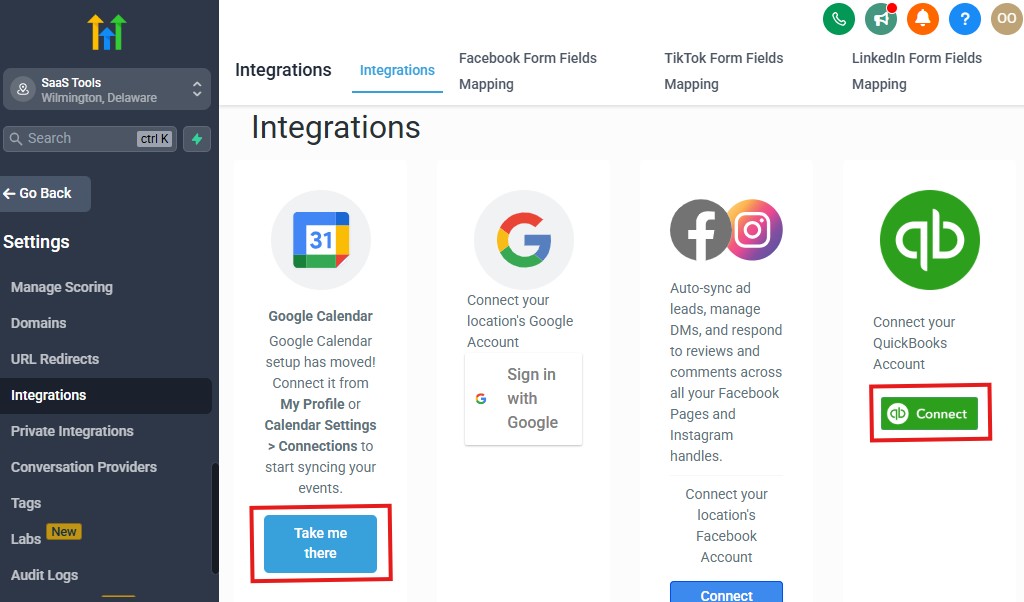
Restaurants often rely on multiple tools to handle reservations, payments, online ordering, delivery logistics, staff management, and promotions.
GoHighLevel connects smoothly with many of these systems so you can centralize your operations, reduce manual work, and keep everything running efficiently from one platform.
Here’s how to integrate GoHighLevel with the tools your restaurant already uses.
Connect Google & Outlook Calendars for Seamless Reservation Management
Sync your restaurant calendars to ensure:
- No double bookings
- Accurate reservation times
- Real-time staff updates
- Unified scheduling across devices
This keeps your host stand and team perfectly aligned.
Integrate Payment Processors for Fast & Easy Transactions
GoHighLevel works with:
- Stripe (best option for restaurants)
- PayPal
- Square (via Zapier/Make)
You can collect payments for:
- Deposits
- Catering orders
- Private events
- Special menus
- Takeout pre-payments
Payments are secure and synced to customer profiles.
Connect Online Ordering Tools & Delivery Platforms (Indirect Integrations)
While not native, GoHighLevel can integrate through Zapier/Make with:
- DoorDash Storefront
- Uber Eats (limited API options)
- Grubhub
- ChowNow
- Toast online ordering
- Square online ordering
- GloriaFood
- BentoBox
- CloudKitchens systems
Use automations to:
- Send order confirmations
- Trigger kitchen notifications
- Add customers to re-engagement sequences
- Track takeout/delivery behavior
This creates a centralized workflow even with third-party delivery tools.
Integrate Restaurant POS Systems (Indirect via APIs)
Many restaurants use POS tools like:
- Toast
- Square POS
- Lightspeed
- Clover
- Revel Systems
Using Zapier, Make, or custom webhooks, you can automate:
- Customer record updates
- Order history logs
- VIP status triggers
- Loyalty updates
- Review requests
- Catering order entries
You connect the POS with GoHighLevel to avoid double entry.
Connect Email Services for Branded Communication
GoHighLevel integrates with:
- Gmail
- Outlook
- Custom domain email (SMTP/IMAP)
This ensures:
- Branded communication
- Better deliverability
- Professional email templates
- Unified inbox for all guests
Your team manages everything from one place.
Use File Storage Tools for Menus, Proposals & Catering Documents
Connect cloud storage platforms like:
- Google Drive
- OneDrive
- Dropbox
Use them to store:
- Menus
- Catering proposals
- Event contracts
- Photos and videos
- Staff documents
Files can be delivered automatically through GoHighLevel workflows.
Integrate Social Media Messaging Channels
GoHighLevel supports:
- Facebook Messenger
- Instagram DMs
- Website chat widget
- Google Business Chat
- WhatsApp (via approved providers)
This centralized inbox helps you respond quickly to inquiries and reservation requests.
Connect Google Business Profile for Review & Lead Management
Syncing Google Business Profile helps you:
- Collect more reviews
- Track review performance
- Respond faster to inquiries
- Capture reservation leads directly into the CRM
This boosts your online visibility and reputation.
Integrate Marketing and Ad Platforms
Connect GoHighLevel with:
- Meta Ads (Facebook/Instagram)
- Google Ads
- TikTok Ads
- YouTube Ads
This allows you to track:
- Leads generated
- Reservation conversions
- Takeout order funnels
- Cost per booking
- Menu download activity
You always know which campaigns drive real results.
Connect Marketing Automation Tools for Custom Workflows
Use Zapier, Make, or webhooks to integrate other restaurant tools:
- Inventory systems
- Staff scheduling apps
- Loyalty tools
- Event management apps
- Kitchen display systems
This creates a fully connected restaurant ecosystem.
Use APIs & Webhooks for Advanced Integrations
If your restaurant uses custom or high-end tools, GoHighLevel supports:
- API connections
- Webhooks for two-way data sync
- Custom scripts for menu updates
- Data syncing with POS or booking systems
This gives you complete integration flexibility.
Advanced Automation for Restaurants
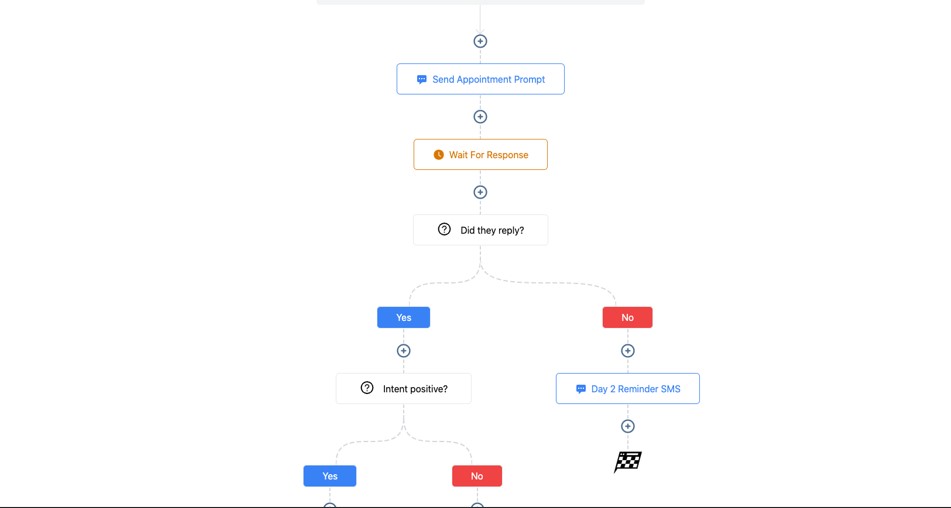
Advanced automation is where GoHighLevel truly transforms your restaurant.
These automations help you run smoother operations, reduce staff workload, improve guest experience, and increase revenue – all without adding extra manual tasks.
From dine-in to takeout, delivery, catering, private events, loyalty programs, and customer follow-up, these powerful workflows ensure everything in your restaurant happens automatically, consistently, and professionally.
Here’s how to use advanced automation to elevate your restaurant operations.
Automated Multi-Step Reservation Workflow
As soon as a guest submits a reservation, trigger a full reservation journey:
- Immediate SMS confirmation
- Email confirmation with details
- Calendar invite
- Menu preview
- Arrival instructions
- Auto-add to CRM & reservation pipeline
- 24-hour reminder
- 3-hour reminder
- “Reply 1 to confirm your table”
- Notify staff and assign table
This creates a smooth and efficient booking experience.
Smart Waitlist Automation With Real-Time Updates
When your restaurant is full, let automation handle the waitlist:
- “You’ve been added to the waitlist” SMS
- Estimated wait time
- Automatic update every 10–15 minutes
- “Your table is ready” message
- Auto-expire if no response
- Add guest to “Waitlist Follow-Up” sequence
No more crowding the entrance or calling out names loudly.
Automated Takeout & Delivery Workflow
Create a complete workflow that triggers on every takeout or delivery order:
- Order confirmation
- Estimated prep time
- Kitchen alert (manual or automated)
- “Order ready for pickup” SMS
- “Order delivered” confirmation (manual trigger)
- Review request
- Thank-you offer for the next order
This builds a consistent and professional ordering experience.
Catering Inquiry to Event Booking Automation
Catering revenue is high-value – automation helps you close more deals smoothly:
- Instant catering menu delivery
- Event details form
- Auto-assign staff for follow-up
- Proposal and pricing workflow
- Deposit request
- “Event confirmed” notification
- Pre-event reminders
- Post-event thank-you message
- Review request
- Add to catering client list
This automation turns inquiries into booked events faster.
Private Event & Large Party Booking Automation
For private dining, birthdays, weddings, or corporate dinners:
- Collect event details automatically
- Send menu options
- Trigger deposit invoice
- Notify kitchen & event manager
- Add tasks for setup
- Send final headcount reminder
- Follow-up afterward to collect reviews
Your restaurant handles events professionally with minimal manual effort.
Special Date Automation (Birthdays & Anniversaries)
Use GoHighLevel’s date-based automation to send:
- Birthday message with a free dessert offer
- Anniversary dinner invitation
- Personalized celebration messages
- VIP event invitations
Guests love these personal touches, and they drive repeat visits.
Upsell & Add-On Automation for Higher Spending
Based on customer behavior or form choices, trigger upsell messages:
- Appetizers
- Desserts
- Wine pairings
- Family-size meals
- Cocktail upgrades
- Event add-ons (decor, sound, staff, etc.)
These boost your average order value without staff effort.
Automated Lost Guest / Inactive Guest Recovery
For guests who haven’t visited recently, create:
- 30-day “We miss you!” message
- 60-day incentive (“Come back and get 10% off”)
- 90-day VIP reactivation campaign
- Seasonal menu update
- Event invites
This keeps your guest base active.
Menu Update & Seasonal Promotion Automation
Whenever you update menus or launch specials:
- Send menu previews
- Announce holiday menus
- Promote chef specials
- Share tasting events
- Invite guests to weekend brunch
This triggers excitement and increases visits.
Automatic Review & Feedback Workflow
After a visit or order:
- Send review request
- Send satisfaction survey
- Filter unhappy guests into private feedback form
- Thank happy guests with a follow-up offer
- Store reviews in the CRM
This boosts your restaurant’s public reputation.
VIP & Loyalty Program Automations
When a guest joins or qualifies:
- Send welcome message
- Assign VIP tag
- Offer early access to events
- Send monthly rewards
- Trigger exclusive invitations
- Track points and redemptions (manually or via integrated tools)
Automation keeps your loyalty system running effortlessly.
Staff Coordination & Internal Task Automation
Use GoHighLevel to automate internal coordination:
- Notify kitchen of large orders
- Trigger tasks for event setup
- Alert servers about allergies
- Send reminders for catering preparation
- Assign tasks after private event bookings
- Alert staff when VIP guests arrive
This keeps your entire team aligned and efficient.
Customer Behavior-Based Automation
Use behavior triggers such as:
- Menu download
- Abandoned reservation
- Catering proposal opened
- Order not completed
- Review left
- Coupon used
- VIP tag added
Then trigger personalized follow-ups.
Frequently Asked Questions
Here are the 5 most important FAQs restaurant owners usually ask when using GoHighLevel. Each answer is simple, practical, and directly addresses what your reader needs.
1. Can GoHighLevel handle restaurant reservations and waitlists?
Yes. GoHighLevel can manage all your reservations, walk-ins, and waitlists in one place. You can automate confirmations, reminders, “table ready” messages, and even collect deposits for high-demand days.
2. Can I use GoHighLevel for takeout, delivery, and online orders?
Yes, but with indirect integrations. You can use GoHighLevel forms, landing pages, or third-party tools (ChowNow, Square, Toast, DoorDash Storefront) and connect them through automations. You can also send automatic order confirmations and pickup notifications.
Does GoHighLevel help with catering and private events?
Absolutely. You can create catering request forms, send proposals, collect deposits, track event details, automate follow-ups, and manage the entire catering pipeline from inquiry to event completion.
Can GoHighLevel send restaurant promotions through email and SMS?
Yes. You can send campaigns for weekly specials, takeout deals, new menus, seasonal promotions, VIP offers, and holiday events. SMS works especially well for last-minute promotions and filling slow nights.
Does GoHighLevel integrate with restaurant POS and delivery apps?
Not directly, but you can connect tools like Toast, Square, Clover, Uber Eats, and DoorDash through Zapier, Make, or webhooks. This allows you to sync customer data, send automated confirmations, track order behavior, and build re-engagement campaigns.
Final Thoughts
GoHighLevel gives your restaurant everything you need to run smoother operations, increase reservations, boost repeat visits, and deliver a better guest experience – all from one centralized system.
When you bring your reservations, takeout orders, catering inquiries, customer communication, payment collection, and marketing into a single platform, your restaurant becomes more efficient, more organized, and more profitable.
You’re no longer juggling multiple apps, chasing guests for confirmations, or manually sending promotions. Instead, your automations do the heavy lifting while you and your team focus on what matters most – delivering great food and creating memorable dining experiences.
Whether you manage a small café, a busy dine-in restaurant, a food truck, a bar, a fine-dining establishment, or a full-scale catering business, GoHighLevel helps you streamline the chaos and build a restaurant that grows consistently.