LIVE NOW: When you sign up for the GoHighLevel Voice AI Promo, you automatically get 50% off for the first 3 months of your GoHighLevel subscription.
And it’s available for both new (new users link) and existing users (existing users link).
The promotion is valid from: Monday, June 1st, 12:00 AM PST to June 7th, 11:59 PM PST, 2026.
And the best part?
👉 The GoHighLevel Voice AI Workshop is completely FREE to attend.
This allows businesses to learn how Voice AI works, see it in action, and implement it in their own business while saving significantly on their GoHighLevel subscription.
If you’ve ever wished your business could:
- answer calls automatically
- respond to missed calls instantly
- qualify leads over the phone
- book appointments without staff involvement
- provide 24/7 phone coverage
Then, GoHighLevel Voice AI is designed for exactly that.
Today, businesses lose countless opportunities because:
- calls go unanswered
- staff are unavailable
- follow-ups happen too late
- leads choose competitors who respond faster
That’s where Voice AI changes the game.
Instead of relying entirely on human staff to answer every call, GoHighLevel Voice AI can:
- answer calls
- engage callers in natural conversations
- qualify prospects
- schedule appointments
- and route conversations when needed.
Even while you’re sleeping.
Whether you’re a:
- local business owner
- agency owner
- coach
- contractor
- healthcare provider
- real estate professional
Voice AI can help you automate phone communication and reduce missed opportunities.
In this guide, you’ll learn:
- what GoHighLevel Voice AI is
- how it works
- what the promo includes
- real-world use cases
- pricing details
- setup instructions
- whether it’s worth it for your business
TL;DR
The GoHighLevel Voice AI Promo gives you:
- ✅ 50% off your first 3 months of GoHighLevel
- ✅ Free access to the GoHighLevel Voice AI Workshop
- ✅ AI-powered phone answering
- ✅ Automated appointment booking
- ✅ AI lead qualification
- ✅ Missed call handling
- ✅ 24/7 customer communication
- ✅ CRM-connected call automation
In simple terms:
👉 GoHighLevel Voice AI allows businesses to answer calls, qualify leads, book appointments, and automate phone conversations using AI.
If your business depends on phone calls, appointments, or inbound leads, this is one of the most powerful AI tools currently available inside GoHighLevel.
And with the current promo, you can test it while saving 50% during your first three months.
And it’s available for both new (new users link) and existing users (existing users link).
What Is GoHighLevel Voice AI?
GoHighLevel Voice AI is an AI-powered phone assistant that can answer calls, talk to customers, qualify leads, schedule appointments, and follow up automatically.
In simple terms…
👉 It works like a virtual receptionist that answers your business calls 24/7.
Instead of hiring someone to answer every call, Voice AI can handle many conversations automatically while still sounding natural and professional.
This helps businesses:
- reduce missed calls
- improve response times
- book more appointments
- qualify leads faster
- provide round-the-clock availability
How Does GoHighLevel Voice AI Work?
Voice AI uses artificial intelligence to understand what callers are saying and respond in real-time.
When someone calls your business:
- Voice AI answers the call
- It listens to the caller’s request
- It responds naturally
- It asks qualifying questions
- It books appointments if needed
- It updates your CRM automatically
- It transfers the call to a human when necessary
The entire process can happen without manual involvement.
It’s More Than Just an Auto Attendant
Many businesses already use:
- voicemail systems
- phone menus
- call routing systems
But Voice AI goes much further.
Traditional systems usually say things like:
“Press 1 for Sales. Press 2 for Support.”
Voice AI can actually hold conversations.
For example:
Caller:
“I’d like to schedule a consultation.”
Voice AI:
“Absolutely. What day works best for you?”
It continues the conversation just like a human receptionist would.
What Can Voice AI Do?
GoHighLevel Voice AI can help businesses automate tasks such as:
- Answering Incoming Calls
Voice AI can answer calls instantly, even outside business hours.
- Booking Appointments
It can connect with your calendar and schedule appointments automatically.
- Qualifying Leads
The AI can ask questions to determine:
- what the customer needs
- their budget
- their timeline
- their level of interest
- Handling Missed Calls
If your team misses a call, Voice AI can help recover the opportunity through automated follow-up.
- Routing Calls
When needed, Voice AI can transfer callers to:
- sales teams
- support teams
- specific departments
- business owners
Who Is Voice AI Designed For?
Voice AI works especially well for businesses that receive a lot of phone calls.
Examples include:
- agencies
- healthcare clinics
- dental practices
- gyms
- contractors
- real estate businesses
- coaches
- local service businesses
Basically…
👉 Any business that depends on phone calls can benefit from Voice AI.
Real Example
Imagine someone calls your business at 11 PM.
Normally:
- nobody answers
- the caller leaves
- the lead may never return
With Voice AI:
👉 The AI answers immediately.
It can:
- answer questions
- collect information
- book appointments
- create a lead inside your CRM
Even while your office is closed.
Why Businesses Are Interested in Voice AI
Businesses are becoming increasingly interested in Voice AI because:
- customers expect fast responses
- missed calls cost money
- staffing costs continue to rise
- businesses need better efficiency
Voice AI helps solve these challenges without requiring additional employees.
Voice AI vs Human Staff
Voice AI is not designed to completely replace your team.
Instead, it helps by handling:
- repetitive calls
- common questions
- appointment scheduling
- lead qualification
While your staff can focus on:
- sales
- customer relationships
- complex support issues
- high-value conversations
The best results usually come from combining AI with human support.
Why Businesses Are Switching to Voice AI
Businesses are changing the way they handle phone calls.
Why?
Because customers expect faster responses than ever before.
Today, people don’t want to:
- wait on hold
- leave voicemails
- wait hours for callbacks
- keep calling multiple times
If a business doesn’t answer quickly…
👉 Many customers simply move on to a competitor.
This is one of the biggest reasons businesses are turning to Voice AI.
Missed Calls Are Costing Businesses Money
Many businesses lose potential customers every day because:
- calls go unanswered
- staff are busy
- offices are closed
- teams are overwhelmed
The reality is simple:
Every missed call could be a lost customer.
Real Example
Imagine someone calls a roofing company after discovering a leak in their home.
If nobody answers:
👉 They are unlikely to wait.
Instead, they’ll call the next company on Google.
The business that answers first often wins the customer.
Customers Expect Immediate Responses
Modern customers want answers immediately.
Whether they’re:
- booking appointments
- requesting estimates
- asking questions
- seeking support
They expect businesses to be available when they reach out.
Voice AI helps businesses meet those expectations without needing staff available 24/7.
Businesses Want 24/7 Availability
Hiring employees to answer phones around the clock is expensive.
Most small businesses simply can’t afford:
- overnight staff
- weekend coverage
- dedicated receptionists
Voice AI helps solve that problem.
What Voice AI Can Do After Hours
When someone calls outside business hours, Voice AI can:
- answer the call
- collect information
- answer common questions
- schedule appointments
- create leads in the CRM
Automatically.
👉 Your business remains available even when your office is closed.
Staffing Costs Continue to Increase
Many businesses are looking for ways to improve efficiency without constantly hiring more employees.
Voice AI helps reduce workload by handling repetitive phone conversations.
Examples of Repetitive Calls
- appointment requests
- pricing questions
- business hours
- service availability
- basic support inquiries
Instead of having staff answer the same questions repeatedly…
👉 Voice AI can handle them automatically.
Businesses Need Faster Lead Qualification
Not every caller is ready to buy.
Voice AI can help qualify leads before they reach your team.
Example Questions
The AI can ask:
- What service are you interested in?
- When would you like to get started?
- What’s your timeline?
- What’s your location?
👉 This helps businesses prioritize serious prospects.
Voice AI Helps Book More Appointments
Many businesses rely heavily on appointments.
Examples include:
- healthcare clinics
- agencies
- consultants
- coaches
- gyms
- contractors
Voice AI can help automate the booking process.
Example
Caller:
“I’d like to schedule a consultation.”
Voice AI:
“Great. We currently have availability tomorrow at 2 PM and 4 PM. Which works best for you?”
👉 Faster booking often leads to more conversions.
Businesses Want Better Customer Experiences
Customers appreciate businesses that are:
- responsive
- available
- organized
- easy to contact
Voice AI helps improve the overall customer experience by reducing wait times and improving communication.
Voice AI Makes Businesses More Scalable
As businesses grow, call volume increases.
Managing every call manually becomes difficult.
Voice AI helps businesses handle larger call volumes without dramatically increasing staffing costs.
👉 This is especially valuable for growing businesses.
AI Technology Has Improved Dramatically
A few years ago, AI phone systems often sounded robotic and unnatural.
Today’s Voice AI is far more advanced.
Modern systems can:
- understand natural speech
- respond conversationally
- handle more complex interactions
- create better caller experiences
As a result, businesses are becoming much more comfortable adopting AI phone automation.
Who Is Driving This Trend?
Businesses adopting Voice AI include:
- marketing agencies
- healthcare providers
- dental clinics
- contractors
- real estate companies
- gyms
- coaching businesses
- local service providers
Because they all face similar challenges:
👉 Too many calls and not enough time.
What the GoHighLevel Voice AI Promo Includes
The GoHighLevel Voice AI Promo is designed to help businesses experience the power of AI phone automation while saving money on their GoHighLevel subscription.
The biggest highlight of the promotion is simple:
👉 You automatically get 50% off for the first 3 months of your GoHighLevel subscription when you sign up during the promo period.
And on top of that…
👉 The GoHighLevel Voice AI Workshop is completely FREE to attend.
This allows businesses to learn how Voice AI works, see real-world examples, and implement it in their own business without paying for expensive training.
But the promotion includes much more than just discounted pricing.
1. 50% Off for the First 3 Months
This is the core benefit of the promotion.
When you sign up through the Voice AI Promo, you automatically receive:
👉 50% off your first 3 months of GoHighLevel.
Example Pricing
| Plan | Regular Price | Promo Price (First 3 Months) |
|---|---|---|
| Starter | $97/month | $48.50/month |
| Unlimited | $297/month | $148.50/month |
| SaaS Pro | $497/month | $248.50/month |
👉 After the first 3 months, your subscription returns to the normal monthly rate.
This allows businesses to test the platform at a significantly reduced cost.
2. Free Access to the Voice AI Workshop
One of the biggest advantages of this promotion is the free workshop.
The workshop walks you through:
- how Voice AI works
- how businesses are using it today
- setup strategies
- automation workflows
- real-world use cases
👉 Even beginners can follow along.
No technical experience is required.
3. Access to GoHighLevel Voice AI
The promotion gives you access to GoHighLevel’s Voice AI capabilities.
Voice AI can help businesses:
- answer incoming calls
- qualify leads
- schedule appointments
- answer common questions
- route callers appropriately
Automatically.
👉 Think of it as a virtual AI receptionist working around the clock.
4. AI-Powered Call Handling
Voice AI can answer phone calls instantly.
Instead of sending callers to voicemail…
👉 The AI can start helping them immediately.
Examples of What It Can Handle
- appointment requests
- pricing questions
- service inquiries
- consultation requests
- general business information
This helps reduce missed opportunities.
5. Automated Appointment Booking
One of the most valuable Voice AI features is appointment scheduling.
The AI can connect with your calendar and help callers book appointments automatically.
Example
Caller:
“I’d like to schedule a consultation.”
Voice AI:
“We currently have openings tomorrow at 2 PM and 4 PM. Which would you prefer?”
👉 The appointment can be booked without staff involvement.
6. AI Lead Qualification
Voice AI can ask qualifying questions before sending leads to your team.
Example Questions
- What service are you interested in?
- When would you like to get started?
- What’s your budget?
- What type of help do you need?
👉 This helps businesses focus on higher-quality opportunities.
7. CRM Integration
One major advantage of GoHighLevel Voice AI is that it connects directly with the CRM.
That means:
- calls
- contacts
- appointments
- notes
- follow-up workflows
Can all be managed inside one platform.
👉 No need for separate systems.
8. Automated Follow-Up Capabilities
Voice AI doesn’t have to stop after the first call.
Businesses can create automated workflows that continue communication after the conversation ends.
Examples
- appointment reminders
- missed appointment follow-ups
- nurture sequences
- lead follow-up campaigns
👉 This helps improve conversion rates.
9. Human Call Transfer
Voice AI is designed to support your team, not completely replace it.
If needed, calls can be transferred to:
- sales teams
- support teams
- receptionists
- business owners
👉 Human assistance is always available when necessary.
10. AI Employee Access (When Included)
Depending on the promotion and account setup, users may also gain access to GoHighLevel’s broader AI ecosystem through AI Employee features.
These tools may help automate:
- conversations
- voice interactions
- follow-ups
- customer engagement
Inside GoHighLevel.
Why This Promo Matters
Most businesses are curious about AI but hesitate because:
- they don’t understand it
- they don’t know where to start
- they worry about cost
This promotion helps solve those concerns by giving businesses:
- discounted pricing
- free training
- hands-on implementation guidance
All at the same time.
How GoHighLevel Voice AI Works
One of the first questions most people ask is:
“How does GoHighLevel Voice AI actually work?”
The answer is surprisingly simple.
GoHighLevel Voice AI acts like a virtual team member that can answer phone calls, talk to customers, ask questions, book appointments, and update your CRM automatically.
Instead of calls going to voicemail or waiting for a staff member to answer…
👉 Voice AI responds immediately.
The Basic Voice AI Workflow
Here’s what typically happens:
- A customer calls your business
- Voice AI answers instantly
- The AI listens and understands the request
- The AI responds naturally
- The AI qualifies the lead
- The AI books an appointment if needed
- Information is stored in the CRM
- A human can take over when necessary
👉 Most of the process happens automatically.
Step 1: A Customer Calls Your Business
Everything begins when someone calls your business phone number.
This could be someone who:
- found you on Google
- visited your website
- saw your Facebook page
- clicked an advertisement
- received a referral
Instead of the call going unanswered…
👉 Voice AI immediately picks up.
Real Example
Imagine someone calls your business at 10 PM.
Normally:
- your office is closed
- nobody answers
- the lead may leave
With Voice AI:
👉 The conversation begins instantly.
Step 2: Voice AI Answers Naturally
Unlike traditional phone menus…
Voice AI can hold actual conversations.
Instead of saying:
“Press 1 for Sales.”
The AI might say:
“Hi, thanks for calling. How can I help you today?”
The caller simply responds naturally.
👉 This creates a much better customer experience.
Step 3: The AI Understands the Caller
Voice AI uses artificial intelligence to understand what the caller is saying.
For example, if someone says:
“I’d like to schedule an appointment.”
The AI recognizes the intent and moves the conversation in the appropriate direction.
Other Common Requests
Voice AI can understand requests such as:
- booking appointments
- requesting estimates
- asking about services
- checking availability
- getting support information
👉 The conversation feels much more natural than traditional phone systems.
Step 4: The AI Qualifies the Lead
Before handing leads to your team, Voice AI can gather important information.
Example Questions
The AI may ask:
- What service are you interested in?
- When would you like to get started?
- What city are you located in?
- How can we help you today?
The answers can automatically be stored inside your CRM.
👉 Your team receives better-qualified leads.
Step 5: The AI Books Appointments
One of the most powerful Voice AI features is appointment booking.
Voice AI can connect directly to your GoHighLevel calendar.
Example
Caller:
“I’d like to book a consultation.”
Voice AI:
“We currently have openings tomorrow at 2 PM and 4 PM. Which works best for you?”
Once the caller chooses:
👉 The appointment is booked automatically.
No Manual Scheduling Required
This helps businesses:
- save time
- reduce administrative work
- improve booking efficiency
Step 6: Voice AI Updates the CRM
As the conversation happens, Voice AI can automatically:
- create contacts
- update records
- save notes
- trigger workflows
- assign opportunities
Inside GoHighLevel.
👉 Everything stays organized automatically.
Step 7: Follow-Up Automation Begins
The conversation doesn’t have to end after the call.
Voice AI can trigger follow-up workflows such as:
- appointment reminders
- confirmation messages
- nurture campaigns
- re-engagement sequences
Example
After booking an appointment:
👉 The customer automatically receives reminders before the meeting.
This helps reduce no-shows.
Step 8: Human Takeover Happens When Needed
Voice AI is powerful…
But it isn’t designed to replace humans completely.
If a caller:
- has a complicated issue
- requests a person
- needs advanced support
👉 The call can be transferred to a real team member.
This Creates the Best Experience
Voice AI handles:
- repetitive conversations
- common questions
- scheduling tasks
Humans handle:
- complex situations
- sales discussions
- relationship building
Real Business Example
Let’s look at a simple example.
A Local Contractor
- Homeowner calls about a roofing repair.
- Voice AI answers immediately.
- AI gathers information about the project.
- AI schedules an inspection.
- Appointment is added to the calendar.
- Lead is created inside the CRM.
- Reminder messages are sent automatically.
👉 All of this can happen without anyone manually answering the phone.
Why Businesses Like Voice AI
Businesses use Voice AI because it helps them:
- reduce missed calls
- improve response times
- book more appointments
- automate repetitive communication
- reduce staff workload
- improve customer experience
Without needing a larger team.
Key Features of GoHighLevel Voice AI
One of the biggest reasons businesses are excited about GoHighLevel Voice AI is because it does much more than simply answer phone calls.
It combines:
- AI phone conversations
- lead qualification
- appointment booking
- CRM automation
- call routing
- follow-up workflows
Into one connected system.
Instead of hiring additional staff or letting calls go to voicemail…
👉 Voice AI helps businesses respond faster and operate more efficiently.
Let’s look at the most important features.
1. AI Phone Answering
This is the core feature of Voice AI.
Whenever someone calls your business, Voice AI can answer instantly.
What It Can Do
- answer inbound calls
- greet callers professionally
- provide business information
- continue conversations naturally
Example
Caller:
“I’d like to know if you’re open on Saturdays.”
Voice AI:
“Yes, we’re open from 9 AM to 3 PM on Saturdays. Would you like to schedule an appointment?”
👉 No voicemail. No waiting.
2. Natural Human-Like Conversations
Unlike traditional phone systems that rely on menus and button presses…
Voice AI can have actual conversations.
Instead of
“Press 1 for Sales.”
Voice AI can simply ask:
“How can I help you today?”
The caller responds naturally, and the AI continues the conversation.
👉 This creates a much better customer experience.
3. Appointment Booking Automation
Voice AI can connect directly with your GoHighLevel calendar.
This allows it to schedule appointments automatically.
What It Can Handle
- appointment booking
- rescheduling
- availability checks
- confirmation messages
- appointment reminders
Example
Caller:
“I’d like to book a consultation.”
Voice AI:
“We currently have openings tomorrow at 10 AM and 2 PM. Which would you prefer?”
👉 The appointment gets booked automatically.
4. Lead Qualification
Not every caller is ready to buy.
Voice AI can ask qualifying questions before sending leads to your team.
Example Questions
- What service are you interested in?
- What’s your timeline?
- What type of project do you need help with?
- What’s your budget range?
👉 This helps your team focus on serious prospects.
5. 24/7 Call Coverage
Customers don’t only call during business hours.
Many inquiries happen:
- evenings
- weekends
- holidays
Voice AI continues answering calls even when your office is closed.
Real Benefit
Instead of missing potential customers overnight…
👉 Your business remains available around the clock.
6. CRM Integration
One major advantage of GoHighLevel Voice AI is its direct integration with the CRM.
As conversations happen, the system can automatically:
- create contacts
- update records
- save call notes
- trigger automations
- update opportunities
👉 Everything stays organized inside one platform.
7. Automated Follow-Up Workflows
Voice AI doesn’t stop after the first call.
It can trigger automated follow-up sequences based on what happened during the conversation.
Examples
- appointment reminders
- consultation confirmations
- lead nurturing campaigns
- missed appointment follow-ups
👉 This improves consistency and conversion rates.
8. Call Routing & Human Transfer
Some situations require a real person.
Voice AI can transfer callers to:
- sales teams
- support teams
- receptionists
- business owners
When necessary.
Example – GoHighLevel Voice AI
If a customer asks for a manager…
👉 The AI can immediately route the call to the correct person.
9. Missed Call Recovery
Missed calls often mean lost revenue.
Voice AI helps reduce this problem by ensuring callers receive immediate engagement.
Even if your staff is unavailable.
👉 More conversations. Fewer lost opportunities.
10. Custom AI Training
Businesses can train Voice AI using their own information.
This allows the AI to understand:
- services
- pricing
- business hours
- appointment processes
- frequently asked questions
👉 The more information you provide, the better the AI performs.
11. Multi-Step Call Workflows
Voice AI can guide callers through multiple stages of a conversation.
For example:
- Answer the call
- Gather information
- Qualify the lead
- Schedule an appointment
- Update the CRM
- Trigger follow-up workflows
👉 All within a single call.
12. Scalable Communication – GoHighLevel Voice AI
As businesses grow, call volume increases.
Voice AI helps businesses handle more conversations without hiring additional receptionists or support staff.
This Is Especially Useful For
- agencies
- healthcare clinics
- contractors
- gyms
- coaches
- local businesses
👉 Growth becomes easier to manage.
Why These Features Matter
Together, these features help businesses:
- answer more calls
- book more appointments
- improve customer experience
- reduce missed opportunities
- save staff time
- automate repetitive communication
Without sacrificing service quality.
Real Business Use Cases – GoHighLevel Voice AI
One of the biggest reasons businesses are adopting GoHighLevel Voice AI is because it solves real-world problems that cost businesses money every day.
We’re talking about problems like:
- missed calls
- delayed responses
- lost leads
- unbooked appointments
- overwhelmed staff
Voice AI helps automate these situations so businesses can respond faster and capture more opportunities.
Let’s look at some practical examples.
1. Marketing Agencies
Marketing agencies often receive inquiries from:
- website visitors
- paid advertising campaigns
- referrals
- social media traffic
The problem is that leads often arrive outside business hours.
Example Workflow
- Prospect calls the agency.
- Voice AI answers immediately.
- AI asks qualifying questions.
- AI books a discovery call.
- Lead information is stored in the CRM.
👉 No lead gets ignored simply because nobody is available.
2. Healthcare Clinics
Healthcare practices receive calls daily for:
- appointments
- consultations
- general inquiries
- scheduling changes
Many clinics struggle with overloaded front desk staff.
Voice AI helps reduce that burden.
Example Workflow
- Patient calls the clinic.
- Voice AI answers.
- AI schedules an appointment.
- Confirmation is sent automatically.
- Reminder workflows begin.
👉 Staff spend less time answering routine calls.
3. Contractors & Home Service Businesses
Contractors are often:
- on job sites
- driving between locations
- meeting customers
Which means many calls go unanswered.
Industries That Benefit
- roofing companies
- plumbers
- electricians
- HVAC companies
- construction businesses
Example Workflow
- Homeowner calls for an estimate.
- Voice AI answers immediately.
- AI gathers project details.
- Inspection appointment gets scheduled.
- Lead enters the CRM.
👉 Fewer leads are lost because of missed calls.
4. Gyms & Fitness Businesses
Gyms receive many calls regarding:
- memberships
- free trials
- class schedules
- personal training
Voice AI can handle many of these conversations automatically.
Example Workflow
- Prospect calls about joining the gym.
- Voice AI answers questions.
- AI books a gym tour.
- Follow-up reminders are sent.
👉 More inquiries turn into memberships.
5. Coaches & Consultants
Many coaches spend valuable time answering repetitive questions.
Voice AI helps automate:
- consultation requests
- discovery calls
- FAQs
- appointment scheduling
Example Workflow
- Prospect calls.
- Voice AI explains available services.
- AI qualifies the prospect.
- Strategy session gets booked automatically.
👉 Coaches spend more time coaching and less time scheduling.
6. Real Estate Businesses
Speed is critical in real estate.
When a prospect calls about a property, every minute matters.
Example Workflow
- Buyer calls about a listing.
- Voice AI answers instantly.
- AI collects contact information.
- AI schedules a viewing.
- Lead enters the CRM.
👉 Faster response often leads to more closed deals.
7. Dental Practices
Dental offices frequently receive calls for:
- cleanings
- consultations
- emergency appointments
- scheduling questions
Voice AI helps automate many of these interactions.
Example Workflow
- Patient calls the office.
- Voice AI answers.
- Appointment is scheduled.
- Reminders are sent automatically.
👉 Staff can focus on patient care instead of phone management.
8. Local Service Businesses
Many local businesses miss calls simply because staff are busy serving customers.
Examples include:
- salons
- med spas
- repair shops
- cleaning companies
- pest control companies
Example Workflow
- Customer calls.
- Voice AI answers immediately.
- AI gathers information.
- Appointment or estimate gets booked.
👉 The business stays responsive even during busy periods.
9. After-Hours Call Handling
One of the most valuable use cases is handling calls outside business hours.
Many businesses lose opportunities because nobody answers after closing time.
Example
A prospect calls at 11 PM.
Instead of voicemail…
👉 Voice AI answers instantly.
The AI can:
- answer questions
- capture lead information
- schedule appointments
- create CRM records
Automatically.
10. Lead Qualification at Scale
Businesses generating high call volume often struggle to identify serious prospects.
Voice AI can help by asking qualifying questions automatically.
Example
The AI may ask:
- What service do you need?
- What’s your timeline?
- What’s your location?
- What’s your budget range?
👉 Sales teams spend more time speaking with qualified prospects.
Why These Use Cases Matter
Businesses that answer calls faster typically:
- book more appointments
- convert more leads
- improve customer experience
- reduce missed opportunities
Voice AI helps make that happen consistently.
Benefits of Using Voice AI
One of the biggest reasons businesses are investing in GoHighLevel Voice AI is because it helps solve some of the most common communication problems businesses face every day.
Think about it.
How many opportunities are lost because:
- calls go unanswered
- staff are busy
- follow-ups are delayed
- customers can’t reach someone immediately
Voice AI helps eliminate many of those problems automatically.
And the benefits go far beyond simply answering phone calls.
1. Fewer Missed Calls
Missed calls often mean missed revenue.
If a customer calls and nobody answers, there’s a good chance they’ll contact a competitor instead.
Voice AI helps prevent that from happening.
Example
A prospect calls your business after hours.
Instead of reaching voicemail…
👉 Voice AI answers immediately and starts helping the caller.
This means more conversations and fewer lost opportunities.
2. 24/7 Availability
Unlike human staff, Voice AI never needs:
- breaks
- vacations
- weekends off
- holidays
It can answer calls around the clock.
Why This Matters
Many businesses receive inquiries:
- late at night
- early in the morning
- during weekends
Voice AI ensures your business remains available even when your office is closed.
👉 Customers get help whenever they need it.
3. Faster Response Times
Speed plays a major role in lead conversion.
The faster you respond, the more likely you are to win the customer.
Voice AI responds instantly.
Instead Of
- voicemail
- waiting for callbacks
- delayed responses
Callers immediately begin a conversation.
👉 Faster response often leads to more booked appointments.
4. More Appointments Booked
Appointment-based businesses can benefit significantly from Voice AI.
Because the AI can:
- check availability
- offer time slots
- schedule appointments
- send confirmations
Automatically.
Example
A prospect calls to schedule a consultation.
Voice AI books the appointment within minutes.
👉 No receptionist required.
5. Reduced Staff Workload
Many staff members spend hours answering repetitive phone calls.
Examples include:
- business hours
- appointment requests
- service questions
- pricing inquiries
Voice AI can handle many of these conversations automatically.
👉 Employees can focus on higher-value work.
6. Better Lead Qualification
Not every caller is ready to buy.
Voice AI helps identify serious prospects before they reach your team.
Example Questions
- What service are you looking for?
- When would you like to get started?
- What’s your location?
- What’s your budget?
👉 Your team spends more time with qualified leads.
7. Improved Customer Experience
Customers appreciate businesses that:
- answer quickly
- provide clear information
- make booking easy
- are available when needed
Voice AI helps create a smoother customer journey.
Result
Customers experience:
- shorter wait times
- faster service
- easier communication
👉 This often leads to higher satisfaction.
8. Better Follow-Up Consistency
Many businesses struggle to follow up consistently.
Voice AI can trigger automated workflows for:
- appointment reminders
- missed appointment follow-ups
- lead nurturing
- customer check-ins
👉 Nothing falls through the cracks.
9. More Organized Lead Management
Because Voice AI connects directly with GoHighLevel CRM…
Every conversation can automatically:
- create contacts
- update records
- save notes
- trigger automations
👉 Your team stays organized without extra effort.
10. Increased Efficiency
Voice AI helps businesses accomplish more with fewer resources.
Instead of hiring additional staff to answer every call…
👉 The AI handles routine conversations automatically.
This improves overall business efficiency.
11. Easier Business Growth
As businesses grow, call volume increases.
Managing every call manually becomes difficult.
Voice AI helps businesses scale communication without dramatically increasing costs.
This Is Especially Valuable For
- agencies
- healthcare clinics
- contractors
- gyms
- coaches
- local businesses
👉 Growth becomes easier to manage.
12. Higher Conversion Opportunities
Businesses that respond faster often convert more leads.
Voice AI helps by:
- answering immediately
- qualifying prospects
- scheduling appointments
- maintaining communication
👉 More conversations often lead to more customers.
Why Businesses Are Investing in Voice AI
Businesses are realizing that:
- speed matters
- availability matters
- follow-up matters
And Voice AI improves all three.
At the same time.
How to Set Up GoHighLevel Voice AI
Setting up GoHighLevel Voice AI is much easier than most people expect.
You do NOT need to:
- know how to code
- hire a developer
- build complicated AI systems
In fact, most businesses can get Voice AI up and running within a few hours.
The goal is simple:
👉 Teach the AI how your business handles phone calls so it can answer questions, qualify leads, and book appointments automatically.
Let’s walk through the setup process step by step.
Step 1: Create HighLevel Account for 30 Days Free
Since you’re just starting with GoHighLevel, you would need to properly set up your account.
And you can do that for free through our exclusive 30-Day Free Trial link here.
In order to start, head over to gohighlevel.com/30-day-free-tial free trial and click on “30 DAY FREE TRIAL” as you can see below.

Upon clicking on “30 DAY FREE TRIAL“, a page will pop that looks exactly like the image below.
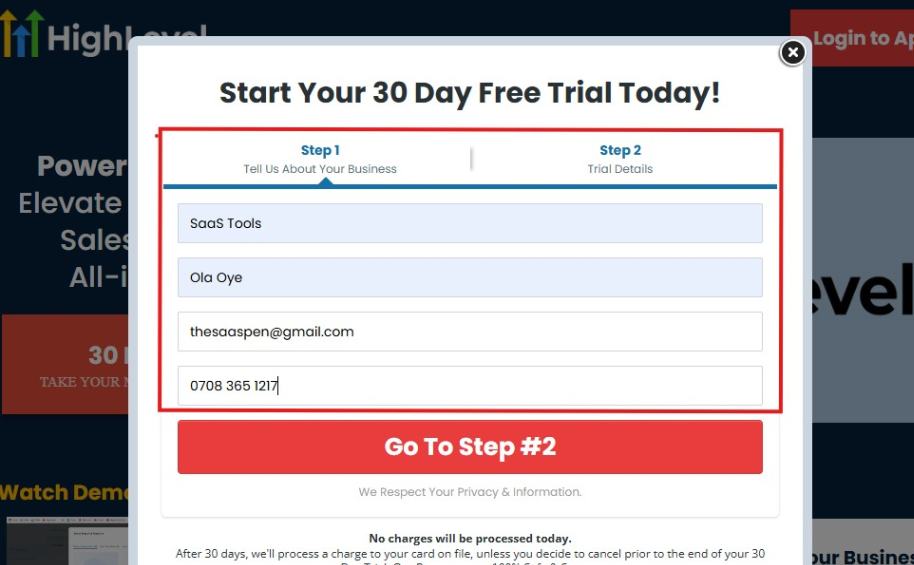
If you take a closer look at the image above, you will see that you need to supply your:
- Business name
- Company name
- Company email
- Phone number
Supply all the pieces of information and click on “Go To Step #2.”
On the next page, you will be required to select the plan you want to opt in for.
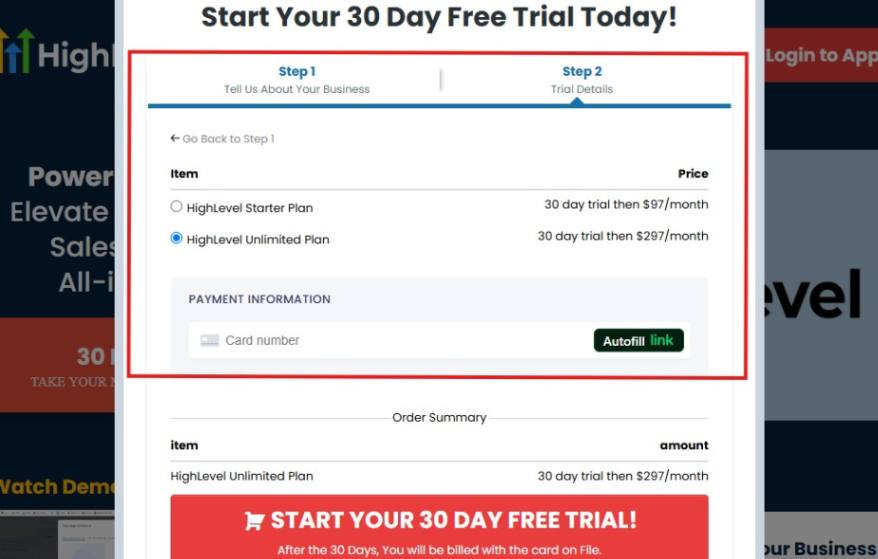
As you can see from the image above, you can either choose from:
- HighLevel Starter Plan
- HighLevel Unlimited Plan
Select the HighLevel Unlimited Plan and continue – you can always upgrade to the SaaS Mode later if you want that or downgrade.
The next thing you want to do is supply your credit card information.
Note: You will not be debited anything today until the end of your trail that is if you don’t cancel. Keep in mind that $1 will be debited and refunded back instantly into your account just to test your card is working.
After you have supplied the information accordingly, click on “START YOUR 30 DAY FREE TRIAL” and you will be asked to confirm you’re not a robot.
After that, the page below will pop up.
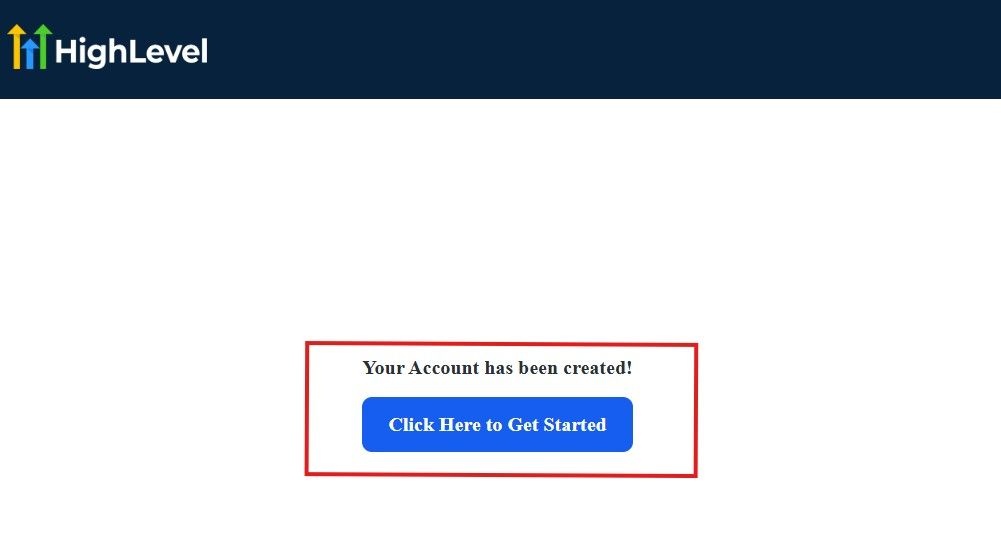
The image above says, “Your Account has been created!” Now, you need to click on the blue button that says “Click Here to Get Started.“
Click on the blue button to start your onboarding process.
Step 2: GoHighLevel Onboarding Process
The onboarding questions help GoHighLevel understand why you have signed up for the platform so that it can tailor your experience accordingly.
This is all you need to do:
After you click on the blue button above, the page below will pop up.
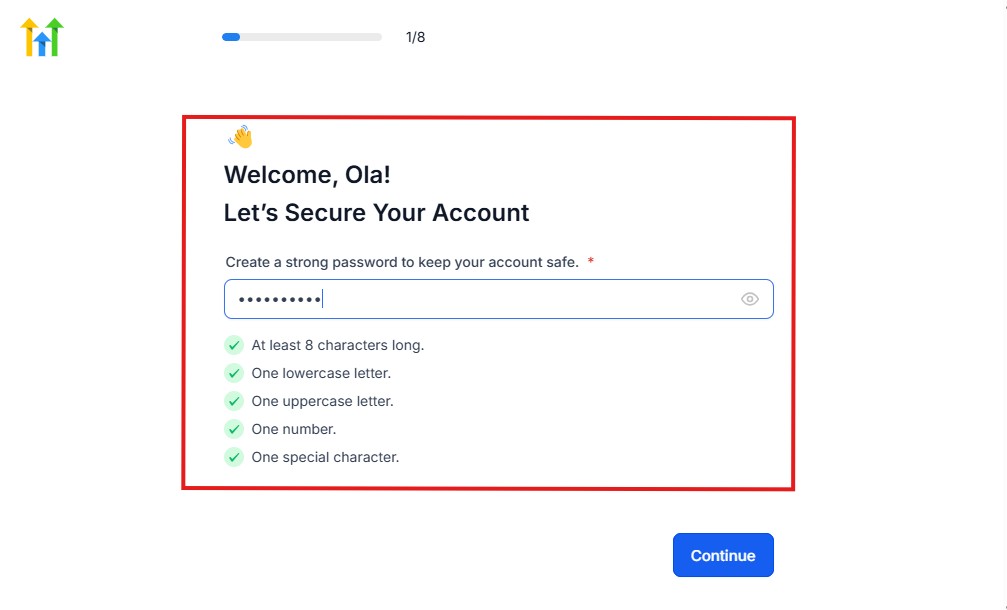
As you can see above, you need to set up your password, and the password has to be:
- At least 8 characters long
- One lowercase letter
- One uppercase letter
- One number
- One special character
If you have input the password and it matches all the description above, everything will be green just the way it’s in the image.
Click on “Continue” there after, and the image below will pop up.
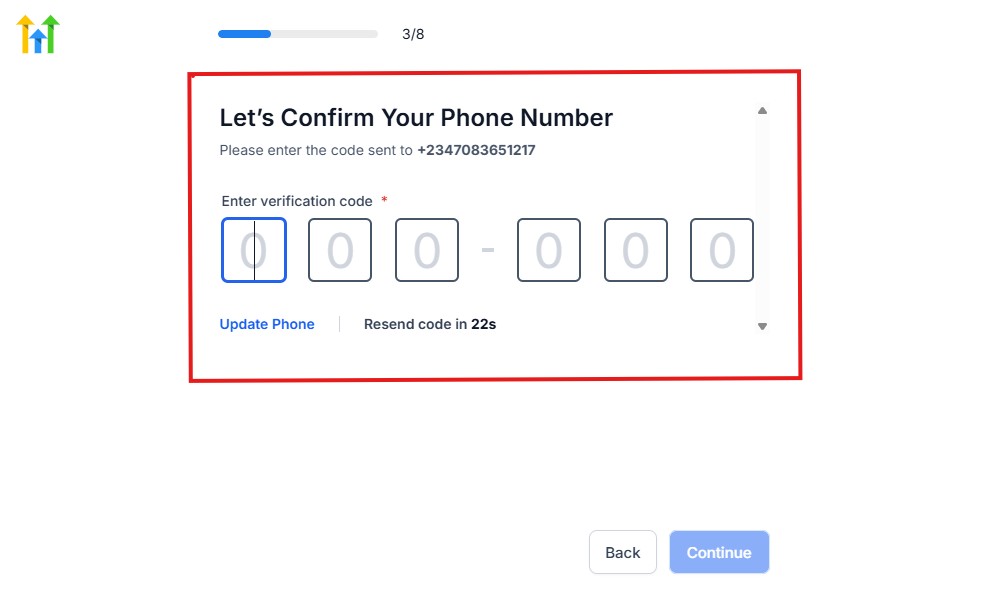
As you can see, a code will be sent to you to confirm your email address and phone number. The process is the same for the 2.
The next thing you need to do is to select how you plan to use GoHighLevel, as you can see below.
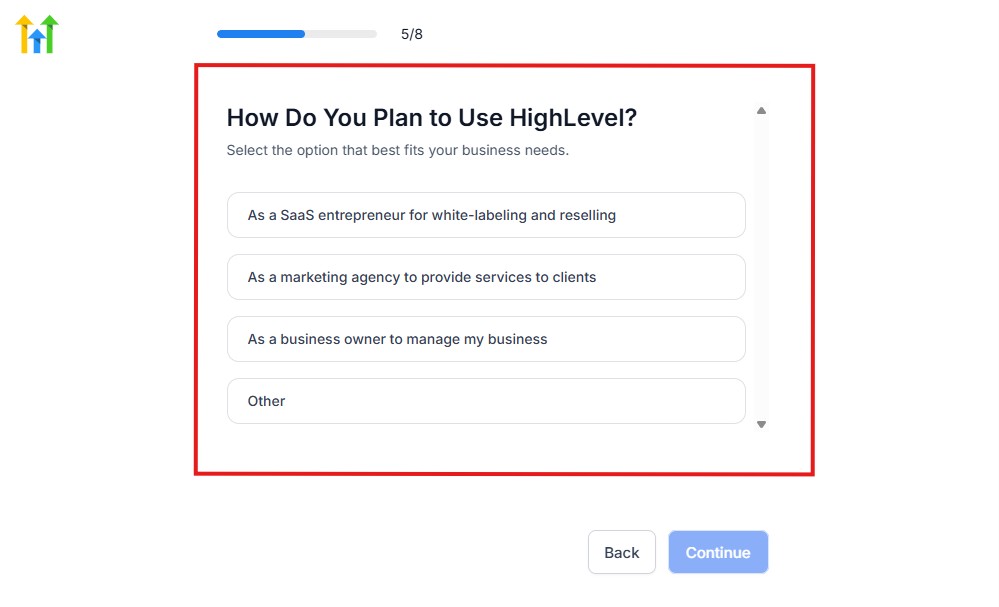
Select what best matches why you have signed up and click on Continue.
On the next page, you will be asked if you plan to resell GoHighLevel or not.
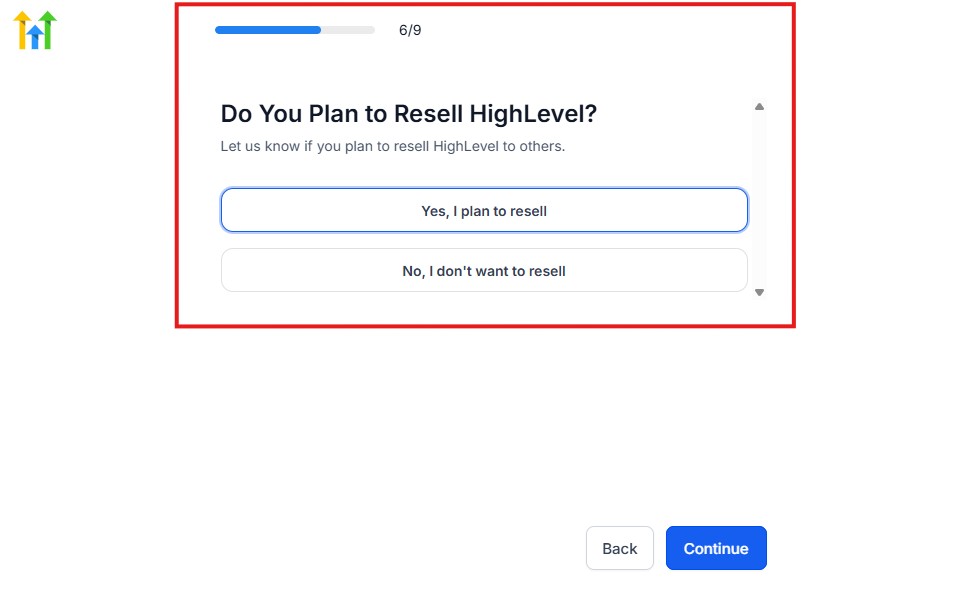
Select the answer based on the reason why you have signed up and click on “Continue”
Then, the page below will pop up.
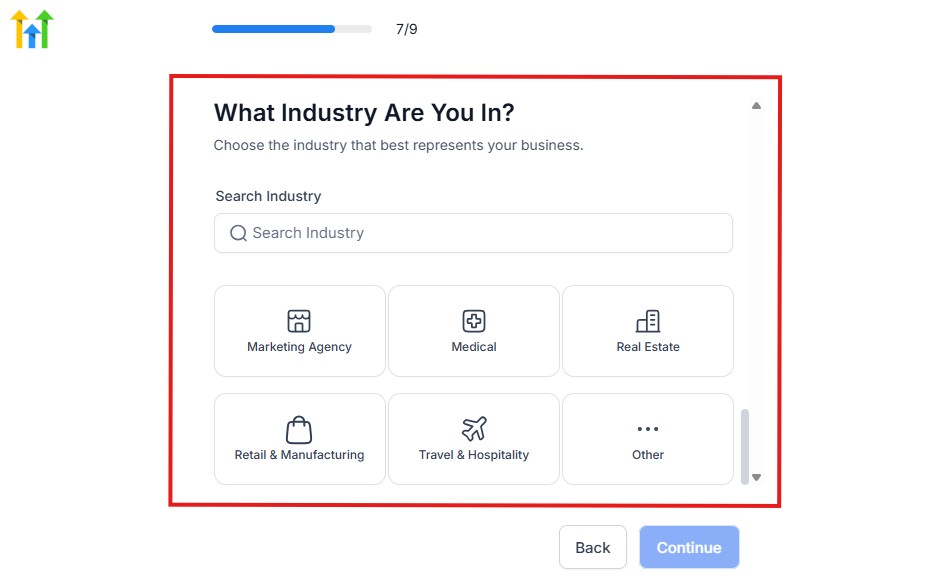
From the image above, you need to select the industry that you fall on. You can also make use of the search button if you can’t find it right away.
Then, click on continue after you select your industry.
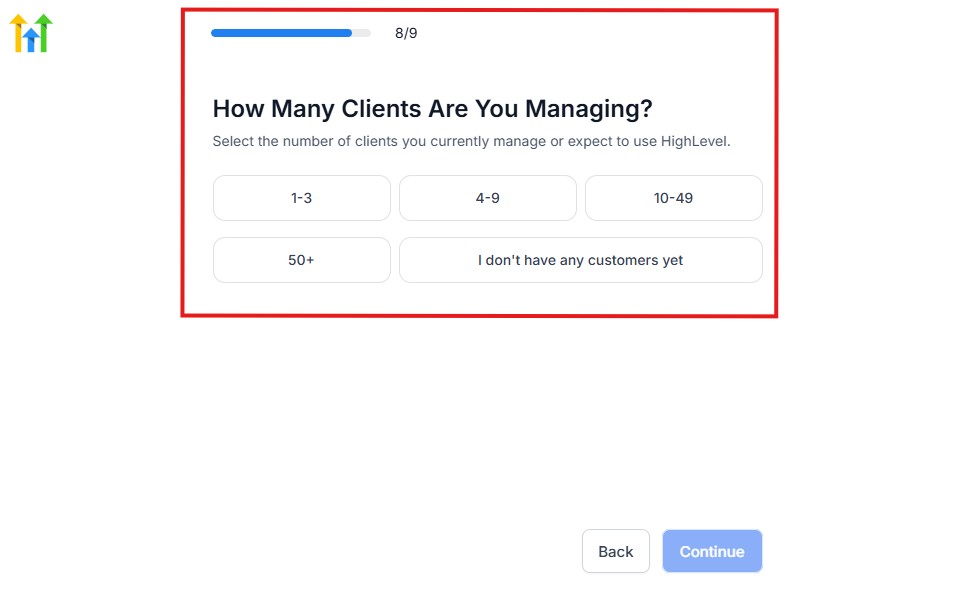
Then, the next thing you need to do is to select the number of clients that you currently have. Select “I don’t have any customers” yet if you currently don’t have one.
On the next page, you will be asked to select the platforms you currently use that you can integrate with GoHighLevel right away.
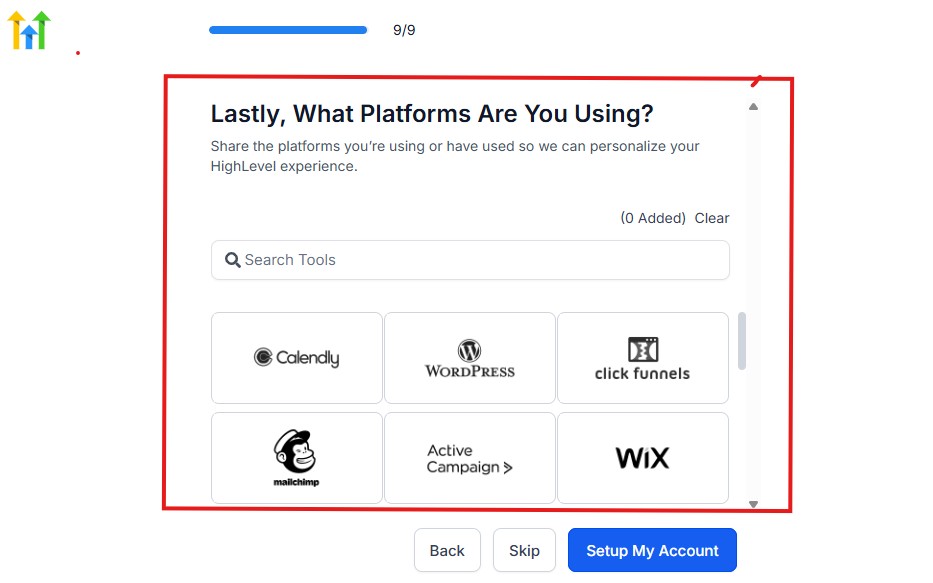
You can use the search button to search for any tools you want to add to your GoHighLevel account.
You can also skip this process and do it later if you want to.
After that, the page below will pop up.
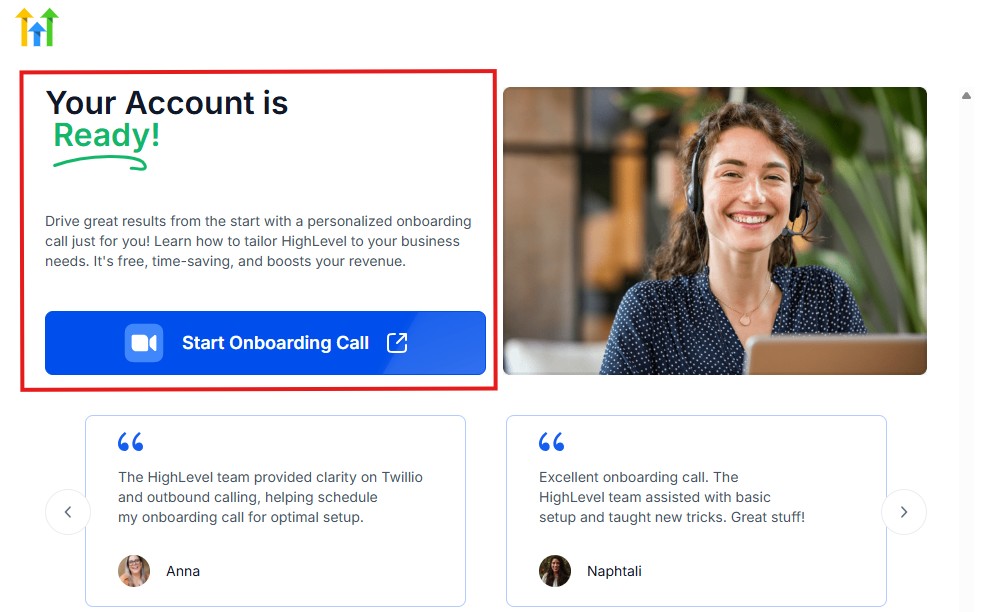
The page above says your account is ready and is asking you to “Start Onboarding Call.”
The “Onboarding Call” allows you to connect with the Go High Level team in order to discuss your account set-up process and everything regarding your plan in using HighLevel.
If you don’t want to start the “Onboarding Call” yet, just stroll down, and you will see the button in the image below.
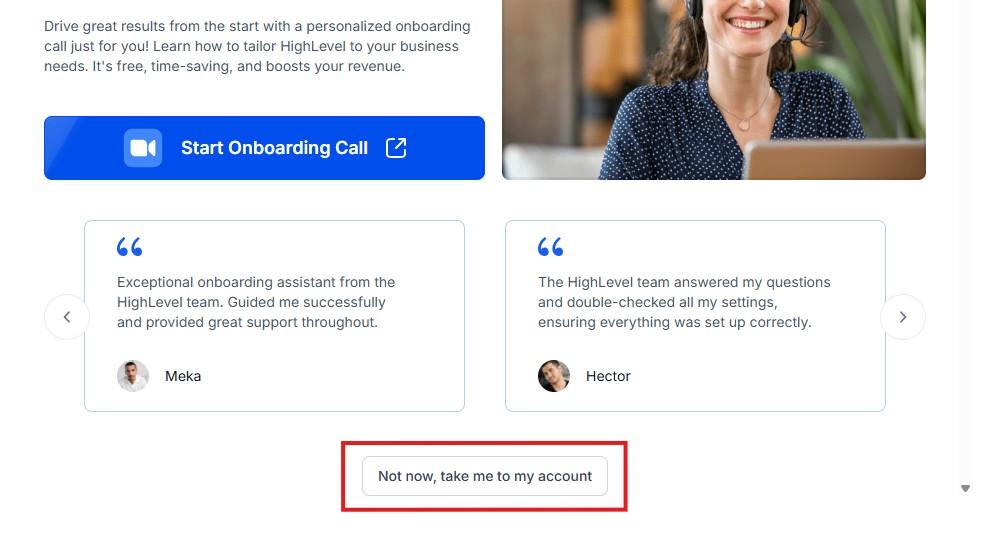
Simply click on “Not now, take me to my account“, and you will have access to your dashboard.
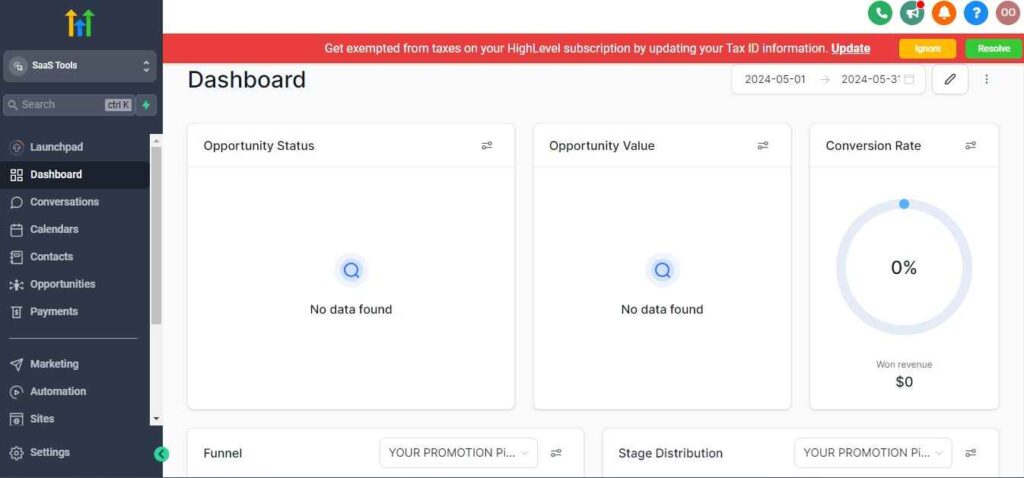
Note: If you have indicated that you want to resell HighLevel, you would have access to the agency dashboard by default, which looks like the image below.
But if you didn’t indicate interest in reselling GHL, your dashboard will look like the image below.
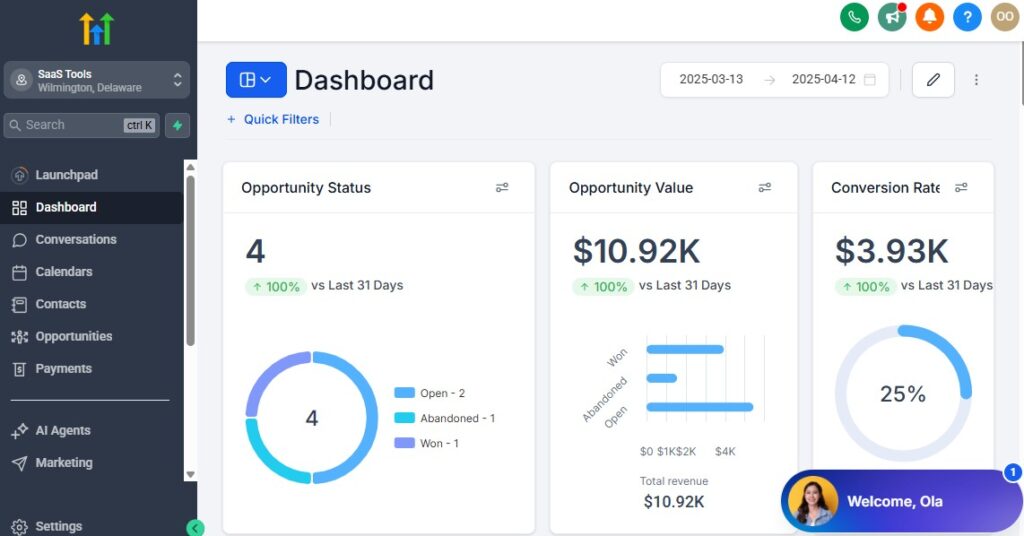
You can switch between these dashboards at any time.
The data you see on the dashboard above are not real data, they’re snapshots that you can use to kickstart your account setup process.
I want to say congratulations. You have successfully set up your Go High Level account.
Step 3: Access Voice AI Inside GoHighLevel
First, log into your GoHighLevel account.
Then navigate to the AI section where Voice AI is available.
This is where you’ll:
- create AI voice agents
- configure phone settings
- train the AI
- manage conversations
👉 Think of this as your Voice AI control center.
Step 4: Create Your AI Voice Agent
Next, create your first AI Voice Agent.
This agent will act as your virtual receptionist.
During Setup, You’ll Define:
- business name
- business type
- services offered
- call objectives
- conversation style
- appointment goals
For example:
A dental clinic may want the AI to:
- answer appointment calls
- schedule cleanings
- answer FAQs
- transfer emergency calls
While a marketing agency may want it to:
- qualify leads
- book consultations
- answer service questions
👉 The setup should match your business needs.
Step 5: Connect Your Business Phone Number
Now connect the phone number you want Voice AI to answer.
This may be:
- your main business number
- a tracking number
- a dedicated sales line
- a support number
Once connected:
👉 Voice AI can begin receiving incoming calls.
Step 6: Train the AI With Business Information
This is one of the most important steps.
The AI needs to understand your business.
Train It With Information Such As:
- services offered
- pricing information
- business hours
- appointment policies
- frequently asked questions
- locations served
Example
If someone asks:
“How much does your consultation cost?”
The AI should already know the answer.
👉 Better training creates better conversations.
Step 7: Configure Your AI Personality
Next, decide how the AI should sound.
You can customize:
- tone
- language style
- professionalism
- response length
Example Styles
- professional
- friendly
- conversational
- formal
- customer-service focused
👉 Choose a style that matches your brand.
Step 8: Connect Your Calendar
If you want Voice AI to book appointments automatically, you’ll need to connect your calendar.
This allows the AI to:
- check availability
- schedule appointments
- reschedule bookings
- send confirmations
Automatically.
Example
Caller:
“I’d like to schedule a consultation.”
Voice AI:
“We currently have availability tomorrow at 10 AM and 2 PM.”
👉 The appointment can be booked during the call.
Step 9: Set Up Lead Qualification Questions
Now decide what information you want the AI to collect.
Common Questions Include
- What service are you interested in?
- When would you like to get started?
- What type of project do you need help with?
- What’s your location?
This information can automatically be added to the CRM.
👉 Your team receives better-qualified leads.
Step 10: Configure Human Call Transfers
Voice AI is powerful, but some situations require a real person.
Set rules for when calls should be transferred.
Examples
Transfer calls when:
- a caller requests a human
- the conversation becomes complex
- support is required
- a sales representative is needed
👉 This creates a better customer experience.
Step 11: Test Your Voice AI
Before going live, test everything thoroughly.
Call your business number yourself and see how the AI performs.
Test Things Like
- greetings
- appointment booking
- lead qualification
- FAQ responses
- call transfers
👉 Fix any issues before launching.
Step 12: Launch and Monitor Performance
Once everything works correctly, go live.
But don’t stop there.
Monitor:
- call quality
- booking rates
- lead conversion rates
- customer feedback
- failed conversations
👉 The best Voice AI systems improve over time.
Real Example Workflow
Here’s what a typical Voice AI setup might look like:
- Customer calls your business.
- Voice AI answers immediately.
- AI asks qualifying questions.
- AI gathers lead information.
- AI books an appointment.
- CRM record is created.
- Reminder workflows begin automatically.
👉 Most of the process runs without manual involvement.
Best Setup Tips
- Keep Conversations Natural
Avoid making the AI sound robotic.
- Train It Thoroughly
The more information you provide, the better it performs.
- Start Simple
Begin with:
- appointment booking
- FAQs
- lead qualification
Then expand later.
- Monitor Conversations Regularly
Review calls and improve the AI over time.
Best Practices for Better Voice AI Results
Setting up GoHighLevel Voice AI is only the first step.
The businesses getting the best results are not necessarily the ones with the most advanced AI setups.
They’re the ones that:
- train the AI properly
- monitor conversations regularly
- optimize workflows over time
Because even the most powerful AI system can perform poorly if it’s not configured correctly.
The good news?
👉 A few simple best practices can dramatically improve your Voice AI performance.
1. Keep Conversations Natural
One of the biggest mistakes businesses make is trying to make the AI sound overly formal or robotic.
Customers prefer conversations that feel natural.
Good Example
“I’d be happy to help you schedule an appointment. What day works best for you?”
Bad Example
“Your request has been received and is currently being processed.”
👉 Natural conversations create better customer experiences.
2. Train the AI Thoroughly
Voice AI can only work with the information you provide.
If the AI doesn’t know:
- your services
- pricing
- business hours
- appointment process
It won’t be able to answer accurately.
Include Information Such As
- services offered
- pricing details
- office hours
- locations served
- appointment policies
- frequently asked questions
👉 Better training creates better conversations.
3. Start With Simple Workflows
Many businesses try to automate everything immediately.
That’s usually a mistake.
Start with simple use cases first.
Good Starting Points
- appointment booking
- answering FAQs
- lead qualification
- call routing
Once those are working well, you can expand into more advanced automations.
👉 Simplicity often produces better results.
4. Use Human Call Transfers Strategically
Voice AI is not designed to replace people entirely.
Some situations still require human interaction.
Transfer Calls When
- customers request a human
- conversations become complex
- sales discussions require personal attention
- support issues need escalation
👉 The best systems combine AI with human support.
5. Connect Your Calendar Properly
If appointment booking is important to your business, your calendar setup must be accurate.
Double-Check
- availability settings
- appointment durations
- time zones
- booking rules
A poorly configured calendar can create scheduling problems quickly.
👉 Proper setup improves booking success.
6. Review Calls Regularly
Don’t assume the AI is perfect.
Review conversations frequently.
Look For
- incorrect answers
- missed opportunities
- customer confusion
- failed bookings
Then make improvements based on what you find.
👉 Continuous improvement leads to better results.
7. Create Clear Conversation Goals
Every Voice AI workflow should have a specific purpose.
Examples include:
- booking appointments
- qualifying leads
- answering questions
- routing calls
If the AI doesn’t have a clear goal, conversations often become ineffective.
👉 Clear objectives improve performance.
8. Keep Business Information Updated
Businesses change all the time.
If you update:
- pricing
- services
- business hours
- policies
Make sure Voice AI knows about those changes.
Otherwise the AI may provide outdated information.
👉 Accuracy builds trust.
9. Test Before Going Live
Never launch Voice AI without testing.
Call the system yourself and experience the conversation as a customer.
Test Things Like
- greetings
- responses
- appointment booking
- lead qualification
- call transfers
👉 Small issues are easier to fix before customers encounter them.
10. Use Voice AI for High-Volume Tasks
Voice AI works best when handling repetitive conversations.
Examples include:
- appointment requests
- consultation bookings
- business hours
- service inquiries
- lead screening
These are the tasks that consume the most staff time.
👉 Automating them creates the biggest impact.
11. Monitor Conversion Metrics
Don’t focus only on the number of calls answered.
Track business outcomes.
Important Metrics
- appointments booked
- qualified leads generated
- missed call recovery
- conversion rates
- customer satisfaction
👉 These metrics reveal whether Voice AI is actually helping your business grow.
12. Continue Optimizing Over Time
The best Voice AI systems are never truly finished.
Businesses that see the strongest results continually improve:
- scripts
- prompts
- call flows
- qualification questions
- booking processes
👉 Small improvements can produce major gains over time.
Common Mistakes to Avoid
Many businesses struggle with Voice AI because they:
- ❌ Overcomplicate workflows
- ❌ Fail to train the AI properly
- ❌ Ignore call reviews
- ❌ Use outdated business information
- ❌ Avoid human call transfers
- ❌ Expect perfect results immediately
Avoiding these mistakes alone can dramatically improve performance.
GoHighLevel Voice AI Pricing
One of the biggest questions businesses ask before using Voice AI is:
“How much does GoHighLevel Voice AI actually cost?”
The good news is that the current GoHighLevel Voice AI Promo makes it much more affordable to get started.
👉 When you sign up during the promotion, you automatically get 50% off for the first 3 months of your GoHighLevel subscription.
This allows you to test Voice AI and other GoHighLevel features at a significantly lower cost.
However, it’s important to understand that Voice AI pricing has a few different components.
Let’s break everything down.
GoHighLevel Subscription Pricing
Before using Voice AI, you’ll need a GoHighLevel account.
| Plan | Regular Price | Promo Price (First 3 Months) |
|---|---|---|
| Starter | $97/month | $48.50/month |
| Unlimited | $297/month | $148.50/month |
| SaaS Pro | $497/month | $248.50/month |
👉 After the first 3 months, regular pricing resumes.
AI Employee Pricing
Voice AI is part of GoHighLevel’s broader AI ecosystem known as AI Employee.
GoHighLevel offers an AI Employee Unlimited Plan that includes access to several AI tools under one monthly subscription. These include:
- Voice AI
- Conversation AI
- Reviews AI
- Content AI
- Ask AI
The AI Employee Unlimited Plan currently costs:
👉 $97/month per sub-account
What Does AI Employee Include?
With AI Employee, businesses get access to:
- Voice AI
- Conversation AI
- AI-powered content generation
- AI review responses
- AI assistance tools
All under a single monthly plan.
Voice AI Usage-Based Pricing
GoHighLevel also offers usage-based pricing for businesses that prefer to pay based on actual usage.
Depending on your setup, Voice AI may be billed based on:
- call minutes
- AI processing
- voice engine usage
Industry pricing references commonly show Voice AI usage around:
👉 $0.06 per minute plus AI processing costs under usage-based models.
Who Should Use Usage-Based Pricing?
Usage-based billing may be a good fit if you:
- receive low call volume
- are testing Voice AI
- want to pay only for what you use
👉 This helps keep costs predictable during the testing phase.
Phone System Costs
This is one area many users overlook.
Voice AI still requires phone infrastructure.
Even if the AI handles the conversation, phone charges may still apply.
Typical Phone Costs May Include
- phone numbers
- inbound call minutes
- outbound call minutes
- call recording
- call transcription
These costs are usually billed separately through GoHighLevel’s phone system.
👉 Voice AI and phone service are two different things.
Which Pricing Option Is Better?
Option 1: Pay-As-You-Go
Best for:
- testing Voice AI
- smaller businesses
- lower call volume
You only pay for what you use.
Option 2: AI Employee Unlimited
Best for:
- agencies
- healthcare practices
- contractors
- gyms
- businesses receiving frequent calls
At:
👉 $97/month per sub-account
You get predictable monthly costs and access to multiple AI tools.
Real Example
Imagine your business receives:
- 15 to 30 calls per day
- appointment requests
- support inquiries
- lead qualification calls
In this situation, the AI Employee Unlimited Plan will often provide better value than paying for every call individually.
👉 The more you use AI, the more attractive unlimited pricing becomes.
Is Voice AI Worth the Cost?
For many businesses, yes.
Especially if you:
- miss calls regularly
- rely on appointments
- generate leads through phone calls
- want 24/7 call coverage
Voice AI can help:
- capture more leads
- reduce missed opportunities
- improve customer experience
- reduce staff workload
Businesses That Usually See the Biggest ROI
Voice AI tends to work particularly well for:
- agencies
- healthcare clinics
- dental offices
- contractors
- real estate businesses
- gyms
- coaches
- local service businesses
Where a single missed call could mean losing a customer.
Important Things to Understand
Before buying, remember:
✅ Voice AI still needs proper setup
✅ AI Employee pricing is separate from your main GoHighLevel subscription
✅ Phone charges may still apply
✅ Better training usually creates better results
Learn More:
- What is GoHighLevel? (Features, Use Cases, Pricing & More)
- GoHighLevel Review: (My Experience After 5 Years)
- GoHighLevel Pricing: (+ Discount Codes)
- GoHighLevel Features: (Full List of Tools)
- GoHighLevel Onboarding Checklist: (Complete Tutorial)
- GoHighLevel for Property Management: (Detailed Tutorial)
- GoHighLevel for Small Businesses: (2026 Helpful Tutorial)
- GoHighLevel for Service Businesses: (2026 Helpful Tutorial)
- GoHighLevel for Local Businesses: (2026 Helpful Tutorial)
GoHighLevel Voice AI vs Traditional Call Handling
For years, businesses have relied on traditional call handling methods such as:
- receptionists
- front desk staff
- voicemail systems
- call routing menus
- customer service teams
And while those methods still work, they also come with limitations.
Today, businesses are increasingly comparing traditional phone systems with GoHighLevel Voice AI to see which option delivers better efficiency, faster response times, and improved customer experiences.
Let’s compare them side by side.
Quick Comparison Table
| Feature | GoHighLevel Voice AI | Traditional Call Handling |
|---|---|---|
| 24/7 Availability | ✅ Yes | ❌ No |
| Instant Call Answering | ✅ Yes | ⚠️ Depends on staff availability |
| Appointment Booking | ✅ Automated | ⚠️ Manual |
| Lead Qualification | ✅ Automated | ⚠️ Manual |
| Missed Call Recovery | ✅ Built-in | ❌ Limited |
| Scalability | ✅ High | ⚠️ Requires more staff |
| CRM Integration | ✅ Automatic | ⚠️ Usually manual |
| Consistent Performance | ✅ Yes | ⚠️ Varies by employee |
| Staff Costs | ✅ Lower | ❌ Higher |
| Human Interaction | ⚠️ Limited | ✅ Full |
1. Availability
One of the biggest differences is availability.
Traditional call handling depends on people.
That means:
- lunch breaks
- vacations
- sick days
- after-hours closures
Can all affect your ability to answer calls.
Voice AI Advantage
Voice AI works:
- 24 hours a day
- 7 days a week
- weekends
- holidays
Without interruption.
👉 Every caller receives an immediate response.
2. Response Speed
When customers call, they expect fast service.
With traditional systems:
- callers may wait
- calls may be missed
- voicemails may pile up
Voice AI Advantage
Voice AI answers instantly.
The moment the phone rings:
👉 The conversation begins.
This reduces delays and improves customer experience.
3. Appointment Booking
Many businesses depend heavily on appointments.
Examples include:
- healthcare clinics
- agencies
- coaches
- contractors
- gyms
Traditional booking requires staff involvement.
Traditional Process
- Staff answers call.
- Staff checks calendar.
- Appointment is booked manually.
Voice AI Process
- AI answers call.
- AI checks calendar.
- Appointment is booked automatically.
👉 Faster and more efficient.
4. Lead Qualification
Traditional call handling usually requires employees to ask qualification questions manually.
Voice AI can automate this process.
Example Questions
- What service are you interested in?
- What’s your timeline?
- What city are you located in?
- What’s your budget?
👉 Your team receives better-qualified leads.
5. Handling High Call Volume
As businesses grow, call volume increases.
Traditional systems often require:
- additional receptionists
- support staff
- larger teams
Voice AI Advantage
Voice AI can handle multiple conversations without hiring additional employees.
👉 This makes growth easier and more affordable.
6. Missed Call Recovery
Missed calls are one of the biggest sources of lost revenue.
With traditional systems:
- callers often leave
- voicemails are forgotten
- opportunities disappear
Voice AI Advantage
Voice AI answers immediately and helps prevent missed opportunities.
👉 More conversations mean more chances to win customers.
7. CRM Integration
Traditional call handling often requires manual data entry.
Employees may need to:
- create contacts
- update records
- add notes
- trigger follow-ups
Voice AI Advantage
Voice AI automatically updates:
- contacts
- notes
- appointments
- workflows
Inside GoHighLevel CRM.
👉 Less administrative work.
8. Cost Comparison
Hiring staff can be expensive.
Businesses may need to cover:
- salaries
- benefits
- training
- turnover costs
Voice AI Advantage
Voice AI helps automate routine conversations without requiring additional hires.
👉 Lower operating costs for many businesses.
9. Customer Experience
Traditional phone support offers a personal touch.
Many customers still prefer speaking with a real person.
This remains one of the biggest strengths of traditional call handling.
Voice AI Advantage
Modern Voice AI can provide:
- immediate responses
- consistent service
- faster booking
While still allowing human transfer when needed.
👉 Businesses get the best of both worlds.
10. Scalability
Traditional call handling becomes harder as businesses grow.
More calls usually mean:
- more staff
- more management
- higher costs
Voice AI Advantage
Voice AI scales much more easily.
Whether your business receives:
- 10 calls per day
- 100 calls per day
- 1,000 calls per day
The AI continues working.
👉 Growth becomes easier to manage.
Does Voice AI Replace Human Staff?
Not completely.
The best businesses use Voice AI to handle:
- repetitive conversations
- appointment scheduling
- lead qualification
- basic support
While humans focus on:
- sales
- customer relationships
- complex support issues
- high-value conversations
👉 Voice AI works best as a support system, not a complete replacement.
Which Option Is Better?
Traditional Call Handling
Best for:
- highly personalized service
- complex customer interactions
- relationship-driven conversations
GoHighLevel Voice AI
Best for:
- faster response times
- appointment booking
- lead qualification
- 24/7 availability
- scalable communication
For most businesses, the ideal solution is often a combination of both.
Frequently Asked Questions
Here are some of the most common questions businesses ask about GoHighLevel Voice AI before getting started.
Is GoHighLevel Voice AI worth it?
Yes, especially if your business relies heavily on phone calls for leads, appointments, or customer inquiries.
Voice AI can help you:
- answer calls instantly
- reduce missed opportunities
- book more appointments
- automate repetitive conversations
- improve customer response times
Businesses that receive regular phone inquiries often see the biggest benefit.
Can GoHighLevel Voice AI answer calls automatically?
Yes.
Voice AI is designed to answer incoming calls automatically and hold natural conversations with callers.
It can:
- answer questions
- collect information
- qualify leads
- schedule appointments
- transfer calls when needed
All without manual involvement.
Can Voice AI book appointments for me?
Yes.
When connected to your GoHighLevel calendar, Voice AI can:
- check availability
- offer appointment times
- schedule bookings
- send confirmations
- trigger reminder workflows
Automatically.
This is one of its most popular features.
Does Voice AI sound like a real person?
Modern Voice AI sounds much more natural than older automated phone systems.
While callers may still recognize they’re speaking with AI, the conversations can feel surprisingly human and conversational when properly configured.
The quality also improves when the AI is trained with accurate business information.
Can a human take over the call if needed?
Yes.
Voice AI does not have to handle every conversation from start to finish.
You can configure rules that allow calls to be transferred to:
- sales teams
- support staff
- receptionists
- business owners
Whenever human assistance is required.
Do I need technical skills to set up Voice AI?
No.
Most business owners can set up Voice AI without coding knowledge.
GoHighLevel provides tools that make it easier to:
- create AI agents
- connect calendars
- configure workflows
- train the AI
The free Voice AI Workshop also helps users learn the setup process step by step.
What is included in the GoHighLevel Voice AI Promo?
The promo includes:
✅ 50% off your GoHighLevel subscription for the first 3 months
✅ Free access to the GoHighLevel Voice AI Workshop
✅ Access to Voice AI tools and training
✅ The opportunity to learn how to automate phone calls, lead qualification, and appointment booking
This allows businesses to explore Voice AI while reducing their upfront costs.
Final Thoughts
Phone calls are still one of the fastest ways customers reach businesses.
The problem is that many businesses lose opportunities every day because:
- calls go unanswered
- staff are busy
- offices are closed
- follow-ups happen too late
And in today’s competitive market, a missed call can easily become a lost customer.
That’s exactly why more businesses are starting to explore AI-powered phone automation.
Why Voice AI Matters
GoHighLevel Voice AI helps businesses respond to callers instantly without relying entirely on staff availability.
Instead of sending callers to voicemail…
👉 Voice AI can answer questions, qualify leads, schedule appointments, and continue conversations automatically.
This helps businesses:
- improve response times
- reduce missed opportunities
- increase appointment bookings
- provide better customer experiences
All while saving valuable time.
What Makes This Promo Valuable?
The biggest attraction of the GoHighLevel Voice AI Promo is simple:
👉 You automatically get 50% off for the first 3 months of your GoHighLevel subscription when you sign up during the promotional period.
And unlike many training programs…
👉 The GoHighLevel Voice AI Workshop is completely free.
This gives businesses a low-risk opportunity to:
- learn how Voice AI works
- see real-world examples
- implement AI phone automation
- test the platform at a discounted price
Who Should Consider Voice AI?
Voice AI is especially valuable for businesses that rely heavily on phone calls.
Examples include:
- agencies
- healthcare clinics
- dental practices
- contractors
- real estate businesses
- coaches
- gyms
- local service providers
If phone calls are an important source of leads and revenue for your business…
👉 Voice AI is worth serious consideration.
Start Simple
One mistake many businesses make is trying to automate everything immediately.
Instead, start with:
- appointment booking
- FAQ handling
- lead qualification
- after-hours call answering
Once those workflows are working well, you can gradually expand your automation.
👉 Simple systems often produce the best results.
Voice AI Works Best With Human Support
Voice AI is powerful, but it works best when combined with people.
Use AI to handle:
- repetitive conversations
- routine inquiries
- scheduling tasks
- lead qualification
And let your team focus on:
- sales conversations
- customer relationships
- complex support issues
This creates the ideal balance between automation and personal service.
The Future of Business Communication
Businesses are increasingly realizing that:
- speed matters
- availability matters
- follow-up matters
Voice AI helps improve all three.
Customers want quick answers and easy communication, and businesses that can provide that experience often have a competitive advantage.
Ready to Get Started?
Take advantage of the promotion, attend the free workshop, and discover how AI-powered phone conversations can help your business capture more leads, book more appointments, and provide a better customer experience.
- 👉 Answer more calls
- 👉 Book more appointments
- 👉 Reduce missed opportunities
- 👉 Automate your phone communication with Voice AI